Marguerite Perey: When The Lab Assistant Gets The Credit

Most people obtain a bachelor’s degree before getting their masters, and even that is a prerequisite for a doctorate. Most people, however, don’t discover a new chemical element.

Marguerite Perey graduated with a chemistry diploma from Paris’ Technical School of Women’s Education in 1929, and applied for work at the Curie Institute, at the time one of the leading chemistry and physics labs in the world. She was hired, and put to work cataloging and preparing samples of the element actinium. This element had been discovered thirty years before by a chemist who had also been working in the Curie laboratory, but this was the height of the chemical revolution and the studies and research must continue.

When Marie Curie died in 1934, the discoverer of actinium, André-Louis Debierne, continued his research and Perey kept providing samples. Marguerite’s work was recognized, and in time she was promoted from a simple lab assistant to a  radiochemist. It would not be an exaggeration to say that Marguerite was, at the time, the world’s leading expert in the preparation of actinium. This expertise would lead her to the discovery of the bottom left corner of the periodic table: francium, element 87, the least electronegative element, and arguably the most difficult naturally occurring element to isolate.

Continue reading “Marguerite Perey: When The Lab Assistant Gets The Credit”

HJWYDK: The Journal Our Community Has Been Awaiting

We’re excited to announce the Hackaday Journal of What You Don’t Know. This will be a peer-reviewed journal of white papers that goes well beyond “look what I did” and will provide full design, data, and everything else needed to reproduce the most interesting things the engineering world has to offer. It’s a complete description of your knowledge offered up for the benefit of all.

Topics will include original and creative research, engineering, and entertainment in the areas of interest to the Hackaday community. These papers should embody original insight, experience, or discovery in any sufficiently challenging domain knowledge. This will be the manual for the things you need to know, but probably don’t. HJWYDK makes that knowledge freely available using the Open Access model for publications. It will be a journal without paywalls or frustration. It’s the journal you will reach for whenever you need to do something that feels impossible.

Useful information doesn’t just happen. It’s won through struggle and leads to unique knowledge. Have your accomplishments recognized at a higher level, and make sure they live on and are freely available.

All papers accepted by the editorial and review process will be immediately published online. They will also be printed in the annual Proceedings of the Hackaday Superconference, with the best submissions invited to present in person at the conference. Submit your papers now!

We are currently seeking Associate Editors and Peer Reviewers. Editors should send your background info to journal@hackaday.com. Reviewers should join the team on the HJWYDK project page and mention your areas of expertise in the join request.

CNC Milling Is More Manual Than You Think

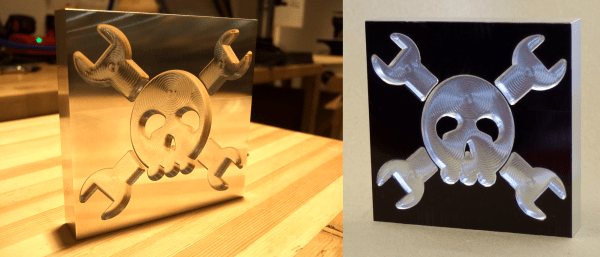
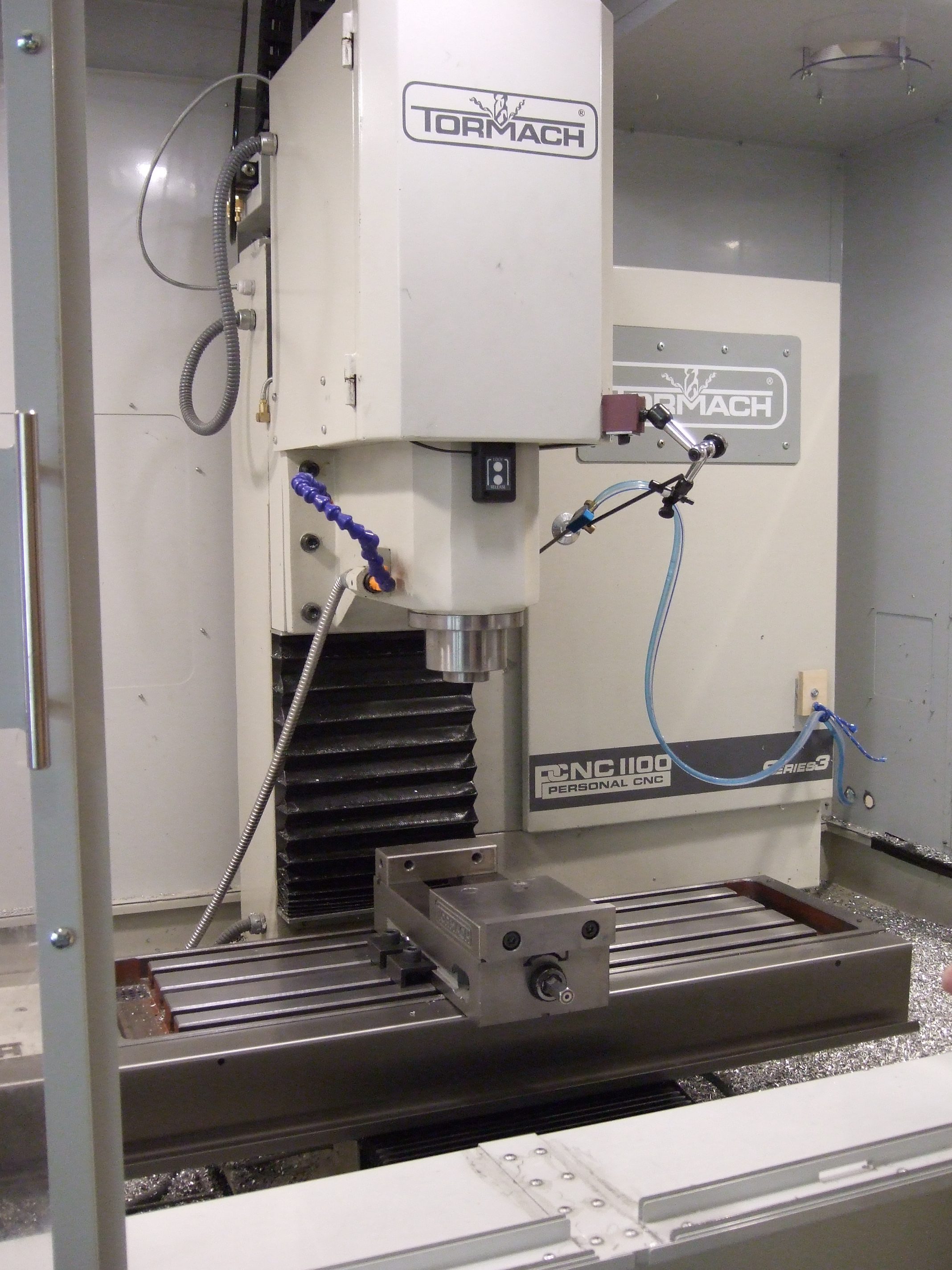
I was in Pasadena CA for the Hackaday Superconference, and got to spend some quality time at the Supplyframe Design Lab. Resident Engineer Dan Hienzsch said I could have a few hours, and asked me what I wanted to make. The constraints were that it had to be small enough to fit into checked luggage, but had to be cool enough to warrant taking up Dan’s time, with bonus points for me learning some new skills. I have a decent wood shop at home, and while my 3D printer farm isn’t as pro as the Design Lab’s, I know the ropes. This left one obvious choice: something Jolly Wrencher on the industrial Tormach three-axis CNC metal mill.

A CNC mill is an awesome tool, but it’s not an omniscient metal-eating robot that you can just hand a design file to. If you thought that having a CNC mill would turn you into a no-experience-needed metal-cutting monster, you’d be sorely mistaken.

Of course the machine is able to cut arbitrary shapes with a precision that would be extremely demanding if done by hand, but the craft of the operator is no less a factor than with a manual mill in making sure that things don’t go sideways. Dan’s good judgment, experience, and input was needed every step of the way. Honestly, I was surprised by how similar the whole procedure was to manual milling. So if you want to know what it’s like to sit on the shoulder of a serious CNC mill operator, read on!

Continue reading “CNC Milling Is More Manual Than You Think”

Hackaday Links Column Banner

Hackaday Links: November 26, 2017

Hey, it’s sometime between Black Friday and Cyber Monday. We’re blowing out everything in the Hackaday Store. There’s some great deals in there. Tindie, our lovable robot dog is also heading up hundreds of Tindie deals for Cyber Monday. If you want some electronic stuff direct from the people who make it, this is the sale to check out.

Looking for some other Black Friday/Cyber Monday sales? Adafruit has compiled a list of retailers so I don’t have to. Thanks, Phil. There are deals from Lulzbot to Makerbot, LittleBits to Sparkfun.

The engineer responsible for Dieselgate has been sentenced to 40 months in prison. There are two takeaways from this: 1) The Nuremberg Defense doesn’t work. 2) Don’t build a business plan around breaking the law, despite what the libertarian hellscape of Hacker News tells you.

The theme for next year’s DEF CON has been announced. It’s, “1983”. What does that mean? Brutalist architecture, first of all. They’re also going for a ‘year before 1984’ thing, where everyone installs always-on, far-field microphones in their house and connects them to the Internet. In other news, Alexas and Google Homes are on sale this Black Friday. Big props for the official DEF CON style guide with typefaces and colors, though.

Over on Hackaday.io, [Frank] has created a very interesting and very cool game for the Vectrex. It’s called Bloxorz, and you can think of it as a cross between Marble Madness and Q*Bert. It’s a puzzle game, and now it’s a project on Kickstarter. Want to check out what this game looks like? Take a look at the video. It’s big into the tradition of early-90s puzzle games (a genre we wish would come back), and if I had a Vectrex, I’d buy one.

I told you SparkleCon tickets are on sale, right?

Here’s an argument you can settle. What is the grit designation of sandpaper? Sandpaper comes in various grits, from 60 (very coarse) to 1500, 2000, and 6000 (for polishing, basically). Here’s a question: how are these numbers derived? I have a vague memory from my youth where someone who probably didn’t know what they were talking about said grit sizes are the number of abrasive particles per some unit of area. A 60-grit sandpaper would have sixty particles of aluminum oxide per square quarter inch, for example. This sounds too stupid to be correct, doesn’t fit with the mesh sizes of different grades of sandpaper, and a cursory Googling does not tell me how sandpaper grit sizes are derived. What say you, Hackaday peanut gallery? Where do the numbers on the back of a sheet of sandpaper actually come from?

Retrotechtacular: How To Repair A Steam Locomotive

Steam locomotives, as a technological product of the 19th century, are not what you would imagine as fragile machines. The engineering involved is not inconsequential, there is little about them that is in any way flimsy. They need to be made in this way, because the huge energy transfer required to move a typical train would destroy lesser construction. It would however be foolish to imagine a locomotive as indestructible, placing that kind of constant strain on even the heaviest of engineering is likely to cause wear, or component failure.

A typical railway company in the steam age would therefore maintain a repair facility in which locomotives would be overhauled on a regular basis, and we are lucky enough to have a 1930s film of one for you today courtesy of the British London Midland and Scottish railway. In it we follow one locomotive from first inspection through complete dismantling, lifting of the frame from the wheels, detaching of the boiler, inspection of parts, replacement, and repair, to final reassembly.

We see steps in detail such as the set-up of a steam engine’s valve gear, and it is impressed upon us how much the factory runs on a tight time schedule. Each activity fits within its own time window, and like a modern car factory all the parts are brought to the locomotive at their allotted times. When the completed locomotive is ready to leave the factory it is taken to the paint shop to emerge almost as a new machine, ready for what seems like a short service life for a locomotive, a mere 130 thousand miles.

The video, which we’ve placed below the break, is a fascinating glimpse into the world of a steam locomotive servicing facility. Most Hackaday readers will never strip down a locomotive, but that does not stop many of them from having some interest in the process. Indeed, keen viewers may wish to compare this film with “A Study in Steel“, another film from the LMS railway showing the construction of a locomotive.

LMS Jubilee class number 5605, “Cyprus”, the featured locomotive in this film, was built in 1935, and eventually scrapped in 1964 as part of the phasing out of steam traction on British railways.

Continue reading “Retrotechtacular: How To Repair A Steam Locomotive”

Building A Skyrim Quest Marker

I’m working on a Skyrim quest marker. You probably know what this is even if you never have played the game. When a character or location in the game relates to a quest, an arrow floats over it so you don’t miss it. If it’s a book, the book has the arrow floating over it. If it’s a person, it floats over that character’s head. It is that quest marker I aim to re-create.

I sat down in front of my sketchbook and drew the basic parameters. I wanted it to be approximately to scale to the human/elf/orc heads it usually floats above. I ended up going with around 9 inches from top to bottom. In terms of thickness, any amount of blatant dimensionality is bad, as the game element exists in only 2 dimensions. That said, I will be re-creating this thing in the real world, and LEDs and acrylic and plywood and other things need to go inside.

I decided to make it around 1.25 inches thick, which would include enough space for a 9V battery if I so chose, plus a proto board and microcontroller.

Designing the Electronics
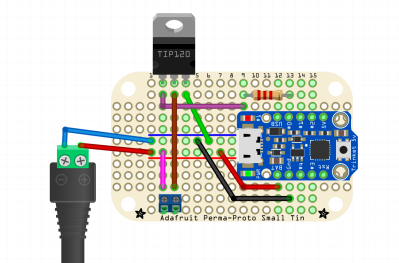
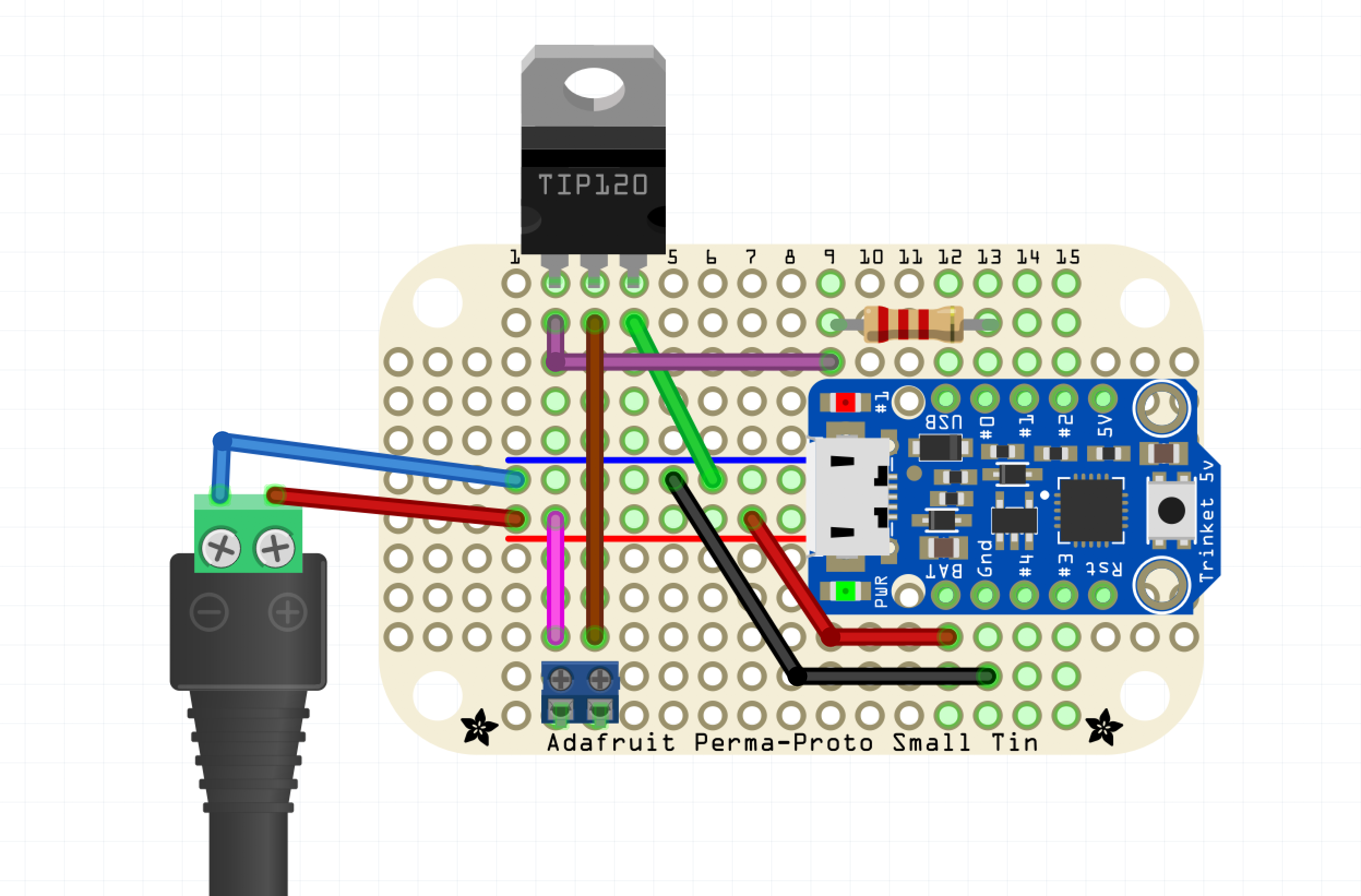
Before I finalized the dimensions I had to design the circuit. Originally I looked at Adafruit’s backlight LED panels, but I felt it would be too hard to fit into the pointy parts of the enclosure, both physically and in terms of light distribution. Instead I went with a strand of cold white LEDs, not individually addressable but only require power and GND to light up. However, the strand is WAY too bright straight from the battery. Fortunately, the strand is PWMable so I am using an Adafruit Trinket ATtiny85 breakout to dim it down somewhat.

I chose a TIP-120 for the switching, a part highly recommended by our own [Adam Fabio]. Power supply will be my wall wart; if I were to take it out into the wild, I could put a 9V battery inside the enclosure — there’s room — but I think I’ll just have it at home this time around.

Designing the Enclosure
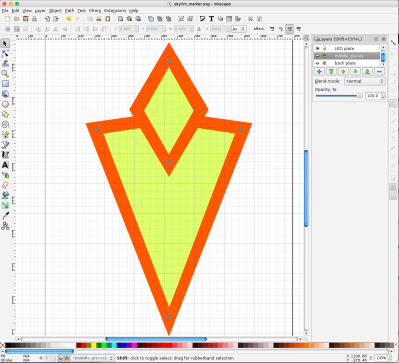
I decided to be flexible with my design. I was going use the laser cutter to cut each layer of the marker out of eighth-inch material. The front will have a bezel holding the acrylic in place, while the back is just a blank piece of plywood. The interior layers, of unknown quantity (as I designed it) would determine the overall thickness of the marker.

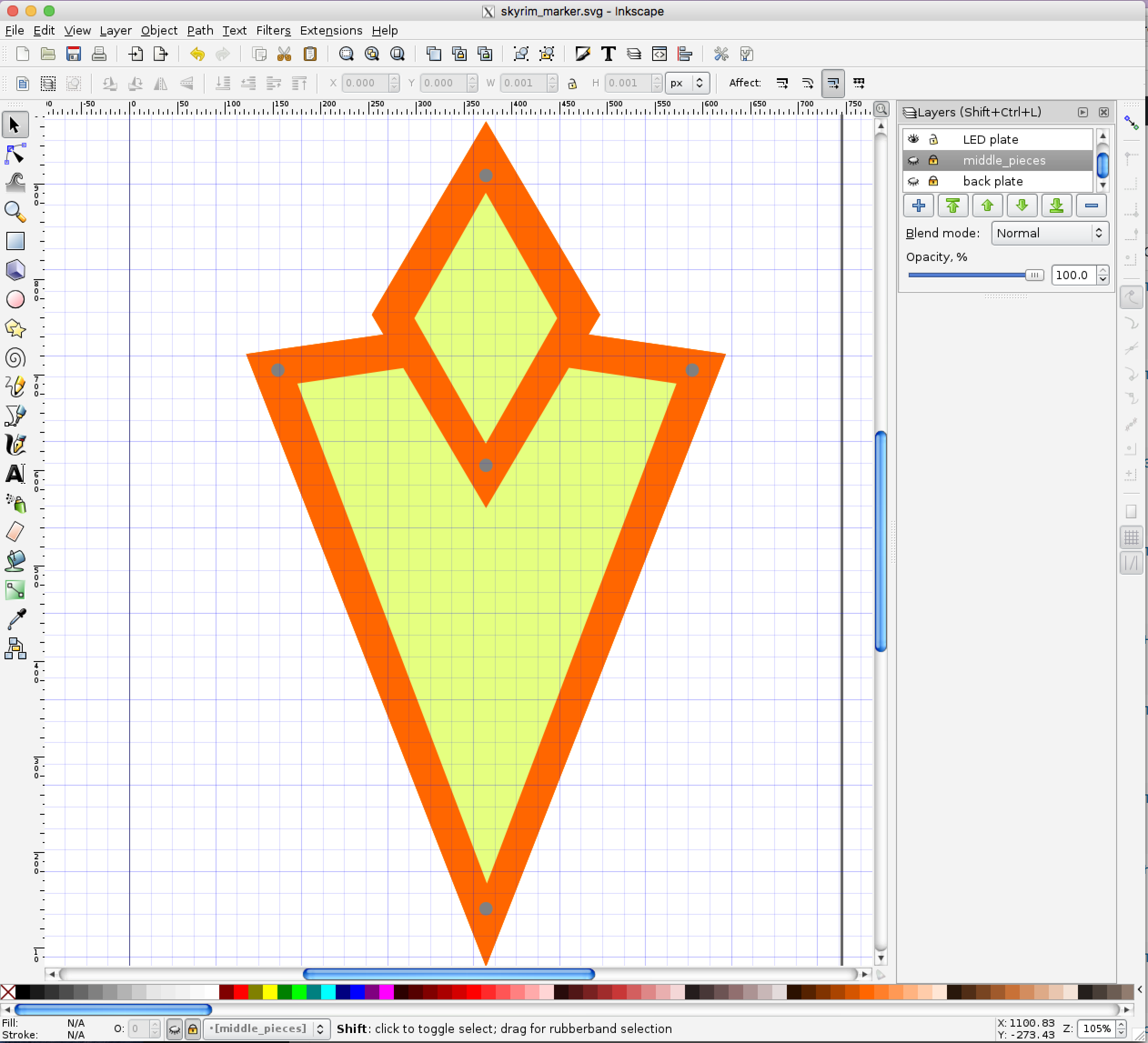
I opened up Inkscape and went to work designing the layers. I did everything in a single Inkscape file with each layer corresponding with a similar layer on the design.

Closer to lasering, when I have a good sense of the projects’s final parameters, I’ll distribute the layers on a series of 12”x12” Inkscape canvases, and I’ll print directly from these. This will allow me to cut some filler projects in the unused portion of the boards, because I’m cheap like that.

The topmost bezel was easy — it’s supposed to look a specific way. I dropped a GIF from the ‘nets into Inkscape and traced it. I duplicated that layer and made the bottom plate, which is basically just a filled-in version of the bezel. There needed to be the vinyl for the light-emitting part, with some sort of bezel keeping it in place. There also needed to be a board for the LEDs, and beneath the LED board there needed to be room for a small circuit board.

I ended up making the whole thing 10 layers thick: Beginning from the top: the outer bezel; then the acrylic and its carrier, which nestle together — I didn’t want any light escaping from the sides. The third layer is an “under bezel” which lifts the acrylic up 1/8” because the LED strips are covered in a little “hill” of plastic. Fourth, the LED plate, painted white with lengths of LED strip attached to it.

I consider those four layers to be the top of the project. The next six are the bottom, consisting of five identical layers making up the electronics compartment, with the back plate, which also has a hole for the power supply and also mounts the protoboard. Each layer is 1/8″ thick, for an overall thickness of 1.25″ — not too bad. It’s somewhat on the heavy side. (By the way, you can find the Inkscape file in the project page.)

Lasering
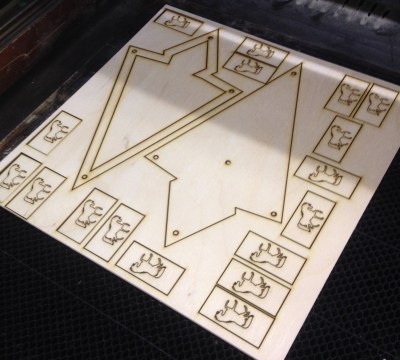
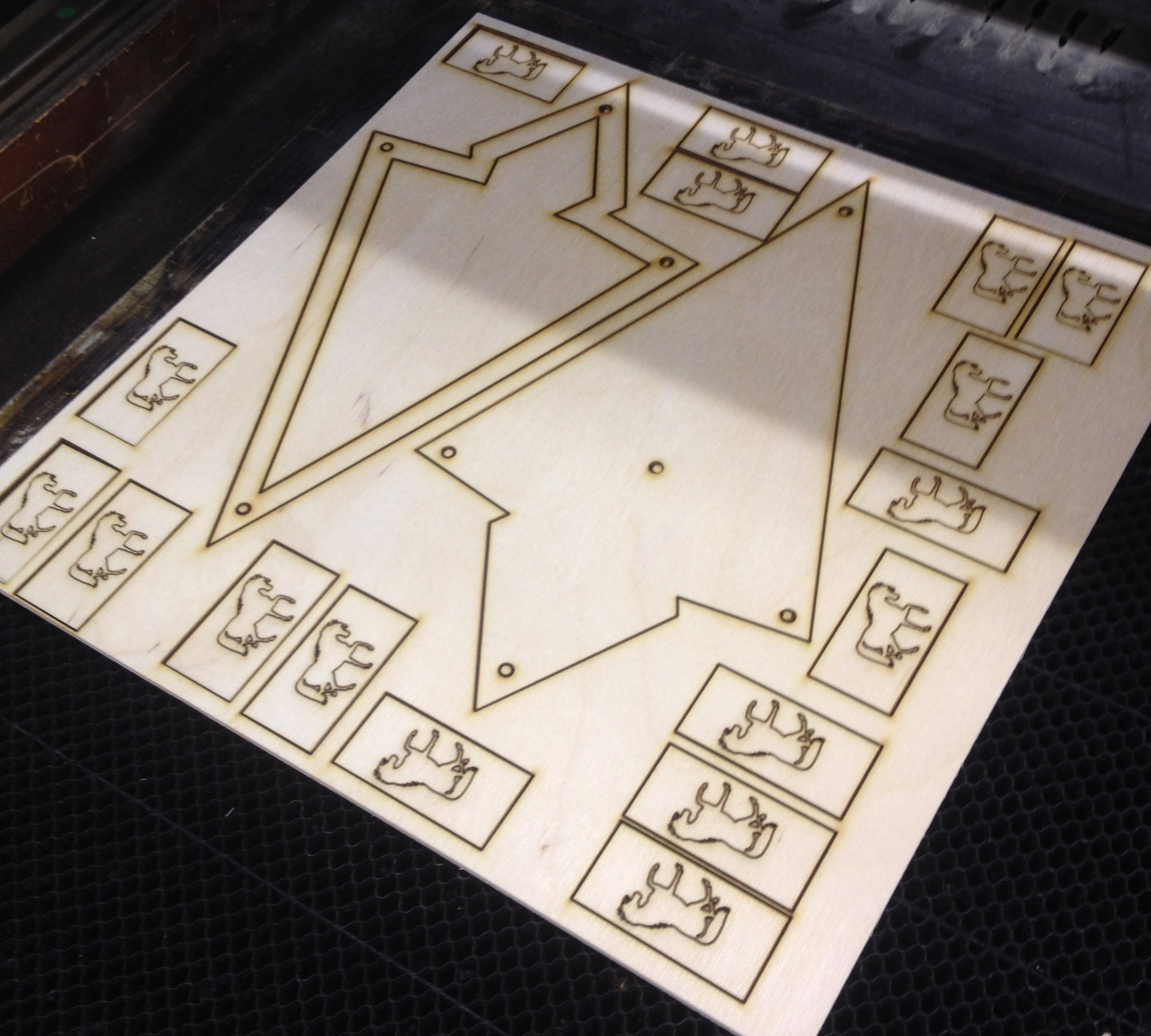
The first fifteen minutes of lasering was hell, as I got all the settings figured out. But once I got everything dialed in, it was a breeze.

The layers were split onto 12″x12″ sheets, with two layers per. So I imported 1″x2″ rectangles with horse shapes on them, and you can see them on the right. We use these in my gaming group for horses, with a figure sitting on top of it to show he or she is mounted.

Once I got dialed into my favorite settings, the lasering went quite well. The wood was about one notch lower in terms of quality than what I’m used to, and I felt like the glue was just a little more refractory or whatever. Still, most of the parts came out perfectly.

I was mostly worried about the acrylic. I took a chance with some translucent white acrylic I found on Amazon. Having never used it before, or had a clear understanding (sorry) of how translucent it was, I bought it sight unseen. Furthermore, I had enough real estate on my 12″x12″ sheet for maybe 3 cuts, so I wanted to get the right settings ASAP.

It worked better than I could have hoped. Someone at the hackerspace had written the best ratio of speed and power on the laser cutter room’s whiteboard walls — 15 speed, 8 power. I ran it through twice to be sure, but it came out perfect, and slid into place like a charm.

The Build
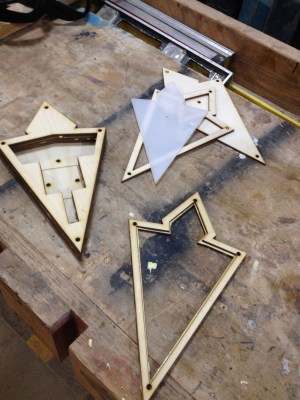
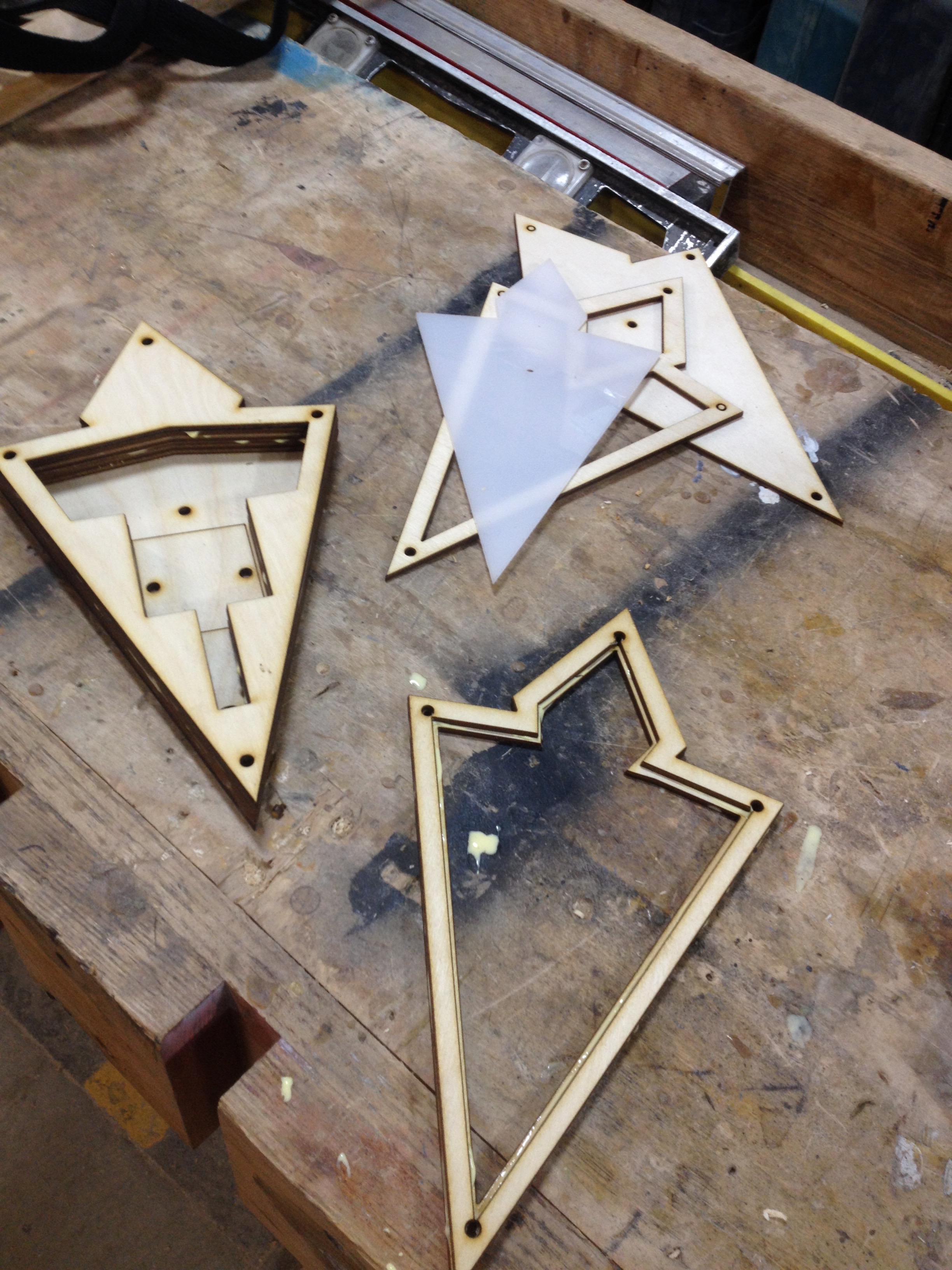
I glued the bottom six layers right there in the hackerspace, as well as the two-layer carrier for the acrylic. All I needed to do was paint the thing, add the electronics, and bolt it together.

Originally I’d envisioned a battery pack inside a harness of some sort, with a black-painted PVC pipe hoisting the marker overhead. That seems like a lot to tackle between now during my first run at the project, so I converted the idea to a tabletop version that uses a wall wart.

When I was prototyping the electronics it had occurred to me that I might be a little ridiculous about the Trinket — what if it didn’t need to be PWMed down? Oh, but it does. LED strips run at full brightness are awfully bright, and that cold white that has all the subtlety of a klieg light. They definitely need to be PWMed down.

The strip comes with a 3M adhesive backing, which was great, However, the solder pads that were most accessible were on the underside, as the top is covered in a plastic bubble that is hard to cut away, even with a sharp knife.

For  the future development, I plan to swap in an ESP and use it as a Twitter alert. In addition, the enclosure was hastily designed and lacked a certain polish. For instance, I would like to use trapped nuts on the top three layers to secure the front bezel from behind, so it doesn’t have those intrusive socket heads showing — or at least inset them somehow.

But all in all I’m happy to have the enclosure work out so well the first try. After countless lasered projects with every grade of success from “abject debacle” on up, maybe I’m starting to get a hang of it! Check out the project page on Hackaday.io.


A Passion For The Best Is In Mechanical Keyboards

There is an entire subculture of people fascinated by computer keyboards. While the majority of the population is content with whatever keyboard came with their computer or is supplied by their employer — usually the bottom basement squishy membrane keyboards — there are a small group of keyboard enthusiasts diving into custom keycaps, switch mods, diode matrices, and full-blown ground-up creations.

Ariane Nazemi is one of these mechanical keyboard enthusiasts. At the 2017 Hackaday Superconference, he quite literally lugged out a Compaq with its beautiful brominated keycaps, and brought out the IBM Model M buckling spring keyboard.

Inspired by these beautiful tools of wordcraft, [Ariane] set out to build his own mechanical keyboard and came up with something amazing. It’s the Dark Matter keyboard, a custom, split, ergonomic, staggered-columnar, RGB backlit mechanical keyboard, and at the 2017 Hackaday Superconference, he told everyone how and why he made it.

Continue reading “A Passion For The Best Is In Mechanical Keyboards”