Challenge Accepted: Automation

Today marks the beginning of the Automation Challenge round for the 2016 Hackaday Prize. We want to see what you can create that automates life. It’s a terrifically fun jumping off point for a project, and done just right, it can score you some amazing prizes.

Technology can make life better and automation is one place that is about to see huge expansion. This is a chance to put your mark on the future by envisioning, prototyping, and explaining your ideas. The animated image at the top of this post is a perfect example of how fun automation builds can be. It’s the part of the Sunday Morning Breakfast Machine which steeps the tea. We covered this Rube-Goldberg like device a few weeks ago. About 1,000 hours went into building a completely automated breakfast machine.

Building something whimsical is fine for entering this round — a lot of discovery happens when having fun with interesting ideas. But there is plenty of room for serious builds as well. Technological development has always included iterating on automation; asking and answering the question of how can we do more with less effort.

AutomationFor instance, you can boil coffee in a pot but then you have to use some filtering technique to sequester the grounds. You can use a French press but that this hasn’t saved you much effort. So someone invented the percolator but you still must watch that you don’t burn your brew. From there we have espresso machines and drip brewers that both regulate how much water is used and at what temperature (in addition to keeping the grounds separate). And now we’re seeing single-unit machines like Nespresso and Keurig which make everything a one-step process, if you’re happy with the pods they sell you. I like to refill my own pods, which lets me choose my own grind. I’d love to see someone automate this entire process of cleaning, grinding, filling and presenting a reusable pod. That would make a great entry and help move more people away from disposable plastic/metal.

All I see when I look around me are ways that life should be more automated, and I bet you have the same proclivity. Now you have a reason to take on the challenge. Automate something and enter it in the Hackaday Prize. Twenty of those entries will be awarded $1,000 and move on to vie for the grand prize of $150,000 and a residency at the Supplyframe Design Lab in Pasadena, plus four other huge top prizes.

The HackadayPrize2016 is Sponsored by:

3D Printering: Makerbot’s Class Action Suit Dismissed

This time last year, Stratasys, parent company of Makerbot, was implicated in a class action suit. Investors claimed Stratasys violated securities laws, and overstated both the performance of the 5th generation of Makerbot printers and the performance of the company itself. Court docs received by Adafruit have revealed this case has been dismissed with prejudice. Makerbot won this one.

The case presented by Stratasys investors relied on two obvious facts. First, the price of Stratasys shares fell far beyond expectations. Second, the extruder for the 5th generation of Makerbot printers – the ‘Smart Extruder’ – was terrible. No one can reasonably dispute these claims; shares of SYSS fell from $120 in September of 2014 to $30 in September of 2015. With many returns to handle, Makerbot quickly redesigned the Smart Extruder.

Both of these indisputable facts are in stark contrast to statements made by Stratasys and Makerbot at the time. In a press release for the 4th quarter 2013 financial results, Stratasys’ expected sales to grow at least 25% over 2013 and stated it was experiencing “strong sales” of its desktop 3D printer. Concerning the Smart Extruder, Makerbot stated this new feature of the 5th generation Makerbots would make them easy to use, and “define the new standard for quality and reliability.”

The facts of this case are not in dispute – Stratasys did not see the growth they expected in late 2013. The Smart Extruder certainly did not make printers more reliable. These facts, however, are not sufficient to violate securities law.  In a wonderful legal turn of phrase, the judge deciding this case called the statements about the quality of the 5th generation Makerbots consisted of, “non-actionable puffery,” and a ‘statement so vague and such obvious hyperbole than no reasonable investor would rely on them.’

Statements made by Stratasys on their financial performance were also found not to be sufficient to violate securities laws. Stratasys did make several statements about negative performance in late 2014 and 2015, and positive statements made earlier did not have an intent to deceive investors.

This is good news for Makerbot. The claims brought by investors in this case had little merit. The case cannot be appealed, and Stratasys is no longer facing a class action suit. Does this news actually matter? Not really; Makerbot is a dead man walking, and 2016 sales will be at levels not seen since 2010 or 2011.

The consumer 3D printing industry is booming, despite the Makerbot bellwether though.

Hacklet 115 – More Quick Tool Hacks

Some of the best hacks are the tools people make to help them complete a project. I last looked at quick tool hacks back in Hacklet 53. Hackers have been busy since then, and new projects have inspired new tools. This week on the Hacklet, I’m taking  a look at some of the best new quick tool hacks on Hackaday.io.

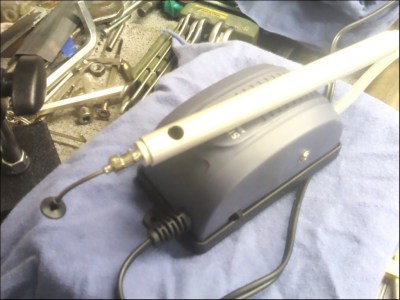
pickupWe start with [rawe] and aquarium pump vacuum pickup tool. Tweezers work great for resistors and caps, but once you start trying to place chips and other large parts, things quickly become frustrating. Commercial machines use high dollar vacuum pickup devices to hold parts. [rawe] built his own version using a cheap Chinese hand pickup tool and an aquarium pump. With some pumps, switching from air to vacuum is easy. Not with [rawe’s] pump. He had to break out the rotary tool and epoxy to make things work. The end result was worth it, a vacuum pickup tool for less than 10 Euro.


via1

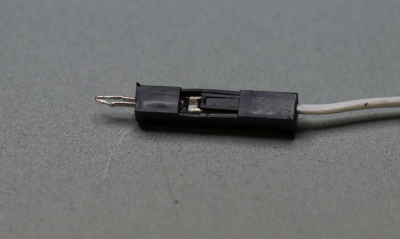
Next we have [David Spinden] with ViaConnect Circuit Board Test Tool, his entry in the 2016 Hackaday Prize. [David] wanted a spring loaded pin which could be used in .100 holes in printed circuit boards. He ended up using pins from one connector, shell from another, and packaging the whole thing up into a new tool. ViaConnect essentially makes any PCB as easy to use as a solderless breadboard. No headers required. This is great both for testing new designs and for the education sector.

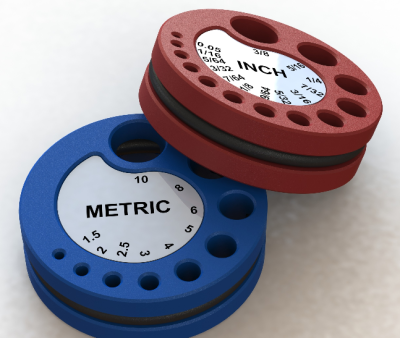
Allen tool holderNext up is our favorite quick tool hacker, [Alex Rich] with Improved Allen Wrench / Hex Key Holder. If [Alex] looks familiar, that’s because he’s the creator of the Stickvise. This time he’s come up with a new way to store and organize your Allen wrenches. Inspired by a similar device seen on a YouTube video from [Tom Lipton], [Alex] opened up his CAD software and started designing. The original used a steel spring to keep the wrenches in place. [Alex] switched the spring to a rubber o-ring. The o-ring securely holds the wrenches, but allows them to be easily pulled out for use. Of course the design is open source, so building your own is only a couple of hours of printing away!


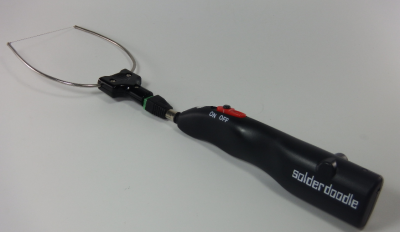
solderdoodFinally we have [Solarcycle] with Cordless Foam Cutting Tool – USB Rechargeable. Soldering irons make a lot of heat in a small area to melt metal. Foam cutters make heat in a larger area to cut Styrofoam. [Solarcycle] saw the relation and converted a Solderdoodle Pro cordless soldering iron into a banjo style hot wire foam cutter. A barrel connector converts the soldering iron tip output to two stiff wires. The stiff wires carry current to a 3 cm length of Kanthal iron-chromium-aluminium (FeCrAl) heating element wire. If you don’t have any Kanthal around, ask your local vape enthusiast – they have tons of it. The result is the perfect hand-held tool for carving and sculpting in foam. Just make sure to have lots of ventilation.

If you want to see more of these hacks, check out our newly updated quick tool hacks list! See a project I might have missed? Don’t be shy, just drop me a message on Hackaday.io. That’s it for this week’s Hacklet, As always, see you next week. Same hack time, same hack channel, bringing you the best of Hackaday.io!

Join The GUI Generation: QTCreator

More and more projects require a software component these days. With everything being networked, it is getting harder to avoid having to provide software for a desktop or phone environment as well as the code in your embedded device.

If you’ve done a lot of embedded systems work, you probably already know C and C++. If so, it is pretty easy to grab up a C compiler and write a command-line application that does what you want. The problem is that today’s users have varying degrees of fear about the command line ranging from discomfort to sheer terror. On a mobile device, they probably don’t even know how to get to a command line. I’ve been waiting for years for the WIMP (Windows/Icon/Mouse/Pointer) fad to fade away, but even I have to admit that it is probably here for the foreseeable future.
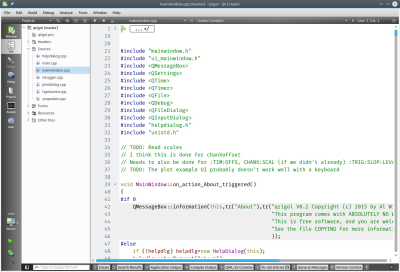
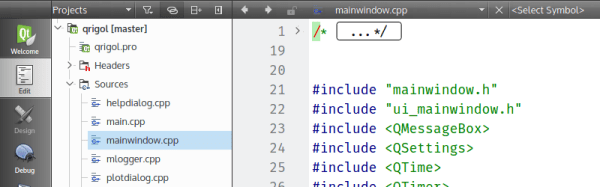
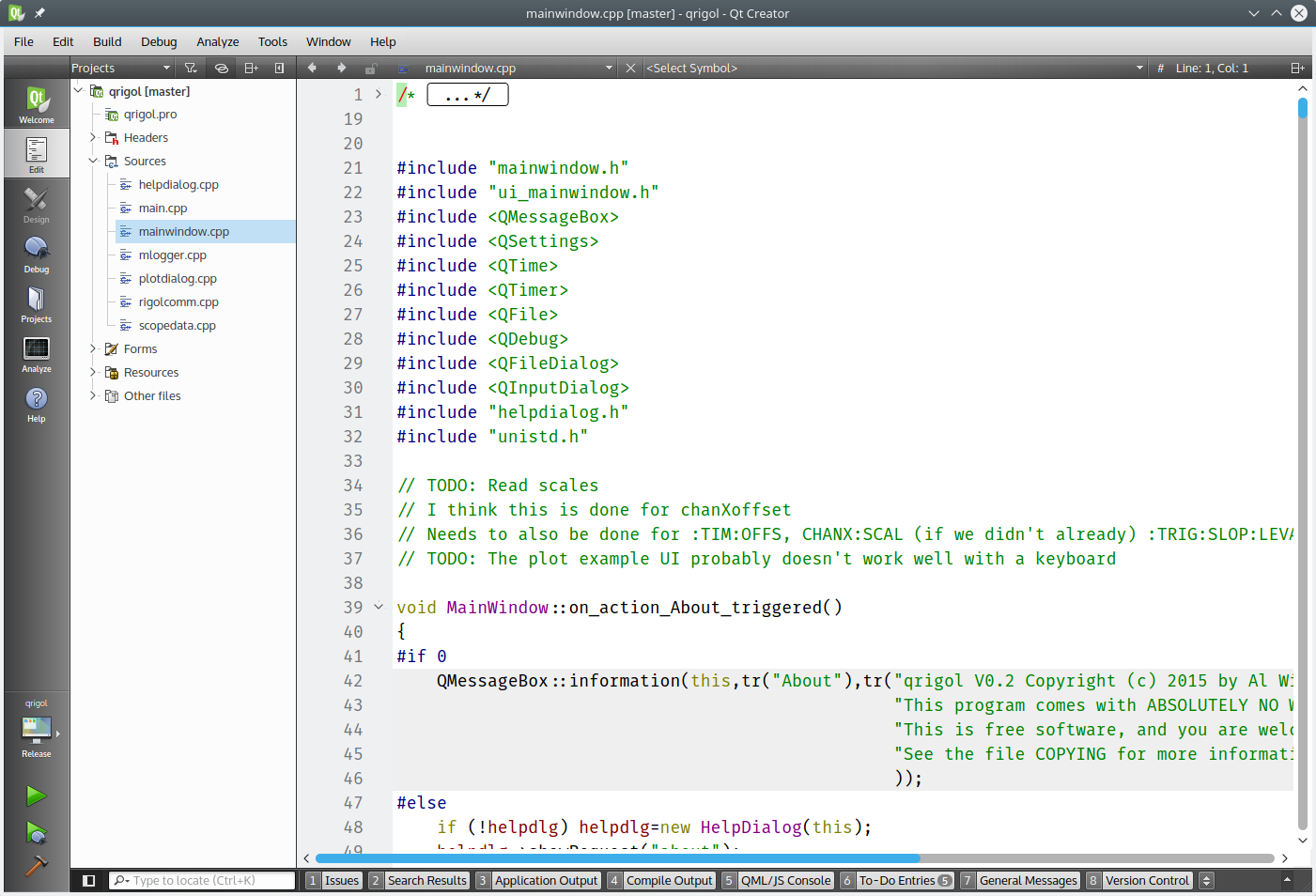
qtrigolSo what’s the alternative? There are actually quite a few. However, I wanted to talk about one that is free, has a wide range of deployment options, uses C++, and is easy to pick up: Qt. Specifically, creating programs with QtCreator (see right). Yes, there are other options, and you can develop Qt programs in a number of ways.

You might think Qt isn’t free. There was a time that it was free for open source projects, but not for commercial projects. However, recent licensing changes (as of version 4.5) have made it more like using gcc. You can elect to use the LGPL which means it is easy to use the Qt shared libraries with closed software. You might also think that a lot of strange constructs that “extend” C++ in unusual ways. The truth is, it does, but with QtCreator, you probably won’t need to know anything about that since the tool will set up most, if not all, of that for you.

Background

If you ever used Visual Basic or something similar, you will feel right at home with QtCreator. You can place buttons and text edit boxes and other widgets on a form and then back them up with code. Buttons create signals when you push them. There are lots of signals like text changed or widgets (controls) being created or destroyed.

To handle a signal, an object provides a slot. There is a meta-compiler that preprocesses your C++ code to get all the signal and slot stuff converted into regular C++. Here’s the good news: you don’t really care. In QtCreator you can write code to handle a button push and exactly how that happens isn’t really much of a worry.

QtCreator has kits that can target different platforms and — in general — the code is reasonably portable between platforms. If you do want to do mobile development for Android or iOS, be sure that you understand the limitations before you start so you can avoid future pitfalls.

You Need Class

Like many similar frameworks, Qt uses an application class (QtApplication) that represents a do-nothing application. Your job is to customize a subclass and have it do what you want. You add widgets and you can even add more screens, if you like. You can connect signals to existing slots or new slots.

There are many classes available, and the online documentation is quite good. Depending on which version of Qt you are using, you’ll need to find the right page (or ask QtCreator to find it for you). However, just to whet your appetite, here’s the Qt5 reference page. From there you can find classes for GUI widgets, strings, network sockets, database queries, and even serial ports.

I could do an entire tutorial on using QtCreator, but it would be a duplication of effort. There’s already a great getting started one provided. You’ll find there is plenty of documentation.

Portability

How do you enumerate serial ports? It depends on the platform, right? In Qt, the platform-specific part is hidden from you. For example, here’s a bit of code that fills in a combo box with the available serial port:

MainWindow::MainWindow(QWidget *parent) :
 QMainWindow(parent),
 ui(new Ui::MainWindow)
{
 ui->setupUi(this);
// initialize list of serial ports
 ports = QSerialPortInfo::availablePorts();
// fill in combo box
 for (int i=0; i<ports.length(); i++) 
 {
   ui->comport->addItem(ports[i].portName(), QVariant(i));
 }
}

The QSerialPortInfo object provides an array of serial port objects. The ui->comport is a combo box and the addItem method lets me put a display string and a data item in for each selection. In this case, the display is the portName of the port and the extra data is just the index in the array (as a variant, which could be different types of data, not just a number). When you select a port, the index lets the program look up the port to, for example, open it.

When the combo box changes, a currentIndexChanged signal will occur. Here’s the slot handler for that:

void MainWindow::on_comport_currentIndexChanged(int index)
{
 QString out;
 // get selected index
 int sel=ui->comport->currentData().toInt();
// build up HTML info string in out
 out="<h1>Serial Port Info</h1>";
 ui->output->clear();
 out += ports[sel].portName() + " " + ports[sel].description() + "
";
 out += ports[sel].systemLocation() + "
";
 if (ports[sel].hasVendorIdentifier() && ports[sel].hasProductIdentifier())
 out += ports[sel].manufacturer() + " ("+ QString::number(ports[sel].vendorIdentifier(),16) + ":" + QString::number(ports[sel].productIdentifier(),16) + ")";
 // and put it on the screen
 ui->output->setText(out);
}

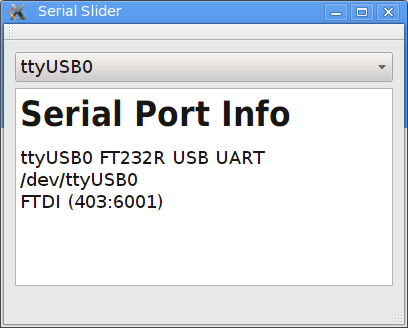
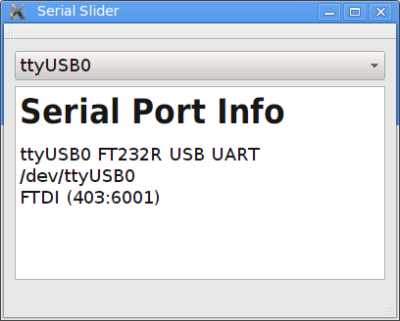
In this case, the result is information about the serial port. You can see the resulting output, below. The QString is Qt’s string class and, obviously, the text display widget understands some HTML.
qtserial

Not Just for GUIs

You can develop console applications using Qt, but then many of the provided classes don’t make sense. There’s even a Qt for Embedded (essentially Linux with no GUI). You can find guides for Raspberry Pi and BeagleBoard.

On the mobile side, you can target Android, iOS, and even Blackberry, along with others. Like anything, it probably won’t just be “push a button” and a ported application will fall out. But it still should cut down on development time and cost compared to rewriting a mobile app from scratch.

And the Winner Is…

I’m sure if you want some alternatives, our comment section is about to fill up with recommendations. Some of them are probably good. But it strikes me that not everyone has the same needs and background. The best tool for you might not work as well for me. I find Qt useful and productive.

Even if Qt isn’t your tool of choice, it still can be handy to have in your tool bag. You never know when you will need a quick and dirty cross-platform application.


Ask Hackaday: How Hard Is It To Make A Bad Solder Joint?

When you learn to solder, you are warned about the pitfalls of creating a solder joint. Too much solder, too little solder, cold joints, dry joints, failing to “wet” the joint properly, a plethora of terms are explained  if you read one of the many online guides to soldering.

Unsurprisingly it can all seem rather daunting to a novice, especially if they are not used to the dexterity required to manipulate a tool on a very small-scale at a distance. And since the soldering iron likely to be in the hands of a beginner will not be one of the more accomplished models with fine temperature control and a good tip, it’s likely that they will experience most of those pitfalls early on in their soldering career.

As your soldering skills increase, you get the knack of making a good joint. Applying just the right amount of heat and supplying just enough solder becomes second nature, and though you still mess up from time to time you learn to spot your errors and how to rework and fix them. Your progression through the art becomes a series of plateaux, as you achieve each new task whose tiny size or complexity you previously thought rendered it impossible. Did you too recoil in horror before your first 0.1″ DIP IC, only to find it had been surprisingly easy once you’d completed it?

A few weeks ago we posted a Hackaday Fail of the Week, revolving around a soldering iron failure and confirmation bias leading to a lengthy reworking session when the real culprit was a missing set of jumpers. Mildly embarrassing and something over which a veil is best drawn, but its comments raised some interesting questions about bad solder joints. In the FoTW case I was worried I’d overheated the joints causing them to go bad, evaporating the flux and oxidising the solder. This was disputed by some commenters, but left me with some curiosity over bad solder joints. We all know roughly how solder joints go wrong, but how much of what we know is heresay? Perhaps it is time for a thorough investigation of what makes a good solder joint, and the best way to understand that would surely be to look at what makes a bad one.

Continue reading “Ask Hackaday: How Hard Is It To Make A Bad Solder Joint?”

Tearing Into Delta Sigma ADC’s

It’s not surprising that Analog to Digital Converters (ADC’s) now employ several techniques to accomplish higher speeds and resolutions than their simpler counterparts. Enter the Delta-Sigma (Δ∑) ADC which combines a couple of techniques including oversampling, noise shaping and digital filtering. That’s not to say that you need several chips to accomplish this, these days single chip Delta-Sigma ADCs and very small and available for a few dollars. Sometimes they are called Sigma-Delta (∑Δ) just to confuse things, a measure I applaud as there aren’t enough sources of confusion in the engineering world already.

I’m making this a two-parter. I will be talking about some theory and show the builds that demonstrate Delta-Sigma properties and when you might want to use them.

Continue reading “Tearing Into Delta Sigma ADC’s”