Homemade Capacitors Of A Mad Scientist

Once upon a time I was a real mad scientist. I was into non-conventional propulsion with the idea of somehow interacting with the quantum vacuum fluctuations, the zero point energy field. I was into it despite having only a vague understanding of what that was and without regard for how unlikely or impossible anyone said it was to interact with on a macro scale. But we all had to come from somewhere, and that was my introduction to the world of high voltages and homemade capacitors.

And along the way I made some pretty interesting, or different, capacitors which I’ll talk about here.

Large Wax Cylindrical Capacitor

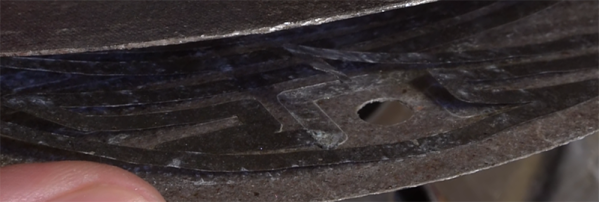
As the photos show, this capacitor is fairly large, appearing like a thick chunk of paraffin wax sandwiched between two wood disks. Inside, the lead wires go to two aluminum flashing disks that are the capacitor plates spaced 2.5cm (1 inch) apart. But in between them the dielectric consists of seven more aluminum flashing disks separated by plain cotton sheets immersed in more paraffin wax. See, I told you these capacitors were different.

I won’t go into the reasoning behind the construction — it was all shot-in-the-dark ideas, backed by hope, unicorn hairs, and practically no theory. The interesting thing here was the experiment itself. It worked!

I sat the capacitor on top of a tall 4″ diameter ABS pipe which in turn sat on a digital scale on the floor. High voltage in the tens of kilovolts was put across the capacitor through thickly insulated wires. The power supply contained a flyback transformer and Cockcroft-Walton voltage multiplier at the HV side. As I dialed up the voltage, the scale showed a reducing weight. I had weight-loss!

But after a few hours of reversing polarities and flipping the capacitor the other way around and taking plenty of notes, I found the cause. The weight-loss happened only when the feed wires were oriented with the top one feeding downward as shown in the diagram, but there was no weight change when the top wire was oriented horizontally. I’d seen high voltage wires moving before and here it was again, producing what looked like weight-loss on the scale.

But that’s only one of the interesting capacitors I’ve made. After the break we get into gravitators, polysulfide and even barium titanate.

Continue reading “Homemade Capacitors Of A Mad Scientist” →

Maker Faire Multicolor And Multi Material 3D Printing

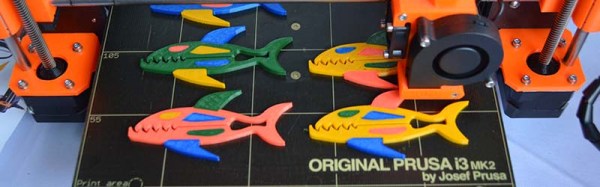
The next frontier of desktop 3D printing is multi-material and multi-color prints. Right now, you can buy a dual toolhead for a Lulzbot, and dual toolheads from other companies exist, although they are a bit rare. In the next few years, we’re going to see a lot of printers able to print dissolvable supports and full-color 3D printers.

Printing in more than one color is almost here, but that doesn’t mean we’re on the cusp of a complete revolution. Multi-material printing is lagging a little bit behind; you’ll be able to print two colors of PLA next year, but printing an object in PLA and ABS is going to be a bit tricky. Printing something in PLA and nylon will be very hard. Color mixing, likewise, will be tricky. We can do it, the tools are getting there, but think of this year as a preview of what we’ll be doing in five years.

Continue reading “Maker Faire Multicolor And Multi Material 3D Printing” →

Hackaday Links: October 2, 2016

Hey Elon, three weeks ago I was in Burning Man in the Nevada desert and after I dug myself a nice K-hole I notice that Mars is a lot like the Nevada desert which got me thinking that if we can live here we can live on Mars but then I realized that Mars really isn’t a lot like the Nevada desert because there are toilets here but if we could build toilets on Mars it would be a lot like the Nevada desert? This week Elon Musk unveiled the Interplanetary Transport System at the International Astronautical Congress in Guadalajara. Instead of filling the room with industry experts the highlights of the Q&A session consisted of a woman who wanted to give Elon a kiss onstage and some guy who was super, super high. Discussion of the technical feasibility of a big, heavy window on the Heart of Gold has not appeared anywhere. Zero thought has been given to the consequences of building a civilization consisting entirely of the wealthiest 1% of Earth’s population. I fully support the Interplanetary Transport System; I’m going because this planet sucks.

[FoamieNinja] over on /r/radiocontrol is experimenting with single bladed propellers. Single bladed propellers are the most efficient way of pushing air behind an engine but haven’t really seen widespread use because they’re really weird, and I don’t know if you can do a variable pitch prop like this. You can find these types of props rarely on big-sized aircraft such as vintage J-3 Cubs sporting a 40HP engine. I haven’t seen them on anything bigger.

Next weekend is the Open Hardware Summit in Portland, Oregon. Hackaday is going to be there, and there’s a BringAHack at OSH Park on Thursday. Last year at the summit, the Open Source Hardware Certification was announced. This year, OSHWA is ready to launch their certification program. The takeaway from last year is that Open Hardware Certification will be free, self-certifying, with penalties based on fines for non-compliance.

The ESP32 is here, but most of them are still in a shipping container somewhere in the Pacific. Here’s a breakout board for the Espressif ESP-WROOM-02.

The J-Core is a clean room, open source CPU and SOC. Currently, it’s only implemented in VHDL until someone has a ton of money to burn on an ASIC. Now, the J-Core is supported by Linux. That makes an ASIC just a bit more likely. Thanks [Stefano] for the tip.

MakerBot is not at the New York Maker Faire this year. This is the greatest proof of the imminent failure of MakerBot, but it does deserve some context. In 2009, MakerBot demoed their first printer, the Cupcake, at the New York Maker Faire in Queens, NY. This was, by any reasonable historical reckoning, the introduction of a simple, easy to use, consumer 3D printer to the masses. The current trend of cheap desktop printers began seven years ago this weekend. MakerBot was so successful that it can be argued that Make:, the magazine and the faire, has tried to take credit for the consumer 3D printer ecosystem, simply because they hosted the launch of the Cupcake. Over the years, everyone has tried to ride MakerBot’s coattails. Since then, a few things happened. Last month, MakerBot introduced a new line of (China-manufactured) 3D printers, and they don’t have a booth. The reasons for this could be that Maker Faire is horrifically expensive for any vendor, and MakerBot is going to be at CES next year anyway, but this is it. The MakerBot obituary was not premature. We won.

Calling All Procrastinators

We have your number… you’re one who likes to while away the daylight hours, then make a mad effort throughout the night to finish everything before the sun again rises. In fact, that describes a lot of us Hackaday writers.

Put those well-honed cramming skills to good use this weekend, because Monday morning is the deadline to enter the 2016 Hackaday Prize. The current challenge is to show us your Assistive Technology. Prototyping some hardware to make life a little bit better for people dealing with a disability, to help those who are aging in place, to provide more widespread access to health care, and the like. We will pick 20 entries from this challenge to win $1000 each and become eligible for one of the five huge prizes.

Huge prizes you say? We’re talking about a grand prize of $150,000 and a residency at the Supplyframe Design Lab in Pasadena, plus four other cash prizes of $25k, $10k, $10k, and $5k. Twenty final projects have been chosen from each of the first four challenges, and there have already been over 1000 total entries! But your chances of pulling a rabbit out of the hat this weekend are still really good. So far there are just under 200 entries in this final challenge — twenty will move forward on Monday.

Call up your friends and stock up on Red Vines and Red Bull (Club Mate if you can get it). Occupy your hackerspace and get to work. If you are pulling all nighter’s in a bid to take Assistive Technology by storm, make sure you let us know on Twitter so we can follow along.

Creating A PCB In Everything: Eagle DRC And Gerber Files

For the next post in the Creating A PCB series, we’re going to continue our explorations of Eagle. In Part 1,  I went over how to create a part from scratch in Eagle. In Part 2, we used this part to create the small example board from the Introduction.

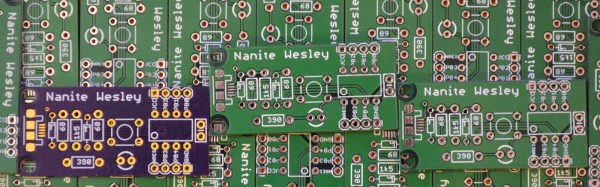
This time around I’ll be going over Design Rule Check (DRC) — or making sure your board house can actually fabricate what you’ve designed. I’ll also be covering the creation of Gerber files (so you can get the PCB fabbed anywhere you want), and putting real art into the silkscreen and soldermask layers of your boards.

The idea behind this series is to explore different EDA suites and PCB design tools by designing the same circuit in each. You can check out the rest of the posts in this series right here.

Continue reading “Creating A PCB In Everything: Eagle DRC And Gerber Files” →

Ask Hackaday: How Do You Make A Hotplate?

Greetings fellow nerds. The Internet’s favorite artificial baritone chemist has a problem. His hotplates burn up too fast. He needs your help to fix this problem.

[NurdRage] is famous around these parts for his very in-depth explorations of chemistry including the best ways to etch a PCB, building a thermometer probe with no instructions, and chemical synthesis that shouldn’t be performed by anyone without years of experience in a lab. Over the past few years, he’s had a problem: hotplates suck. The heating element is usually poorly constructed, and right now he has two broken hotplates on his bench. These things aren’t cheap, either: a bare-bones hotplate with a magnetic stirrer runs about $600.

Now, [NurdRage] is asking for help. He’s contacted a few manufacturers in China to get a hundred or so of these hotplate heating elements made. Right now, the cost for a mica and metal foil hotplate is about $30 / piece, with a minimum order quantity of 100. That’s $3,000 that could be better spent on something a bit more interesting than a heating element, and this is where you come in: how do you build the heating element for a hotplate, and do it cheaply?

If you buy a hotplate from the usual lab equipment supplier, you’ll get a few pieces of mica and a thin trace of metal foil. Eventually, the metal foil will oxidize, and the entire hotplate will stop working. Repairs can be done with copper tape, but by the time that repair is needed, the heating element is already on its way out.

The requirements for this heating element include a maximum temperature of around 350 ºC. That’s a fair bit hotter than any PCB-based heat bed from a 3D printer gets, so consider that line of reasoning a dead end. This temperature is also above what most resins, thermoplastics, and composites can handle, which is why these hotplates use mica as an insulator.

Right now, [NurdRage] will probably end up spending $3,000 for a group buy of these heating elements. That’s really not that bad – for the price of five hotplates, he’ll have enough heating elements to last through the rest of his YouTube career. There must be a better way, though, so if you have an idea of how to make a high-temperature heating element the DIY way, leave a note in the comments.

New Part Day: Wireless BeagleBones On A Chip

The BeagleBone is a very popular single board computer, best applied to real-time applications where you need to blink LEDs really, really fast. Over the years, the BeagleBone has been used for stand-alone CNC controllers, the brains behind very large LED installations, and on rare occasions has been used to drive CRTs. If you just want a small Linux board, get a Pi. If you want to do something interesting with hardware, get a BeagleBone.

The BeagleBone ecosystem has grown a lot in the last year, from the wireless and Grove connector equipped BeagleBone Green, the robotics-focused BeagleBone Blue, the Zoolander-inspired Blue Steel. Now there’s a new BeagleBone, built around a very interesting System on Module introduced earlier this year.

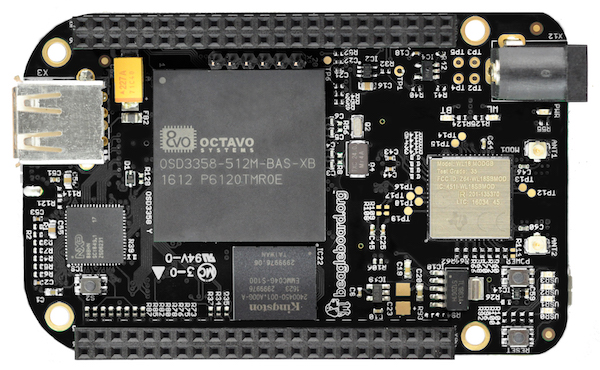
The new board is called the BeagleBone Black Wireless, and it brings to the table all you know and love about the BeagleBone. There’s a 1GHz ARM355x with two 32-bit 200MHz PRUs for the real-time pin toggling. RAM is set at 512MB, with 4GB of eMMC Flash and Debian pre-installed, and a microSD card for larger storage options. The new feature is wireless connectivity: a TI WiFi and Bluetooth module with provisions for 802.11s replaces the old Ethernet connector.

Taken at face value, the new BeagleBone Black Wireless deserves a mention — it’s a BeagleBone with wireless — but isn’t particularly noteworthy. But when you get to the gigantic brick of resin dropped squarely in the middle of the board does the latest device in the BeagleBone family become very, very interesting. The System on Module for this version of the BeagleBone is the BeagleBone On A Chip released a few months ago. The Octavo Systems OSD335x is, quite literally, a BeagleBone on a chip. It’s a BGA with big balls, making it solderable with hand-applied solder paste and a toaster oven reflow conversion. In fact, the BeagleBone Wireless was designed by [Jason Kridner] in Eagle as a 6-layer board. It’s still a bit beyond the standard capabilities of OSHPark, but the design can still be cut down, and shows how this BeagleBone on a Chip can be applied to other Open Hardware projects.