Blue Pill As A Nerdy Swiss Army Knife

Not everyone can afford an oscilloscope, and some of us can’t find a USB logic analyzer half the time. But we can usually get our hands on a microcontroller kit, which can be turned into a makeshift instrument if given the appropriate code. A perfect example is buck50 developed by [Mark Rubin], an open source firmware to turn a STM32 “Blue Pill” into a multi-purpose test and measurement instrument.

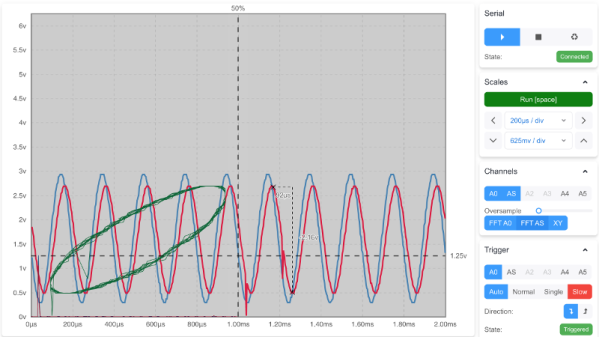
buck50 comes with a plethora of functionality built in which includes an oscilloscope, logic analyzer, and bus monitor. The device is a two way street and also comes with GPIO control as well as PWM output. There’s really a remarkable amount of functionality crammed into the project. [Mark] provides a Python application that exposes a text based UI for configuring and using the device though commands and lots of commands which makes this really nerdy. There are a number of options to visualize the data captured which includes gnuplot, gtk wave and PulseView to name a few.

[Mark] does a fantastic job not only with the firmware but also with the documentation, and we really think this makes the project stand out. Commands are well documented and everything is available on [GitHub] for your hacking pleasure. And if you are about to order a Blue Pill online, you might want to check out the nitty-gritty of the clones that are floating around.

Thanks [JohnU] for the tip!

Micro Macro Keyboard Is ‘Mega-Based

There’s a certain kind of joy that comes in throwing something together from spare parts, or from finding utility in a proof of concept for another project. [Clewsy] is cooking up something clacky and built this baby keeb to prove some stuff out, such as reading a key matrix. Now it’s become a music/media controller that looks great next to a giant matching volume knob.

Beneath the gently backlit Gateron blues is a custom ATMega32u4-based board, which is viewable through the clear acrylic bottom plate. That’s a nice touch. We’re not sure if the wood came from a picture frame, but if not, they seem like a great candidates for enclosure material.

This keeb looks fantastic, and we are partial to both the clear and the chrome keycaps. We can only hope [Clewsy] sends the details of the next build our way.

If you want to get started building keyboards, you can’t go wrong with a macro keyboard like this one. If you have way more than four macros in mind, build something bigger, like a custom game pad with a joystick.

E-Ink Calendar Paves A Path For All

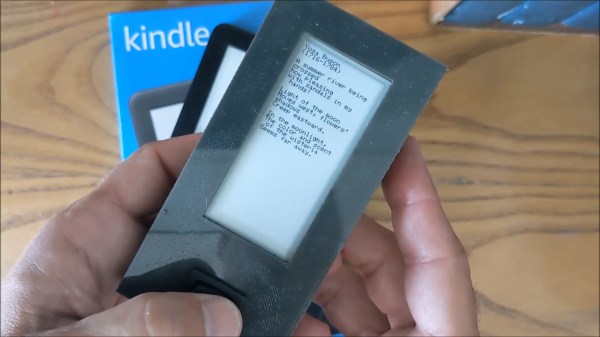
[Martin Fasani] has set out to build a beautiful low power E-Ink Calendar he can hang on his wall. But perhaps more importantly, the work he has done makes it easier for everyone in the future to have a e-ink display. Many battery-powered e-ink projects connect to some server, download a bitmap image, display the new image, and then go into a deep sleep power mode. [Martin’s] project is no different, but it uses a handy microservice that does the conversion and rendering for you.

The firmware for this ESP32/ESP32S2 based calendar is open sourced on GitHub, with a version based on the Arduino framework as well as the native ESP-IDF framework. One particularly fantastic part of the firmware is a C++ component called CalEPD that drives e-paper displays. CalEPD extends the Adafruit_GFX class and is broken out in a separate repo, making it easy to consume on other projects. Since this supports dozens of different e-paper displays, this simplifies the process of building a calendar with different screens. The firmware includes a Bluetooth setup flow from a smartphone or tablet. This means you can quickly configure how often it wakes up, what it queries, and other important features.

The hardware shown in the demo video has a 7.5″ Waveshare screen with 800 x 400 resolution nestled inside a 3D-printed shell. There is also a 5,000 mAh battery with an ESP32 TinyPICO powering the whole system. The TinyPICO was picked for its incredible deep sleep power consumption. All this fits into a frame just 11 mm thick, for which STL files are available. [Martin] continues to work on this calendar display and has recently added support for FocalTech touch panel controllers. We’re excited to see where he takes it next!

This isn’t the first e-ink display project we’ve seen but this is a great reference to build your own. If you need another good starting point, this weather display might give you that little bit of inspiration you need.

Continue reading “E-Ink Calendar Paves A Path For All”

Actuator Opens The Door To Drier Dishes

Dishwashers are great at washing dishes and even rinsing them, most of the time. Where they tend to fail is in the drying part. Somehow these things dry hot enough to warp stoneware dishes, but not so well that things are actually dry when you open the door. Blame it on the lack of air movement.

Ideally, the dishwasher cycle is started soon after dinner time so it can be finished and opened up before it’s time for bed. But if you do that, then you miss all the dishes from late-night snacking and the occasional wine glass. Wait until bedtime to start it, and it has to sit several hours with moisture inside. Obviously, the answer is to listen for the victory beeps at the end of the cycle, and use a slow but forceful actuator to push the door open.

[Ivan Stepaniuk] is listening for the dishwasher’s frequencies with a microphone, amplifying them with a trusty LM386, and using an STM32 blue pill to crunch the audio. [Ivan] has plans to incorporate an ESP8266 board for IoT, presumably to get a notification when the door has been opened successfully. Check out the demo after the break.

Yes, dishwashers are great until they aren’t, and some little part breaks. But why pay for a new detergent compartment cover when you can just print one?

Continue reading “Actuator Opens The Door To Drier Dishes”

Bare-Metal STM32: From Power-Up To Hello World

Some may ask why you’d want to program a Cortex-M microcontroller like the STM32 series using nothing but the ARM toolchain and the ST Microelectronics-provided datasheet and reference manual. If your first response to that question wasn’t a panicked dive towards the nearest emergency exit, then it might be that that question has piqued your interest. Why, indeed?

Definitely, one could use any of the existing frameworks to program an STM32 MCU, whether the ST HAL framework, plain CMSIS, or even something more Arduino-flavored. Yet where is the fun in that, when at the end of the day one is still fully dependent on that framework’s documentation and its developers? More succinctly, if the contents of the STM32 reference manuals still look like so much gibberish, does one really understand the platform?

Let’s take a look at how bare-metal STM32 programming works, and make the most basic example run, shall we? Continue reading “Bare-Metal STM32: From Power-Up To Hello World”

Micropython On Microcontrollers

There are plenty of small microcontrollers available for all kinds of tasks, each one with its unique set of features and capabilities. However, not all of us want to spend time mucking about in C or assembly to learn the intricacies of each different chip. If you prefer the higher planes of Python instead, it’s not impossible to import Python on even the smallest of microcontrollers thanks to MicroPython, which [Rob] shows us in this project based on the ESP32.

[Rob] has been working on a small robot called Marty which uses an ESP32 as its brain, so the small microcontroller is already tasked with WiFi/Bluetooth communications and driving the motors in the robot. Part of the problem of getting Python to run on a platform like this is that MicroPython is designed to be essentially the only thing running on the device at any one point, but since the ESP32 is more powerful than the minimum requirements for MicroPython he wanted to see if he could run more than just Python code. He eventually settled on a “bottum-up” approach to build a library for the platform, rather than implementing MicroPython directly as a firmware image for the ESP32.

The blog post is an interesting take on running Python code on a small platform, and goes into some details with the shortcomings of MicroPython itself which [Rob] ended up working around for this project. He’s also released the source code for his work on his GitHub page. Of course, for a different approach to running Python and C on the same small processor, there are some libraries that accomplish that as well.

Local And Remote Debugging With GDB

As a debugger, GDB is a veritable Swiss Army knife. And just like exploring all of the non-obvious uses of a those knives, your initial response to the scope of GDB’s feature set is likely to be one of bewilderment, subsequent confusion, and occasional laughter. This is an understandable reaction in the case of the Swiss Army knife as one is unlikely to be in the midst of an army campaign or trapped in the wilderness. Similarly, it takes a tricky debugging session to really learn to appreciate GDB’s feature set.

If you have already used GDB to debug some code, it was likely wrapped in the comfort blanket of an IDE. This is of course one way to use GDB, but limits the available features to what the IDE exposes. Fortunately, the command line interface (CLI) of GDB has no such limitations. Learning the CLI GDB commands also has the advantage that one can perform that critical remote debug session even in the field via an SSH session over the 9600 baud satellite modem inside your Swiss Army knife, Cyber Edition.

Have I carried this analogy too far? Probably. But learning the full potential of GDB is well worth your time so today, let’s dive in to sharpen our digital toolsets.

Continue reading “Local And Remote Debugging With GDB”