Benchmarking USB Transfer Speeds

boards

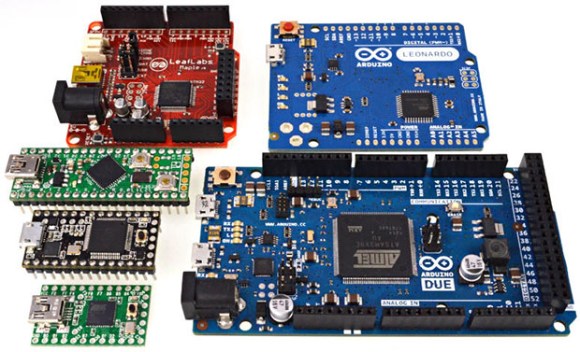
[Paul Stoffregen], creator of the Teensy series of microcontroller dev boards, noticed a lot of project driving huge LED arrays recently and decided to look into how fast microcontroller dev boards can receive data from a computer. More bits per second means more glowey LEDs, of course, so his benchmarking efforts are sure to be a hit with anyone planning some large-scale microcontroller projects.

The microcontrollers [Paul] tested included the Teensy 2.0, Teensy 3.0, the Leonardo and Due Arduinos, and the Fubarino Mini and Leaflabs Maple. These were tested in Linux ( Ubuntu 12.04 live CD ), OSX Lion, and Windows 7, all running on a 2012 MacBook Pro. When not considering the Teensy 2.0 and 3.0, the results of the tests were what you would expect: faster devices were able to receive more bytes per second.  When the Teensys were thrown into the mix, though, the results changed drastically. The Teensy 2.0, with the same microcontroller as the Arduino Leonardo, was able to outperform every board except for the Teensy 3.0.

[Paul] also took the effort to benchmark the different operating systems he used. Bottom line, if you’re transferring a lot of bytes at once, it really doesn’t matter which OS you’re using. For transferring small amounts of data, you may want to go with OS X. Windows is terrible for transferring single bytes; at one byte per transfer, Windows only manages 4kBps. With the same task, Linux and OS X manage about 53 and 860 (!) kBps, respectively.

So there you go. If you’re building a huge LED array, use a Teensy 3.0 with a MacBook. Of course [Paul] made all the code for his benchmarks open source, so feel free to replicate this experiment.
Programming Microcontrollers With A Raspi

rasduino

The advent of the Arduino brought the world of microcontrollers to hobbyists, students, and artist the world over. Right now we’re in the midst of a new expansion in hobbyist electronics with the Raspberry Pi, but we can’t expect everyone to stay in the comfortable, complex, and power-hungry world of Linux forever, can we? Eventually all those tinkerers will want to program a microcontroller, and if they already have a Raspberry Pi, why not use that?

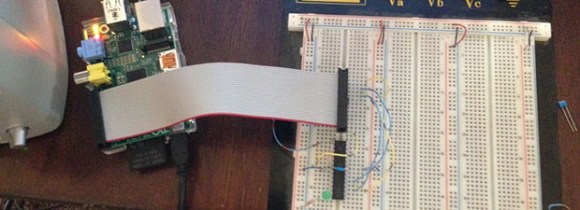
[Kevin] wanted to turn his Raspi into an AVR development workstation, without using any external programmers. He decided to use the Raspi’s SPI port to talk to an AVR microcontroller and was able to make the electrical connections with just a few bits of wire an a handful of resistors.

For the software, [Kevin] added support for SPI to avrdude, available on his git. Theoretically, this should work with any AVR microcontroller with the most popular ATMegas and ATtinys we’ve come to love. It doesn’t support the very weird chips that use TPI programming, but it’s still extremely useful.

Tamagotchi ROM Dump And Reverse Engineering

tamagotchi-rom-dump-and-reverse engineering

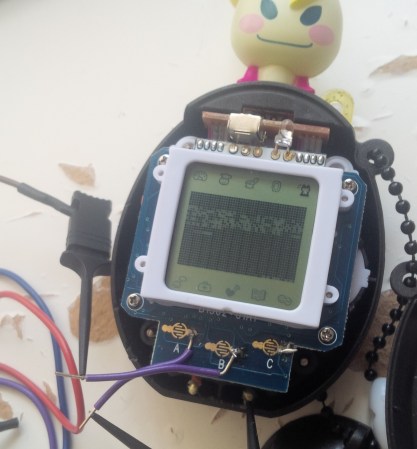
Often the true key to success is persistence and that holds true for this project which dumped the ROM from the current generation of Tamagotchi toys. If you’re a fan of learning the secrets built into consumer electronics — and you know we are — you’ll want to go back and watch the 24-minute lecture on Tamagotchi hacking which [Natalie Silvanovich] gave a 29C3 last year. She had made quite a bit of headway hacking the playable pods, but wasn’t able to get her hands on a full ROM dump from the General Plus chip on board processor. This update heralds her success and shares the details of how it was done.

As we learned form the video lecture it was a huge chore just to figure out what processor this uses. It turned out to be a 6502 core with a few other things built in. After prowling the manufacturer’s website she found example code for writing to Port A. She was then able to execute her own code which was designed to dump one byte of ROM at a time using the SPI protocol.

[Natalie] posted her code dump if you’re interested in digging through it. But as usual we think the journey is the most interesting part.

[Thanks Itay]

Wireless Microcontroller/PC Interface For $3

uc

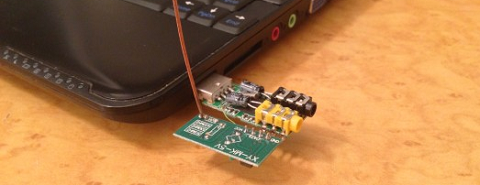
Sending data from a microcontroller to a PC usually requires some sort of serial connection, either through fiddly on-chip USB, FTDI chips, or expensive radio ICs. [Scott] didn’t want to deal with this when creating a network of wireless temperature sensors, so he hacked up a few cheap 433 MHz radio transmitters and receivers to transmit data to a PC for about $3.

After sensor data is collected on a microcontroller and sent over radio, there’s still the issue of getting it into a PC. For this, [Scott] piped the data into the microphone port of a cheap USB sound card. We’ve seen this trick before both in the world of microcontrollers and loading programs onto a Commodore 64 via a cassette interface.

Once the data is sent into the sound card, it’s decoded with a a small Python app. Given the range and quality of the RF transmitters and receivers  [Scott] says it’s not an extremely reliable way to send data to a PC. It is cheap, though, and if you need to read sensors wirelessly on a budget, it’s hard to do much better.

Check out [Scott]’s demo of his creation below.

[youtube=http://www.youtube.com/watch?v=GJHFldPwZvM&w=580]

Microcontroller Enumerates As USB Printer — Can Be Programmed By Printing

avr-programming-by-printing

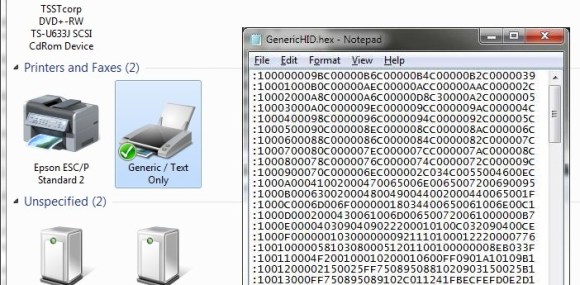
This is a fascinating concept. We’re not sure of its usefulness, but it definitely stands on its own just for the concept. [Dean Camera] just added a new HID class to the LUFA project that lets you flash AVR chips by printing to them. This means once you have a file like the one seen open in Notepad above, you can just click on File, then on Print, and the firmware will be uploaded to the chip.

[Dean] is the creator of the LUFA project and still likes to get his hands dirty hacking around with it. This idea came to him while he was exploring the concept of using the MIDI protocol to program a chip. That didn’t pan out because of the way Microsoft has handled MIDI in newer versions of Windows. But he did get the idea of making LUFA identify itself as a simple USB printer. He dug into the specification and figured out how to do that. Once Windows connects to the device it doesn’t really care what data gets sent to it. So [Dean] wrote a parser for the bootloader which could accept the incoming hex code and write it to the chip’s program memory.

Weather-O-Matic Displays Digital Weather On An Analog Face

SANYO DIGITAL CAMERA

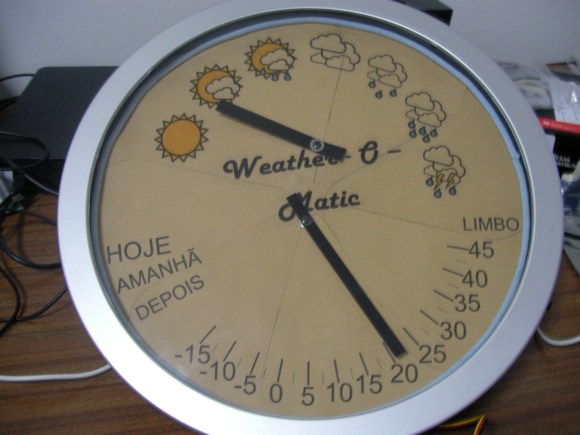
This clean-looking readout uses analog dials to display the weather. [Nuno Martins] calls it the Weather-O-Matic and after the jump he explains what went into the project.

The hardware is about as simple as it gets. Each hand has a servo motor attached to it. An MSP430 gets the weather via a serial connection to a computer (data is scraped by a Python script) and sets the dials accordingly. The microcontroller also takes user input in the form of a single button on the side of the frame. The words on the left side of the dial are Portuguese for Today, Tomorrow, and After (meaning the day after tomorrow). Pressing the button multiple times will scroll through these three words, followed by the forecast temperature high and low for that day being displayed.

The nice thing about this is that the servo motors will stay in place if you cut the power to them. We bet if he wanted to make this a permanent fixture in his house he could get it to run well on batteries by using the sleep function of the microcontroller and adding an RF transceiver to communicate with the server.

Continue reading “Weather-O-Matic Displays Digital Weather On An Analog Face”

Bluetooth Stepper Motor Driver

bluetooth-stepper-motor-driver

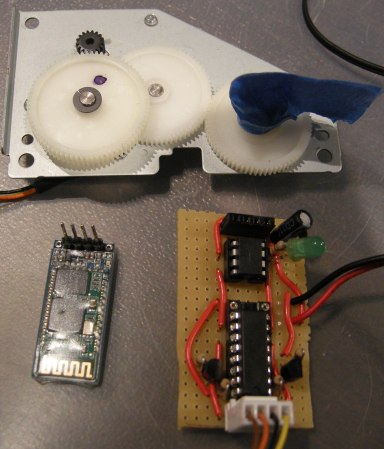
[Dan] salvaged some parts from an old printer a while back and finally found some time to play with them. One of the things he was most interested in is the geared stepper motor seen above. He was able to get it running with an Arduino in no time so he decided to take the project a little bit further. What he ended up with is a stepper motor driver which can be controlled over Bluetooth.

The motor can’t be driven directly, but with a simple motor driver like the L293 chip [Dan] used it’s not hard to interface them with your control hardware of choice. From there he added an ATtiny85 which will take care of the stepping protocol necessary to move the motor. The Bluetooth module he’s using functions as a serial device, making it really simple to interface with the uC. [Dan] uses a pin header to connect the module, so switching to a different type of serial device in the future will be quick and painless.

After the break you can see him sending step commands to the driver board.

Continue reading “Bluetooth Stepper Motor Driver”