Meet The Pinguino – A Completely Open PIC-based Dev Platform

pinguino

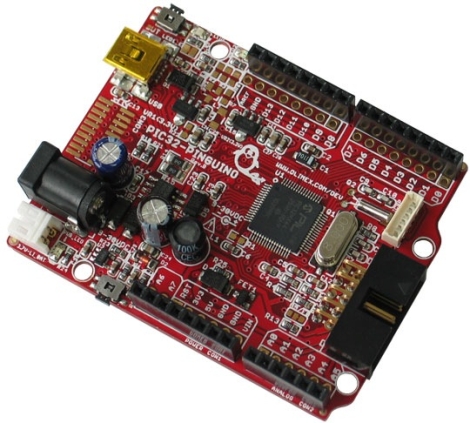
[Phillip Torrone] from Make recently sat down with [Jean-Pierre Mandon] and [Tsvetan Usunov], creators of the Pinguino, to hear more about their product. While the name might not sound familiar, we’re pretty sure you’ll be seeing more of this development platform as time goes on.

Essentially created by makers for makers, the Pinguino is a 32-bit PIC based Arduino-compatible prototyping platform, much like Microchip’s chipKIT. The Pinguino boasts 100% Arduino compatibility just as the chipKIT, though their tool chain has been built from scratch, meaning it is completely open source. The Pinguino even include an on-board microSD slot and a built-in Li-Po charger – two huge features that make this a solid chipKit competitor.

Phil discusses the history of the Pinguino with the pair, diving into technical differences between the two platforms, as well as where they plan on taking the platform in the future. It’s certainly an interesting read for anyone interested in open software and hardware that has been considering giving the chipKIT a try.
Open Source Makes This USB Arcade Controller Build A Breeze

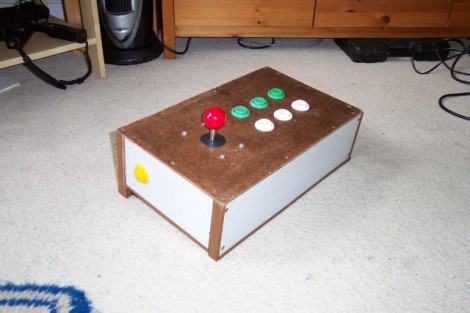
[Jamie] built his own USB connected arcade controller. We’ve been seeing a lot of these lately, and they usually involve soldering buttons to a keyboard PCB. But [Jamie] decided to go a different route and use his own microcontroller. This method always gets a bit hairy when it comes to deciding how to connect it to a computer. Dealing with the USB stack used to be quite tricky, but the LUFA project is slowly taking the pain out of the process.

The Lightweight USB Framework for AVRs is an open source project that handles the hard work associated with USB capable AVR microcontrollers. [Jamie] knew that they already had a sample implementation of a hardware joystick. He’s not using one of the supported boards and so wasn’t able to just compile and go. But porting the code to work with his minimus board was simple enough. With the code in place, the physical build was quite simple. The buttons and joystick were mounted on the surface of an overturned drawer. Each is connected to one pin of the controller board and to ground. LUFA makes sure that the device enumerates as a joystick, and [Jamie] was gaming in no time.

Quick And Easy DIY PIC Development Board

diy_pic_dev_board

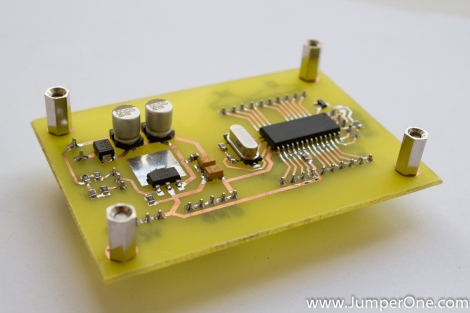
A few months back, [Phil] was looking to get into PIC development, but he couldn’t seem to find a simple development board for the PIC16F883 microcontroller he wanted to use. Since no retail offering had exactly what he was looking for, he decided to put together a dev board of his own.

He spent a couple hours in Eagle, putting together a simple board layout. [Phil] then busted out the iron and copper clad, making his dev board a reality using the tried and true toner transfer method.

He says that the board itself is quite simple, consisting of little more than the PIC, an LM1117 linear voltage regulator, and all the pin headers you could possibly need. While very basic and not necessarily a hack, we do like seeing people make their own tools when the market doesn’t provide what they want.

If you have been looking around for a simple PIC development solution, be sure to swing by [Phil’s] site – all of the schematics and layout files are free for the taking.

Gaming Scoreboard And Storage Box In One

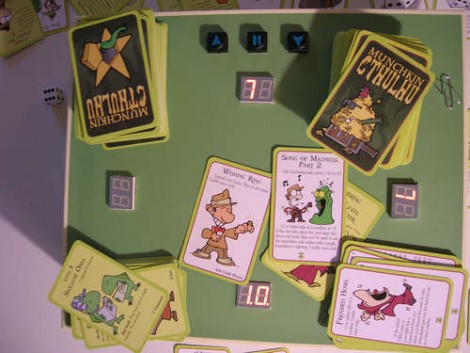
This game storage box will also keep score for you. [Marcus] built it for playing the card game Munkin, but some clever programming could adapt it for most needs. The hardware is built around an ATtiny2313 to do the thinking, and a MAX7219 to drive the 7-segment displays. Each player has their own two-digit score readout, which is perfect for this game which only tracks scores from -9 up to 10.

In the video after the break you can see [Marcus’] explanation of the user interface. One player acts as scorekeeper for the game. That person uses three buttons to adjust the score as necessary, and to move the current player marker, expressed as a decimal point on one of the displays. Pressing all three keys will put the unit into programming mode. This lets you select the number of players and at which position they are sitting, as well as make adjustments to the score if necessary.

Continue reading “Gaming Scoreboard And Storage Box In One”

Bread Head Makes AVR Programming A Snap

bread_head_quick_avr_programming_header

[Quinn] over at Blondihacks has been working with AVR microcontrollers a lot recently, and wanted a quick way to program the ATtiny13a (her current AVR of choice) while the chip is still seated in a breadboard.

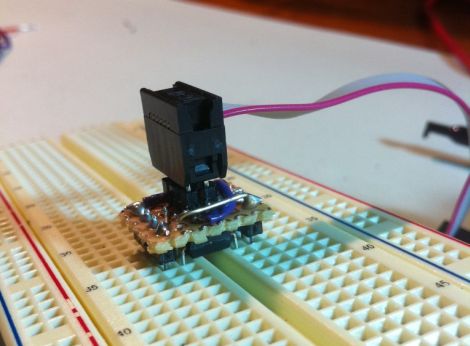
To speed up code revision and testing, she built a small programming header that she calls the Bread Head. The device is wonderfully simplistic, consisting of little more than snappable header pins and a bit of upside-down protoboard.

She soldered six headers to the top (formerly the bottom) side of the board, while a set of eight oversized headers were soldered to the opposite side of the programmer. Small bits of wire were soldered in to connect all of the appropriate pins together before [Quinn] slipped the header snugly over the top of the ATtiny and gave it a quick test. Everything worked perfectly, so she slathered in in epoxy for sturdiness and called it a day.

She says that the programmer works so well that she’s likely to make a similar header for other common AVRs too.

Getting The Lead Out Of The Arduino Runtime

mhvlib_arduino_efficiency_runtime

Ah, the Arduino.

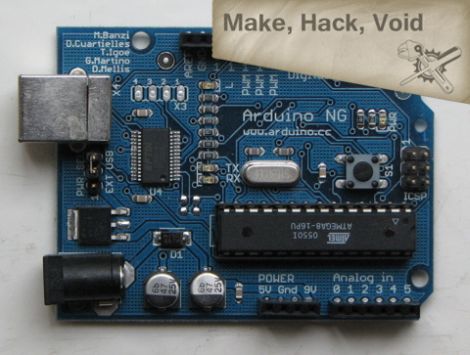
Love it or hate it, there’s no denying that part of its accessibility comes at the expense of speed and efficiency. We honestly like the platform as well as all of the others out there, because we believe that everything has its proper place and purpose. The crew over at Make, Hack, Void think that the Arduino dev boards are well and good, but that the core of the Arduino runtime could use some improvement.

They have taken it upon themselves to dig deep into the code and make some of the improvements that many advanced Arduino users have been clamoring for. Their MHVLib is an efficiency oriented runtime library which works on all AVR microcontrollers, whether they be standalone uCs or Arduino-branded hardware.

They have changed the way that the Arduino handles pin and port information, as well as how object and buffers are allocated in memory. Their code still relies on an Arduino-style bootloader, though they recommend Optiboot since it’s about a quarter of the size of the Arduino version.

There’s a complete list of what has been implemented available on their site, and you can grab the code via their GIT repository if you want to give it a try yourself.

Hacking SPOT Personal Satellite Tracker To Pass More Information

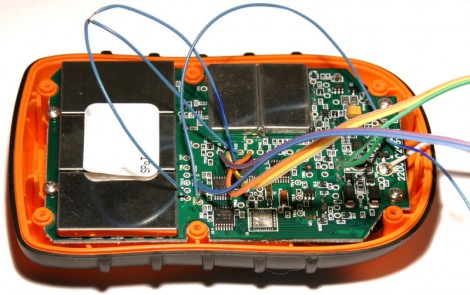
For less than $100 you can buy a little tracking module that will upload your location to a satellite. But you’ll only get latitude and longitude information. [Natrium42] spent some time reverse engineering the hardware, and the communications protocol, to allow custom data to be transferred using a SPOT module.

The flat fee for the hardware includes a one-year service plan allowing you to tack your device on the SPOT website. [Natrium42] started poking around in the transmitted data packages, and figured he could push custom messages like altitude data if he had some way to encode it as a valid latitude/longitude package. He found that location data is transmitted as two sets of three bytes each. The four least significant bits of each set get rounded by the server, leaving a total of 40 usable bits between the two data sets. He wrote encoding and decoding functions that will allow you to transfer whatever information you want.

So what is this good for? To get the process working he removed the MSP430 microcontroller from the board and is using his own replacement. So you can transmit GPS data from the onboard module, your own module, or sensor data for anything you’re able to hook up the to the replacement uC.