Debugging MSP430 Using Eclipse

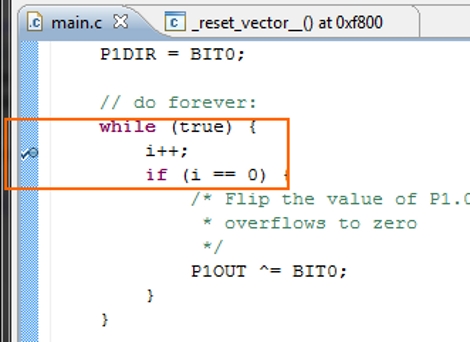
[Springuin] just posted a tutorial about debugging MSP430 projects using Eclipse. He read our feature about debugging under IAR, a proprietary IDE which TI offers as a code-limited freebie with the TI Launchpad. In that writeup we wondered if anyone would put together a tutorial using open source tools like DDD and GDB to make debugging easier for those that choose to use operating systems other than Windows. Even though he didn’t directly use those particular packages, this should work just as well.

Eclipse is a popular IDE for many different languages like C, C++, Java, and others. We’ve already seen it used to develop for the TI Evalbot on Linux systems. [Springuin] is using the Java-based IDE on a Windows system, and this is the first time we recall seeing directions on using an open-source alternative for programming with the TI Launchpad under Windows. That being said, the only real Windows specific parts are the steps necessary for communicating with the programmer. Since this method uses MSP-GCC and msp430-gdbproxy, it should be easy to do this under Linux as well. Use our tutorial to set up those tools if you haven’t already, then follow this one for a setting up and debugging in the Eclipse environment.
Reverse Engineering A Mobile Phone E-paper Display

msp430_epaper_display

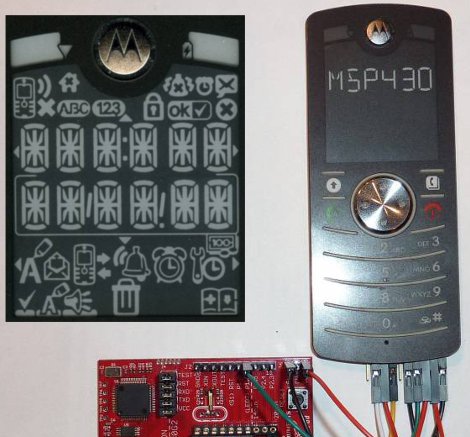
While e-paper is common among e-readers, there are very few, if any phones other than the MOTOFONE that exclusively use an e-paper display. [Steve] had one of these phones sitting around and thought it could be used to build a low-power clock. Since the bistable e-paper display can retain the currently active content even when power is removed, he would only need to update the clock once a minute, when the time changed.

Unfortunately for him, very little publicly-available documentation exists for the display controller Motorola used. To get an idea of how the display was driven, he had to sniff the SPI communications between the processor and the display. Once he had the basic commands down, he spent quite a bit of time figuring out how to activate the different segments of the display, due to what seems to be a rushed design process on Motorola’s part.

Now that [Steve] had reverse-engineered just about everything, he connected the phone to a TI MSP430 to drive the display. He programmed the LaunchPad to serve as a basic clock with great results, as you can see in the video below.

If your interest in e-paper hacking has been piqued, be sure to check out our previous e-paper coverage here.

Continue reading “Reverse Engineering A Mobile Phone E-paper Display”

Amazing Backyard Rocket Ship Tree House

Ravenna_Ultra-Low-Altitude_Vehicle

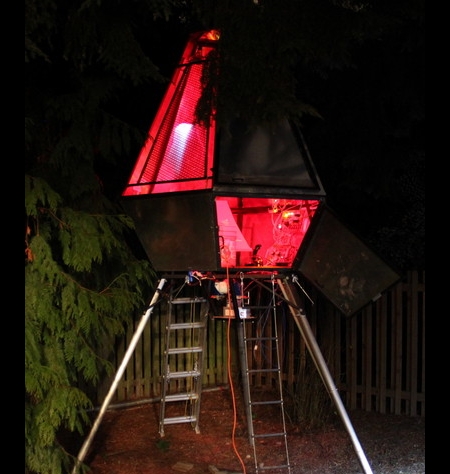
If you thought you had a cool tree house as a kid, think again. Tasked with landscaping his back yard and building a tree house for his son, [Jon] decided to go all out and build him a rocket ship instead.

Rising 15 feet into the Seattle skyline, the tree house known as the Ravenna Ultra-Low-Altitude Vehicle (RULAV), is sure to be the envy of every kid in the neighborhood. [Jon] and a friend worked for well over a year on their creation, welding, grinding, painting, and riveting their way along. After the structure was built, they fabricated some custom PCBs, using them to build the ship’s 14 control panels. The entire operation is controlled by a custom OS built to run on the three ATmega MCUs that manage operations.

Not content with just a handful of knobs and switches, the ship contains over 800 LEDs among its laundry list of electronics goodies. Compressed air is used to shoot water from positioning “thrusters”, while a paint mixer spins under the ship to simulate the rough and bumpy nature of space travel. The simulated launches are capped off with plenty of authentic NASA-style audio and a sub woofer that gives everything a deep, resonating rumble.

The project is truly amazing, and a ton of work went into every little detail in order to make this the most spectacular tree house ever seen. [Jon] definitely takes the award for “Coolest Dad Ever” for this build, even we’re jealous!

The pictures certainly don’t do it justice, so be sure to check out the video below for a quick introduction and demo of this awesome project.

Thanks to [Jeremy Elson] for the tip.

Continue reading “Amazing Backyard Rocket Ship Tree House”

Interfacing An Arduino With A TFT LCD

tft_lcd

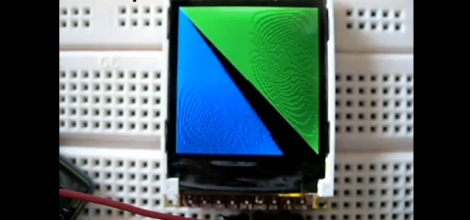
Seven-segment displays and monochrome LCDs are fine for most projects, but some things simply look better in color. [John] over at the Little Bird Electronics blog recently wrote up a tutorial demonstrating the use of a TFT LCD panel with an Arduino. The specific panel he chose was a 4D Systems 1.44” TFT LCD that happened to feature a dedicated graphics processor, which should allow for some fantastic visuals when used to its fullest potential.

The LCD takes its commands over a serial interface, making it a simple five-wire display solution for your projects. The display can be programmed manually by sending hex commands over the serial interface, but there are also some user-developed libraries available that will allow you to use the majority of the most popular functions without the learning curve. One thing to note is that the LCD must be flashed with a particular flavor of firmware before it can communicate over the serial interface, a process for which [John] provides a walk through.

The LCD panel can be used with any Arduino-compatible board, so it can be useful in a whole host of projects.

Stick around to see a simple demo of the board in use.

Continue reading “Interfacing An Arduino With A TFT LCD”

Blasting Off With GPS

Launching model rockets is a good time, but more often than not, it’s hard to tell how high the rocket went or how fast it moved – both essential facts when bragging about your latest flight. [Chris] recently built a GPS-based altimeter for the USC Rocket Propulsion Lab, so that they could track the performance of their latest project. The circuit is based off a Picaxe 18x and uses a GPS module to obtain NMEA altitude data. Once the data is obtained, it is stored on an external EEPROM to be read back after the rocket has been recovered.

[Chris] unfortunately does not have any pictures of the board he built, but he has made his circuit diagram and source code available. He reports that the logger worked perfectly aside from a small bit of time where the GPS module temporarily lost its satellite lock.

If you are interested in reading more about flight data recording and telemetry, be sure to check this out.

Analog To Digital Converter Build

analogue_digital_converter

[Daniel Garcia] sent us a quick tutorial he put together demonstrating how to use an ATmega168 to perform analog to digital conversions. This timely tutorial would make for a nice complimentary project for those of you who decided to build your own digital to analog converter after reading our post from a few days ago.

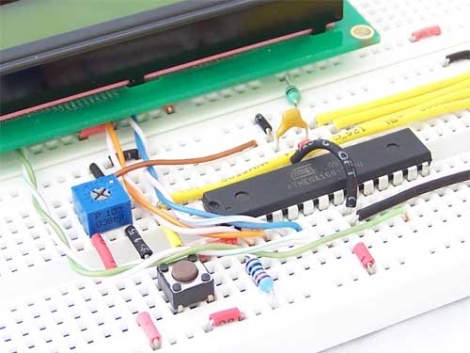
The ATmega168 has six pins that are typically used for digital I/O, but they can be used for analog input as well. In his example, he uses a trimpot as an analog input device, connecting it to one of the aforementioned analog pins. Its value is returned as a 16-bit number which is then displayed on the attached LCD. The LCD display and the breadboard layout used in this project are covered in his previous writeups, so be sure to give those a read through before working through this tutorial.

Free (…as In ‘free Beer’) ARM Kit

NXP holds a lot of market share for their ARM based solutions as it is. That’s why we were a little surprised when we found a link on their website announcing that they were giving away free LPCXpresso development boards, based on their Cortex-M0 line.

Catches? Unfortunately there are a few to get the board shipped and running. In order to do so, you must…

  • register with a corporate email address
    …the promo is targeted at engineers
  • use the crippled IDE supplied with the board
    …due to hard to find (non-existent?) documentation for the integrated LPC-Link
  • upload an original video of the physical destruction of a competing board to the NXP website

While killing your Arduino may not sound like the most fun, some qualified readers may be interested in moving up to 32-bits for a price that is hard to beat.