
[youtube=http://www.youtube.com/watch?v=Sn-e1g4vOak]
Here’s a quick video covering some of the pitfalls you may encounter when setting up SSH tunnels.
Related: Björk teaches you about electronics
[Thanks Lon]
[youtube=http://www.youtube.com/watch?v=Sn-e1g4vOak]
Here’s a quick video covering some of the pitfalls you may encounter when setting up SSH tunnels.
Related: Björk teaches you about electronics
[Thanks Lon]

[Chris Harrison] and [Scott E. Hudson] have built a novel system for faking a 3D video chat session. Their implementation separates the image of the chat participant from the background. They then dynamically reposition the video based on the movement of the viewers head. Their using the OpenCV library to do facial recognition (just like the Laughing Man demo). The 3D effect is very similar to what you see in [Johnny Lee]’s Wiimote headtracking. A video of the pseudo 3D chat is embedded below.

We’ve all dreamt, with tears in our eyes, of one day flying with a jet pack. The inherent danger of falling and/or exploding were almost as much as of a deterrent as the price tag. Now, that dream is closer to our grasp. This system, looks like it is basically just a pump that drags along behind you pushing water through nozzles on your back. You can see a video of someone flying around on one here. We think that the theme song should actually come with the unit and be broadcast at all times.
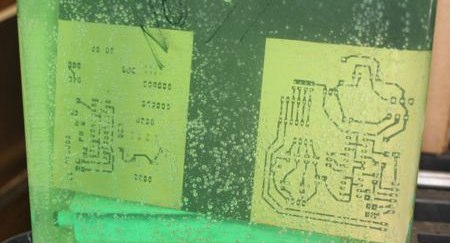
[ladyada] has republished an interesting snippet from the synthDIY mailing list. [David Dixon] discusses the actual chemistry behind ferric chloride based home circuit board etching. He concludes that ferric chloride is essentially a ‘one-shot’ oxidant. It can’t be regenerated and can be difficult to dispose of properly. The use of acidified copper chloride is a much better path and becomes more effective with each use, as long as you keep it aerated and top up the acidity from time to time. This etchant solution is actually the result of initially using hydrogen peroxide as an oxidant along with muriatic acid. You can see us using this solution in our etching how-to and while creating the board for our RGB lock. For more information on using hydrogen peroxide, check out [Adam Seychell]’s guide and this Instructable.
Aside: [ladyada] has added the receiver code to the Wattcher project page.

This was certainly the last thing we expected to see today. [ShaunF] has created a Greasemonkey script to bypass the captcha on filehosting site Megaupload. It uses a neural network in JavaScript to do all of the OCR work. It will auto submit and start downloading too. It’s quite a clever hack and is certainly helped by the simple 3 character captcha the site employs. Attempting to do the same thing with ReCAPTCHA has proven much more difficult.
UPDATE: [John Resig] explained of how it works.
[via Waxy]
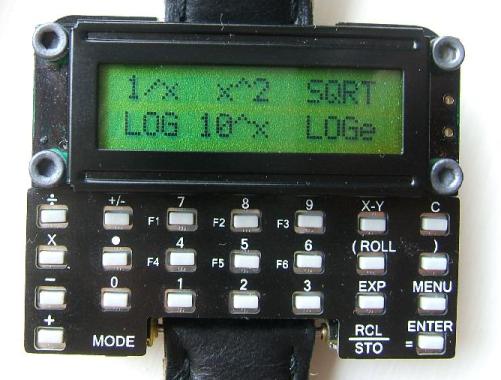
When the band support on [David]’s Casio CFX-400 Scientific Calculator Watch finally broke after 10 years of use, he found it almost impossible to find another watch with the same functionality. Like any good engineer, [David] decided to design a watch to meet his needs. The result of his endeavors was the µWatch, a programmable watch based on a PIC24 with both RPN and Algebraic calculation modes. The watch runs open source software and is expandable thanks to a serial port, an ICSP programming port, and a spot for an infrared LED on the board. On his site, [David] shows how he made the first µWatch and offers kits for anyone who wants to build their own. We’ve been told that the next batch of kits will be made available in 1-2 weeks and are expected to sell out fast.
[Thanks Tomesz]

[Alex] was frustrated by the amount of time it took to start prototyping with an AVR ATtiny. To make things easier, he built headers that carry the 8 and 20 pin chips and plug directly into breadboards. The boards include a 6pin ISP header, resonator, pull-up resistor, reset, and blocking caps. The ATtiny2313 version also has a serial connection header. This is a prototype though, and he forgot to route one of the connections. He plans on having a large batch of boards ready for next month.









