Power Resistance Isn’t Futile

As [Electronoobs] points out, everything has resistance. So, how hard can it be to make a high-power resistor? In the video below, he examines a commercial power resistor and how to make your own using nichrome wire.

Sure, in theory, you can use a long piece of wire, but normally, you want to minimize the amount of space occupied. This leads to winding the wire around some substrate. If you just wind the wire, though, you get an inductor. This can cause nasty voltage spikes when there is a change in current through the resistor. You can get “noninductive” wire wound resistors that use either two opposing windings or alternate the turn direction on each turn. This causes the magnetic fields to tend to cancel out, reducing the overall inductance.

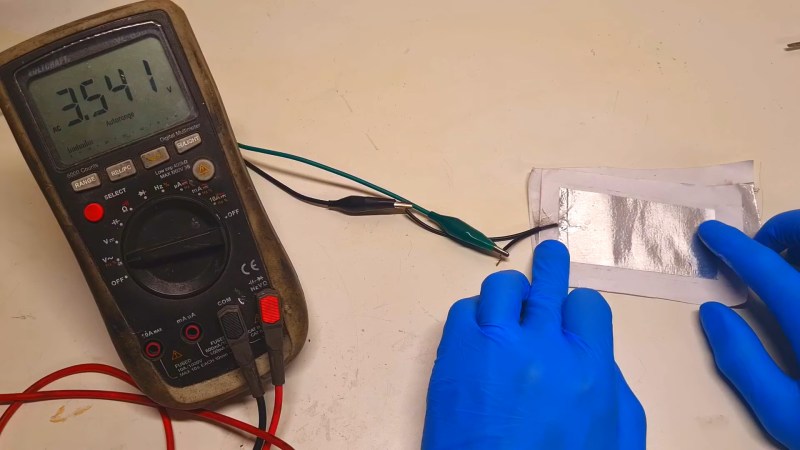
Nichrome wire has more resistance per millimeter and can dissipate more power. Modern digital meters can measure the resistance of a wire if you account for the test leads. To make a substrate, [Electronoobs] got creative since he anticipated generating a lot of heat. The final product even uses water cooling.

Why do you want a big resistor? Maybe you need a dummy load, or you want to drain some batteries. If you want to recycle nichrome wire, it is much more common than you might expect.

Continue reading “Power Resistance Isn’t Futile”

Protoboard Z80 Computer Teaches The Basics

As curious people, we’re all incredibly fortunate to live in an age where information can so easily be obtained. If you want to learn how something works, from a cotton gin to an RBMK reactor, you’re just a few keystrokes away from articles, diagrams, and videos on the subject. But as helpful as all of that information can be, we also know that there’s no substitute for hands-on experience.

While we can’t recommend you try building a miniature graphite-moderated nuclear reactor, there’s plenty of other devices that you can study by constructing your own functioning model. For example, when [Jorisclayton] wanted to really know what was going on inside a computer, they decided to go back to basics and build their own Z80 machine. To maximize the experience, they skipped any of the existing kit designs and instead wired the whole thing up by hand across a few perfboards.

The main board contains a 4 MHz Z80 processor, paired with 32K ROM and 64K RAM. Here you’ll also find the clock generator, I/O decoder, serial port, voltage regulator, and a trio of expansion slots that use a long strip of 2.54 mm pin headers as the interface. In the first expansion slot you’ve got a primordial “graphics card” based around the TMS9918 video display controller (VDC) and 16K of additional RAM. The second expansion card has a CompactFlash reader and an LED array mapped to I/O address 0x00h so it can be used for various notifications.

[Jorisclayton] says the final expansion board is still being worked on, but the idea is for it to handle user input through a PS/2 keyboard connector, as well as provide ports for a pair of Super Nintendo (or compatible) controllers. Everything is held together with a minimalist 3D printed frame to show off all that careful soldering.

Obviously there’s no PCB design files to share for this one, but [Jorisclayton] has posted a schematic for wiring everything up if you’re looking for resources to build your own Z80 computer. Sure the chips themselves might no longer be in production, but that doesn’t mean this venerable CPU is going anywhere just yet.

3D Printed Fidget Knife Snaps Back And Forth All Day Long

Fidget toys all have a satisfying mechanical action to engage with, and [uhltimate]’s OTF (out the front) “fidget knife” model provides that in spades. The model snaps open and closed thanks to a clever arrangement of springs and latches contained in only three printed pieces.

Here’s how it works: at rest, the mock blade (orange in the image above) is latched in the closed position. As one presses the slider forward, the bottom spring begins to pull up against the blade until it moves far enough to release the latch. When the latch is released, the tension built up in the spring propels the blade outward where it again latches in the open position. Retraction is the same essential process, just in the opposite direction (and using a latch on the opposite side of the blade, which faces the other direction.)

As you may imagine, effective operation depends on the material. The model is designed to be printed in PLA, but [uhltimate] also provides a part variation with a stiffer spring for those who find that basic model isn’t quite up to the task for whatever reason. Smooth surfaces are also helpful for hitch-free operation, but lubrication shouldn’t be necessary.

If this sort of thing is up your alley, don’t miss the satisfying snap action of this 3D printed toggle mechanism, either!

Continue reading “3D Printed Fidget Knife Snaps Back And Forth All Day Long”

Put More Korry In Your Flight Sim Switches

Never underestimate how far some flight simulator aficionados will go with their builds. No detail is too small, and every aspect of the look and feel has to accurately reflect the real cockpit. As a case in point, check out these very realistic Korry buttons that [Santi Luib III] built for an Airbus A320 simulator.

Now, you might never have heard of a “Korry button” before, but chances are you’ve seen them, at least in photos of commercial or military aircraft cockpits. Korry is a manufacturer of switches and annunciators for the avionics industry, and the name has become shorthand for similar switches. They’ve got a very particular look and feel and are built to extremely high standards, as one hopes that anything going into a plane would be. That makes the real switches very expensive, far more so than even the most dedicated homebrew sim builder would be comfortable with.

That’s where [Santi] comes in. His replica Korry buttons are built from off-the-shelf parts like LEDs and switches mounted to custom PCBs. The PCB was designed for either momentary or latching switches, and can support multiple LEDs in different colors. The assembled PCBs snap into 3D printed enclosures with dividers to keep light from bleeding through from one legend to the other.

The lenses are laser-cut translucent acrylic painted with urethane paint before the legends are engraved with a laser. The attention to detail on the labels is impressive. [Santi]’s process, which includes multiple coats of sealers, gets them looking just right. Even the LEDs are carefully selected: blue LEDs are too bright and aren’t quite the proper shade, so [Santi] uses white LEDs that are dimmed down with a bigger resistor and a light blue photographic gel to get the tint just right.

These buttons are just beautiful, and seeing a panel full of them with the proper back-lighting must be pretty thrilling. If civil aviation isn’t your thing, check out this A-10 “Warthog” cockpit sim, and the cool switches needed to make it just right.

Continue reading “Put More Korry In Your Flight Sim Switches”

Simplest Speaker Oscillator, Now Even Simpler

It never fails. Lay down some kind of superlative — fastest, cheapest, smallest — around this place and someone out there says, “Hold my beer” and gets to work. In this case, it’s another, even simpler audio oscillator, this time with just a loudspeaker and a battery.

Attentive readers will recall the previous title holder was indeed pretty simple, consisting only of the mic and speaker from an old landline telephone handset wired in series with a battery. Seeing this reminded [Hydrogen Time] of a lucky childhood accident while experimenting with a loudspeaker, which he recreates in the video below. The BOM for this one is even smaller than the previous one — just a small speaker and a battery, plus a small scrap of solid hookup wire. The wire is the key; rather than connecting directly to the speaker terminal, it connects to the speaker frame on one end while the other is carefully adjusted to just barely touch the flexible wire penetrating the speaker cone on its way to the voice coil.

When power is applied with the correct polarity, current flows through the wire into the voice coil, which moves the cone and breaks the circuit. The speaker’s diaphragm resets the cone, completing the circuit and repeating the whole process. The loudspeaker makes a little click with each cycle, leading to a very rough-sounding oscillator. [Hydrogen Time] doesn’t put a scope on it, but we suspect the waveform would be a ragged square wave whose frequency depends on the voltage, the spring constant of the diaphragm, and the spacing between the fixed wire and the voice coil lead.

Yes, we realize this is stretching the definition of an audio oscillator somewhat, but you’ve got to admit it’s simple. Can you get it even simpler?

Continue reading “Simplest Speaker Oscillator, Now Even Simpler”

A render of the USB Blaster, showing all the major parts

The Cheapest USB Blaster Ever, Thanks To CH552

Here’s a CH552G-based USB Blaster project from [nickchen] in case you needed more CH552G in your life, which you absolutely do. It gives you the expected IDC-10 header ready for JTAG, AS, and PS modes. What’s cool, it fits into the plastic shell of a typical USB Blaster, too!

The PCB is flexible enough, and has all the features you’d expect – a fully-featured side-mounted IDC-10 header, two LEDs, a button for CH552 programming mode, and even a UART header inside the case. There’s an option to add level shifter buffers, too – but you don’t have to populate them if you don’t want to do that for whatever reason! The Hackaday.io page outlines all the features you are getting, though you might have to ask your browser to translate from Chinese.

Sadly, there’s no firmware or PCB sources – just schematics, .hex, BOM, and Gerber .zip, so you can’t fix firmware bugs, or add the missing USB-C pulldowns. Nevertheless, it’s a cool project and having the PCB for it is lovely, because you never know when you might want to poke at a FPGA on a short notice. Which is to say, it’s yet another CH552 PCB you ought to put in your PCB fab’s shopping cart! This is not the only CH552G-based programming dongle that we’ve covered – here’s a recent Arduino programmer that does debugWire, and here’s like a dozen more different CH552G boards, programmers and otherwise.

The board shown in real life, top and bottom, showing the pinout and alternate functions silkscreened.

A CH552G Devboard In Case You Missed It

We might just never get tired of covering cool small cheap MCUs, and CH552G sure fits this description. Just so you know, here’s a Hackaday.io project you should check out – a CH552G devboard that’s as simple as it sufficient, in case you needed a tangible reminder that this chip exists, has a lively community, and is very much an option for your projects.

The devboard design by [Dylan Turner] is so straightforward, it’s almost inspiring – a square of PCB with the chip in the center and plenty of empty space for your mods. Everything is open-source with KiCad sources stored on GitHub. The most lovely aspect of this board, no doubt, is having the pin mapping written on the bottom, with all the alternate pin functions – you won’t have to constantly glance at the datasheet while wiring this one up. Plus, of course, there’s the microUSB port for programming, and the programming mode button that a few CH552 projects tend to lack.

It’s simple, it’s self-documenting, it’s breadboardable, and it’s definitely worth putting into the shopping cart at your PCB fab of choice. Oh, and there are bringup instructions on GitHub, in case you need them. Whether you want to prototype the cheapest macropad or keyboard ever, or perhaps a reflow hotplate, the CH552 delivers. If these CH552 projects aren’t enough to light your fire, here are a dozen more.