Reverse-Engineering The Mechanical Bendix Central Air Data Computer

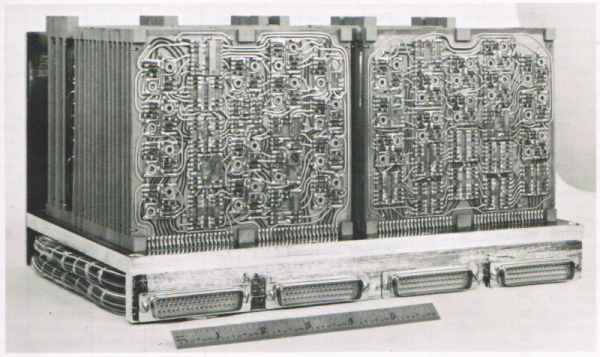
Before the era of digital electronic computers, mechanical analog computers were found everywhere. From the relative simplicity of bomb sights to the complexity of fire control computers on 1940s battleships, all the way to 1950s fighter planes, these mechanical wonders enabled feats which were considered otherwise impossible at the time.

One such system that [Ken Shirriff] looked at a while ago is the Bendix Central Air Data Computer. As the name suggests, it is a computer system that processes air data. To be precise, it’s the mechanism found in airplanes that uses external sensor inputs to calculate parameters like altitude, vertical speed, Mach number and air speed.

Continue reading “Reverse-Engineering The Mechanical Bendix Central Air Data Computer”

A Casio Game Console With A Sticker Printer? Why Didn’t We Get It!

To work in the computer games business in the mid-1990s was to have a grandstand seat at a pivotal moment. 32-bit gaming was the order of the day and 3D acceleration was making its first appearance in high-end PC graphics cards, so perhaps the fastest changes ever seen in gaming happened across a few short years. It’s a shock then after spending that decade on the cutting edge, to find a ’90s console we’d never heard of from a major manufacturer. The Casio Loopy was a Japan-only machine which targeted a female gaming demographic, and featured a built-in sticker printer as its unique selling point.

On the face of it the Loopy was up there with the competition, featuring a similar 32-bit SuperH processor to the Sega Saturn paired with a megabyte of RAM, but staying with cartridges as the rest of the industry moved towards CDs led to its games being space-limited and expensive. At the same time the original PlayStation was winning developers from the cartridge model with a lower-cost barrier to entry, so the Loopy failed to capture a market and was off sale by 1996. We can see that its graphics may have been a little dated for the 32-bit era and that sticker printer would have driven parents crazy with requests for expensive cartridges, but we can’t help wishing it had made it out of Japan like their portable computers did.

Thanks [Stephen Walters] for the tip.

Header: Incog88, CC BY-SA 3.0.

The Clock, Another Way To Modify The Sound Of A Synth Chip

The Philips SAA1099 is perhaps one of the lesser-known among the crop of 1980s-era 8-bit sound generator chips, but with three stereo voices onboard it makes a capable instrument for chiptune experimentation. It’s attracted the attention of [Folkert van Heusden], who’s tried the novel experiment of seeing what happens when a sound chip’s clock is varied.

A quick search of the internet reveals that the chip, which appeared in early Sound Blaster cards, is intended to have an 8 MHz clock. He’s hooked it up to an Arduino as a variable clock source, which surprised us but it seems an ATmega328’s timer is faster than we expected.

There are a couple of WAV files, and as expected the clock frequency has a significant effect on the pitch. The samples just sweep up and down without much attempt at making a sound you’d want to hear, but it does raise an interesting possibility of adding a further pitch bending ability to the capabilities already in the chip. When these circuits were new we couldn’t control a clock on a whim with the 8-bit processors of the day, so of course none of us thought to try this at the time. He’s tried it, so you don’t have to.

The SAA1099 has been mentioned in these pages only once, as a chip used in peripherals for 1980s Czech computers.

Vintage Computer Festival Southern California

The Vintage Computer Festival is coming to sunny Southern California in February 2024. That’s right, bring your Commodores, your Tandys,  your PDP-11s, and Altairs. The world of retrocomputing will be open to vendors, visitors, and exhibitors at The Hotel Fera Events Center in Orange, California on February 17th and 18th, 2024.

If you’re thinking there already is a VCF out west, you’d be right. VCF West was held in August at the Computer History Museum. The CHM is in Mountain View, California. That puts it nearly at the epicenter of the microcomputer revolution of the ’70s and ’80s.

Southern California still had plenty of computer enthusiasts though. For the non-geographically inclined amongst us, SoCal is nearly 6 hours from Mountain View by car.  We’re sure we’ll see many familiar faces at SoCal, along with plenty of new ones.

The Vintage Computer Federation holds several events across the country each year. You might have heard some music from VCF Midwest 2023 back in September. Hackaday was also out in force at VCF East this year, where our own [Bil Herd] moderated a panel of vintage computer YouTubers including [Usagi Electric], [Adrian’s Digital Basement], and [FranLab].

A 6502-based single-board computer with a ROMulator attached

Debug Your Senile Computers With The ROMulator

Some of you may have heard of the ROMulator, a device that can emulate RAM and ROM on 6502-based computers. But how does it work? How do you use it? What computers is it compatible with? [Jeff Tranter] covers that and more in his review of the ROMulator 6502.

The ROMulator is an FPGA-based board that slots between the 6502 and its socket on whatever computer it came from. It can emulate, but not intercept, accesses to RAM and ROM, which can be used to e.g. replace a ROM that you’re swapping very often or expand the RAM available to the CPU.

In his review, [Jeff] shows the ROMulator in action many computers, notably his custom 6502-based computer, a replica of an Apple 1 and two different replicas of the SUPERBOARD 2. He shows how the ROMulator can be configured, tested, used to debug the computers and even expand their RAM. Overall, [Jeff] thinks it’s a useful 6502 debugger that would have saved him lots of time in the past and we definitely agree.

Continue reading “Debug Your Senile Computers With The ROMulator”

[Ken] Looks At The 386

The 80386 was — arguably — Intel’s first modern CPU. The 8086 was commercially successful, but the paged memory model was stifling. The 80286 also had a protected mode, which differed from the 386’s. [Ken Shirriff] takes the 386 apart for us in a recent blog post.

The 286’s protected mode was less successful than the 386 because of several key limitations as it was a 16-bit processor with a 24-bit address bus. It still required segment changes to access larger amounts of memory, and it had no good way to call back into real mode for compatibility reasons. The 386 fixed all that. You could adopt a segment strategy if you wanted to. But you could also load the segment registers once to point to a 4 GB linear address space and then essentially forget them. You also had a virtual 86 mode that could simulate real mode with some work.

The CPU used a 1-micron process, compared to the 1.5-micron process used earlier. The chip had 285,000 transistors (although the 80386SL had many more). That was ten times the number of devices on the 8086. The cheaper 386SX did use the 1.5 micron process for a while, but with a 16-bit external bus, this was feasible. While 285,000 sounds like a lot, a Core i9 has around 4.2 billion transistors. Times have changed.

A smaller design also allowed chips like the 386SL for laptops. The CPU took up only about a fourth of the die. The rest held bus controllers and cache interfaces to cut costs on laptops. That’s why it had so many more transistors.

[Ken] does his usual in-depth analysis of both the die and the history behind this historic device. We spent a lot of time writing protected mode 386 code, and it was nice to see the details of a very old friend. These days, you can get a pretty capable CPU system on a solderless breadboard, but designing a working 386 system took a few extra parts. The 80286 was a stepping stone between the 8086 and 80386, but even it had some secrets to give up.

Restoration Of A Thinkpad 701C

This is like ASMR for Hackers: restoration specialist [Polymatt] has put together a video of his work restoring a 1995 IBM Thinkpad 701c, the famous butterfly keyboard laptop. It’s an incredible bit of restoration, with a complete teardown and rebuild, even including remaking the decals and rubber feet.

[Polymatt] runs Project Butterfly, an excellent site for those who love these iconic laptops, offering advice and spare parts for restoring them. In this video, he does a complete teardown, taking the restored laptop completely apart, cleaning it out, and replacing parts that are beyond salvaging, like the battery, and replacing them. Finally, he puts the whole thing back together again and watches it boot up. It’s a great video that we’ve put below the break and is well worth watching if you wonder about how much work this sort of thing involves: the entire process took him over two years.

We’ve covered some of his work in the past, including the surprisingly complicated business of analyzing and replacing the Ni-Cad battery that the original laptop used. Continue reading “Restoration Of A Thinkpad 701C”