Forget Siri – Make Wolfram Alpha Your Personal Assistant

So you can spend a bundle on a new phone and it comes with a voice-activated digital assistant. But let’s be honest, it’s much more satisfying if you coded up this feature yourself. Here’s a guide on doing just that by combining an Asterisk server with the Wolfram Alpha API.

Asterisk is a package we are already familiar with. It’s an open source Private Branch Exchange suite that lets you build your own telephone network. Chances are, you’re not going to build one just for this project, but if you do make sure to document the process and let us know about it. With the Asterisk server in place you just need to give the assistant script an extension (in this case it’s 4747).

But then there’s the problem of translating your speech into text which can be submitted as a Wolfram query. There’s an API for that too which uses Google to do that translation. From there you can tweak abbreviations and other parameters, but all-in-all your new assistant is ready to go. Call it up and ask what to do when you have a flat tire (yeah, that commercial drives us crazy too).

[Thanks M]
Help [Chris] Boot His Cray-1 Supercomputer

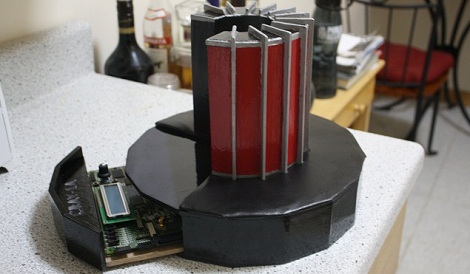
[Chris Fenton] needs your help. After constructing a 1/10th scale, cycle accurate Cray-1 supercomputer and finding a disk with Cray software on it, he’s ready to start loading the OS. There’s a small problem, though: no one knows how to boot the thing.

[Chris] posted a disk image for a Cray-1/X-MP with the help of the people at archive.org. Now he needs your help – if you think you can reverse engineer the file system, [Chris] will pay handsomely with a miniature model of a Cray printed on his MakerBot. In any case, it seems like a fun challenge.

From our quick glance at the disk image with a HEX editor, it looks like [Chris] has something special on his hands. We see a few references to “Cray memory and registers,” as well as “IOP-0 Kernel, Version 4.2.2” in the header along with a few dates referencing July of 1989.  This is consistent with the history of the source disk pack. If you think you’ve got what it takes to reverse engineer the file system of a Cray-1, this is your chance.

Now Pictures On The Internet Can Be Faked

We know it’s shopped, but we can’t tell because of the pixels. PhD student [Kevin Karsch] along with a few other friends will be presenting their methods to render objects into preexisting photos at SIGGRAPH Asia next month.

The paper (PDF…) covers how [Kevin] et al. go about putting impossible objects into photos. The user first defines the geometry of the picture; legs of tables are defined and the table top is extruded from these legs. The lights are then defined by drawing a bounding box and with a little bit of algorithmic trickery, a 3D object is inserted into the scene.

Comparing the results to the original picture is jaw-dropping. For us, photoshopping a bunch of billiard balls on a pool table would take hours, and it would never look quite right. [Kevin]’s work for SIGGRAPH can do the whole scene in minutes and produces results we couldn’t dream of.

There’s no downloadable software yet, but the algorithms are there. Check out the video demo of the techniques and results after the break.

Continue reading “Now Pictures On The Internet Can Be Faked”

Hardware Version Control Using Visual DIFF

As the Open Source Hardware movement gathers steam, it has become clear that the tools to work collaboratively on hardware are in the dark ages when compared with slick frameworks like Git used to work on software projects. We’ve read a fair amount about this lately, but the idea of visual difference generation for PCB layout is one of the better proposals we’ve seen.

Of course the big difference when it comes to version control is that software is text, but hardware is graphic and only represented by text for the computer to use. It’s easy to use the ‘diff’ command to show you what text is out and what text is in, but that doesn’t translate to a schematic. [Windell] is using command-line utilities to produce a schematic that colors changes differently for easy visual detection. This means exporting before and after schematics as PDF files or images, then using ImageMagick to process them. He also points out that there’s a package out there called DiffPDF that will let you compare differences in PDF files automatically.

Check out what he has to say in his article, and make sure you get to the bottom where he suggests ways you can help. We agree that it shouldn’t be hard to roll visual diff functionality into open source software packages used for hardware design, and to integrate that into version control systems. It’ll just take some time for the concept to proliferate.

Video: Learning To Program For The ATmega328p Part I

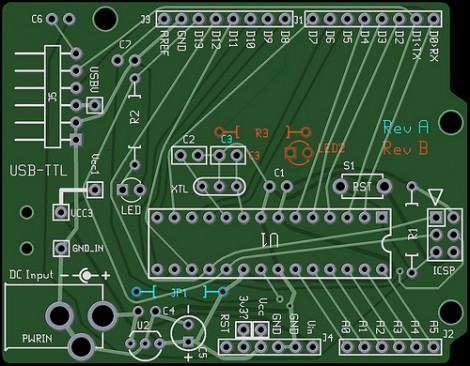
Many of you are familiar with the Arduino. Many of you hate it…* This post isn’t about the Arduino. It is about the processor that is at the heart of many Arduino boards. If you are in the camp of people who can’t understand why others dislike the Arduino so much, this series is for you. In this series of videos, [Jack] will explore how to program for the ATmega328p processor using C. If you have been programming for the Arduino, you may have had some issues with the speed of your code at points. Programming in C will allow you to wring out nearly the last ounce of processing power that the ATmega processors can provide. It will also let you access the peripherals on the processor directly and to switch between different processors when you need more (or less) capabilities.

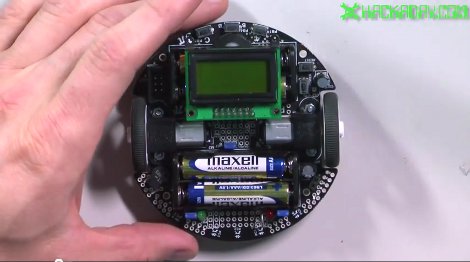
In this first video, [Jack] shows you all of the features of the 3pi robot, which he will be using as a fancy development board for the ATmega328p. He then shows you how to get your development environment set up and then walks you through one of the sample programs provided for the 3pi robot.

*Here at Hackaday, we are officially neutral in the ongoing Arduino love/hate war. We don’t care what microcontroller is used in the hacks that we show, only that they are cool.

Video is after the break!
Continue reading “Video: Learning To Program For The ATmega328p Part I”

ATTiny Hacks: Run Your Arduino Project On An ATTiny!

Yup. We have all been there. You throw together a really elaborate Arduino project that only really needs a couple pins, far fewer than the Arduino’s native microcontrollers have to offer. Well fear not, [Thatcher] has solved just this problem by adding some ATTtiny cores to the Arduino IDE. His blog details the process from grabbing the MIT developed core files and loading them up in your Arduino software directories. The modification looks simple and although [Thatcher] shows the whole process on a Mac it only involves unzipping and tossing files into a folder. With ATTiny chips only a few bucks each this is perfect for those simple software driven hacks that don’t require an entire Uno duct taped to the outside of an enclosure.  Nice work [Thatcher]!

Classic Game Cabinet Becomes A Drivable Car

[Garnet Hertz], a professor and “artist in residence” at UC Irvine, built a drivable Outrun arcade cabinet for an experiment in augmented reality.

The old fiberglass and wood cabinet was hacked up and the motors, wheels, and drive train from an electric golf cart were stuffed inside. The original steering wheel and pedals were used for the controls. Although the top speed of the in-game car is about 180 mph, that was brought down to a reasonable 13 miles per hour.

Continue reading “Classic Game Cabinet Becomes A Drivable Car”