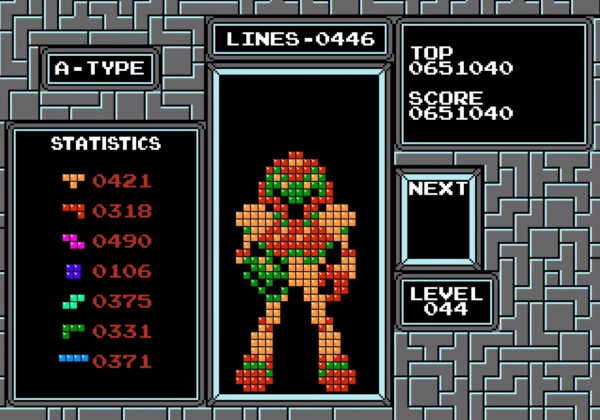
Check out Samus looking boss in this pixelated image. Who would have thought of using Tetris as a canvas for these types of graphics? Coming up with the original idea of strategically clearing and leaving Tetris pieces to end up with what is shown above is hard enough. But how in the heck do you implement the algorithm that generated this programmatically?
First off, two thing should not be surprising about this. It wasn’t manually generated during normal gameplay. That would be beyond savant level. The other thing to note is that the order in which pieces occurred was not random, but strategically calculated by the algorithm. The challenge is not only to occupy and clear the correct pixels, but to make sure the correctly colored pieces remain.
You need to see the fast-motion video embedded after the break to fully appreciate the coding masterpiece at work. We’re not going to try to paraphrase how the algorithms functions, but get comfy with the link above which walks through all of the theory (in addition to supplying the code so you can try it yourself).
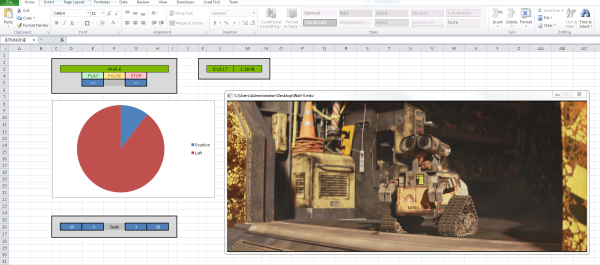
The Excel subreddit exploded earlier this week when redditor [AyrA_ch] shared his custom spreadsheet that allowed him to play video files on a locked-down work computer. How locked down? With no access to Windows Media Player and IE7 as the only browser (all plugins disabled, no HTML5), Excel became the unlikely hero to cure a 3-hour boredom stint.
Behind the cascade of rectangles and in the land of the Excel macro, [AyrA_ch] took advantage of the program’s VBA (Visual Basic for Applications) functions to circumvent the computer’s restrictions. Although VBA typically serves the more-complex-than-usual macro, it can also invoke some Windows API commands, one of which calls Windows Media Player. The Excel file includes a working playlist and some rudimentary controls: play, pause, stop, etc. as well as an inspired pie chart countdown timer.
As clever as this hack is, the best feature is much more subtle: tricking in-house big brother. [AyrA_ch]’s computer ran an application to monitor process usage, but any videos played through the spreadsheet were attributed to Excel, ensuring the process usage stayed on target. You can download it for yourself over on GitHub.
No one is sitting around their workbench trying to come up with the next great oscilloscope or multimeter, but function generators still remain one of the pieces of test equipment anyone – even someone with an Arduino starter pack – can build at home. Most of these function generators aren’t very good; you’re lucky if you can get a sine wave above the audio spectrum. [Bruce Land] had the idea to play around with DMA channels on a PIC32 and ended up with a function generator that uses zero CPU cycles. It’s perfect for a homebrew function generator build, or even a very cool audio synthesizer.
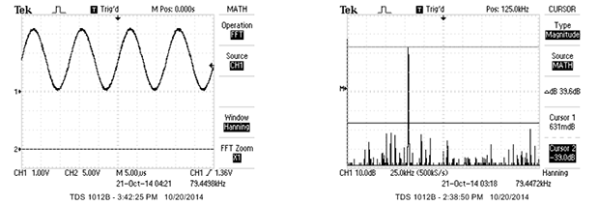
The main obstacles to generating a good sine wave at high frequencies are a high sample rate and an accurate DAC. For homebrew function generators, it’s usually the sample rate that’s terrible; it’s hard pushing bits out a port that fast. By using the DMA channel on a PIC32, [Bruce] can shove arbitrary waveforms out of the chip without using any CPU cycles. By writing a sine wave, or any other wave for that matter, to memory, the PIC32 will just spit them out and leave the CPU to do more important work.
[Bruce] was able to generate a great-looking sine wave up to 200 kHz, and the highest amplitude of the harmonics was about 40db below the fundamental up to 100 kHz. That’s a spectacular sine wave, and the perfect basis for a DIY function generator build.
Star Wars: Yoda Stories was released by LucasArts in 1997 to minimal critical acclaim. As IGN said, “like Phantom Menace proved, just because it’s Star Wars doesn’t mean it’s good.” This didn’t stop [Zach] from playing it, and years later, taking an interest in reverse engineering the game.
[Zach]’s reverse engineering of Star Wars: Yoda Stories (google cache) takes a look at the game’s data file. This binary file is parsed by the game at run time to extract sound effects, sprites, and map tiles. Perhaps the best known game data file type was Doom’s WAD file, which had purpose built editing programs from third parties.
After a quick look at the data file in HxD, [Zach] began writing scripts in C# to extract different sections of the data file. Once the sections were found, more code was used to apply a color palette and generate bitmaps.
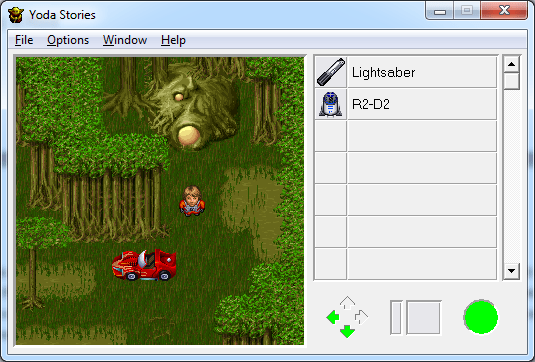
In the end, [Zach] managed to get a couple thousand tiles of the game’s data. He found some interesting ones, such as the sports car that he replaced the X-Wing with in his mod. The engine for an earlier Lucasarts game, Indiana Jones and His Desktop Adventures, should be very similar, and once we find the Mac install disk and a copy of ResEdit, we’ll post something on Hackaday.io.
[Gadget Addict] found out about a contest being held by a shoe seller. Their mobile app has a game very much like Bejeweled. The high scorer each month gets £500. His choices were to be better at the game than everyone else, or to be smarter. He chose the latter by writing a computer vision program to play the game.
There are two distinct parts of a hack like this one. The first is just figuring out a way to programmatically detect the game board and correctly identify each icon on it. This is an iPad game. [Gadget Addict] is mirroring the screen on his laptop, which gives him easy access to the game board and also allows for simulated swipes for automatic play. Above you can see two examples where black pixels may be counted in order to identify the icon. A set of secondary checks differentiates similar entries after the first filtering. The other part of the hack involves writing the algorithms to solve for the best move.
If you liked this one, check out a super-fast Bejeweled solver from several years back. We should also mention that this was just a proof of concept and [GA] never actually entered the contest.
While most embedded development is still done in C and/or assembly, some people are working with more modern languages. The team over at Gobot has successfully managed to get Go running on the Intel Edison.
The Go programming language, which has been around for about five years, compiles to machine code like C. It has a number of modern features including concurrency, garbage collection, and packages.
We’ve looked at the Edison on Hackaday before, and even took a detailed look at the hardware. It features a Quark SoC, Bluetooth, and WiFi, which makes it well suited for connected devices.
Getting Go to work on the Edison hardware wasn’t particularly difficult, since it supports the Pentium instruction set and MMX. However, a library was needed to interface with the Edison’s peripherals. The Gobot team whipped up gobot-intel-iot, which makes it easy to work with GPIO, I2C, and PWM.
Computer animation is a task both delicate and tedious, requiring the manipulation of a computer model into a series of poses over time saved as keyframes, further refined by adjusting how the computer interpolates between each frame. You need a rig (a kind of digital skeleton) to accurately control that model, and researcher [Alec Jacobson] and his team have developed a hands-on alternative to pushing pixels around.
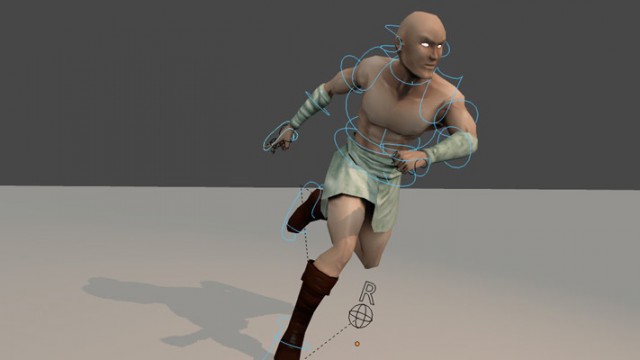
Control curves (the blue circles) allow for easier character manipulation.
The skeletal systems of computer animated characters consists of kinematic chains—joints that sprout from a root node out to the smallest extremity. Manipulating those joints usually requires the addition of easy-to-select control curves, which simplify the way joints rotate down the chain. Control curves do some behind-the-curtain math that allows the animator to move a character by grabbing a natural end-node, such as a hand or a foot. Lifting a character’s foot to place it on chair requires manipulating one control curve: grab foot control, move foot. Without these curves, an animator’s work is usually tripled: she has to first rotate the joint where the leg meets the hip, sticking the leg straight out, then rotate the knee back down, then rotate the ankle. A nightmare.
[Alec] and his team’s unique alternative is a system of interchangeable, 3D-printed mechanical pieces used to drive an on-screen character. The effect is that of digital puppetry, but with an eye toward precision. Their device consists of a central controller, joints, splitters, extensions, and endcaps. Joints connected to the controller appear in the 3D environment in real-time as they are assembled, and differences between the real-world rig and the model’s proportions can be adjusted in the software or through plastic extension pieces.
The plastic joints spin in all 3 directions (X,Y,Z), and record measurements via embedded Hall sensors and permanent magnets. Check out the accompanying article here (PDF) for specifics on the articulation device, then hang around after the break for a demonstration video.