What Exactly Is A Gaussian Blur?

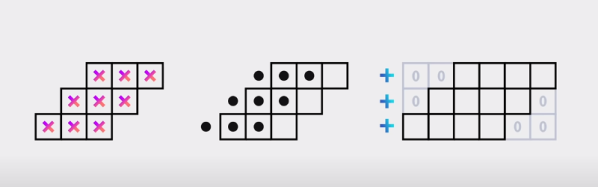
Blurring is a commonly used visual effect when digitally editing photos and videos. One of the most common blurs used in these fields is the Gaussian blur. You may have used this tool thousands of times without ever giving it greater thought. After all, it does a nice job and does indeed make things blurrier.

Of course, we often like to dig deeper here at Hackaday, so here’s our crash course on what’s going on when you run a Gaussian blur operation. Continue reading “What Exactly Is A Gaussian Blur?”

It’s Linux – But On An ESP32

GNU/Linux is an open-source marvel that has over the past three decades given us an almost infinitely versatile and powerful UNIX-like operating system. But even it has its limitations, particularly at the lower end of the hardware scale where less fully-featured processors often lack the prerequisites such as a memory management unit. Thus [JuiceRV]’s feat of booting a Linux kernel on an ESP32 microcontroller seems impossible, what’s happening?

The ESP’s dual 32-bit Xtensa cores are no slouch in the processing power department, but without that MMU it’s not an obvious Linux candidate platform. The solution to this problem comes in the form of an emulated RISC-V virtual machine which provides just enough grunt for a Linux 5.0.0 kernel to boot.

By any measure this represents an impressive piece of work, but will this new-found ability to run Linux on a microcontroller take the world by storm? Of course not, unless your tastes run to the very slowest of computing experiences. It is however the essence of the hack, and for that we salute it.

It’s not the first time Linux has run on a microcontroller, in the past someone hooked up a 30 pin SIMM and an SD card to an 8-bit Atmel chip and did it in a similar way with an ARM emulator.

Via CNX Software.

Header image: Ubahnverleih, CC0.

An OLED Photo Frame Powered By The ATtiny85

Rolling your own digital picture frame that loads images from an SD card and displays them on an LCD with a modern microcontroller like the ESP32 is an afternoon project, even less if you pull in somebody else’s code. But what if you don’t have the latest and greatest hardware to work with?

Whether you look at it as a practical application or an interesting experiment in wringing more performance out of low-end hardware, [Assad Ebrahim]’s demonstration of displaying digital photographs on an OLED using the ATtiny85 is well worth a look. The whole thing can put put together on a scrap of perfboard with a handful of common components, and can cycle through the five images stored on the chip’s flash memory for up to 20 hours on a CR2032 coin cell.

As you might expect, the biggest challenge in this project is getting all the code and data to fit onto the ATtiny85. To that end [Assad] wrote his own minimal driver for the SSD1306 OLED display, as the traditional Adafruit code took up too much space. The driver is a pretty bare bones implementation, but it’s enough to initialize the screen and get it ready for incoming data. His code also handles emulating I2C over Atmel’s Universal Serial Interface (USI) at an acceptable clip, so long as you bump the chip up to 8 MHz.

For the images, [Assad] details the workflow he uses to take the high-resolution color files and turn them into an array of bytes for the display. Part of that it just scaling down and converting to 1-bit color, but there’s also a bit of custom Forth code in the mix that converts the resulting data into the format his code expects.

This isn’t the first time we’ve seen somebody use one of these common OLED displays in conjunction with the ATtiny85, and it’s interesting to see how their techniques compare. It’s not a combination we’d necessarily chose willingly, but sometimes you’ve got to work with whats available.

The Internet – On A Casio Calculator!

Over the years we’ve become used to seeing some impressive hacks of high-end calculator software and hardware, most often associated with the Z80-based models from Texas Instruments. But of course, TI are far from the only player in this arena. It’s nice for a change to see a Casio receiving some attention. The Casio fx series of graphical calculators can now communicate with the world, thanks to the work of [Manawyrm] in porting a TCP/IP stack to them.

As can be seen in the video below, lurking in the calculator’s menu system is an IRC client, there is also a terminal application and a webserver which you can even visit online (Please be aware that it’s only a calculator though, so an onslaught of Hackaday readers clicking the link may bring it down). The Casio doesn’t have a network interface of its own, so instead, it speaks SLIP over the serial port. In this endeavor, it uses a UART driver sourced from [TobleMiner].

It’s always good to see a neglected platform get some love, and also to note that this is an unusual outing for an SH4 CPU outside its most familiar home in the Sega Dreamcast. It’s a surprise then to read that the SH4 in a calculator of all products, is a custom version that lacks an FPU. This deficiency doesn’t mean it can’t be overclocked though, as this very old Hackaday article describes.

Continue reading “The Internet – On A Casio Calculator!”

Cracking A GBA Game With NSA Tools

[Wrongbaud] is a huge fan of Japanese kaiju-style movies, including Godzilla and King Kong. In honor of the release of a new movie, he has decided to tackle a few projects to see how both of these monsters can hold their own against other legendary monsters. In this project, he is using Ghidra, named after another legendary kaiju, against the password system of the Game Boy Advance game Kong: King of Atlantis.

Since this project is a how-to, [wrongbaud] shows how to search Ghidra for existing scripts that might already have the functionality needed for GBA analysis and emulation. When not, he also illustrates how to write scripts to automate code analysis, and then moves on to cracking the level password system on the game.

The key to finding the passwords on this game was looking for values in the code that were seven characters long, and after some searching [wrongbaud] is finally able to zero in on the code responsible for handling passwords. Once found a brute force method was automated to find viable passwords, and from there the game was officially pwned. For anyone interested in security, reverse engineering, or just the way that binaries work, it’s quite the detailed breakdown. Of course, it’s not the only example we have seen that uses this software tool to extract passwords.

You Are Doomed To Learn WebAssembly

At first, Web browsers displayed HTML pages. But then people wanted those pages to do something. So we got — among other things — JavaScript. Then people wanted to do super complicated and compute-intensive things. So now we have WebAssembly. If you want to learn it, [diekmann] has a 4-part series that covers everything from getting started to porting Doom into your browser.

Paradoxically, instead of using a browser, he uses the wasm binary toolkit to run code more like a standard assembler. And wasm — what most people call WebAssembly — isn’t like most assemblers you know. Instead of labels, there are blocks that work much more like high-level language constructs such as while loops in C.

Continue reading “You Are Doomed To Learn WebAssembly”

Using Ghidra To Extract A Router Configuration Encryption Key

Who doesn’t know the struggle? Buying an interesting piece of hardware for a song and a dance, and then finding that the device’s firmware and/or configuration file is locked down with various encryption or obfuscation methods. This was the experience [Ali Raheem] had when he got a TP-Link TL-MR3020 V3 for a mere 18 British Pounds, intending to use this 4G-capable router to increase internet reliability.

Naturally this can all be done when staying inside the vendor-provided marked lines, which in this case meant ignoring the encrypted configuration files. As the owner of the hardware, this was of course unacceptable and thus [Ali] got a firmware image from the TP-Link site to see what could be gleaned from it in terms of encryption keys and other hints.

After obtaining the TP-Link-provided BIN file, the application of binwalk helpfully extracted the files embedded in it, followed by John the ripper decrypting the passwords in the /etc/passwd.bak file, and ultimately finding the encrypted /etc/default_config.xml file. Searching for this filename string in the rest of the extracted files led to /lib/libcmm.so.

Dropping this shared library file into Ghidra to disassemble its code, [Ali] found a function suspiciously called decryptFile. Inside was a reference to the global key string, which when tossed into OpenSSL and after some fiddling turned out to decrypt the XML configuration file in des-ecdb mode. From this point dropping in one’s own configuration files should be no problem after encrypting them to make the firmware happy. Nice work!