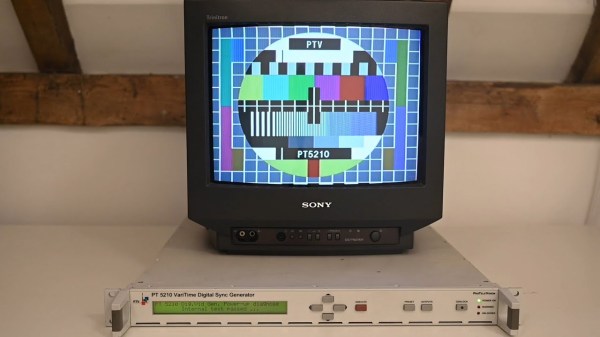
While most countries have switched to digital broadcasting, and most broadcasts themselves have programming on 24/7 now, it’s hard to remember the ancient times of analog broadcasts that would eventually stop sometime late at night, displaying a test pattern instead of infomercials or reruns of an old sitcom. They were useful for various technical reasons including calibrating the analog signals. Some test patterns were simply camera feeds of physical cards, but if you wanted the most accurate and reliable test patterns you’d need a Philips pattern generator which created the pattern with hardware instead, and you can build your own now because the designs for these devices were recently open-sourced. Continue reading “Recreating An Analog TV Test Pattern”→
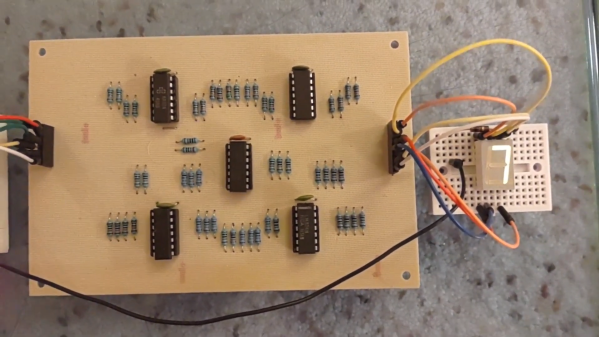
Of digital electronics, a wise man once said that “Every idiot can count to one.” Truer words have rarely been spoken, because at the end of the day, every digital circuit is really just an analog circuit with the interesting bits abstracted away. And to celebrate that way of looking at things, we’re pleased to present this BCD to seven-segment converter that uses no logic chips.
With cheap and easily available chips that perform this exact job, it might seem a little loopy to throw 20 LM324 op-amps at the job. But as [gschmidt958] explains, this is strictly for the challenge, plus it made a nice entry in the recently concluded Op-Amp Challenge contest. His work began in simulation, exploring op-amp versions of the basic logic gates — NAND, AND, OR, and NOT — all of which rely on using the LM324s as comparators. There were real-world curveballs, of course, not least of which was running out of the 10k resistors used for input averaging. Another plot twist was running out of time to order a PCB, which required designing one using MS Paint and etching it at home.
The demo video below shows the circuit at work, taking the BCD output of a 74HC393 counter — clocked by a 555, naturally — and driving a seven-segment LED. It’s honestly a lot of work for such a simple task, but there’s something satisfying about the whole project. We think [Widlar] would be proud.
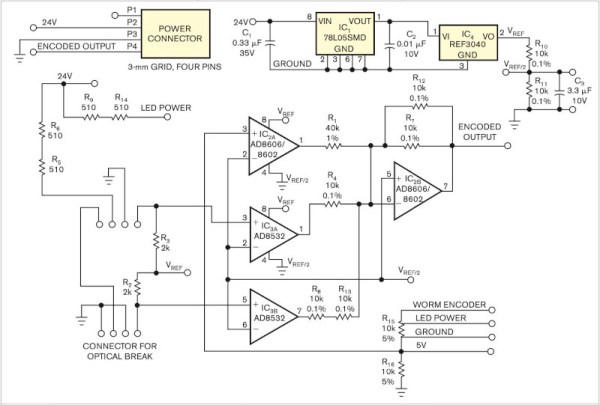
It’s been a running battle in some quarters for years, whether analog sensor processing is better than digital. Proponents of digital are sometimes driven by lack of familiarity with analog circuitry, while analog die-hards point to delays and software crashes in microcontrollers. We’d probably toe the line that a mixture of the two skills is best, but [paul] has gone full-on for the analog side with his position and limit sensor for a remote telescope. The ‘scope had only one control wire carrying a digital signal, so how was he to get extra information down it? The solution was to overlay a DC voltage, and use a summing network composed of a series of op-amps to encode position and limit data as voltage.
In operation, the circuit is a straightforward DC summing amplifier of the type that op-amps were designed for and at which they excel. We’re not so sure it needs the high-precision resistors and the choice of op-amps seems the wrong way round with the AD8532’s high current output being better suited to driving the line than straightforward summing, but we can see it does the job. If you’re after a demonstration of a DC summing amplifier using an op-amp, here’s your project. Meanwhile if you’re curious about an op-amp inside the black box, take a look at one of the simplest integrated circuit op-amps ever made.
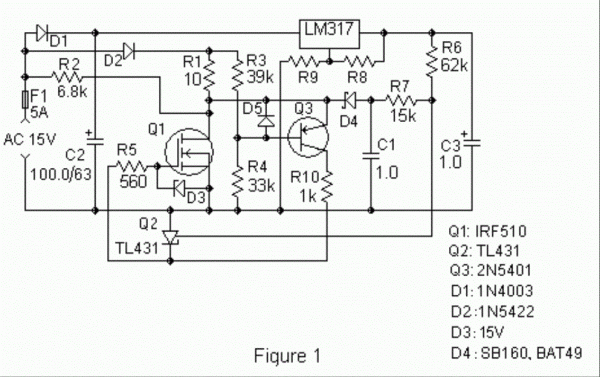
While we might all be quick to grab a microcontroller and an appropriate sensor to solve some problem, gather data about a system, or control another piece of technology, there are some downsides with this method. Software has a lot of failure modes, and relying on it without any backups or redundancy can lead to problems. Often, a much more reliable way to solve a simple problem is with hardware. This heating circuit, for example, uses a MOSFET as a heating element and as its own temperature control.
The function of the circuit relies on a parasitic diode formed within the transistor itself, inherent in its construction. This diode is found in most power MOSFETs and conducts from the source to the drain. The key is that it conducts at a rate proportional to its temperature, so if the circuit is fed with AC, during the negative half of the voltage cycle this diode can be probed and used as a thermostat. In this build, it is controlled by a set of resistors attached to a voltage regulator, which turn the heater on if it hasn’t reached its threshold temperature yet.
In theory, these resistors could be replaced with potentiometers to allow for adjustable heat for certain applications, with plastic cutting and welding, temperature control for small biological systems, or heating other circuits as target applications for this type of analog circuitry. For more analog circuit design inspiration, though, you’ll want to take a look at some classic pieces of electronics literature.
Imagine you’re a young engineer whose boss drops by one morning with a sheaf of complicated fluid dynamics equations. “We need you to design a system to solve these equations for the latest fighter jet,” bossman intones, and although you groan as you recall the hell of your fluid dynamics courses, you realize that it should be easy enough to whip up a program to do the job. But then you remember that it’s like 1950, and that digital computers — at least ones that can fit in an airplane — haven’t been invented yet, and that you’re going to have to do this the hard way.
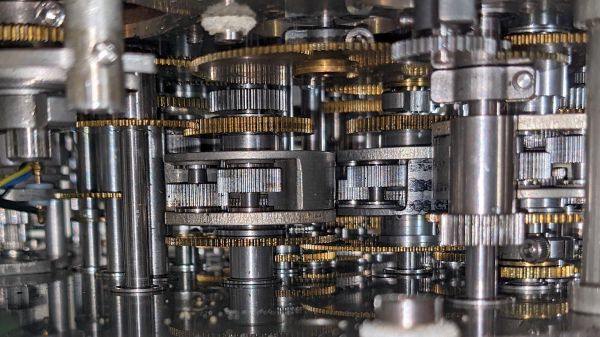
The scenario is obviously contrived, but this peek inside the Bendix MG-1 Central Air Data Computer reveals the engineer’s nightmare fuel that was needed to accomplish some pretty complex computations in a severely resource-constrained environment. As [Ken Shirriff] explains, this particular device was used aboard USAF fighter aircraft in the mid-50s, when the complexities of supersonic flight were beginning to outpace the instrumentation needed to safely fly in that regime. Thanks to the way air behaves near the speed of sound, a simple pitot tube system for measuring airspeed was no longer enough; analog computers like the MG-1 were designed to deal with these changes and integrate them into a host of other measurements critical to the pilot.
To be fair, [Ken] doesn’t do a teardown here, at least in the traditional sense. We completely understand that — this machine is literally stuffed full of a mind-boggling number of gears, cams, levers, differentials, shafts, and pneumatics. Taking it apart with the intention of getting it back together again would be a nightmare. But we do get some really beautiful shots of the innards, which reveal a lot about how it worked. Of particular interest are the torque-amplifying servo mechanism used in the pressure transducers, and the warped-plate cams used to finely adjust some of the functions the machine computes.
If it all sounds a bit hard to understand, you’re right — it’s a complex device. But [Ken] does his usual great job of breaking it down into digestible pieces. And luckily, partner-in-crime [CuriousMarc] has a companion video if you need some visual help. You might also want to read up on synchros, since this device uses a ton of them too.
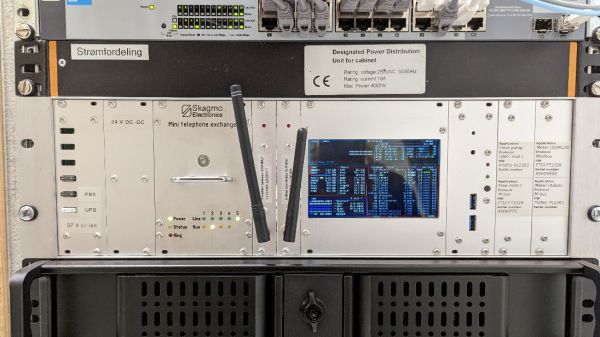
It doesn’t happen often, but every once in a while we stumble upon someone who has taken obsolete but really cool phone-switching equipment and built a private switched telephone in their garage or basement using it. This private analog phone exchange is not one of those, but it’s still a super cool build that’s probably about as ambitious as getting an old step-by-step or crossbar switch running.
Right up front, we’ll stipulate that there’s absolutely no practical reason to do something like this. And hacker [Jon Petter Skagmo] admits that this is very much a “because I can” project. The idea is to support a bunch of old landline phones distributed around the house, and beyond, in a sort of glorified intercom system. The private exchange is entirely scratch-built, with a PIC32 acting as the heart of the system, performing such tasks as DTMF decoding, generating ring voltage, and even providing a CAN bus interface to his home automation system.
The main board supports five line interface daughterboards, which connect each phone to the switch via an RJ11 jack. The interface does the work of detecting when a phone goes off-hook, and does the actual connection between any two phones. A separate, special interface card provides an auto-patch capability using an RDA1846S RF transceiver module; with it, [Jon Petter] can connect to any phone in the system from a UHF handy-talkie. Check out the video below for more on that — it’s pretty neat!
We just love everything about this overengineered project — it’s clearly a labor of love, and the fit and finish really reflect that. And even though it’s not strictly old school, POTS projects like this always put us in the mood to watch the “Speedy Cutover” video one more time.
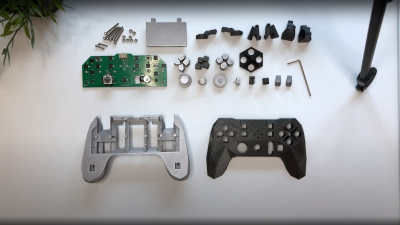
Input Labs’ mission is to produce open-source Creative Commons hardware and software for creating gaming controllers that can be adapted to anyone. Alpakka is their current take on a generic controller, looking similar to a modern Xbox or PlayStation controller but with quite a few differences. The 3D printed casing has a low-poly count, angular feel to it, but if you don’t like that you can tweak that in blender to just how you want it. Alpakka emulates a standard USB-attached keyboard, mouse, and Xinput gamepad in parallel so should just work out of the box for both Linux and Windows PC platforms. The firmware includes some built-in game profiles, which can be selected on the controller.
No special parts here, just 3D prints, a PCB and some nuts and bolts
The dual D-pads, augmented with an analog stick, is not an unusual arrangement, but what is a bit special is the inventive dual-gyro sensor arrangement –which when used in conjunction with a touch-sensitive pad — emulates a mouse input. Rest your thumb on the right-hand directional pad and the mouse moves, or else it stays fixed, kind of like lifting a mouse off the pad to re-center it.
The wired-only controller is based around a Raspberry Pi Pico, which has plenty of resources for this type of application giving a fast 250 Hz update rate. But to handle no fewer than nineteen button inputs, as well as a scroll wheel, directional switch, and that analog stick, the Pico doesn’t have enough I/O, needing a pair of NXP PCAL6416A I2C IO expanders to deal with it.
The PCB design is done with KiCAD, using a simple 3D printed stand to hold the PCB flat and the through-hole components in place while soldering. Other than a few QFN packages which might be a problem for some people, there is nothing tricky about hand-soldering this design.