Ball Balancing Arduino-Style

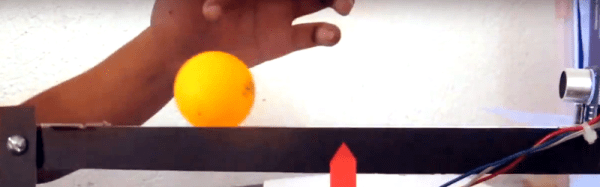
If you have a good sense of balance, you can ride a unicycle or get on TV doing tricks with ladders. We don’t know if [Hanna Yatco] has a good sense of balance or not, but we do know her Arduino does. Her build uses the ubiquitous HC-SR04 SONAR sensor and a servo.

This is a great use for a servo since a standard servo motor without modifications only moves through part of a circle, and that’s all that’s needed for this project. A PID algorithm measures the distance to the ball and raises or lowers a beam to try to get the ball to the center.

Continue reading “Ball Balancing Arduino-Style” →

Encryption For Arduino With Spritz

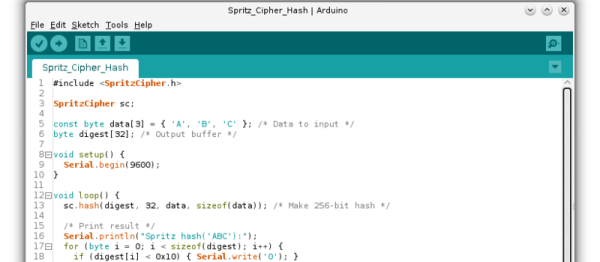
Hackaday.io user [Abderraouf] has written an implementation of the new(ish) Spritz cipher and hash for Arduino. While we’re not big enough crypto-nerds to assess the security of the code, it looks like it’s going to be pretty handy.

Spritz itself is a neat cipher. Instead of taking in fixed blocks of data and operating on them, it allows you to process it in (almost) whatever chunks it comes in naturally, and then extract out the encrypted results piecewise. It works both as a two-way cipher and as a one-way hash function. It looks like Spritz is a one-stop-shop for all of your encryption needs, and now you can run it on your Arduino.

In case you are afraid of new implementations of new ciphers (and you should be), Spritz’s pedigree should help to put you at ease: it was developed by [Ron Rivest] to be a successor to his RC4 algorithm, and it incorporates a lot of the lessons learned about that algorithm over the past. This doesn’t exclude subtle flaws in the implementation of the library (no offence, [Abderraouf]!) or your work downstream, but at least the underlying algorithm seems to be the real deal.

[Abderraouf] links it in his writeup, but just for completeness, here’s the Spritz paper (PDF). What crypto libraries do you currently use for Arduino or microcontroller projects? We’ve been fans of XXTEA for ages, but more because it’s simple and small than because it’s secure. Spritz may be simple enough to implement easily, and still more secure. Sweet.

Robot Listens To Commands–Literally

Where you might see a can, [Adam Kumpf] sees a robot. [Adam’s] robot (named [Canny]) doesn’t move around, but it does have expressive eyebrows, multicolored eyes, and a speaker for a mouth. What makes it interesting, though, is the fact that it receives audio commands via the headphones it wears. You can see [Canny] in action in the video below.

The headphones couple audio tones to [Canny’s] microphone using AFSK (audio frequency shift keying). [Canny] uses an opamp to bring the microphone level up and then uses a 567 PLL IC to decode the audio tones. [Adam] selected two clever frequencies for the mark and space (12345 Hz and 9876 Hz). In addition to being numerically entertaining, the frequencies are far enough apart to be easy to detect, pass through the headphones with no problem, and are not harmonically related.

Continue reading “Robot Listens To Commands–Literally” →

Corkscrew LASER “Hologram”

If you watch much science fiction, you know that in the future, there’re plenty of 3D holographic displays. From Princess Leah’s distress call to the Star Trek holodeck, there’s no shortage of computers that can make realistic images. It might not be up to holodeck standards, but [freedscript] created a 3D display for an Arduino using a chopstick, a motor, some paper, and a LASER. Of course, it isn’t actually a hologram, but neither is half the stuff you see on TV (Star Trek’s holographic characters were disturbingly solid for standing waves). The display is a type of volumetric display.

Continue reading “Corkscrew LASER “Hologram”” →

Wireless Water Meter Monitor Watches Waste

It’s no secret that hackers like to measure things. Good numbers lead to good decisions, like when to kick your wastrel teenager out of a luxuriously lengthy shower. Hence the creation of this wireless Arduino-based water meter interface.

We’ll stipulate that “wireless” is a bit of a stretch. Creator [David Schneider] chose to split the system into two parts – a magnetometer and an Arduino to sense impulses from the water company meter, and a Raspberry Pi to serve the web interface. The water meter is at the street rather than in his house, so the sensor is wired to the Pi with some telephone cable. But from there the system is wireless.

[David] goes into some good detail on the sensing problem he faced, which relies on detecting the varying magnetic field due to the spinny-bits inside the flowmeter and cleaning up the signal with the Arduino; he also addresses aliasing errors that occur when flow rate approaches the sampling rate of the magnetometer.

We like the fact that there’s a lot of potential to leverage this technique to monitor other processes with rotating magnetic fields. And like this optically coupled gas-meter monitor, it’s not invasive of the utility’s equipment either, which is a plus.

[via reddit]

Audio Effects On The Intel Edison

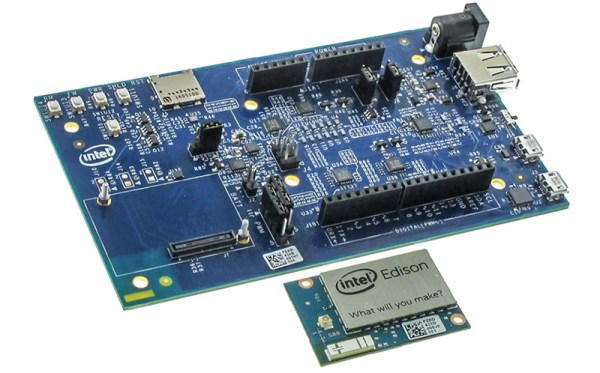
With the ability to run a full Linux operating system, the Intel Edison board has more than enough computing power for real-time digital audio processing. [Navin] used the Atom based module to build Effecter: a digital effects processor.

Effecter is written in C, and makes use of two libraries. The MRAA library from Intel provides an API for accessing the I/O ports on the Edison module. PortAudio is the library used for capturing and playing back audio samples.
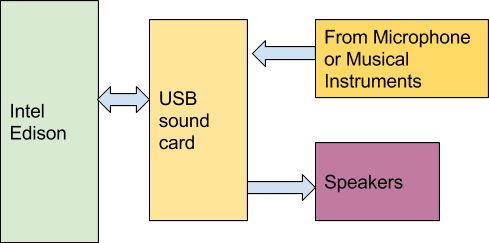
F9GW4Y4IGQFYP23.MEDIUMTo allow for audio input and output, a sound card is needed. A cheap USB sound card takes care of this, since the Edison does not have built-in hardware for audio. The Edison itself is mounted on the Edison Arduino Breakout Board, and combined with a Grove shield from Seeed. Using the Grove system, a button, potentiometer, and LCD were added for control.

The code is available on Github, and is pretty easy to follow. PortAudio calls the audioCallback function in effecter.cc when it needs samples to play. This function takes samples from the input buffer, runs them through an effect’s function, and spits the resulting samples into the output buffer. All of the effect code can be found in the ‘effects’ folder.

You can check out a demo Effecter applying effects to a keyboard after the break. If you want to build your own, an Instructable gives all the steps.

Continue reading “Audio Effects On The Intel Edison” →

The Biggest Super Hexagon Fan

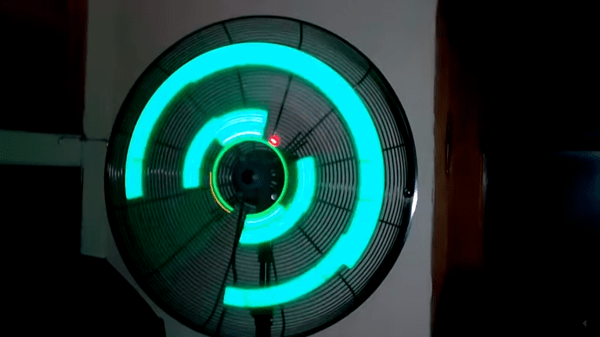
For those who haven’t addicted themselves to Super Hexagon yet, it’s pretty… addicting, to say the least. Normally this 80’s arcade-style game would run in a browser but some of the people at Club de Jaqueo in Buenos Aires decided to cram all of that into an Arduino. They didn’t stop there, though, and thought that it would work best with a POV display.

To navigate the intricate maze of blending a POV display with a fast-paced game like this, the group turned to the trusty Arduino Micro. After some frustration in the original idea, they realized that the game is perfectly suited for a POV display since it’s almost circular. The POV shouldn’t take up too much of the processing power of the Arduino, so most of the clock cycles can be used for playing the game. They couldn’t keep the original name anymore due to the lack of hexagon shape (and presumably copyrights and other legal hurdles), but the style of the original is well-preserved.

The group demonstrated their setup this past weekend, and the results are impressive judging by the video below. They’ve also released their source code and schematics as well, in case you have an old fan (or maybe even a bicycle?) lying around that is just begging to be turned into a mini-arcade game.

Continue reading “The Biggest Super Hexagon Fan” →