Bare Bones Arduino IR Receiver

TV Remote

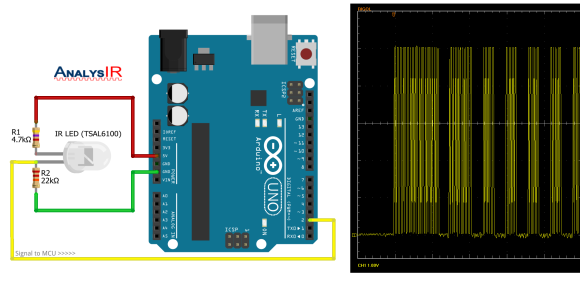
Old infrared remote controls can be a great way to interface with your projects. One of [AnalysIR’s] latest blog posts goes over the simplest way to create an Arduino based IR receiver, making it easier than ever to put that old remote to good use.

Due to the popularity of their first IR receiver post, the silver bullet IR receiver, [AnalysIR] decided to write a quick post about using IR on the Arduino. The part list consists of one Arduino, two resistors, and one IR emitter. That’s right, an emitter. When an LED (IR or otherwise) is reverse biased it can act as a light sensor. The main difference when using this method is that the IR signal is not inverted as it would normally be when using a more common modulated IR receiver module. All of the Arduino code you need to get up and running is also provided. The main limitation when using this configuration, is that the remote control needs to be very close to the IR emitter in order for it to receive the signal.

What will you control with your old TV remote? It would be interesting to see this circuit hooked up so that a single IR emitter can act both as a transmitter and a receiver. Go ahead and give it a try, then let us know how it went!

Art-O-Matic Is Spirograph’s Young Hip Offspring

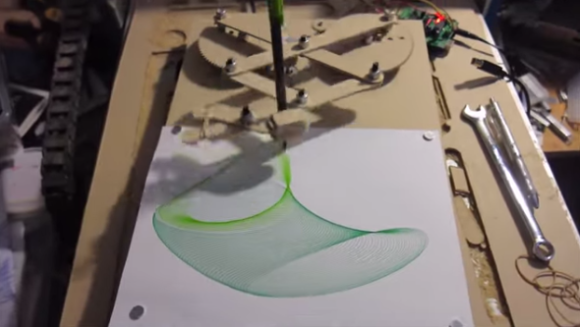
Art-O-Matic automatic spirograph

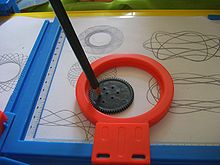
Some of our more senior experienced readers may remember a toy called the Spirograph. In case you don’t, it’s a geometric shape drawing toy. The way it works is a plastic disc with gear teeth around the perimeter and various holes on its face is spun around a plastic ring with gear teeth on the inside. A pencil is inserted in one of the holes in the disc and, when spun around the inside of the ring, draws different complex shapes called hypotrochoids.

 Art-O-Matic automatic Spirograph

This was fun enough to keep a kid entertained for a few minutes. It took a while to make a complete shape and sometimes it was easy to mess up (especially if the hole chosen for the pencil was near the outside of the disc). [Darcy] thought it would be neat to combine the Spirograph’s drawing style with modern technology. The result is called the Art-O-Matic and it draws some pretty wild art, you guessed it, automatically.

Click past the break for more!

Continue reading “Art-O-Matic Is Spirograph’s Young Hip Offspring”

Papilio Duo: FPGA, Logic Analyzer, Debugger, And Arduino Compatible

Back

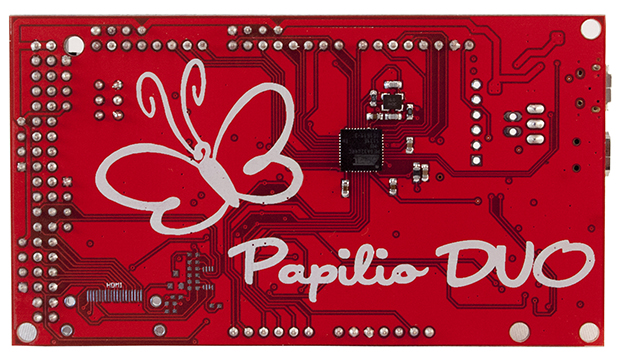
It’s been a while since we’ve seen some new boards that combine an FPGA and an Arduino, so naturally the state of the art is a little bit behind. The latest from [Jack Gassett], the Papilio Duo, aims to change that by addressing all the complaints of the original Papilio and adding some neat, modern features that you would expect on a board designed in 2014.

On board the Duo is an ATMega32u4, the same chip used in the Arduino Leonardo, allowing for easy integration with your standard Arduino projects. The top of the board is where the real money is. There’s a Spartan 6 FPGA with 9k logic cells, enough to run emulate some of the classic computers of yore, including the famous SID chip, Yamaha YM2149, and the Atari POKEY (!).  With host and device USB, 512k or 2M of SRAM, and an ADC on the FPGA inputs, this board should be able to handle just about everything you would want to throw at it. There’s even a breakout for HDMI on the bottom.

There are a few interesting software features of the Duo, including a full debugger for the ATMega chip, thanks to an emulated Atmel JTAG ICE MKII. Yes, an Arduino-compatible board finally has a real debugger. The FPGA can also implement a 32 channel logic analyzer, making this not only an extremely powerful dev board, but also a useful tool to keep around the workbench.

Physical Keys Not Just For Doors Anymore, Now Available For Windows

Physical Key Locks and Unlocks Windows Computer

If you have ever forgotten your computer password after a long weekend or maybe you can remember it but just can’t seem to type it correctly, [Thomas] has a project for you. It’s a physical key that locks and unlocks your PC.

So how does it work? The heart of the project is an Arduino Leonardo. You may recall that this board is a bit different from the preceding Arduinos as it can enumerate on a host computer as a Human Interface Device (HID), such as a keyboard or mouse. The Arduino sketch continually reads an input pin using an internal pull-up resistor to make it logic high with the key switch connecting the signal to ground. When the Arduino sees the pin change from high to low, it sends out a keyboard command consisting of the Windows Key and “L”, which is the keyboard shortcut for locking the computer.

When the physical key is turned again, the Arduino sees the pin change back to a high state and it again emulates a keyboard but this time enters your password. You do have to include your password in the Arduino sketch for this to work. In addition, there are two LED’s wired up to show if the computer is locked or not, but you’ll be able to tell pretty quick when trying to get back to work.

Continue reading “Physical Keys Not Just For Doors Anymore, Now Available For Windows”

The Lightgame Project: A Multiplayer Arduino Game

lightgame_3Summer is upon us. The Lightgame Project is a multiplayer reaction time based game built around the Arduino. It’s a perfect rainy day project for those restless kids (and adults!). Designed by two undergraduate students [Efstathios] and [Thodoris] for a semester long project, all the hard work has already been done for you.

There are tons of reasons we love games that you can build yourself. For one, it’s an amazing way to get children interested in hobby electronics, making, and hacking. Especially when they can play the game with (and show off to) their friends. Another reason is that it is a perfect way to share your project with friends and family, showcasing what you have been learning. The game is based on your reaction time and whether or not you press your button when another players color is shown. The project is built around two Arduinos connected via I2C. The master handles the mechanics of the game, while the slave handles the TFT LCD and playing music through a buzzer.

I2C is a great communication protocol to be familiar with and this is a great project to give it a try. [Efstathios] and [Thodoris] did a great job writing up their post, plus they included all the code and schematics needed to build your own. It would be great to see more university professors foster open source hardware and software with their students. A special thanks goes out to [Dr. Dasygenis] for submitting his student’s work to us!

Continue reading “The Lightgame Project: A Multiplayer Arduino Game”

Using State Machines In Your Projects

arduino, 16 button keypad and LCD display


[Tony] has developed a method of using a state machine to validate keypad inputs. His method checks the commands character by character as they are entered in by a 16 button keypad. State machines are often used to break down complex problems into sequential tasks, making code development easier. While [Tony’s] example uses the keypad, Arduino Uno, and a character LCD, the theory can be applied to numerous projects, such as this Dahlander motor switch.

As you see, state machines can be very versatile. Stick around after the break as we take a look at [Tony’s] state machine and provide a brief explanation of how it all works.  Continue reading “Using State Machines In Your Projects”

A Wireless Computer Remote That Emulates A USB Keyboard

PCRemote

If you are anything like [Antoine], you would love to be able to control your PC with a simple hand-held remote control from anywhere in your house. [Antoine] wrote in to tell us about his wireless computer remote that emulates a USB keyboard, making it suitable for any device that uses a USB keyboard.

His blog post is very well written and contains a ton of design information and background on the project. He initially wanting to easily control his PC’s music from anywhere in his house without needing to be within line of sight of his computer. The end result is a very handy remote that can be used to change music, video, and even launch applications on his computer. The system consists of a base station for his remote that connects to the computer and acts as a USB keyboard, and the remote itself. The base station uses V-USB on an Arduino to interface with the computer, and VirtualWire to handle the wireless protocol for the remote. For those of you who don’t know about VirtualWire (now superseded by RadioHead), it is a very cool Arduino library that lets you easily use raw wireless interfaces (also called vanilla wireless interfaces).

Without going into too much detail here (be sure to see the actual post for more information), the remote itself was redesigned after the initial proof of concept to maximize battery life. The final power consumption is very impressive, resulting in a battery life of more than two years! This remote system is very well put together and contains many aspects that can easily be reused for other projects.