Large Magnets Spark On Halloween, Who Knew?

This overly large magnet certainly completes the mad scientist look (for an even crazier look, take a jar of water with red food coloring and place in one large cauliflower, instant brain in a jar).

The base of the magnet is painted foam cut with a makeshift hot-knife; to get the magnet sparking [Macegr] laser etched acrylic with a fractal pattern and embedded LEDs in the ends of the acrylic. An Arduino handles the flashing LEDs and also produces a 60Hz PWM pulse for the spark’s hum. The end result is satisfyingly mad, and while practicing your evil ominous laugh catch a video of the magnet after the jump.

Continue reading “Large Magnets Spark On Halloween, Who Knew?”

Halloween Props: Voice-changing Daft Punk Costume

[Dr. West] shared his Halloween costume with us; a Daft Punk inspired voice-changing helmet. He stared with a motorcycle helmet, cutting out a hole in the back for a sub-woofer speaker. Inside there’s an old computer mic and the amp circuitry for a portable stereo system. An Arduino is used to pick up the wearer’s voice from the microphone and perform the digital signal processing. Once the alterations have been made the signal is sent to an R-2R resistor ladder to perform the digital to analog conversion, and onto the amp for broadcast. Hear the result in the video after the break.

The rest of the helmet is window dressing. He found some kind of auto-body repair product called flex-edging to use as metallic hair. Those fins are accented with strings of red and blue LEDs. The faceplate finishes the look using speakers from the stereo system and a tinted visor.

He wan’t going for a replica, but we think his creation would be right at home with the look of the original.

Continue reading “Halloween Props: Voice-changing Daft Punk Costume”

Halloween Props: Talking Skeleton In Reaper Robes

Here’s a great way to guard your front door on Halloween. [Sam Seide] built a motion controlled talking skeleton. The electronics are fairly straight forward, consisting of an Arduino, WAV shield, PIR motion sensor, servo motor for the jaw, and a couple of red LEDs for the eyes. But [Sam] did some really neat things in the design of the skeleton itself. As we saw with the puking pirate, he built the body out of PVC so that he can take it apart for easy storage. Under the reaper robe you’ll find a set of powered computer speakers that connect to the WAV shield. The servo motor is mounted in the skull and moves the jaw using a small wire arm. Since the whole thing is a bit flexible (thanks to the PVC), the torque of the motor causes the skeleton to move around, adding a touch of life. Don’t miss the well-made video walkthrough after the break.

Continue reading “Halloween Props: Talking Skeleton In Reaper Robes”

AVR Programming 02: The Hardware

You may be able to write the most eloquent code in the history of embedded systems but without a way to run it on the hardware it will be worthless. In this installment of the tutorial series we will:

  • Look at some of the available AVR programmer options
  • Place the microcontroller on a breadboard and connect it to a power supply and a programmer.
  • Use programming software to send some example code to the microcontroller

If you missed Part 1 take a few minutes to review that portion of the tutorial and then join us after the break.

Series roadmap:

Continue reading “AVR Programming 02: The Hardware”

New Dynamic Duo, Arduino And Eclipse

There are a lot of solutions to programing an Arduino: the default avr-g++, Studio, etc. But [Sandeep] let us know about using one of the more powerful IDEs out there, Eclipse, to do the same. We’ve already outlined why Eclipse is a great IDE but now the fact that you can use it in your MCU based projects adds to its usefulness and already large feature list. However, don’t be turned off by [Sandeep’s] tutorial. While it is aimed at people who are completely new to setting up an IDE and working with an AVR, the tips certainly can benefit even the most experienced hacker.

Cheap And Easy SMS Via GSM For Your MCU

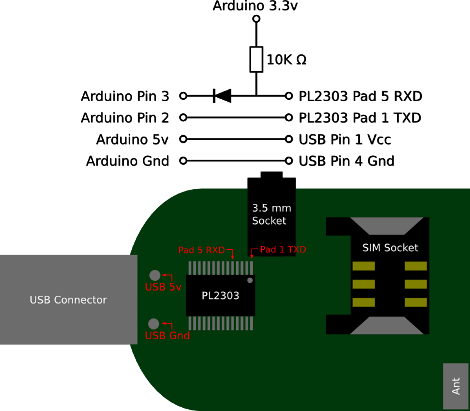
Non acronym version of the title: send and receive text messages via cell phone communication towers using an Arduino or other microcontroller. “We’ve been doing that for years!” you cry, well yes, technically. But [Fincham] lays it outs simply; commercial offerings are expensive and finding a cell phone that uses RS232 now a days is getting difficult, so a new way of doing the same old is necessary. The good news is USB GSM modems are readily available, cheap, and only require a few interface pins to get them talking with an Arduino. In fact, the image above is all you need.

Data Confirmation With RF Communications

[Rafael] built a system that uses radio frequency for communications. The code he was using with the inexpensive receiver/transmitter pairs already had some error correction but from time to time an entire message would be missed by the receiver. He set out to make these RF communications more robust.

A little more than a year ago we looked at using these same transmitters with an Arduino. [Rafael] has a similar setup but since they are unidirectional he chose to use two pairs for bidirectional communication (each operating at a different frequency to avoid interference). On one end, a computer transmits data to the Arduino which is in a remote location. His confirmation protocol relies on a randomly generated message identifier. The computer will continually transmit the same message. The Arduino continually receives these messages, comparing them with the last successfully received message. If they match, it is considered a successful data transfer and the Arduino transmits a confirmation back to the computer which then starts transmitting the next message.

This isn’t an application-specific protocol. For demonstration purposes [Rafael] built a quick home automation setup that uses it to operate a house lamp.