Punching Accelerometers

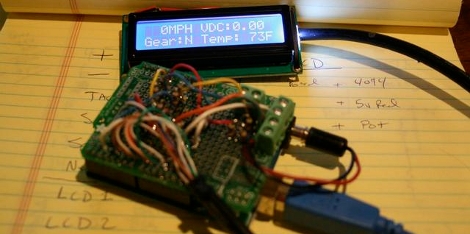
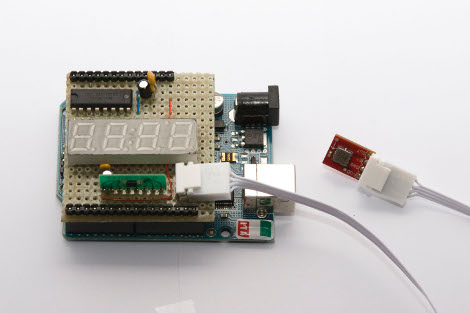
Shortly after finishing his Makiwara punching bag, [Abieneman] wired and programmed an Arduino to an accelerometer to find out just how much acceleration (and with some math, force) is behind his punches. The project is simple and would be quick to reproduce for your own measuring and experiments: all that he used included an Arduino, accelerometer (with A/D converter), LED displays (and shift register). We were a little disappointed to learn of how much static the accelerometer produced, so measuring things such as impulse, energy, and pretty much anything not kinematic is nullified. But it makes us wonder, how much static would be in say, a Wii Remote punching bag?

Laser Cut And Printable Cases

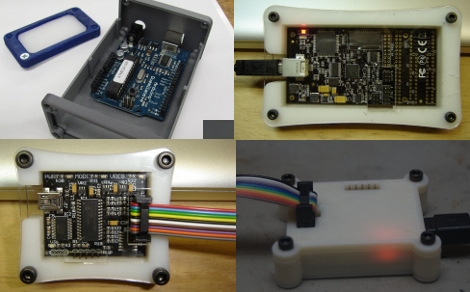
If you’re like us you’ve got quite a few prototyping tools that are bare PCB boards. If you’re using them a lot you might want to protect them with some type of case but the lack of mounting holes can make this difficult. One popular solution to this problem is to design a case for a perfect fit, then cut it with a laser or print it out of plastic. We’ve got examples of both.

[Stewart Allen] set to work designing laser cut cases for the AVR Dragon and the Bus Pirate V2go after seeing our post about on-the-go prototyping. We think this is especially important if you have an AVR Dragon as it’s been known to bite the dust if the bottom is shorted out. If you have access to a laser cutter you can download is DXF files and the models and cut your own.

If you don’t have a laser cutter but can get some time with a 3D printer check out the Bus Pirate V2go printed case and the Arduino printed case.

Public Transportation Notifier

[Knuckles904] was tired of waiting for the bus. His town had installed GPS units on the buses so that riders could track their locations via the Internet so he knew there should be a way to avoid the wait while also never missing the bus. He developed a sketch for an Arduino to check the bus location and notify him when it was on its way.

This method saves him from leaving his computer running. It parses the text data from the public transportation website and updates both an LED display, as well as a Twitter feed. Now he can monitor several different bus lines via the hardware at home, or though a cell phone if he’s on the go.

Hacking The MindFlex, More!

[vimeo http://vimeo.com/10184668%5D

Reader [Eric] sent us a powerfully informative, yet super simple hack for the MindFlex toy. Don’t worry, it’s not another worthless shock ‘game’, And it’s using an actual interface instead of the built-in LEDs.

With two wires for the serial protocol, and an Arduino, you’ll be able to view “signal strength, attention, meditation, delta, theta, low alpha, high alpha, low beta, high beta, low gamma, high gamma” brainwaves. While it’s not medical grade, it’s a lot more intuitive than previous interfaces.

The original intent was for a system called MentalBlock, but we’re wondering what would you do with brainwave data?

Arduino IPod Library Work Continues

[David Findlay] has been hard at work on his Arduino iPod remote library and is now showing off some Wii Nunchuck control in the video after the break. When we looked in on his work in September he was using a Staples Easy Button to control the iPod. Now he’s added all of the functionality for iPod simple remote mode, and most of the advanced mode.

Advanced mode works well with his iPod Photo but the iPhone just returns errors. We know that Apple uses some tricks to keep unauthorized accessories out, so we hope that [David] finds a way to sniff out the necessary accessory protocols from an approved model.

Continue reading “Arduino IPod Library Work Continues”

Core3Duino (April Fools?!) And XDuino

It’s inevitable. You knew it, we knew it, and while this is being posted on April 1st; its no joke. [johndavid400’s] Core3Duino. As we mentioned before, with the additional Arduinos you have now 3 separate processors, allowing 24digital IO, 18 PWM, 18 analog inputs, and more.

Now to keep flamers at bay (calm down), we’ve combined this post with the introduction of xDuino. Yet another attempt at porting Arduino to separate hardware platforms. For the price of a Duemilanove you can have 5 serial, 48 IO, 18 analog, 68Kbytes of Ram and more!

[Thanks Kamil]

Balancing Skateboard/segway

[youtube=http://www.youtube.com/watch?v=7UKxuVliaIA]

[XenonJon] got a lot of attention for a skateboard/segway style balancing platform he took to the Makerfaire in Newcastle. He decided to try to build it the cheapest and easiest possible way in an attempt to help others build their own. The build is documented very well, however you have to email him to request the code for the Arduino. Maybe after enough requests, he’ll just pop it online. We thought this looked familiar, so we searched the archive and found this very similar setup from back in 2005. Unfortunately, that project page appears to be gone now.