A VFD Clock That Tells The Time, Then Tells You To **** Off

sweary_vfd_clock

Clocks are relatively simple devices – they tell time, and most often sport a handful of other utilitarian features like alarms and radios. Rarely though, do you see a clock that will wake you up in the morning and also curse at you shortly thereafter. [Matt Evans] clearly thought that clocks need to pack a little more attitude, so he built his girlfriend a clock that not only tells time, but spouts off nasty phrases as well. What a lucky gal!

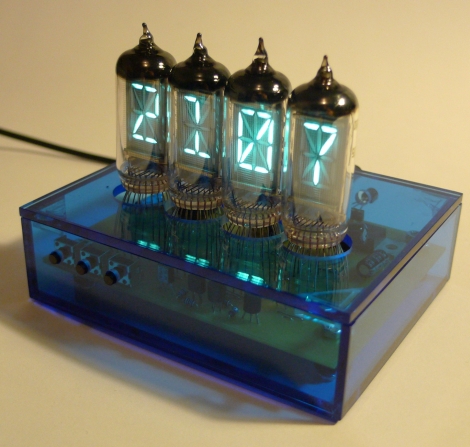
The clock was constructed using IV-17 VFD tubes, each bearing 16 light-able segments. It seemed wasteful to simply use the tubes to tell time, so [Matt] got busy adding other features to the clock. It has an alarm, a calendar that is always stuck on his girlfriend’s birthday, and an ambient light sensor to dim the tubes at night. It also sports a variable rudeness setting, allowing for mild insults when family members are present, and extremely foul language for when your frat brothers swing by.

He has plenty of pictures on his site, but we’re betting people will want to see schematics and some source code. After all, Mother’s Day is but a few months away!
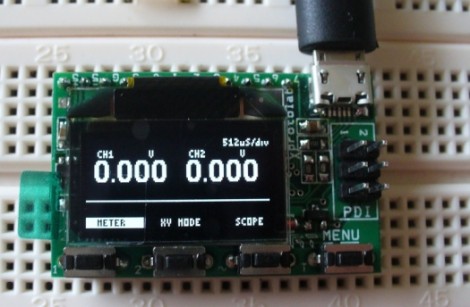
Xprotolab: Oscilloscope And Xmega Development Board

Here’s a nice hands-on overview of the Xprotolab, a development board based around the AVR ATxmega32A4 microcontroller. The tiny DIP package includes an OLED display, four tactile switches, and it can be powered via a micro USB connector. The device ships ready to use as a two-channel Oscilloscope, but check out how small it is in the video after the break to decide if this will actually be useful for you. It’s not that it doesn’t have a lot of features, in fact it’s packed with them, but that screen is quite small for meaningful work. Still, at $35 it’s an inexpensive way to get your hands on the hardware and acquaint yourself with this line of microprocessors. Not that in order to flash new firmware you will need a PDI capable programmer. Continue reading “Xprotolab: Oscilloscope And Xmega Development Board” →

Replace An N64’s Worn Out Joystick

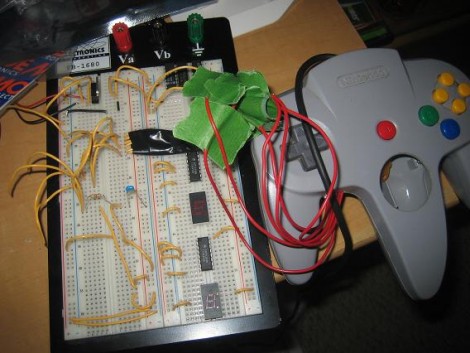
As gaming consoles age the controllers will inevitably show some wear, and sadly may give out all together. [Kyle] couldn’t bear to watch his Nintendo 64 controller bite the dust so he replaced the thumb stick with one from a PlayStation. This is a bigger job than you might imagine because the two parts are fundamentally different. The original N64 stick uses a rotary encoder to output data to the control chip, while the PlayStation stick is an analog device. [Kyle’s] solution was to read the analog values using a PIC, but lower in the thread you can read about another user who pulled off a similar hack using an AVR. Both convert the signals into the rotary encoder format that the N64 chip is listening for. From the looks of the clip embedded after the break, this couldn’t work any better!

Continue reading “Replace An N64’s Worn Out Joystick” →

USB Controller For Multiple Servos

USB_controller_for_6_servos

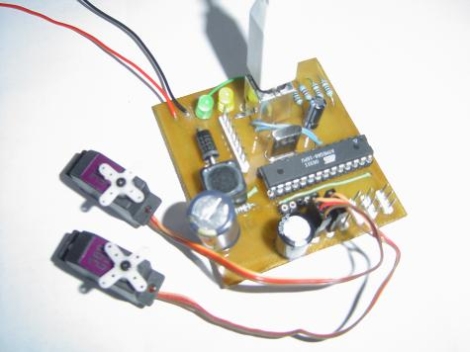
[dunk] constructed an easy to use AVR-based USB controller with the ability to drive up to six R/C hobby servos at once.  While the USB-powered Atmega8 he used supplies the necessary PWM signaling for all of the servos, an external power supply rated up to 30v at 3A is necessary to provide the 5v of power each servo requires.  His project is an extension of the USB servo controller built by [Ronald Schaten] and includes several significant upgrades.  The addition of 5 more servos aside, [dunk] switched to AVRlib routines for multi-servo control and PWM management, as well as added the aforementioned power supply to prevent an excessive current draw on the USB port.  His tutorial includes a complete parts list, Eagle PCB schematic, the required USB servo source code, as well as a sampling of commands that can be issued to the servo controller.

STK200 Pocket Change Programmer

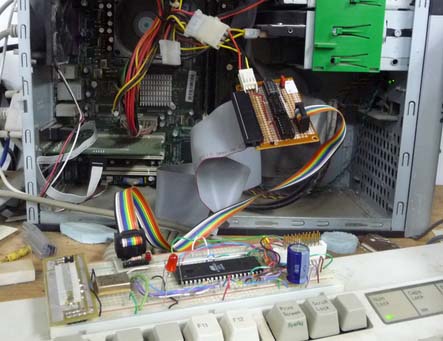
A common complaints of beginners to microcontroller programming is the availability of DIY tools that do not require a parallel port.  Using not much more than a couple of 74xx series chips and some protoboard, [Rue] was able to create an AVR programmer for less than the cost of some chips it can program – giving parallel programmers a run for thier money. [Rue] used Linux treat the ubiquitous PATA/IDE port as a parallel port. By having avrdude treat the programmer as an Atmel STK200, [Rue] was able to upload a blinky program to his AVR microcontroller through ISP. If anybody can think of an even lower cost unconventional solution give us a shout.

Update: Microtouch The 8-bit Ipod Touch

It looks like [rossum] and [Ladyada] have teamed up and been busy working on the microtouch. Since we covered it last year its had a few minor improvements like an upgrade to the ATmega32u4 microprocessor and some new software. The new and improved microtouch also features an accelerometer as well as some software to go along with it. Plus its now for sale on adafruit for about a quarter the price of an ipod touch (just in case you don’t feel like making your own).

For the unaware the microtouch is a lightweight AVR based ipod touch. It comes with a bootloader which allows you to download your “apps” to the microtouch without the need for an AVR programmer. While it may lack some of the computing power and features of the ipod touch (like music), the microtouch is definitely appealing for its open hardware/software and easy to use touch screen.

SNES Arcade Controller

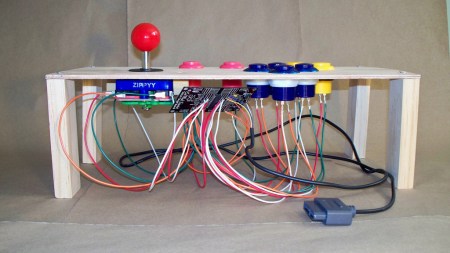
[Daniel] is making a mini arcade cabinet with an SNES housed inside. He wanted to build an arcade controller for it and chose to construct something from scratch instead of destroying an original piece of hardware. We can almost feel you guys sighing with relief at that one. He sent us some nice photos of his build and pointed out that he’s using one of the Evilmadscientist AVR boards housing an ATtiny2313. The arcade buttons are readily available at sparkfun. The source code for this project is available after the break.

Continue reading “SNES Arcade Controller” →