Adding Bluetooth Remote Control To PC Speakers

adding-bluetooth-remote-control-to-pc-speakers

[Andrzej’s] plain old computer speakers are ordinary no more. He pulled off a fairly complicated hack which now lets him control speakers via Bluetooth.

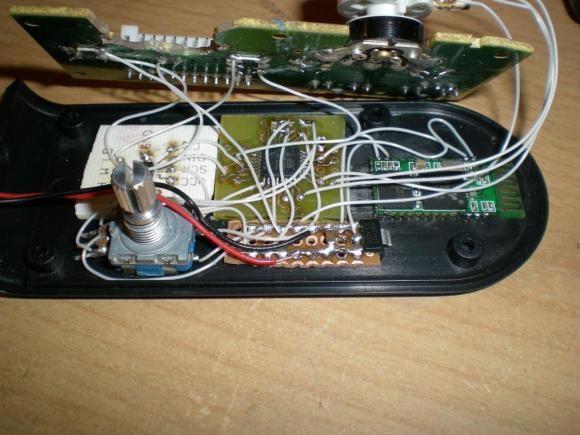
He had a set of Creative brand computer speakers with a volume potentiometer that needed replacing. He was having trouble finding a drop-in replacement part and decided he would just go with a rotary encoder. Obviously you can’t just drop one of those in, he would need a microcontroller to monitor the encoder and translate the change into the appropriate resistance. He figured if he was going this far he might as well make the most out of the uC.

Above you can see all the stuff he crammed into the original case. The rotary encoder is seen on the lower left. An ATmega8 is on a PCB he made himself. The white part to the left is a digital potentiometer which feeds the resistance to the original speaker PCB. On the left is the Bluetooth module which lets him control everything from his phone. You can see a demo of that after the break.

Continue reading “Adding Bluetooth Remote Control To PC Speakers”

Android Controlled Minecraft Ores

[Ryan] has a friend with a birthday coming up, and being inspired by ever 12-year-olds favorite game, he decided to make a Minecraft ore block with RGB LEDs. The block can change from diamonds to emeralds via commands send from an Android phone.

After a few false starts, [Ryan] eventually had his ore cube laser cut at Acess Space, a hackerspace-ish group in Sheffield. The box was constructed out of 3mm MDF, while the windows were laser cut out of frosted acrylic, while the stone pattern on the cube is one giant custom-made sticker.

With the tedious part of the build out of the way, [Ryan] set to work on the electronics. He used a PIC attached to a few very large RGB LEDs, and a Bluetooth module that allows him to connect his phone to an ore block. Dialing in the right colors took some work, but eventually, [Ryan] had an Android-controlled Minecraft ore block, able to transmutate between gold, iron, diamond, emerald, lapis, and redstone.

You can check out a video of [Ryan]’s ore block in action after the break.

Continue reading “Android Controlled Minecraft Ores”

Bluetooth Headset Garage Door Opener Update

bluetooth-headset-garagedoor-opener-update

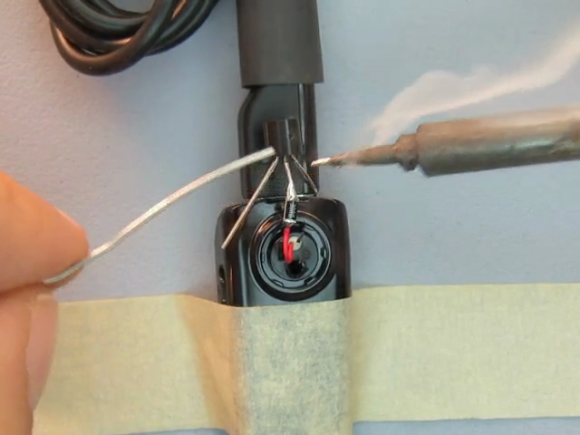
[Lou Prado] sent in a link to his new video on using a Bluetooth headset as a garage door opener for your Android device. This isn’t a new hack, and we’ve actually seen him pull it off once before back in 2011. But we’re running this as an update for a couple of reasons. First off, we had forgotten about the hack and it’s worth revisiting. Secondly, the headset which he used with the initial hack has gone out of production. He chose a new model, and the assembly video (embedded after the break) which he made is a treasure trove of best practices to use when hacking consumer electronics.

Here’s how the hardware part of the hack goes. He removes the speaker from the headset and solders the base of a transistor in-line with a resistor to the red wire. The emitter connects to the grounded frame of the USB charging cable which is plugged into an outlet next to your garage door opener. The collector of the transistor is then connected to the garage door opener, along with a common ground connection, allowing audio from the headset to trigger the transistor to open the door.

The systems is secure based on Bluetooth pairing, which was done with his phone before starting the hardware hack.

Continue reading “Bluetooth Headset Garage Door Opener Update”

Remote Control Command Center Includes RF And IR Functions

all-in-one-remote-relay-includes-RF

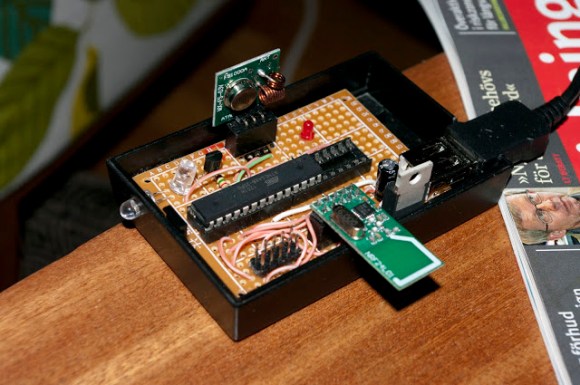
We’re still not quite sure what to call these projects, but as we’ve said before, it’s a pleasure to see what people are doing to use one remote control to rule them all. The project being developed by [Kalle Löfgren] seeks to simplify the remote controlled items in his home by combining all control into one smart phone app. The linchpin of the system is this command center which lets a smart phone send IR and RF commands to various devices (translated).

We’ve seen this done with pretty beefy microcontrollers, like this project that uses a PIC32. But the communications going on between the smartphone and the base station are very simple, as are the remote control commands which are being relayed. So we’re not surprised to find that this setup just uses an ATmega88, IR LED, Bluetooth Module, and RF module. There is no connection to a computer (the USB simply provides power via a cellphone charger). If you’re interested in how [Kalle] sniffed the protocol for each remote he wrote two other articles which you can find in the write-up linked above.

A Clever Solution For Constantly Locking Workstations

ROBOT

[Vasilis] works at CERN, and like any large organization that invented the World Wide Web, they take computer security pretty seriously. One ‘feature’ the IT staff implemented is locking the desktop whenever the screen saver runs. When [Vasilis] is in his office but not at his battlestation, the screen saver invariably runs, locking the desktop, and greatly annoying [Vasilis].

The usual Hackaday solution to this problem would be a complex arrangement of RFID tags, webcams, and hundreds, if not thousands of lines of code. [Vasilis] came up with a much better solution: have the computer ping his phone over Bluetooth. If the phone is detected by the computer, kill the screen saver.

The code is up on Github. It’s not much – just 20 lines of a Bash script – but it’s just enough to prevent the aggravation of typing in a password dozens of times a day.

Wireless Pinball Controller For Tablet Gaming

wireless-pinball-controller

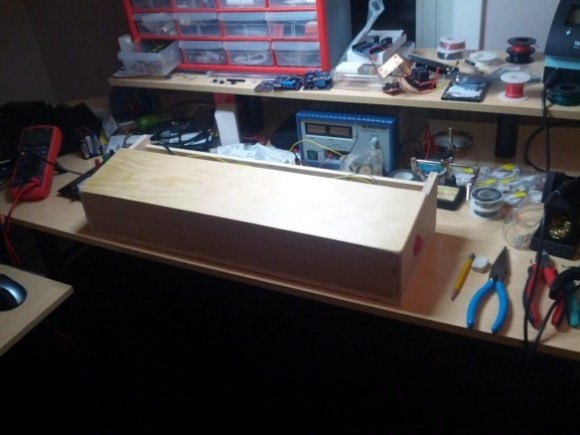
This wooden box is a wireless pinball controller and tablet stand. The idea is to set it on a workbench to give you some of the thrill of standing and playing the real thing. [Jeff] has been rather addicted to playing a pinball app on Android lately, and started the journey because he needed a way to give his thumbs some relief.

An Arduino monitors buttons on either side of this wooden controller. [Jeff] is new to working with hardware (he’s a Linux Kernel developer by trade) and was immediately struck with button debouncing issues. Rather than handle this in software (we’ve got a super-messy thread on that issue with our favorite at the bottom) he chose a hardware solution by building an SR latch out of two NAND gates.

With the inputs sorted out he added a BlueSMiRF board to the project which allowed him to connect a Nexus 7 tablet via Bluetooth. At this point he ran into some problems getting the device to respond to his control as if it were an external keyboard. His stop-gap solution was to switch to a Galaxy Tab 10.1 which wasn’t throwing cryptic errors. Hopefully he’ll fix this in the next iteration which will also include adding a plunger to launch the pinball, a part which just arrived in the mail as he was writing up this success.

We’ve embedded his quick demo video after the break.

Continue reading “Wireless Pinball Controller For Tablet Gaming”

Beginner’s Android/Arduino Example Shows The Power Of App Inventor

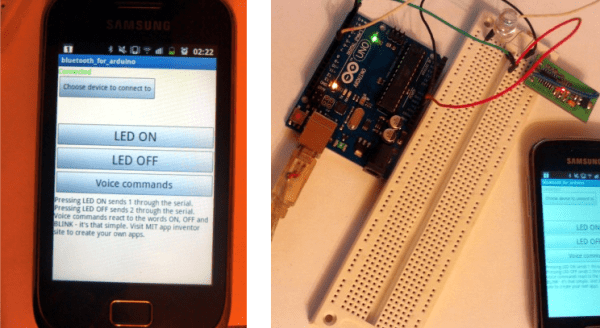
This is a simple project. It uses an Android device to switch an LED driven by the Arduino. Connectivity is provided by the Bluetooth module inserted in the breadboard. But one look at the UI on the Android device and you might think this is anything but simple. The truth is that [Kerimil] didn’t spend forever learning Java and programming the app. Instead he’s showing off the power of  App Inventor to get your Android controls up and running fast.

Check out the third button down; when was the last time you added voice commands to your project? It’s worth clicking through to see just how simple that portion was. App Inventor — a Google cast-out that is now maintained by MIT — is a graphical tool that unlocks the power of an Android handset to those with the most basic of programming understanding. For instance, the voice controls shown off after the break are provided by a single bracket which uses conditional statements to ‘listen’ for the words on, off, and blink. You’ll find the voice recognition diagram after the break as well.

You could try to go completely graphical with this project. There’s the option of programming the Arduino side of the project in a similar way.

Continue reading “Beginner’s Android/Arduino Example Shows The Power Of App Inventor”