Nixie Clock Uses Ingenious Software RTC

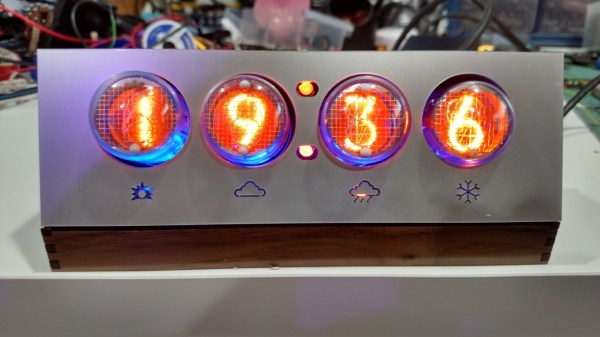
There’s something about Nixie Tube Clocks that keeps drawing hackers to build their own iterations, even if its been done a gazillion times before. Their depleting supply, and the high voltage drivers to control them, makes it all the more interesting. [Pete Mills], a veteran of several interesting projects, many of which we have featured here, is no exception and decided to build his own version of a Nixie Tube Clock, but with several nifty features.

To put it in a nut shell, his Clock uses Nixie tubes for display, has USB serial communication, temperature measurement, AC frequency measurement, time and date keeping with a software based RTC, software driven boost converter for the 175V DC nixie tube supply and a windows app for clock configuration.

The software based time keeping is pretty interesting. It is essentially a method to calibrate the crystal to more closely match real time, and some code to keep track of the time and date.  This obviously leads to a reduction in components and the spin-offs that comes with that; increased reliability, cost reduction, real estate savings. The RTC code can easily be ported to other clock projects irrespective of the display used. Besides keeping track of time and date, it can also account for leap years, and report the day of the week. A zero-crossing detector connected to the low-voltage transformer supply that powers the clock can also be used as an alternative way of keeping time.

When connected to a serial console over UART, the clock can report back many variables depending on the queries it receives. The high voltage DC needed to drive the Nixie tubes is generated using a simple boost converter controlled by the micro controller. An important “gotcha” that [Pete] deduced after blowing off several fuses, was to disconnect the micro controller port connected to the PWM timer and explicitly set it to output low via software. There’s a couple of other issues that he ran into – such as board layout, power supply, incorrect pullups – that make for interesting reading. The clock enclosure is still work in progress, but [Pete] hopes to get it done sometime soon.

He also wrote a Windows application – Nixie Clock Communicator – to help with time setting and calibration. Finally, he describes in detail the process of calibrating the clock’s software based RTC. Based on his calculations, the clock will drift by about 48 seconds over an 8 month period. Since he will be adjusting for DST much sooner than that, his clock ought to be off from correct time by not more than a minute at any given time. Not bad for a clock that does not use a dedicated RTC chip. [Pete] still has some of the prototype boards to give away if someone is interested. If you’d rather build it yourself from scratch, [Pete] has posted the software code, schematics and PCB, and a BoM.

Transparent Alarm Clock Runs Linux

[Benoit] was using an extremely old alarm clock which normally ran on mains power, and he plugged it in to his computer’s UPS to keep it operational during power outages. He noticed that when the UPS switched on that the clock would run fast, though, and apparently it was keeping time by watching the power system frequency. To solve this problem he created his own feature-dense clock which runs Linux.

This alarm clock has everything: seven-segment displays housed in clear epoxy, a touch interface, battery backup, the ability to retrieve the time from an NTP server, and a web interface to change the clock’s settings over the network. That was a large part of [Benoit]’s decision to have the clock run Linux; the network capabilities add a lot of functionality to the clock like the ability to send commands to other devices at particular times. The clock runs on an Aria G25 SOM and has a custom case that looks very professional.

We’re suckers for a high-quality clock builds here, and [Benoit]’s most recent project hits all of our buttons. Even though it doesn’t currently drive people insane or tell confusing time, the Linux and networking capabilities could certainly open up options!

hand in hand clock

Odd Clock Moves Minute Hand To Hour Hand

We see a lot of clocks here on Hackaday. Some make it easy to tell the time, others are more cryptic. [dragonator] has done something that is so simple, we are surprised it isn’t more common. In a typical mechanical hand clock the minute and hour hands rotate around the same axis. [dragonator] decided to take the minute hand and move it out to the tip of the hour hand.

It works because of a gear system hidden behind the thick hour hand. As the hour hand turns, the gear system rotates, the last gear of which is connected to the minute hand. Since the minute hand rotates 12 times for every one revolution of the hour hand, the gear ratio can easily be calculated.

hand in hand clockThe 3D printed parts were designed by [dragonator] himself. All of the design files are available here for anyone who wants to build one of these neat clocks.

The clock uses a Trinket microcontroller board to keep track of the time and to send step signals to a StepStick that drives a NEMA 17 stepper motor. There is no on-board battery power for this clock, 9-12vdc comes in via a wall wart and is stepped down to 5v by the micro controller’s regulator. Even still, this is a great project that makes it fun to watch time pass, check the video out after the break.

Continue reading “Odd Clock Moves Minute Hand To Hour Hand”

Large Seven-Segment Clock Build Takes Time To Perfect

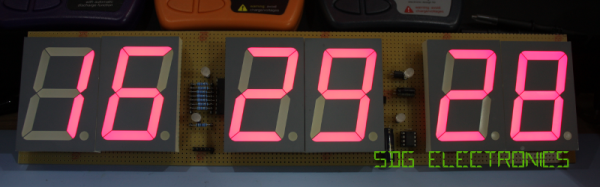
[Kevin Rye] built a discrete TTL based seven-segment clock, and he wasn’t too happy with the ugly insides compared to the nice enclosure he built for it. He embarked on creating another large seven-segment clock to put inside that enclosure.

Clocks, and specifically seven-segment based ones, aren’t anything new to write about. This particular project, which is still work in progress, is interesting. [Kevin] is an experienced hacker, but the problems he encountered and resolved along the way could prove useful to a fellow hacker someday.

To start with, he tried rectifying his old build. But in his own words “You can polish a turd, but it’s still a turd.” Five years later, he’d had enough. He’s built a lot of other clocks, but rather than repurposing them, he decided to start from scratch. He quickly breadboarded an Arduino, some displays and drove them using the Multiplex7seg library. That library supports only four characters, so he was back to the drawing board. With a fresh start, his design is now moving along nicely. For now, he’s designed three boards for the display, two boards for the colons between digits, the main Arduino-clone controller board and a 3D printed front frame to hold the displays. It will be nice to finally see that enclosure receive some fitting occupants and bring this build to closure.

Fibonacci Clock Is Hard To Read, Looks Good

Artists have been incorporating the golden ratio in their work for many hundreds of years, and it is thought that when proportions are in line with this ratio, it tends to be more aesthetically pleasing. With that in mind, the clock that [Philippe] created must mathematically be the best looking clock we’ve ever featured, even if it is somewhat difficult to tell time from it.

The clock is made up of squares which represent the first five numbers of the Fibonacci sequence. The squares are backlit with LEDs, which will illuminate red for the hour, green for the minute, and blue representing the overlap of hours and minutes. Simply add up the red and blue squares to get the hour, and add the green and blue squares to get the minutes. The minutes are displayed in 5 minute increments since there aren’t enough blocks though, so you’ll also have to multiply. Confused yet? If not, it turns out that there are several ways to display certain times using this method, any of which can be randomly selected by the clock. [Philippe] reports that there are 16 different ways to represent 6:30, for example.

The clock is driven by an ATmega328P and is housed in a wooden case. There are schematics and code available on [Philippe]’s site if you want to build your own, there are detailed descriptions of how to tell time with this clock. You’ll probably need those. If you like getting confused by clocks, you might also like this one as well.

Continue reading “Fibonacci Clock Is Hard To Read, Looks Good”

Building A Transistor Clock From Scrap

[Phil] has already built a few clocks with Nixies, VFDs, and LED matrices. When his son requested his own clock, he wanted to do something a little different. Inspired by the dead bug style of [Jim Williams]’ creations, [Phil] set out to build a clock made entirely out of discrete components. That includes the counters, driver circuits, and an array of LED.

There are a few inspiration pieces for [Phil]’s clock, starting with the Transistor Clock, a mains-powered clock that uses 194 transistors, 566 diodes, and exactly zero integrated circuits. Design patterns from a clock so beautiful it’s simply called The Clock are also seen, as is a Dekatron emulator from [VK2ZAY].

[Phil]’s creation has no PCB, and all the components are soldered onto tiny wires arranged into something resembling the clocks circuit. It’s a fantastic contraption, and while we’ll still have to give the design award to the clock, [Phil]’s creation shows off the functional circuits; great if he’ll ever need to debug anything.

Modern Spin On An Old Technology

It seems that the longer a technology has been around, the more likely it is that all of the ideas and uses for that technology will be fleshed out. For something that’s been around for around 5500 years it must be especially rare to teach an old dog new tricks, but [Sebastian] has built a sundial that’s different from any we’ve ever seen.

Once done with all of the math for the sundial to compute its angles and true north based on his latitude and longitude, [Sebastian] used Autodesk Inventor to create a model. From there it was 3D printed, but the interesting part here is that the 3D printer allowed for him to leave recesses for numbers in the sundial. The numbers are arranged at such angles inside the sundial so that when it’s a particular hour, the number of the hour shines through the shadow of the sundial which creates a very unique effect. This would be pretty difficult to do with any machine tools but is easily accomplished via 3D printing.

[Sebastian] wanted a way to appreciate the beauty of time, and he’s certainly accomplished that with this new take on  the sundial! He also wonders what it would be like if there was a giant one in a park. This may also be the first actual sundial build we’ve featured. What does that mean? Check out this non-pv, sun-powered clock that isn’t a sundial.

Thanks to [Todd] for the tip!