Conventional wisdom dictates that if you need to make a million of something, you go to China. China is all about manufacturing, and there aren’t many other places on the planet that have the industry and government-subsidized shipping that will bring your product from China to people around the world. Building a million things in China is one thing, but what about building one thing? How do you create a working prototype of your latest product, and how do you make that prototype look like something that isn’t held together with zip ties and hot glue? The folks at Hatch Manufacturing have a guide for doing just that, and lucky for us, it’s a process that’s easy to replicate in any well-equipped shop.
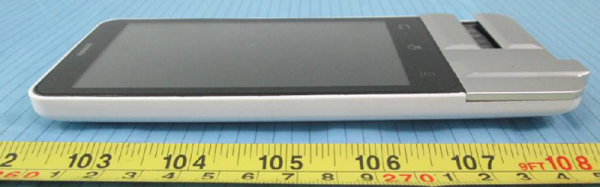
In this tutorial/case study/PR blitz, Hatch Manufacturing takes on constructing a one-off smartphone. The Huaqiangbei markets in Shenzhen are filled with vendors selling smartphones of all shapes and sizes. If you want a miniature iPhone running Android, that’s no problem. If you want a phone that looks like a 1969 Dodge Charger with the Stars and Bars on top, you can find it in China. But how are all these phones made, and how do you show off a prototype to factories begging for business?
The answer, as is always the case, comes from one-off manufacturing. Building, assembling and reworking PCBs is a well-trodden path whose process could fill several volumes, but for this post, Hatch Manufacturing decided to focus on the plastics that go into a smartphone or tablet.
Once the case or enclosure is designed with a few CAD tools, a block of plastic is run through a mill. After that, it’s a matter of painting and finishing the latest smartphone that will show up in the Chinese market. Putting a professional finish on a block of plastic is something that will look familiar to anyone who has ever assembled a miniature plastic model. There’s priming, airbrushing, sanding, more painting, sanding, wet sanding, and still more sanding. After that comes polishing the plastic part to a fine finish. It is extraordinarily labor intensive work even for a skilled hand with the right equipment.
Once the plastics are done, the PCB, display, battery, and everything else comes together in a completely custom one-off prototype. It’s very similar to how this would be done in any small shop with a benchtop mill and a dozen grades of wet/dry sandpaper. It’s also something anyone can do, provided they have enough practice and patience.
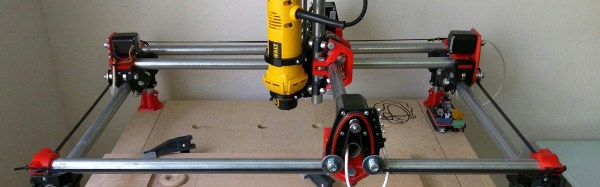
[Allted] has designed a CNC machine that you can print yourself; adding conduit, bearings, and the standard vitamins to bring it to life. The CNC machine uses a mechanical design similar to an etch-a-sketch, though instead of the maze of pulleys and cable it uses four stepper motors to do the X and Y translation. The machine looks to be about as accurate as a Shapeoko, and is able to handle light cutting in aluminum.
The coolest part is the extensibility of the printer. For example, [Allted] needed to print a lot of parts to make orders of the kit. So, he built a 4 headed 3D printer by copying blocks of the design, and tying them all to the same belt. The design also seems to be a little more resistant to dust and debris than some homemade rigs. The CNC won the Boca Bearings design competition. If you’d like to build one yourself, [Allted] has all the instructions with print setting recommendations on his website.
Perhaps the tolerances on today’s hobbyist machines just aren’t good enough for you, or perhaps the work area is just too cramped. Either way, there are times when an off-the-shelf solution just wont fit your needs, and you resolve to build your own CNC machine. Fortunately, none of us are alone in this endeavor because hobbyists have been building their own automation equipment for years. Whether you’re talking building the machine, generating the G-code, or interpreting that G-code into motor signal pulses, the DIY CNC community has evolved a sophisticated set of tools aimed at getting the job done. I thought I’d take a tour of some of the hobbyist’s tools that hallmark 2016 as the best year yet to build your CNC machine.
Hardware
In the last few years, affordable extruded profiles and brackets have made leaps and bounds to satisfy a hungry DIY 3D printer community. Beyond 3D printers, these beams and brackets are a good start for some of our needs in the world of linear motion control. Here’s a quick look at a few components off-the-shelf.
Makerslide Extruded Profiles
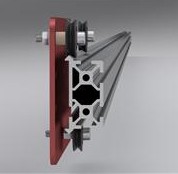
Unless you’ve discovered a deal on eBay or AliExpress, building up a machine from precision linear rails can be a pricey ordeal. Linear rails offer us a rigid, wiggle-free guide for motion along a single axis, but in some cases, the cost needed for hobbyists to afford this precision is outside their budget. [Barton Dring] took the idea of guided linear motion and launched a custom extruded rail that enables bearings to slide freely along an axis. Dubbed Makerslide, this extruded rail features a groove embedded directly into the extrusion and aims to be compatible with most other 20-mm extruded profiles like those from Misumi and Rexroth.
On a similar note, the folks at OpenBuilds took [Barton’s] concept in a slightly different direction. For many of us who have already committed to extrusions from one vendor and have our closets gushing with excess tubes, Open Rail is an extruded v-groove attachment that enables bearing-mounted plates to slide freely just like the extrusions of Makerslide. Unlike Makerslide, however, almost any 20-mm extrusion can be retrofitted with Open Rail, rather than requiring a specialized extrusion.
OpenBuilds Linear Actuator Kits
CNC machines encompass a wide variety of machine designs that spans far beyond this article’s scope. For conventional machines, however, a single motor drives a motion along a single axis. To add direction in a separate dimension, we can sometimes chain together two of the same linear motion units. The folks at OpenBuilds have taken this principle to heart offering single-axis systems as kits. With some creativity and forethought, users can develop a number of automated solutions based on the principle of appending multiple axes. Of course, the folks at OpenBuilds haven’t stumbled upon a never-before-seen solution. Misumi, Rexroth, and other professional automation equipment companies have been selling linear motion systems for years; however, their price range easily leaps beyond the 10K mark.
Not an End-All, but a Solid Start
Despite the design flexibility, neither Makerslide nor OpenBuilds is the all-encompassing solution for every CNC endeavor. Specifically, for rigid machines that can chew through steel, a structure built from bolted aluminum extrusions will be far less rigid than professional machines of a similar scale. Nevertheless, for machines that don’t experience heavy loads, like a 3D printer, a laser cutter, or even some small routers, both Makerslide and OpenBuilds offer an excellent starting point.
Software
With our hands full of stepper motors, extruded profiles, and belts, it’s time to start exploring a software solution to drive it all. While there are plenty of machine-specific solutions, I thought I’d highlight two that are flexible enough to be tuned to a custom machine.
G-code Interpreters
G-code interpreters do just that: they accept input commands in G-code (be it directly from a file or serially through a cable) and convert the commands to step and direction digital outputs with the right timings to produce the control signals for stepper motor drivers. In one sense, they’re the “brains” of the machine, taking the G-code “instruction set” and outputting behaviors that correspond to the input instructions.
LinuxCNC
Image Credit: LinuxCNC Wiki
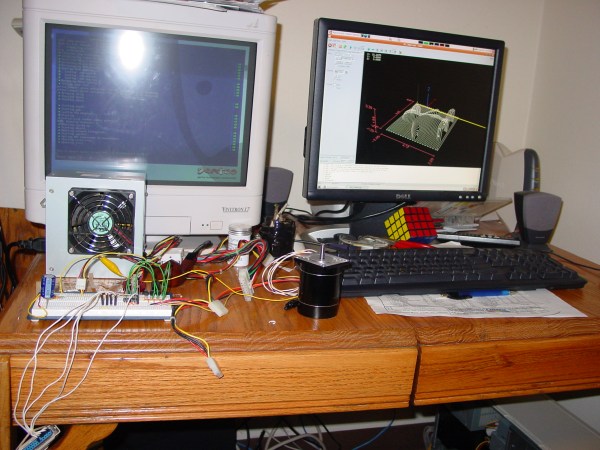
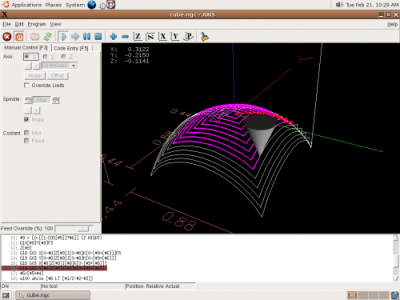
LinuxCNC spun out from a US-government-funded initiative to develop a motion control package for standards testing back in the 90s. Over time, it has evolved into a software package designed to turn a PC into a G-code interpreter, and it’s currently packaged as real-time Linux distribution. From your LinuxCNC-configured PC, you can simply connect your stepper motors, limit switches and other digital I/O devices to the PC’s parallel port which, in turn, outputs motor step and direction pulses to drive your physical hardware.
LinuxCNC isn’t just a G-code interpreter, though. The 15+ years of active development have given it a solid foundation which makes it one of the most adaptable software packages for developing custom machines. By enabling custom kinematics, users can drive non-Cartesian machines like SCARA arms. With a core operating system based on Debian Linux, users can link additional PC peripherals, like USB game controllers, to drive their machines. Some devoted software hackers have even fleshed out the current user interface to directly generate G-code for simple cuts, rather than simply run existing G-code.
Grbl
With over 7 years of active development, Grbl has proven itself to be simple, reliable G-code interpreter firmware for the Arduino Uno. Simply connect your motor controllers and limit switches to the Uno, and Grbl firmware handles the step and direction pulse timing for all 3 axes of your machine. Grbl doesn’t aim to be an all-encompassing interpreter like LinuxCNC, but in exchange it’s a far simpler solution that is relatively easy to set up and works for most, if not all, typical use-cases for a 3-axis machine.
Though Grbl drives the physical hardware, it still requires a serial interface to receive G-code instructions to execute. Fortunately, G-code-streaming packages exist: bCNC and UGS, which have been tested specifically with Grbl.
G-code Generators
Having a fancy CNC machine doesn’t say much if we can’t generate instructions to drive it to cut parts! We need a solution for generating G-code, and, once again, the open source software community has jumped in to provide several packages.
dxf2gcode
It’s not unlikely that many of your designs may boil down to a collection of flat plates with simple features on them. For 2D milling, dxf2gcode simplifies the process of generating G-code based on an original design file, in this case: a dxf. The project also features automatic cutter compensation done in software, a very handy feature that will generate an offset toolpath based on the diameter of the tool and the type of cut (pocket or outside edge).
gcmc
Image Credit: gcmc homepage
If you’ve ever tried writing G-code manually, you’ll quickly realize just how unreadable it is without having memorized the majority of the commands. GCMC is a front-end language aimed at producing human-readable machine routines. By abstracting away the unnecessary idiosyncrasies of the language, gcmc facilitates the generation of complex tool motions and patterns simply by tweaking a few parameters.
Doing the Research
Building your own CNC machine may just be your next labor of love, but unless you prefer to reinvent the wheel (and, hey, starting from first principles isn’t always a bad thing), it’s worth taking a look at the tomes of build logs, forum posts, and existing software from the gurus who have built CNCs before us. While I’ve highlighted a few of the more common tools in the land of hardware and software, this list is far from complete. So go forth! Do your research–and, of course, let us know what you find in the comments.
2007 wasn’t that long ago, but [Adam Ziegler’s] build log is, nevertheless, a pleasant romp through a not so distant past. From beginning to the end of the build, we enjoyed reading [Adam]’s progress and struggles as he worked through the build. Sometimes it’s hard to see the very normal daily work that goes into a project when it’s all polished up at the end.
He designed the mechanics himself, but after some less-successful attempts, decided to just buy the electronics. The machine is a well executed MDF gantry mill with conduit rails and 6000-series ball bearings on angle stock. It’s a good example of what you can do with cheap materials and careful planning.
[Adam] ran a few jobs on the machine, some of which he took on before it was even built (which he doesn’t recommend doing). After his adventure with this gateway machine, he’s put it up for sale and is purportedly working on a new model. The standard pattern of CNC addiction is a live alive and well.
If you’re looking to get into CNC machining on the cheap, we’ve seen similar affordable builds for your inspiration.
Is it really possible to build a rotary encoder out of a flattened tin can and a couple of photodetectors? Sure it’s possible, but what kind of resolution are you going to get from such a contraption? Is there any way that you’d be able to put them to work in a DIY project like a CNC router? If you pay attention to the basics then the answer is yes, and [HomoFaciens] wants to prove that to you with this detailed video on homebrew encoder design.
Faithful Hackaday readers will no doubt recognize [HomoFaciens] from a number of prior appearances on these pages, including this recent hardware store CNC router build. When we first ran across his builds, we admit a snicker or two was had at the homemade encoders, but if you watch the results he manages to get out of his builds, you quickly realize how much you can accomplish with very little. The video is a primer on encoder design, walking you through the basics of sensing rotation with phototransistors, and how a pair of detectors is needed to determine the direction of rotation. He also discusses the relative merits of the number of teeth in the chopper; turns out more isn’t necessarily better. And in the end he manages to turn a car wiper motor into a high-torque servo, which could be a handy trick to have filed away.
Cx5 is a strange material that’s a favorite of model makers and prop replicators. It’s kind of like a wax, kind of like a clay, and a little bit like a plastic. Now it’s a 3D printer filament. It looks very interesting for sculpted and highly detailed models, something the 3D printing scene hasn’t had yet.
[Zemnmez] could find dozens of apps and webpages that would calculate resistor color codes for him automatically. What he couldn’t find is one that would do it in reverse – i.e. type in a resistor value and return the correct color code. He made this.
[aggaz] needed a way to connect multiple MIDI devices to his computer. The MIDI spec provides a neat piece of hardware for just this occasion – the MIDI thru box. The only thing you need to build a single MIDI thru box is an opto-isolator and a buffer. It’s easy enough to build, although the DIN5 jacks used for MIDI devices are pretty expensive nowadays. (FWIW- We get an invalid certificate error when loading this page but you should still be able to load it.)
AliExpress always has some interesting stuff on it, and [Ethan] found something very cool. They’re A8 CPUs found in the latest iPhone. Are they real? Who knows. I bought one, and you’re going to get pictures in another links post in a month or so.
The Game Boy Micro was released by Nintendo in 2005 and quickly became one of the coolest and most desired handheld consoles on the planet. You need only look at the eBay listings for the Micro as evidence of its desirability. [ModPurist] took an old DS Lite and converted it into a Game Boy Micro – same idea, larger package.
[Frank Howarth] is one of the big guns when it comes to woodworking on YouTube, and now he’s doing something completely unlike his other builds. He’s building a gigantic CNC machine. Yes, we’ve seen dozens of CNC router builds, but this one adds a few nifty features we’ve never seen before.
The plans for [Frank]’s CNC machine call for a 4 foot by 8 foot table, over which a router on a gantry gnaws away at wood. This is the standard size for shop-sized CNC router, but [Frank] is adding in his own twist: he’s building a 12 foot long table, by way of a four foot extension. This one small addition allows [Frank] to put tenons in tree trunks, engravings on the side of furniture, or just to make one part of a very large piece flat.
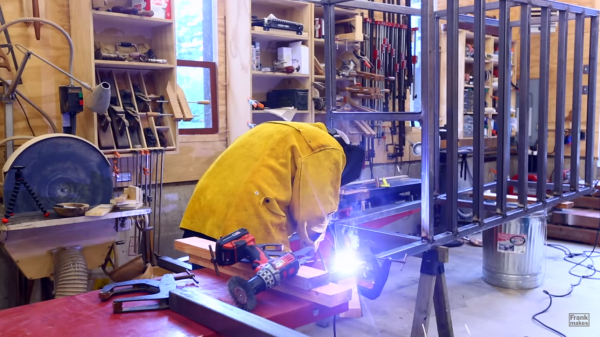
Right now, the build is just about the base, constructed out of 2″ square steel tube. While the welding is by all accounts an amateur job, everything is square, straight, and true. Now, with a metal base scooting around on hockey puck feet, [Frank] is ready to start on the robotic part of the build, something we’re all interested to see.


 Unless you’ve discovered a deal on eBay or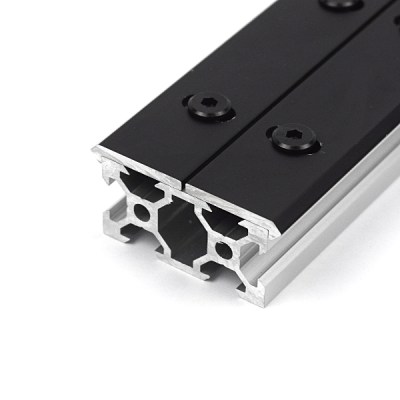
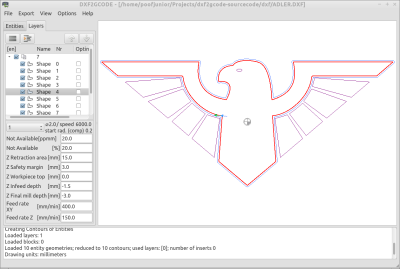 It’s not unlikely that many of your designs may boil down to a collection of flat plates with simple features on them. For 2D milling, dxf2gcode simplifies the process of generating G-code based on an original design file, in this case: a dxf. The project also features automatic cutter compensation done in software, a very handy feature that will generate an offset toolpath based on the diameter of the tool and the type of cut (pocket or outside edge).