Getting PCIe Working On The New Pi 5

After the Pi 4 released, a discovery was quickly made that the internals of the popular single-board computer use PCIe to communicate with each other. This wasn’t an accessible PCIe bus normally available in things like desktop computers for expansion cards, though; this seemed to be done entirely internally. But a few attempts were made to break out the PCIe capabilities and connect peripherals to it anyway, with varying levels of success. The new Pi 5 seems to have taken that idea to its logical conclusion and included a PCIe connector, and [George] is showing us a way to interface with this bus.

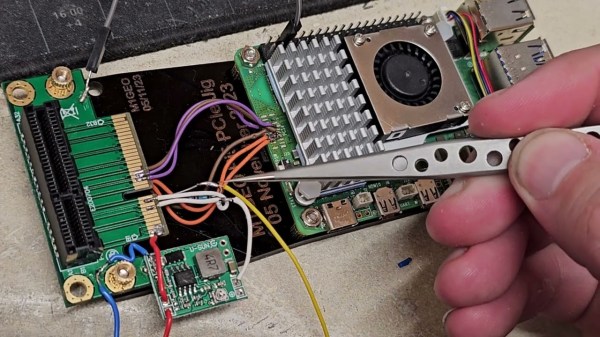
The bus requires the port to be enabled, but once that’s done it’s ready to be used. First, though, some support circuitry needs to be worked out which is why [George] is reverse engineering the system to see what’s going on under the hood. There are a few handshakes that happen before it will work with any peripherals, but with that out of the way a PCIe card can be connected. [George] removed the connector to solder wires to the board directly in order to connect a proper PCIe port allowing a variety of cards to be connected, in this case a wireless networking card and an old Firewire card. This specific build only allows Gen 1 speeds, but the bus itself supports faster connections in theory with better wiring and support circuitry.

While it might not be the prettiest solution, as [George] admits, it does a great job of showing the inner workings of this communication protocol and its use in the new, more powerful Raspberry Pi 5. This makes a lot of things more accessible, such as high-speed PCIe HATs allowing for a wide range of expansion for these popular single-board computers, which wouldn’t have been possible before. If you’re still stuck with a Pi 4, though, don’t despair. You can still access the PCIe bus on these older models but it’ll take a little bit more work.

Thanks to [CJay] for the tip!

Continue reading “Getting PCIe Working On The New Pi 5”

Cursive Out Loud: Dealing With Dragons

When we last left this broadening subject of handwriting, cursive, and moveable type, I was threatening to sing the praises of speech-to-text programs. To me, these seem like the summit of getting thoughts committed to what passes for paper these days.

A common thread in humanity’s tapestry is that we all walk around with so much going on in our heads, and no real chance to get it out stream-of-consciousness style without missing a word — until we start talking to each other. I don’t care what your English teacher told you — talking turns to writing quite easily; all it takes is a willingness to follow enough of the rules, and to record it all in a readable fashion.

But, alas! That suggests that linear thinking is not only possible, but that it’s easy and everyone else is already doing it. While that’s (usually) not true, simply thinking out loud can get you pretty far down the road in a lot of mental vehicles. You just have to record it all somehow. And if your end goal is to have the words typed out, why not skip the the voice recorder and go the speech-to-text route?

Continue reading “Cursive Out Loud: Dealing With Dragons”

The TAK Ecosystem: Military Coordination Goes Open Source

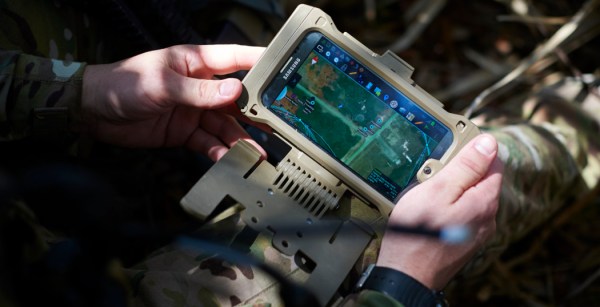
In recent years you’ve probably seen a couple of photos of tablets and smartphones strapped to the armor of soldiers, especially US Special Forces. The primary app loaded on most of those devices is ATAK or Android Tactical Assault Kit. It allows the soldier to view and share geospatial information, like friendly and enemy positions, danger areas, casualties, etc. As a way of working with geospatial information, its civilian applications became apparent, such as firefighting and law-enforcement, so CivTAK/ATAK-Civ was created and open sourced in 2020. Since ATAK-Civ was intended for those not carrying military-issued weapons, the acronym magically become the Android Team Awareness Kit. This caught the attention of the open source community, so today we’ll dive into the growing TAK ecosystem, its quirks, and potential use cases.

Tracking firefighting aircraft in 3D space using ADS-B (Credit: The TAK Syndicate)

Continue reading “The TAK Ecosystem: Military Coordination Goes Open Source”

2022 Hackaday Prize: Save The World Wildcard Challenge Begins Now

Continuing the concept of saving planet Earth with gnarly, repeatable hacks, the fifth and final challenge of the 2022 Hackaday Prize is all about making the world better with smart and sustainable hardware. While the focus is still on saving the planet, this time, anything goes. Does your project not fit within the confines of a previous challenge? Here is your last chance to enter the 2022 Hackaday Prize: Start your entry today!

Go Wild!

We’ve already run contest rounds that focused on green power generation, recycling, hacking tech out of the landfills, and just finished up making our world more climate-resistant and connected. How else do you want to use your hacking powers to make the world a better place? Well, that’s up to you. This is the wildcard round, after all. If your project helps to keep this planet running for future generations, you can enter it here.

The Save the World Wildcard challenge starts right now and runs until October 16th. As with previous rounds, we’ll award one of ten $500 prizes to each finalist, and the best projects will have a chance at the overall 2022 Hackaday Prize. So get hacking!

2022 Hackaday Prize: Make Your World More Disaster Resistant, More Engaged

Following along with the 2022 Hackaday Prize theme on building a better world by doing what we all do best – hacking together solutions – the fourth round of the Prize focuses on making our local communities more resilient against and sensitive to severe weather and environmental disasters. Whether it’s an early warning system for wildfires or a distributed communication network that will keep working even when the cell phone service goes down, we’re challenging you to help make your world safer by reacting sooner and better. Get your project entered now!

Sensing

We love systems that help us monitor our environments, and not just for idle curiosity or citizen science. Sometimes it’s critical. We’ve seen monitors aimed at giving you a personal particulate air quality indicator, especially helpful for people with respiratory problems when downstream of a forest fire.

But even better is networking these together to generate an air quality map, or to log long-run trends over time and space. CanAirIO, for instance, has both a fixed and mobile unit that can help map out CO2 and particulate matter quality. Or maybe it’s not wildfires that invade your airspace, but rather pollution from car use. We’ve seen projects like that before too, and anything along these lines would make a great entry into this challenge round. Could you predict local air quality? Continue reading “2022 Hackaday Prize: Make Your World More Disaster Resistant, More Engaged”

An Off-Grid Makeshift Cell Network

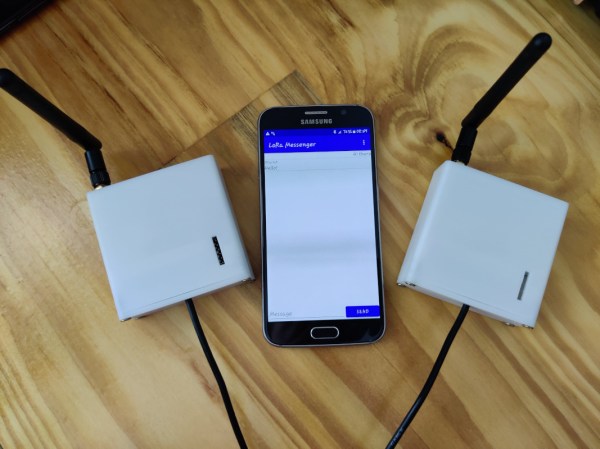
When traveling into the wilderness with a group of people, it’s good to have a method of communications set up both for safety and practicality. In the past people often relied on radios like FRS, CB, or ham bands if they had licenses, but nowadays almost everyone has a built-in communications device in their pocket that’s ready to use. Rather than have all of his friends grab a CB to put in their vehicle for their adventures together, [Keegan] built an off-grid network which allows any Android phone to communicate with text even if a cell network isn’t available.

The communications system is built on the LoRa communications standard for increased range over other methods like WiFi using a SX1278 chip and an ESP8266. The hardware claims a 10 km radius using this method which is more than enough for [Keegan]’s needs. Actually connecting to the network is only half of the solution though; the devices will still need a method of communication. For that, a custom Android app was created which allows up to 8 devices to connect to the network and exchange text messages with each other similar to a group text message.

For off-grid adventures a solution like this is an elegant solution to a communications problem. It uses mostly existing hardware since everyone carries their own phones already, plus the LoRa standard means that even the ESP8266 base station and transmitter are using only a tiny bit of what is likely battery power. If you’re new to this wireless communications method, we recently featured a LoRa tutorial as well.

Turn On Sarcasm With The Flip Of A Switch

Sarcasm is notoriously difficult to distinguish in online communities. So much, in fact, that a famous internet rule called Poe’s Law is named after the phenomenon. To adapt, users have adopted several methods for indicating implied sarcasm such as the /s tag, but more recently a more obvious sarcasm indicator has appeared that involves random capitalization througout the sarcastic phrase. While this looks much more satisfying than other methods, it is a little cumbersome to type unless you have this sarcasm converter for your keyboard.

The device, built by [Ben S], is based around two Raspberry Pi Pico development boards and sits between a computer and any standard USB keyboard. The first Pi accepts the USB connection from the keyboard and reads all of the inputs before sending what it reads to the second Pi over UART. If the “SaRcAsM” button is pressed, the input text stream is converted to sarcasm by toggling the caps lock key after every keystroke.

For communicating in today’s online world with rapidly changing memes, a device like this is almost necessary for making sure you aren’t misunderstood on whichever popular forum you like to frequent. We don’t know how long this trend will continue, either, but until something else replaces it to more concisely communicate sarcasm we expect it to remain relevant. The build is also a reminder of the various interesting ways that microcontrollers can be programmed to act as keyboards.

Thanks to [ted yapo] for the tip!