The Empire Strikes Back With The ESP8266

Like many of us, [Matthew Wentworth] is always looking for a reason to build something. So when he found a 3D model of the “DF.9” laser turret from The Empire Strikes Back intended for Star Wars board games on Thingiverse, he decided it was a perfect excuse opportunity to not only try his hand at remixing an existing 3D design, but adding electronics to it to create something interactive.
As the model was originally intended for a board game, it was obviously quite small. So the first order of business was scaling everything up to twice the original dimensions. As [Matthew] notes, the fact that it still looks so good when expanded by such a large degree is a credit to how detailed the original model is. Once blown up to more useful proportions, he modified the head of the turret as well as the barrel to accept the electronics he planned on grafting into the model.

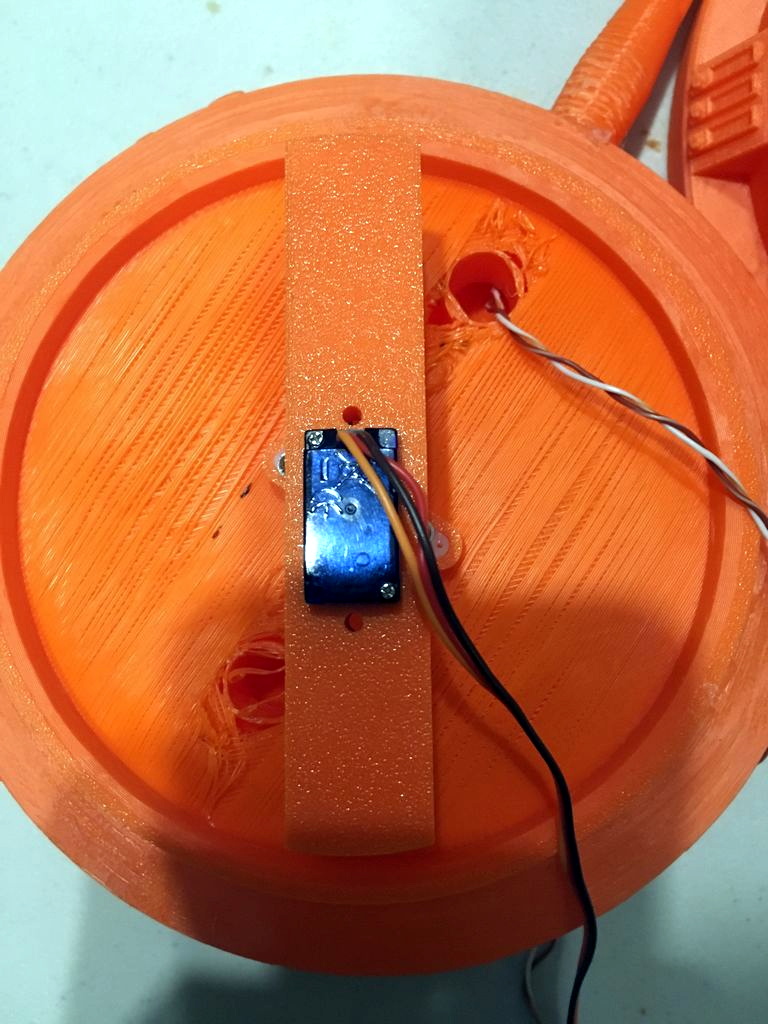
He created a mount for a standard nine gram servo inside the head of the turret which allows it to rotate, and the barrel got an LED stuck in the end. Both of which are controlled with a NodeMCU ESP8266 development board, allowing [Matthew] to control the direction and intensity of the pew-pew over WiFi. He mentions that in the future he would like to add sound effects that are synchronized to the turret rotation and LED blinking.

For the software side of the project, he used Blynk to quickly build a smartphone interface for the turret. This is the first time he had used Blynk, and reports that outside of a little trial and error, it was some of the easiest code he’s ever written for the Arduino. This is a sentiment we’ve been seeing a lot of recently towards Blynk, and it’s interesting to see how often it shows up in ESP8266 projects now.

Looking ahead [Matthew] says he wants to paint and detail the turret, as the bright orange color scheme probably wouldn’t do terribly well on Hoth. If he can manage the time, he’d also like to add it to the long list of OpenCV-powered turrets that hackers love harassing their friends and family with.
Continue reading “The Empire Strikes Back With The ESP8266”

Humans Vs. Zombies Via The ESP8266

Zombies, for the most part, remain fictional and are yet to trouble human communities. Despite the many real world calamities we face, the zombie concept remains a compelling one and the subject of many books, films, and video games. [CNLohr] was at MagStock Eight when he met [Aaron], who has developed a real world game in this vein. (YouTube, embedded below.)

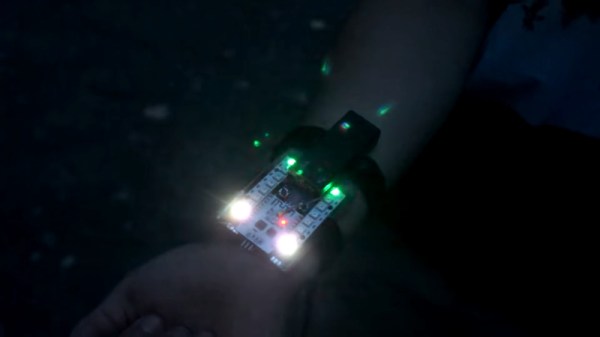
[Aaron]’s game goes by the name of SpyTag, and is played by a group of people who each have a small device affixed to their wrist. Two players start off as zombies, and the rest are humans. The zombies can use their devices as proximity detectors to hunt down nearby humans, and the humans can use their devices to detect nearby zombies, helping them escape and evade.

The devices operate using the ESP8266, in AP+station mode. The proximity sensing works on a very simple method. Devices show their human or zombie status by appearing as a WiFi AP by that name, and proximity detection is achieved by showing the signal strength of the opposite AP on an LED bar on the device. Once zombies get close enough to human devices, the humans are infected and become zombies themselves.

It’s a tidy and lightweight way to implement the gameplay, and requires no infrastructure or support hardware outside of the wristband hardware for the players. While this method would likely be vulnerable to spoofing, [CNLohr] reports that future work will likely switch to using the ESP-NOW protocol to make the game more secure.

[Aaron] has shared the project on Github for those interested in digging deeper into the code. We’ve seen a similar game played before, using IR instead. Video after the break.

[Thanks to Baldpower for the tip!]

Continue reading “Humans Vs. Zombies Via The ESP8266”

ESP8266 And Alexa Team Up To Tend Bar

After a hard day of soldering and posting memes online, sometimes you just want to yell at the blinking hockey puck in the corner and have it pour you out a perfectly measured shot of your favorite libation. It might not be the multi-purpose robot servant we were all hoping to have by the 21st century, but [Jake Lee] figures it’s about as close as we’re likely to get for under fifty bucks or so (Jake’s security certificate seems to have expired a few days ago so your browser may warn you, here’s an archived version).

From the hardware to the software, his Alexa-enabled drink pouring machine is an exercise in minimalism. Not that there’s anything wrong with that, of course. The easiest solutions are sometimes the best ones, and we think the choices [Jake] made here strike a perfect balance between keeping things simple and getting the job done. It’s by no means the most complete or capable robotic bartender we’ve ever seen, but it’s perhaps the one most likely to be duplicated by others looking to get in on the voice-controlled drinking game.

So how does it work? For one, [Jake] didn’t go through the trouble of creating a “proper” Alexa skill, that’s quite a bit of work just to pour a shot of rum. Instead, he took the easy way out and used the FauxMo library on his ESP8266 to emulate a few WeMo smart switches. Alexa (and pretty much every other home automation product) has native support for turning these on and off, so with the proper code you can leverage it as an easy way to toggle the chip’s digital pins.

Using the Alexa’s “Routines” capability, these simple toggles can be chained together and associated with specific phrases to create more complex actions. For example, you could chain the dispensing alcohol, lowering the room lighting, and playing music all to a single voice command. Something like “I give up”, perhaps.

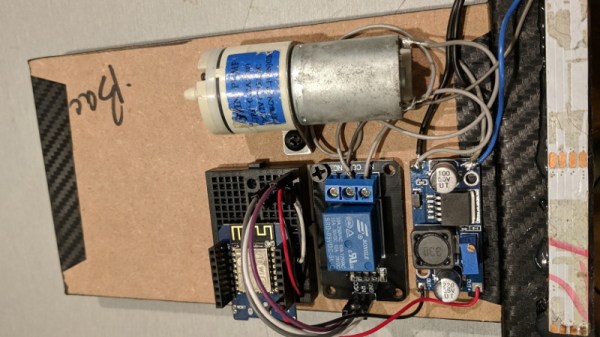
When Alexa tells the drink dispenser to turn on, the ESP8266 fires a relay which starts up a small 12 V air pump. This is connected to the bottle of rum though a glass tube that [Jake] bent with a blow torch, and starts to pressurize it. With the air at the top of the bottle pushing down on it, a second glass tube gives the liquid a way to escape. This method of dispensing liquid is not only easy to implement, but saves you from having to drink something that’s passed through some crusty eBay pump.

If you prefer the “right” way of getting your device talking to Amazon’s popular home surveillance system, our very own [Al Williams] can get you headed in the right direction. On the other hand, if the flowing alcohol is the part of this project that caught your attention, well we’ve got more than a few projects that cover that topic as well.

A 3D Printed Robotic Chariot For Your Phone

As we’ve said many times in the past, the wide availability of low-cost modular components has really lowered the barrier to entry for many complex projects which previously would have been nigh-on impossible for the hobbyist to tackle. The field of robotics has especially exploded over the last few years, as now even $100 can put together a robust robotics experimentation platform which a decade ago might have been the subject of a DARPA grant.

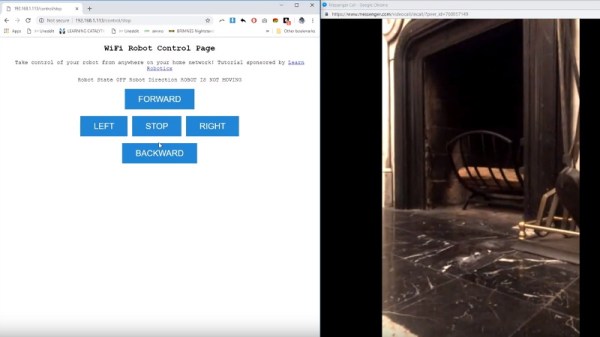
But what if you want to go even lower? What’s the cheapest and easiest way to put together something like a telepresence robot? That’s exactly what [Advance Robotics] set out to determine with their latest project, and the gadget’s final form might be somewhat surprising. Leveraging the fact that nearly everyone has a device capable of video calls in their pocket, the kit uses simple hardware and 3D printed components to produce a vehicle that can carry around a smartphone. With the phone providing the audio and video link, the robot only needs to handle rolling around in accordance with the operators commands.

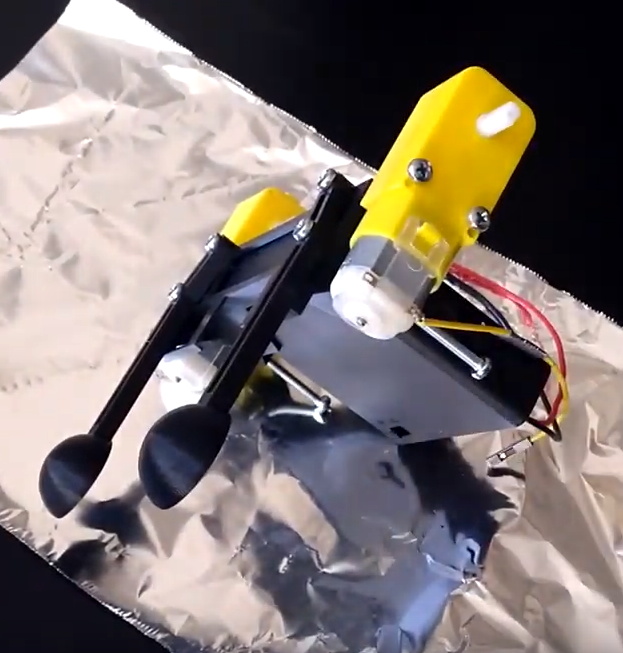
The robot chassis consists of a few simple 3D printed components, including the base which holds the phone and electronics, the wheels, and the two rear “spoons” which are used to provide a low-friction way of keeping the two-wheeled device vertical. To get it rolling, two standard DC gear motors are bolted to the sides. With the low cost of printer filament and the fact that these motors can be had for as little as $2 online, it’s hard to imagine a cheaper way to get your electronics moving.

As for the electronics, [Advance Robotics] is using the Wemos D1 Mini ESP8266 development board along with L298N motor controller, another very low-cost solution. The provided source code pulls together a few open source libraries and examples to provide a simple web-based user interface which allows the operator to connect to the bot from their browser and move it around with just a few clicks of the mouse.

If you like the idea of printing a rover to explore your living room but want something a bit more advanced, we’ve seen printable robotics platforms that are sure to meet your needs, no matter what your skill level is.

Continue reading “A 3D Printed Robotic Chariot For Your Phone”

This Chromecast Volume Knob Has A Certain ’70s Chic

Chromecast devices have become popular in homes around the world in the last few years. They make it easy to cast audio or video from a smartphone or laptop, to a set of speakers or a display connected to the same network. [Akos] wanted to control the volume on these devices with a single, simple piece of equipment, rather than always reaching for a smartphone. Thus was built the CastVolumeKnob.

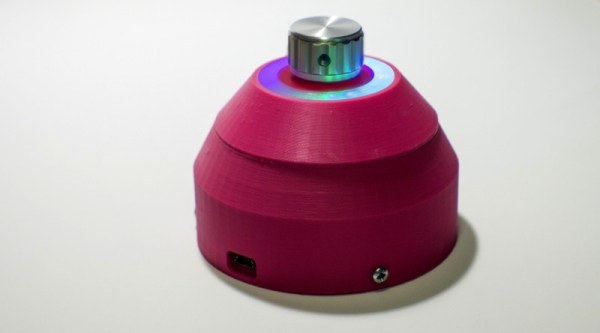
The project began by using Wireshark to capture data sent by the pychromecast library. Once [Akos] understood the messaging format, this was implemented in MicroPython on an ESP8266. A rotary encoder is used as a volume knob, and a Neopixel ring is used for visual feedback as to the device being controlled and the current volume level.

Further work was done to improve usability, with an ATtiny85 microcontroller being used to monitor the encoder for button presses before waking up the ESP8266, greatly reducing power consumption. The device is also rechargeable, thanks to an 18650 lithium polymer battery, and charger and boost converter boards. It’s all wrapped up in a sleek 3D printed case, with a translucent bezel for the LEDs and a swanky machined aluminium knob as the cherry on top.

It’s a homemade device that nonetheless would be stylish and unobtrusive in the living room environment. We imagine it proves very useful when important phone calls come in and it’s necessary to cut the stereo down to a more appropriate volume.

For another take, check out this USB volume knob with a nice weighty feel, courtesy of lead shot.

Don’t Toss That Bulb, It Knows Your Password

Whether it was here on Hackaday or elsewhere on the Internet, you’ve surely heard more than a few cautionary tales about the “Internet of Things” by now. As it turns out, giving every gadget you own access to your personal information and Internet connection can lead to unintended consequences. Who knew, right? But if you need yet another example of why trusting your home appliances with your secrets is potentially a bad idea, [Limited Results] is here to make sure you spend the next few hours doubting your recent tech purchases.

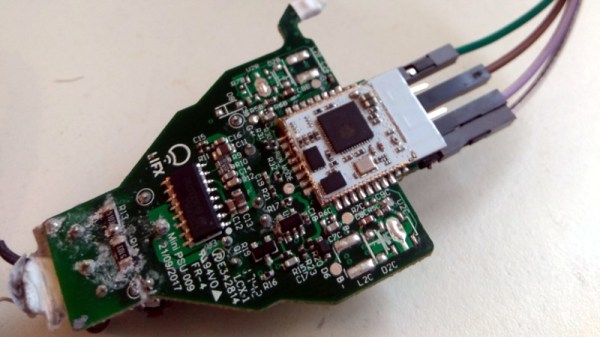
In a series of posts on the [Limited Results] blog, low-cost “smart” bulbs are cracked open and investigated to see what kind of knowledge they’ve managed to collect about their owners. Not only was it discovered that bulbs manufactured by Xiaomi, LIFX, and Tuya stored the WiFi SSID and encryption key in plain-text, but that recovering said information from the bulbs was actually quite simple. So next time one of those cheapo smart bulb starts flickering, you might want to take a hammer to it before tossing it in the trash can; you never know where it, and the knowledge it has of your network, might end up.

Regardless of the manufacturer of the bulb, the process to get one of these devices on your network is more or less the same. An application on your smartphone connects to the bulb and provides it with the network SSID and encryption key. The bulb then disconnects from the phone and reconnects to your home network with the new information. It’s a process that at this point we’re all probably familiar with, and there’s nothing inherently wrong with it.

The trouble comes when the bulb needs to store the connection information it was provided. Rather than obfuscating it in some way, the SSID and encryption key are simply stored in plain-text on the bulb’s WiFi module. Recovering that information is just a process of finding the correct traces on the bulb’s PCB (often there are test points which make this very easy), and dumping the chip’s contents to the computer for analysis.

It’s not uncommon for smart bulbs like these to use the ESP8266 or ESP32, and [Limited Results] found that to be the case here. With the wealth of information and software available for these very popular WiFi modules, dumping the firmware binary was no problem. Once the binary was in hand, a little snooping around with a hex editor was all it took to identify the network login information. The firmware dumps also contained information such as the unique hardware IDs used by the “cloud” platforms the bulbs connect to, and in at least one case, the root certificate and RSA private key were found.

On the plus side, being able to buy cheap smart devices that are running easily hackable modules like the ESP makes it easier for us to create custom firmware for them. Hopefully the community can come up with slightly less suspect software, but really just keeping the things from connecting to anything outside the local network would be a step in the right direction.

(Some days later…)

[Limited Results] had hinted to us that he had previously disclosed some vulnerabilities to the bulb’s maker, but that until they fixed them, he didn’t want to make them public. They’re fixed now, and it appears that the bulbs were sending everything over the network unencrypted — your data, OTA firmware upgrades, everything.  They’re using TLS now, so good job [Limited Results]! If you’re running an old version of their lightbulbs, you might have a look.

On WiFi credentials, we were told: “In the case where sensitive information in the flash memory wasn’t encrypted, the new version will include encrypted storage processing, and the customer will be able to select this version of the security chips, which can effectively avoid future security problems.” Argue about what that actually means in the comments.

Tiny Cheap ARM Boards Get WiFi

Over the last few years, we’ve seen the value of putting tiny WIFi-enabled microcontrollers on a module that costs a dollar or two. Those smart light bulbs in your house probably have an ESP8266 in them, and you can build a WiFi-enabled anything with one of these chips for next to no money. Now there’s a new module that takes the design philosophy of, ‘a reasonably powerful microcontroller, on a module, that does WiFi’ to its logical conclusion. It’s the W600 module from Seeed Studios. It’s got an ARM Cortex-M3, it’s FCC and CE certified, it’s got WiFi, and it’s cheap. This is what the people want, so somebody’s got to give it to them.

This product seems to be the followup and/or refinement of the Air602 WiFi Development board released by Seeed late last year. While the module itself grew a few more castellated pins and an RF can, the other specs look to be the same. Compared to the ESP-8266, which this module is obviously competing against, the Air600 is more than capable of pulling its own weight with five GPIO pins that do PWM, a decent amount of Flash, and all the WiFi support you could want.

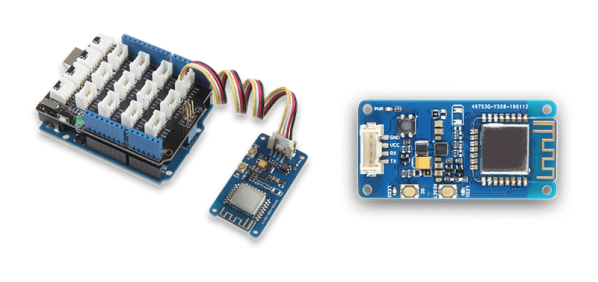
The W600 is part of an entire family of boards, with the module itself readily available, but there’s also a few breakout boards that add connections for power and serial, a bigger breakout board that’s trying really hard to forget the pin misalignment of the Arduino Uno, and since this is Seeed, a board that connects to everything via Grove connectors. What’s a Grove connector? It’s power, ground, and either I2C or serial over a connector I couldn’t buy the last time I checked.

The W600 and its family of boards will be shipping shortly — China is shutting down for two weeks soon, after all — and there are plans for support for the Arduino IDE, Micropython, and an SDK for the tool chain of your choice.

Is the ESP8266 still the go-to for putting WiFi? Probably. But here’s some more competition.