Modded Microwave Sets Its Own Clock

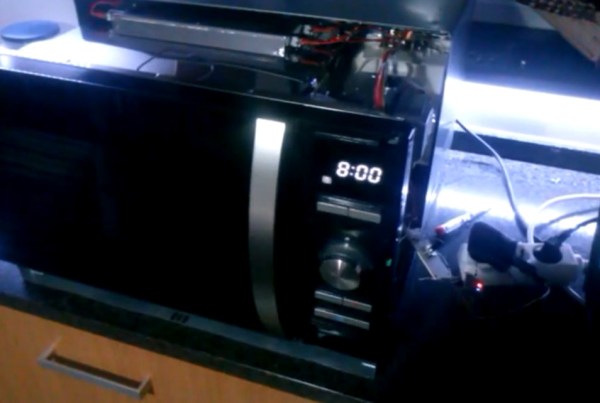
Of all the appliances in your house, perhaps the most annoying is a microwave with a flashing unset clock. Even though a lot of devices auto-set their time these days, most appliances need to have their time set after being unplugged or after a power outage. [Tiago] switches off power to some of his appliances while he’s at work to save a bit of power, and every time he plugs his microwave back in he has to manually reset the clock.

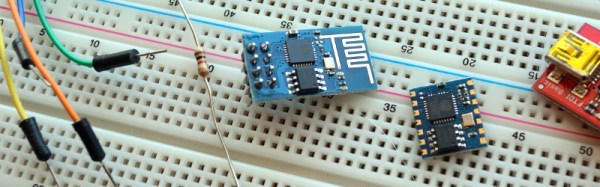
Thankfully [Tiago] wrote in with his solution to this problem: an add-on to his microwave that automatically sets the time over the network. [Tiago]’s project uses an ESP8266 running the Lua-based firmware we’ve featured before. The ESP module connects to [Tiago]’s WiFi network and pulls the current time off of his Linux server.

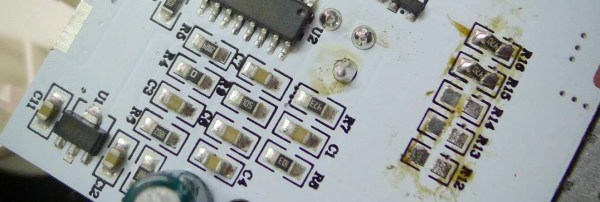
Next, [Tiago] ripped apart his microwave and tacked some wires on the “set time” button and on the two output pins of the microwave’s rotary encoder. He ran all three signals through optoisolators for safety, and then routed them to a few GPIO pins on his ESP module. When the microwave and the ESP module are powered up, [Tiago]’s Lua script pulls the time from his server, simulates a press of the “set time” button, and simulates the rotary encoder output to set the microwave’s time.

While [Tiago] didn’t post any detailed information on his build, it looks like a great idea that could easily be improved on (like adding NTP support). Check out the video after the break to see the setup in action.
Continue reading “Modded Microwave Sets Its Own Clock”

circuit board

Internet Knows Your Every Move Thanks To IKEA And ESP8266

[terenceang] got his feet wet with the ESP8266 WiFi module by hacking up an IKEA Molgan PIR light. The stock PIR light simply lights when motion is detected. [terenceang] added some extra functionality to it by making it send notifications to his phone as well.

The default configuration of the stock PIR light was to only work at night. This is done with a photo diode. It was removed to make it work in daylight, along with several other components. He removed a handful of current limiting resistors to disable the hi output LEDs. One was preserved as a visual indicator. The onboard voltage regulator didn’t supply enough current for the ESP8266. [terenceang] used some electronic wizardry and was able to solve the problem with an opto-coupler.

The one thing he would change is moving from battery to mains power, as expected battery life is less than two weeks.Schematics, source code and tons of great pictures are available on his blog. If you want to give it a try but need a crash course check out the recent news that the Arduino IDE works with ESP8266, or give direct programming a try.

Arduino IDE Support For The ESP8266

Despite a wealth of tutorials for setting up and writing code for the ESP8266 WiFi module, there has not been much of anything on programming this cheap wireless module with the Arduino IDE. Finally, this has changed. After many months of coding, the Arduino IDE supports the ESP8266 module.

The Arduino IDE support was announced on the ESP8266 community forum. Setup is fairly simple with downloads for Linux, OS X, and Windows. This isn’t an ESP8266 shield, either: you can write code for the ESP module, connect the serial pins, and hit the program button.

The basic functions of the Arduino IDE – pinMode, digitalRead, digitalWrite, and analogRead – are available. Most of the WiFi functions work just like the WiFi shield library.

There are a few things that aren’t written yet; PWM doesn’t work, as the ESP8266 only has one hardware PWM source. SPI and I2C slave mode aren’t done yet, and uploading sketches via WiFi needs a little bit of thought. That said, this is a great introduction to programming the ESP module. If the Arduino IDE isn’t your thing, you could always do it the cool way with [CNLohr]’s programming tutorial we featured last week.

Another Radio Module For IoT Fun – EMW3162

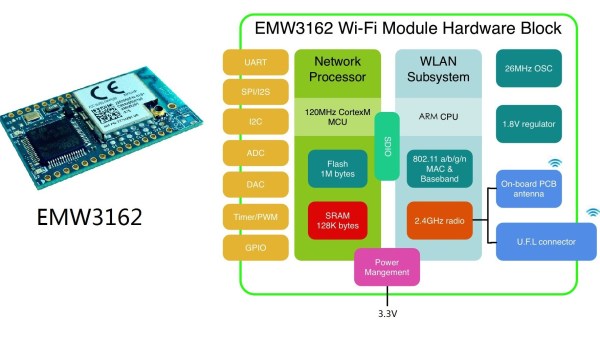
The availability of cheap radio modules is making them ubiquitous in an increasing number of projects that we have been seeing recently. The usual go-to solution is using any one of the several modules based on the ESP8266 device. [Willem] wrote in to share with us his experiences with another radio module – the EMW3162 from MXChip, which at $10 isn’t as cheap as the ESP8266 modules, but is a more capable, power packed, device.

The EMW3162 (PDF datasheet) is a low-power embedded WiFi module with integrated wireless LAN, and a STM32F205 Cortex-M3 microcontroller that runs a “self-hosted” WiFi networking library and software application stack. The microcontroller has 1M flash, 128k RAM and runs at 120MHz. And since MXChip is a Broadcom partner, they are allowed to use the WICED_SDK.

The on-board ARM M3 means all kinds of useful interfaces are available: UART, SPI, I2C, ADC, DAC, PWM, TIMERS, GPIO, and a JTAG flash interface. The good news could be on the power consumption figures – the module is touted to be low-power, and the data sheet shows 7mA when connected to an access point but with no data transfer. When transmitting at 20kbps, the current draw is about 24mA, which goes up to 320mA at 11Mbps.

[Willem] has his EMW3162_WICED repository up on Github, but also take a look at the MXChips MICO (Mico-controller based Internet Connectivity Operation System) repository. At the moment, he has it working using Linux, with a gnu gcc compiler and a JLINK JTAG programmer. He also has the WICED SDK working and has a WiFi AP with an on-board 120MHz arm chip. It would be interesting to hear about other users’ experiences with this radio module. Do let us know in the comments below!


How To Directly Program An Inexpensive ESP8266 WiFi Module

The ESP8266 is the answer to “I want something with Wifi.” Surprisingly, there are a number of engineers and hobbyists who have not heard of this chip or have heard of it but don’t really understand what it is. It’s basically the answer to everything IoT to so many engineering problems that have plagued the hobbyist and commercial world alike.

The chip is a processor with integrated RAM, some ROM, and a WiFi radio, and the only external components you will need are 4 capacitors, a crystal and an external flash! It’s CHEAP, like $4/ea cheap! Or $5 if you want it on a nice, convenient carrier board that includes all these components. The power consumption is reasonable (~200mA)1, the range is insane ~300m2 without directional equipment, and a PCB trace antenna and ~4km if you want to be ridiculous.

One place thing that more people need to know about is how to program directly for this chip. Too many times projects use it as a crutch via the AT commands. Read on and find out how to hello world with just this chip.

Continue reading “How To Directly Program An Inexpensive ESP8266 WiFi Module”

TwitterPrinter Keeps Track Of 2015 Hack-A-Day Prize

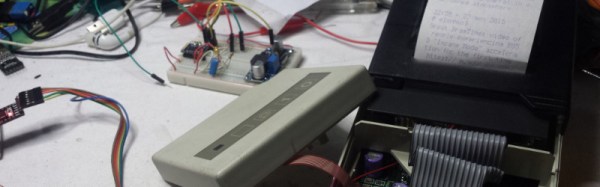
[Mastro Gippo] is getting to be somewhat of a Hackaday legend. He didn’t win the 2014 Hackaday prize but was in attendance at the event in Munich, and to make sure he keeps up with this year’s Prize, he built this old-school printer that prints all of the updates from the Hackaday Prize Twitter account.

The device uses the now-famous ESP8266 module for connecting the printer to the Internet. It doesn’t scrape data straight from Twitter though, it looks at [Mastro Gippo]’s own server to avoid getting inundated with too many tweets at once. The program splits the tweets into a format that is suitable for the printer (plain text) and then the printer can parse the data onto the paper. The rest of the design incorporates a 3.3V regulator for power and some transistors to turn the printer on and off. Be sure to check out the video of the device in action after the break!

[Mastro Gippo] notes that this eliminates the need to have a smartphone in order to keep up with the 2015 Hackaday Prize, which is ironic because his entry into the Trinket Everyday Carry Contest was a smarter-than-average phone. We’ll be expecting something that doesn’t waste quite as much paper for his official contest entry, though!

Continue reading “TwitterPrinter Keeps Track Of 2015 Hack-A-Day Prize”

Hackaday Links Column Banner

Hackaday Links: March 1, 2015

The somewhat regular Hardware Developers Didactic Galactic was a few days ago in San Francisco. Here’s the video to prove it. Highlights include [James Whong] from Moooshimeter, the two-input multimeter, [Mark Garrison] from Saleae, and a half-dozen other people giving talks on how to develop hardware.

[Taylor] made a portable NES with a retron, a new-ish NES clone that somehow fits entirely in a glop top IC. The controllers sucked, but [Taylor] made a new one with touch sensors. All that was required was eight transistors. The enclosure is an Altoid tin, and everything works great.

Here’s a YouTube channel you should subscribe to: Ham College. The latest episode covers the history of radio receivers and a crystal radio demonstration. They’re also going through some of the Technical class question pool, providing the answers and justification for those answers.

[Prusa] just relaunched prusaprinters and he’s churning out new content for it. Up now is an interview with [Rick Nidata] and his awesome printed container ship.

The tip line is overflowing with ESP8266 breakout boards. Here’s the simplest one of them all. It’s a breadboard adapter with stickers on the pin headers. Turn that into a right-angle breadboard adapter, and you’ll really have something.

Here’s something that’s a bit old, but still great. [Dillon Markey], one of the stop-motion animators for Robot Chicken modified a Nintendo Power Glove for animation duties. It seems to work great, despite being so bad. Thanks [Nicholas] for the link.

[David] the Swede – a consummate remote control professional we’ve seen a few times before – just flew his tricopter in a mall so dead it has its own Wikipedia page. Awesome tricopter, awesome location, awesome video, although we have to wonder how a few really, really bright LEDs would make this video look.

Here’s an item from the tip line. [Mark] wrote in with an email, “Why do you put names in [square brackets] in the blog entries? Just curious.” The official, [Caleb]-era answer to that question is that sometimes people have bizarre names that just don’t work in text. Imagine the sentence, “[12VDC] connected the wires to the terminal” without brackets. The semi-official answer I give is, “because.”