This Week In Security: Linux Flaws, Python Ownage, And A Botnet Shutdown

The ides of security March are upon us — Qualys reports the discovery by their threat research unit of vulnerabilities in the Linux AppArmor system used by SUSE, Debian, Ubuntu, and Kubernetes as an additional security mechanism and application firewall.

AppArmor was added to Linux in 2010, and the vulnerabilities Qualys discovered have been present since 2017, and allow unprivileged (non-root) local users to elevate privileges by executing arbitrary code in the kernel, gaining root access, or perform a denial-of-service attack across the entire system by replacing all AppArmor behavior with “deny all” rules.

All Linux kernels since Linux 4.11 are vulnerable. If your Linux distribution enables AppArmor, and quite a few do, you’ll want to be updating as soon as fixes are available from your distribution maintainers. On systems with untrusted users, such as shared environments, VPS server environments, and the like, this is even more critical and urgent. Even on single-user systems, vulnerabilities like these allow other exploits, like the Python attack below, mechanisms to elevate their access and persistence.

At the time of writing, the full details of the AppArmor vulnerability are limited until the Linux Kernel team releases a stable version with the fixes for distribution maintainers. Qualys has published the technical write-up with the currently public information.

Python Projects Compromised

StepSecurity reports on a new campaign to infect Python projects on GitHub with a complex malware that, once deployed, appears to be yet another crypto and login stealer.

The attacker first gains access to the GitHub credentials via another info stealing worm – the Glassworm stealer infects VSCode extensions with over 35,000 downloads of infected extensions in October of 2025. Glassworm harvests NPM, GitHub, and OpenVSX credentials and sends them to a remote command and control (C2) server. It also harvests a wide range of crypto currency wallet extensions to steal crypto directly. Continue reading “This Week In Security: Linux Flaws, Python Ownage, And A Botnet Shutdown”

The Most Satisfying Way To Commit

Have you ever finished up a bit of code and thought that typing “git push” in a terminal is just not a satisfying finish? So did [penumbriel], so he built a big red button he could smash instead.

This is a very simple hack: an Arduino sits inside a 3D-printed case that holds a big, red button. The case itself is very sturdily made to withstand a good satisfying smack: it has thick walls, brass insets, and rubber feet to protect the de The code for the Arduino is very, very simple: it spoofs a USB HID using the standard keyboard library, and automatically types out “git push” whenever the button is pressed. Or smashed, because you know you’re going to want to slam that thing. So far, so good– very innovative for 2006, right?

The detail that made this project stand out in 2025 was the technique [penumbriel] used for lettering– we’re always looking

With a simple soap-and-water mask, the cured silicone peels right off, leaving a clean label.

for new ways to make a good front panel. In this case, the letters were printed as a valley and filled with silicone adhesive. To protect the top surface of the print, soapy water was used as a mask. The silicone would not adhere to the wet plastic, so all [penumbriel] had to do was peel it off after it had cured, leaving solid white inside. It’s a neat trick, and a great way to use up an old tube of silicone before it goes hard. You could also use it for injection molding, but this is a great use for the dregs.

This might go well next to the programmer’s macro pad we featured a while back, but it really needs to stay as a big red button for maximum satisfaction.


Get Thee To Git

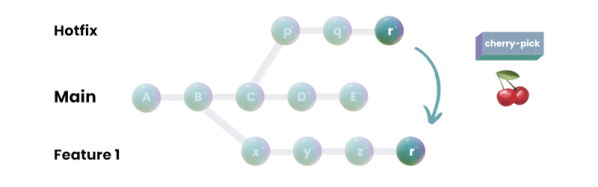
While version control used to be reserved for big corporate projects, it is very mainstream these days. You can attribute much of that to Git, the software that has nearly displaced other version control. Git works well, it is versatile, and it scales well. It is easy to use as an individual developer or as part of a worldwide team. But Git is also one of those things that people don’t always study, they just sort of “pick it up” as they go. That motivated [Glasskube] to create “The Guide to Git I Never Had.”

If you are ready to click away because you are not a software person, hang on. Git is actually useful for many different kinds of data, and there are a number of hardware projects that use Git in some form. That’s especially true if the project has some code associated with it, but there are projects that consist of PCBs, reverse engineering documentation, or schematics.

Continue reading “Get Thee To Git”

Git Good, By Playing A Gamified Version Of Git

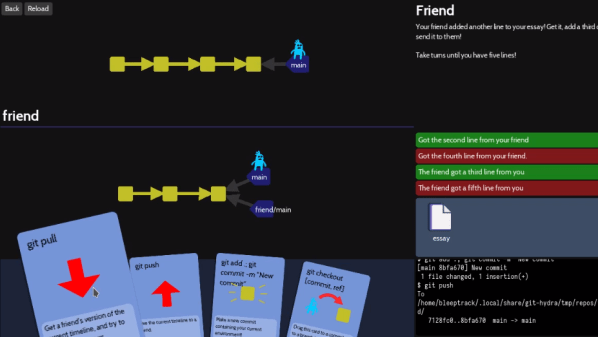
What better way to learn to use Git than a gamified interface that visualizes every change? That’s the idea behind Oh My Git! which aims to teach players all about the popular version control system that underpins so many modern software projects.

Git good, with a gameified git interface.

Sometimes the downside to a tool being so ubiquitous is that it tends to be taken for granted that everyone already knows how to use it, and those starting entirely from scratch can be left unsure where to begin. That’s what creators [bleeptrack] and [blinry] had in mind with Oh My Git! which is freely available for Linux, Windows, and macOS.

The idea is to use a fun playing-card interface to not only teach players the different features, but also to build intuitive familiarity for operations like merging and rebasing by visualizing in real-time the changes a player’s actions make.

The game is made with beginners in mind, with the first two (short) levels establishing that managing multiple versions of a file can quickly become unwieldy without help. Enter git — which the game explains is essentially a time machine — and it’s off to the races.

It might be aimed at beginners, but more advanced users can learn a helpful trick or two. The game isn’t some weird pseudo-git simulator, either. The back end uses real git repositories, with a real shell and git interface behind it all. Prefer to type commands in directly instead of using the playing card interface? Go right ahead!

Oh My Git! uses the free and open-source Godot game engine (not to be confused with the Godot machine, a chaos-based random number generator.)

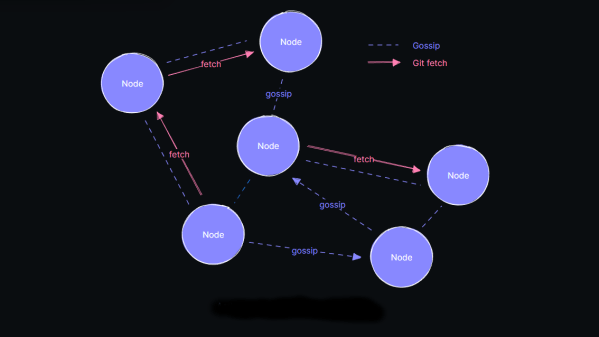
diagram of the radicle node-to-node connectivity

Radicle: An Open-Source, Peer-to-Peer, GitHub Alternative

The actions of certain large social networks have recently highlighted how a small number of people possess significant power over the masses and how this power is sometimes misused. Consequently, there has been a surge in the development of federated (or decentralized) services, such as Mastodon and Matrix.  But what about development? While GitHub and similar services are less likely to be used for political manipulation, they are still centralized services with a common failure point. Radicle is an open-source, peer-to-peer collaboration stack built on top of Git but backed with public key cryptography as a standard and a gossip protocol to ensure widespread data sharing across the network and, thus, some fault tolerance.

Essentially, code and associated documentation are secured cryptographically with an identity. The Git protocol is used for actual data transfer from peer-to-peer, which means that updates are only sent as deltas, not complete copies, maximizing channel bandwidth efficiency. A custom gossip protocol is used for metadata transfer around the network of peers. The projects had a local-first ideology, with users running a full-stack node on their hardware and all features available, even offline, which is great for laptop users who move around locations with sporadic access to the internet.

Judging from their Zulipchat instance, this is a highly active space, so perhaps it is worth diving in and seeing if it floats your boat. Fancy getting onto the Fediverse, but only have a spare MS-DOS machine to try it on? We’ve got it covered. Want to use Git but not online? You need a private Git server. Finally, too much Git? How about Gitless?

Thanks [Anonymous] for the tip! No, that wasn’t lost on us :D

Linux Fu: Deep Git Rebasing

If you spend much time helping people with word processor programs, you’ll find that many people don’t really use much of the product. They type, change fonts, save, and print. But cross-references? Indexing? Largely, those parts of the program go unused. I’ve noticed the same thing with Git. We all use it constantly. But do we? You clone a repo. Work on it. Maybe switch branches and create a pull request. That’s about 80% of what you want to do under normal circumstances. But what if you want to do something out of the ordinary? Git is very flexible, but you do have to know the magic incantations.

For example, suppose you mess up a commit message — we never do that, of course, but just pretend. Or you accidentally added a file you didn’t want in the commit. Git has some very useful ways to deal with situations like this, especially the interactive rebase.

Continue reading “Linux Fu: Deep Git Rebasing”

Too Much Git? Try Gitless

Git has been a powerful tool for software development and version control since the mid ’00s, gaining widespread popularity since then. Originally built by none other than Linus Torvalds for handling Linux kernel development, it’s branched out for use with all kinds of other projects. That being said, it is not the easiest thing to learn how to use, with tons of options, abstract ideas, and non-linear workflows to keep track of. So if you’re new to the system or don’t need all of its vast swath of features, you might want to try out an alternative like Gitless.

Thanks to the fact that the original Git is open source, it’s free to modify and use as any user sees fit, and there are plenty of options available. This one aims to simplify many of the features found in the original Git, implementing a tracking system which somewhat automates commits. It also includes a simplified branching system, making it easier to switch between branches and keep better track of all that’s happening in a project. The command line interface is simplified as well, and the entire system is backwards-compatible with Git which means that if you find yourself needing some of the more advanced tools it’s possible to switch between them with relative ease.

For those of us keeping track of our own software projects, who don’t necessarily need the full feature set that the original Git has to offer, this could be a powerful tool that decreases the steep learning curve that Git is known for. It’s definitely a system work diving into, though, regardless of whichever implementation you choose. It’s an effective tool for everything from complex, professional projects to small hobby projects on the Arduino.