MQTT Dashboard Uses SHARP Memory LCD

One of the more interesting display technologies of the moment comes from Sharp, their memory display devices share the low power advantages of an e-ink display with the much faster updates we would expect from an LCD or similar. We’ve not seen much of them in our community due to cost, so it’s good to see one used in an MQTT dashboard project from [Raphael Baron].

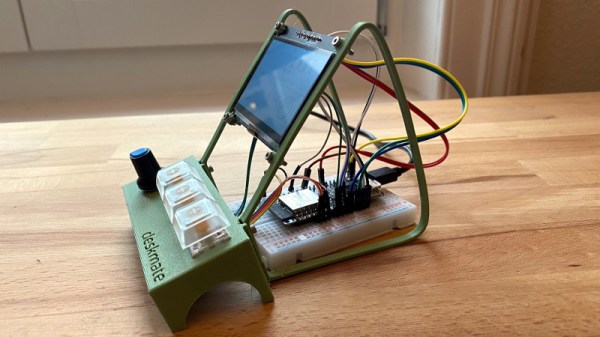
The hardware puts the display at the top of a relatively minimalist 3D printed encloseure with the LOLIN32 ESP32 development board behind it, and with a plinth containing a small rotary encoder and three clicky key switches in front. The most interesting part of the project is surprisingly not the display though, because despite being based upon an ESP32 development board he’s written its software with the aim of being as platform- and display-independent as possible. To demonstrate this he’s produced it as a desktop application as well as the standalone hardware. A simple graphical user interface allows the selection of a range of available sources to monitor, with the graphical results on the right.

All code and other assets for the project can be found in a handy GitHub repository, and to put the thing through its paces he’s even provided a video that we’ve placed below the break. User interfaces for MQTT-connected devices can talk as well as listen, for example this MQTT remote control.

Continue reading “MQTT Dashboard Uses SHARP Memory LCD”

How An Engineer Designs A DIY Energy Recovery Ventilator

We have no idea whether [Nick Goodey] is a trained engineer or not. But given the detailed design of this DIY energy recovery ventilator for his home HVAC system, we’re going to go out on a limb and say he probably knows what he’s doing.

For those not in the know, an energy recovery ventilator (ERV) is an increasingly common piece of equipment in modern residential and commercial construction. As buildings have become progressively “tighter” to decrease heating and cooling energy losses to the environment, the air inside them has gotten increasingly stale. ERVs solve the problem by bringing fresh, unconditioned air in from the outside while venting stale but conditioned air to the outside. The two streams pass each other in a heat exchanger so that much of the energy put into the conditioned air is transferred to the incoming unconditioned air.

While ERV systems are readily available commercially, [Nick] decided to roll his own after a few experiments with Coroplast and some extensive calculations convinced him it would be a viable idea. One may scoff at the idea of corrugated plastic for the heat exchanger, but the smooth channels through the material make it a great choice. He built up a block of Coroplast squares with the channels in alternate layers oriented orthogonally, letting stale inside air pass very close to fresh outside air to exchange heat without ever mixing directly. The entire system, including fans, an Arduino for control, sensors galore, and the Hubitat home automation hub, is powered by DC, so no electrician was needed. [Nick] has a ton of detail in his build log, including all the tools and calculators he used to design the system.

Given the expense of ERV systems, we’re surprised we haven’t seen more stories about DIY versions. We have talked about HVAC systems a lot, though — after all, HVAC techs are hackers who make housecalls.

An Open Source IR Gateway Based On The ESP8266

The market is absolutely inundated with smart gadgets, with everything from coffee makers to TVs advertising that they support the latest and greatest in home automation platforms. Don’t worry about how many of those platforms and services will still up up and running in the next few years, the thing will probably stop working before then anyway. No sense worrying about the details in a disposable world.

Of course, not all of us are so quick to dump working hardware in the name of the latest consumer trend. Which is why [Viktor] has developed an open source infrared gateway that can connect your “dumb” devices to the latest flash in the pan backend service with nothing more than a software update. Though even modern smart TVs still include IR remotes, so there’s nothing stopping you from using it with newer gear if you don’t trust like the built-in implementation.

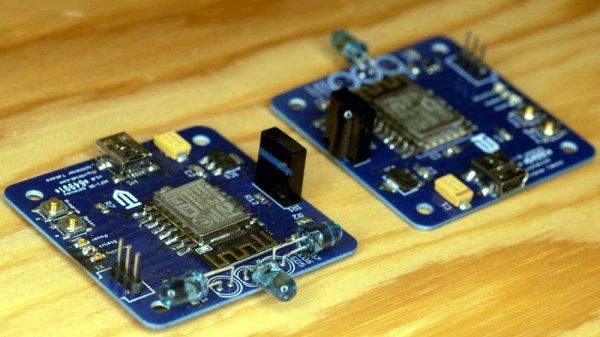
The hardware here is really quite simple, essentially boiling down to a few IR LEDs and an IR receiver hanging off the GPIO ports of an ESP8266. While the receiver isn’t strictly necessary, it does allow [Viktor] to rapidly implement new IR codes. He just points the existing remote at the board, hits a button, and the decoded command gets sent out over MQTT where he can easily snap it up.

[Viktor] has done the hard work of creating the PCB design and testing out different IR LEDs to find the ones with the best performance. But if you wanted to just throw something together in a weekend, you should be able to get his firmware running with little more than a bare ESP and a random IR LED salvaged from an old remote. But don’t be surprised if you get hooked on the concept and end up rolling your own home automation system.

Slack Off From Home With A Networked Jam Session

Those of you who were regular office dwellers before the pandemic: do you miss being with your coworkers at all? Maybe just a couple of them? There’s only so much fun you can have through a chat window or a videoconference. Even if you all happen to be musicians with instruments at the ready, your jam will likely be soured by latency issues.

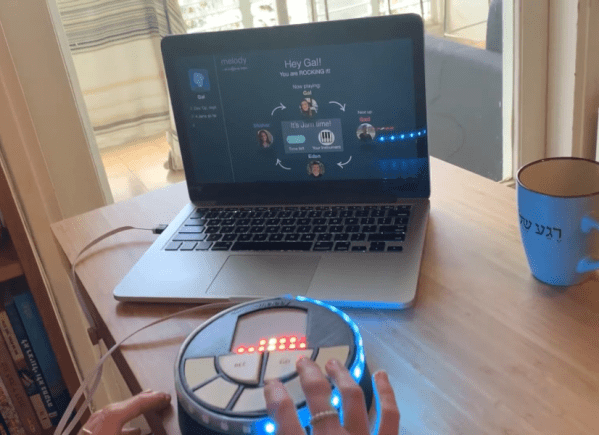
[Eden Bar-Tov] and some fellow students had a better idea for breaking up the work-from-home monotony — a collaborative sequencer built for 2020 and beyond. Instead of everyone mashing buttons at once and hoping for the best, the group takes turns building up a melody. Each person is assigned a random instrument at the beginning, and the first to go is responsible for laying down the beat.

Inside each music box is an ESP8266 that communicates with a NodeRed server over MQTT, sending each melody as a string of digits. Before each person’s turn begins, the LED matrix shows a three second countdown, and then scrolls the current state of the song. Your turn is over when the LED strip around the edge goes crazy.

Music can be frustrating if you don’t know what you’re doing, but this instrument is built with the non-musician in mind. There are only five possible notes to play, and they’re always from the same scale to avoid dissonance. Loops are always in 4/4, which makes things easy. Players don’t even have to worry about staying in time, because their contributions are automatically matched to the beat. Check it out after the break.

Tired of sitting indoors all day, but still want to make music? Build a modular synth into a bike and you’ve solved two problems.

Continue reading “Slack Off From Home With A Networked Jam Session”

Share Your Clipboard Across Machines Using MQTT

Many of us regularly move from one computer to another for work, play, and hacking; every now and then finding yourself wishing you could copy something on one machine and paste on another without additional steps in between. [Ayan Pahwa] was well acquainted with this frustration, so he created AnywhereDoor, a cross-platform clipboard sharing utility that uses MQTT.

Some cloud-based solutions already exist to do this, but that means sending your private clipboard data to someone else’s server. Not keen on that idea, [Ayan]’s solution makes use of a MQTT broker that can run anywhere on the local network, and lightweight python clients to run on Mac, Windows and Linux. The client checks your clipboard at specified intervals, and publishes new data to a topic on the broker, to which all the clients are subscribed. The data is end-to-end encrypted using Fernet symmetrical key encryption, so the data won’t be readable to anyone else on the network. Currently, AnywhereDoor only supports copying text, but media is planned for a future version.

We like the relative simplicity of the utility, and see it being very handy for hackers bouncing between machines in the lab. Simple software utilities that solve a specific and real problem can are very useful, like a wiring documentation tool, or Kicad to isolation routing patchwork converter.

Simple MP3 Player Hides Home Automation Brilliance

Like bubble wrap or the corkscrew, plenty of everyday objects have lost almost all ties to their original purpose. It could be that the original product had no market but was able to find one in an unexpected place, or simply that the original use case disappeared. We think that this MP3 player for children might arrive at a similar fate as a home automation controller thanks to a recent project by [Sebastian].

The MP3 player is known as a Jooki and works by using small figurines (and a few buttons) to control the device. Different figurines cause the MP3 player to change playlists, for example, but it turns out that the device is capable of communicating over MQTT. This means that [Sebastian] was able to use the MQTT messages from the Jooki to do all kinds of things beyond its intended use with openHAB, an open-source home automation system, such as dimming the lights and closing the blinds when he puts his son to bed.

This platform has considerable potential for hacking thanks to the lightweight communications system it uses under the hood. The Jooki is a little pricey, but if you happen to have one around, it’s an impressive tool that can go well beyond its original intended use.

Do You Know Where Your Children Are? Check The Weasley Clock

What’s the coolest thing you could build for a Harry Potter fan, aside from a working magic wand or Quidditch broomstick? We would have to say a Weasley clock that shows the whereabouts of everyone in the family is pretty high on the list, especially if that fan is a wife and mother.

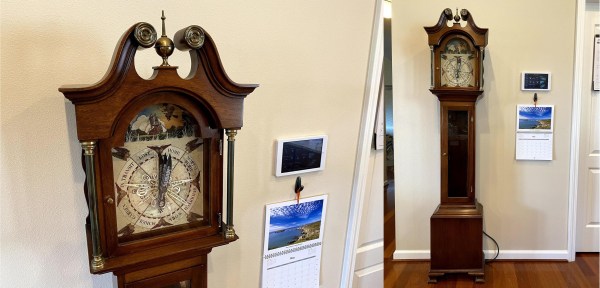
Here’s how it works: they’ve set up geofences to define the boundaries of home, each person’s school or workplace, and so on. The family’s locations are tracked through their phones’ GPS using Home Assistant, which is hosted on a Raspberry Pi. Whenever someone’s location changes, the Pi alerts the clock over MQTT, and it moves the 3D-printed hands with servos.

The clock has some interesting granularity to it as well. As someone gets closer to home, their pointer’s distance reflects that in its proximity to the Home slice. And Home itself is divided into the main house and the shop and reflected by the pointer’s position.

We particularly like the attention to detail here, like the art poster used for the clock’s face that includes all the Weasley’s whereabouts in the background. It’s built into a thrift store grandmother clock, which is smaller than a grandfather clock but no less majestic. In the future there are plans to implement the clock’s chimes to announce that someone is back home.

No matter what you’re into, the whereabouts clock idea can probably fit that universe. For instance, here’s one that uses LEGO mini-fig heads to locate roommates.