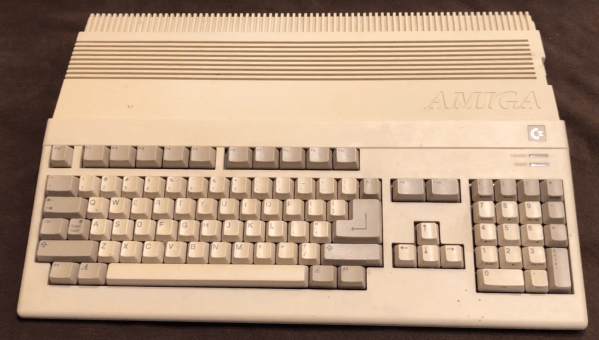
Despite the huge strides in computing power and functionality that have been achieved in the past few decades, there are still some things that older computers can do which are basically impossible on modern machines. This doesn’t just include the ability to use older hardware that’s now obsolete, either, although that is certainly a perk. In this two-part restoration of an Amiga 500, [Jeremy] shows us some of these features like the ability to directly modify the audio capabilities of this retro machine.
The restoration starts by fixing some damage and cleaning up the rest of the machine so it could be powered up for the first time in 30 years. Since it was in fairly good shape he then started on the fun part, which was working with this computer’s audio capabilities. It includes a number of amplifiers and filters in hardware that can be switched on or off, so he rebuilt these with new op-amps and added some new controls so that while he is using his MIDI software he can easily change how it sounds. He also restored the floppy disk drives and cleaned up the yellowing on the plastic parts to improve the overall appearance, as well as some other general improvements.
These old Amigas have a lot going for them, but since [Jeremy] is a musician he mostly focused on bringing back some of the musical functionality of his childhood computer, although he did build up a lot of extra features in this machine as well. These types of audio circuits are not something found in modern computers, though, so to get a similar sound without using original hardware you’ll need to build something like this NES audio processing unit programmed in Verilog.


The device is inspired by the Theremin, and was built to celebrate its 100th anniversary. The Nanoaetherphone II is all about using sensors to capture data from wireless hand-wavey interactions, and turn it into MIDI messages. To this end, it has an LDR sensor for detecting light levels, which determines volume levels. This is actuated by the user’s thumb, blocking the sensor or allowing ambient light to reach it. At the front of the handheld unit, there is also an ultrasonic range sensor. Depending on how close the sensor is to the user’s hand or other object determines the exact note sent by the device. As a MIDI controller, it is intended to be hooked up to an external synthesizer to actually generate sound.