
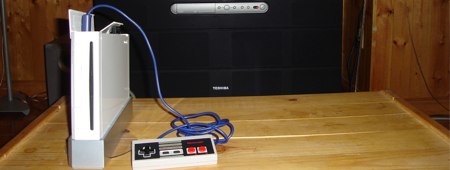
If you poke around [Raphaël]’s site, the creator of today’s featured hack, you’ll find a lot of interesting projects. X2Wii is an ongoing project to adapt controllers from earlier console generations so they work with the Wii’s GameCube ports. He adapted his Multiuse tiny1 which uses an ATmega8. The code is all assembly so the microcontroller can keep up with the protocol. Definitely check out [Raphaël]’s other project pages.
nintendo373 Articles
Wii Fit World Of Warcraft
[youtube=http://www.youtube.com/watch?v=ucEV7N0N9Pw&hl=en]
By now you’ve probably seen the video of two researchers from the German Research Center for Artificial Intelligence (DFKI) navigating through maps on Google Earth by using the Wii Fit Balance Board. They’ve gone even further now by using the board to navigate World of Warcraft. It’s obvious that the board is usable with any 3D environment. The hack is entirely software based, as the board is completely unmodified. It relays data to a laptop via Bluetooth, where the pressure data in converted to directional instructions by their custom app written in C#. No notes on the project are available on DFKI’s site, but we’re betting they’ll release the software to the public once all the kinks are worked out.
[via Balance Board Blog]
Wii Dual NAND Flash Hack
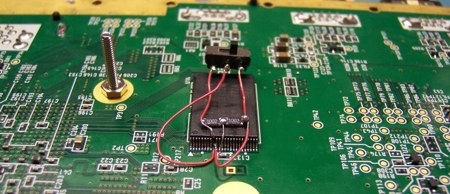
[ChipD] successfully installed two NAND flash chips into his Wii. He can keep the stock firmware on one and then flip a switch if he wants to boot using the other chip with a modified firmware. This hack is fairly straight forward. All it took was someone with steady hands to try it out. The new NAND chip is identical to the original and was salvaged from a flash drive. The chips were soldered as a stack except for the chip enable pin. The chip enable from each chip is attached to a small switch to toggle between which is active. You could use a TSOP socket to swap the different chips, but it wouldn’t fit inside the Wii case. This little switch could be hidden easily next to the GameCube ports.
Nintendo DS Music Creation
[youtube=http://www.youtube.com/watch?v=MQCZnwNr0ms&hl=en]
Homebrew developer [yaarglafr] recently released this video of his Protein DScratch in action. You can download a demo version here. The program simulates DJ scratching on the DS with an intuitive interface much like the ones on the touchscreen turntables we discussed the other day. It works well with any of the major DS slot devices; just run a DLDI patch on it and you’re good to go.
Nintendo DS Homebrew Guide

Running homebrew applications on the Nintendo DS is easier than ever these days, but if you didn’t get into the scene on the ground floor, knowing where to start can appear much more daunting than it actually is. The great thing is: you don’t need to crack open your DS and void the warranty. There are numerous peripheral options that handle this easily with no hardware mods required. DS Fanboy has served up a useful guide to the most popular peripherals and homebrew software. They explain the pros and cons of each peripheral along with the installation and uses of a few popular homebrew apps.
Already well versed in the homebrew arts? Then try some hacks we’ve featured previously, like building a serial interface or installing DSLinux and loading it with with software like this on-screen qwerty keyboard.
DIY DS Lite RumblePak
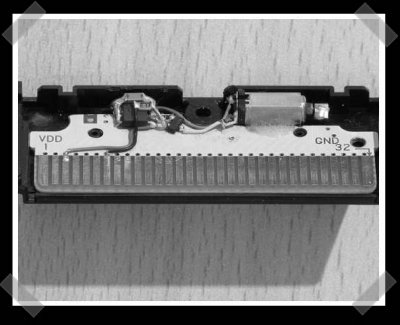
This one’s been making the blog rounds, but it really fits us. Nintendo makes one, but this instructables tells you how to make your own for a DS lite. It uses a PIC 12F675 to read the input line and activate a vibration motor from an old nokia cell phone.
Oh, speaking of instructables, I forgot to mention that they finally picked a winner for their laser etching machine. Of course, if you lack the budget, you can make your own for $60.
DIY Wireless NES Controllers For Wii/Gamecube
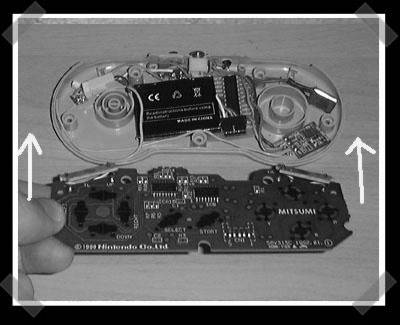
[Mark] sent in his wireless classic nintendo controller project. He built a wireless NES and SNES controller to use with his Wii via the Gamecube port. He used off the shelf TX/RX hardware and used some PIC controllers to glue everything together. iPod batteries keep em powered and keep the weight down. He provides all the schematics and a walk through on constructing the SNES controller. The circuits are pretty simple, so it’s definitely repeatable. This is almost enough to get me to buy a Wii.
— video after the break.
Continue reading “DIY Wireless NES Controllers For Wii/Gamecube”









