Popular Printers Pwned In Prodigious Page Prank

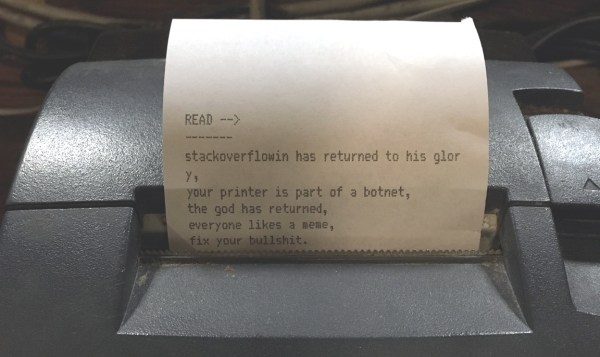
A new day dawns, and we have another story involving insecure networked devices. This time it is printers of all makes and descriptions that are causing the panic, as people are finding mystery printouts bearing messages such as this:

Stackoverflowin has returned to his glory, your printer is part of a botnet, the god has returned

Well that’s it then, you can’t argue with a deity, especially one who has apparently created a botnet from the world’s printing devices. Printer owners the world over are naturally worried about their unexpected arrival, and have appeared on support forums and the like to express their concern.

We are of course used to taking everything our printers tell us at face value. Low on ink? I hear you, my inanimate reprographic friend! But when our printer tells us it’s part of a botnet perhaps it’s time to have a little think. It is entirely possible that someone could assemble a botnet of compromised printers, but in this case we smell a rat. Only in farcical crime dramas do crooks announce their crimes in such a theatrical fashion, you might say it’s the point of a botnet not to be detected by its host. Reading some of the reports it seems that many of the affected systems have port 9100 open to the world, that’s the standard TCP printer port, so it seems much more likely that someone has written a little script that looks for IP addresses with port 9100 open, and trolls them with this message.

The real message here is one with which we expect Hackaday readers will be very familiar, and which we’ve covered before. Many network connected appliances have scant regard for security, and are a relative push-over for an attacker. The solution is relatively straightforward to those of a technical inclination, be aware of which services the devices is exposing, lock down services such as uPNP and close any open ports on your router. Unfortunately these steps are probably beyond many home users, whose routers remain with their default manufacturer’s settings for their entire lives. It’s a shame our printer troll didn’t add a link to basic router security tips.

If you want to have a little fun, some of the printed pages include an email address for ‘the god’. It would be fun to figure out who this is, right?

33C3: How Can You Trust Your Random Numbers?

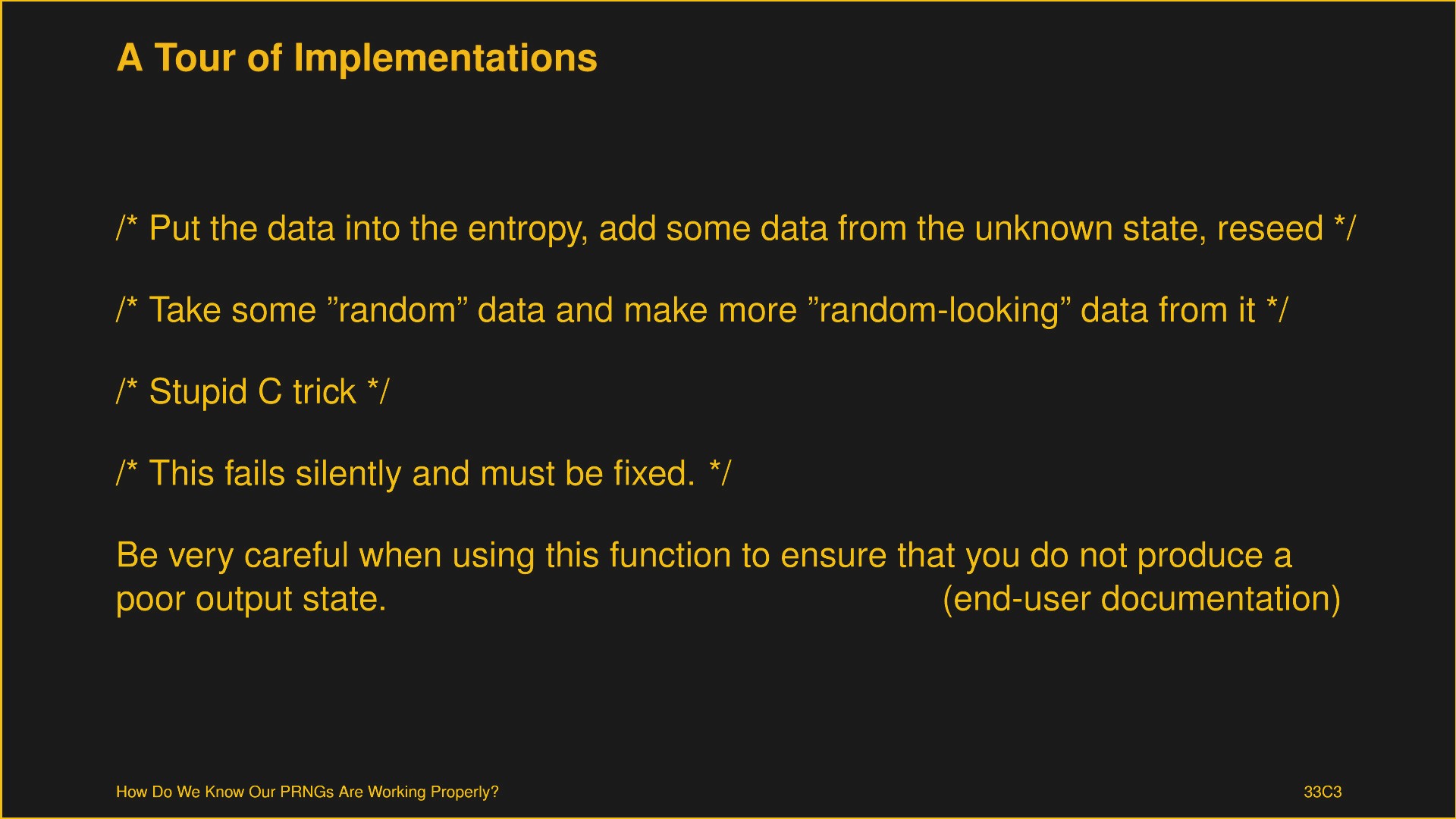
One of the standout talks at the 33rd Chaos Communications Congress concerned pseudo-random-number generators (PRNGs). [Vladimir Klebanov] (right) and [Felix Dörre] (left) provided a framework for making sure that PRNGs are doing what they should. Along the way, they discovered a flaw in Libgcrypt/GNUPG, which they got fixed. Woot.

mpv-shot0012-zoomCryptographically secure random numbers actually matter, a lot. If you’re old enough to remember the Debian OpenSSL debacle of 2008, essentially every Internet service was backdoorable due to bad random numbers. So they matter. [Vladimir] makes the case that writing good random number generators is very, very hard. Consequently, it’s very important that their output be tested very, very well.

So how can we test them? [Vladimir] warns against our first instinct, running a statistical test suite like DIEHARD. He points out (correctly) that running any algorithm through a good enough hash function will pass statistical tests, but that doesn’t mean it’s good for cryptography.
Continue reading “33C3: How Can You Trust Your Random Numbers?”

Autonomous Delivery: Your Impulse Buys Will Still Be Safe

I heard a “Year in Review” program the other day on NPR with a BBC World Service panel discussion of what’s ahead for 2017. One prediction was that UAV delivery of packages would be commonplace this year, and as proof the commentator reported that Amazon had already had a successful test in the UK. But he expressed skepticism that it would ever be possible in the USA, where he said that “the first drone that goes over somebody’s property will be shot down and the goods will be taken.”

He seemed quite sincere about his comment, but we’ll give him the benefit of the doubt that he was only joking to make a point, not actually grotesquely ignorant about the limitations of firearms or being snarky about gun owners in the US. Either way, he brings up a good point: when autonomous parcel delivery is commonplace, who will make sure goods get to the intended recipient?

Continue reading “Autonomous Delivery: Your Impulse Buys Will Still Be Safe”

TruffleHog Sniffs Github For Secret Keys

Secret keys are quite literally the key to security in software development. If a malicious actor gains access to the keys securing your data, you’re toast. The problem is, to use keys, you’ve got to write them down somewhere – oftentimes in the source code itself. TruffleHog has come along to sniff out those secret keys in your Github repository.

It’s an ingenious trick — a Python script goes through the commit history of a repository, looking at every string of text greater than 20 characters, and analyzing its Shannon entropy. This is a mathematical way of determining if it looks like a relatively random string of numbers and letters. If it has high entropy, it’s probably a key of some sort.

Sharing source code is always a double-edged sword for security. Any flaws are out for all to see, and there are both those who will exploit the flaws and those who will help fix them. It’s a matter of opinion if the benefits outweigh the gains, but it’s hard to argue with the labor benefits of getting more eyes on the code to hunt for bugs. It’s our guess though, that a lot of readers have accidentally committed secret keys in a git repository and had to revert before pushing. This tool can crawl any publicly posted git repo, but might be just as useful in security audits of your own codebase to ensure accidentally viewable keys are invalidated and replaced.

For a real world example of stolen secret keys, read up on this HDMI breakout that sniffs HDCP keys.

OWL Insecure Internet Of Energy Monitors

[Chet] bought an electricity monitor from OWL, specifically because it was open and easy to hack on at him within the confines of his home network. Yay! Unfortunately, it also appears to be easy to hack read outside of his home network too, due to what appears to be extraordinarily sloppy security practices.

The short version of the security vulnerability is that the OWL energy monitors seem to be sending out their data to servers at OWL, and this data is then accessible over plain HTTP (not HTTPS) and with the following API: http://beta.owlintuition.com/api/electricity/history_overview.php?user=&nowl=&clientdate=. Not so bad, right? They are requiring username and password, plus the ID number of the device. Maybe someone could intercept your request and read your meter remotely, because it’s not encrypting the transaction?

Nope. Much worse. [Chet] discovered that the username and password fields appear not to be checked, and the ID number is the device’s MAC address which makes is very easy to guess at other device IDs. [Chet] tried 256 MACs out, and got 122 responses with valid data. Oh my!

Take this as a friendly reminder and a cautionary tale. If you’re running any IoT devices, it’s probably worth listening to what they’re saying and noting to whom they’re saying it, because every time you send your data off to “the cloud” you’re trusting someone else to have done their homework. It is not a given that they will have.

33C3: If You Can’t Trust Your Computer, Who Can You Trust?

It’s a sign of the times: the first day of the 33rd Chaos Communications Congress (33C3) included two talks related to assuring that your own computer wasn’t being turned against you. The two talks are respectively practical and idealistic, realizable today and a work that’s still in the idea stage.

In the first talk, [Trammell Hudson] presented his Heads open-source firmware bootloader and minimal Linux for laptops and servers. The name is a gag: the Tails Linux distribution lets you operate without leaving any trace, while Heads lets you run a system that you can be reasonably sure is secure.

It uses coreboot, kexec, and QubesOS, cutting off BIOS-based hacking tools at the root. If you’re worried about sketchy BIOS rootkits, this is a solution. (And if you think that this is paranoia, you haven’t been following the news in the last few years, and probably need to watch this talk.) [Trammell]’s Heads distribution is a collection of the best tools currently available, and it’s something you can do now, although it’s not going to be easy.

Carrying out the ideas fleshed out in the second talk is even harder — in fact, impossible at the moment. But that’s not to say that it’s not a neat idea. [Jaseg] starts out with the premise that the CPU itself is not to be trusted. Again, this is sadly not so far-fetched these days. Non-open blobs of firmware abound, and if you’re really concerned with the privacy of your communications, you don’t want the CPU (or Intel’s management engine) to get its hands on your plaintext.

[Jaseg]’s solution is to interpose a device, probably made with a reasonably powerful FPGA and running open-source, inspectable code, between the CPU and the screen and keyboard. For critical text, like e-mail for example, the CPU will deal only in ciphertext. The FPGA, via graphics cues, will know which region of the screen is to be decrypted, and will send the plaintext out to the screen directly. Unless someone’s physically between the FPGA and your screen or keyboard, this should be unsniffable.

As with all early-stage ideas, the devil will be in the details here. It’s not yet worked out how to know when the keyboard needs to be encoded before passing the keystrokes on to the CPU, for instance. But the idea is very interesting, and places the trust boundary about as close to the user as possible, at input and output.

33C3: Understanding Mobile Messaging And Its Security

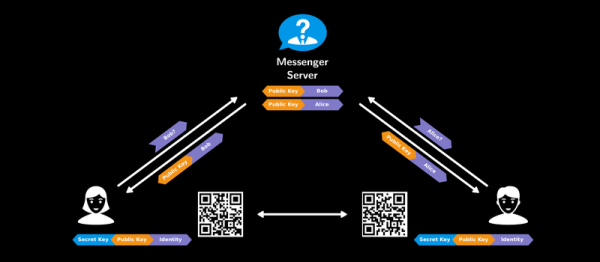
If you had to explain why you use one mobile messaging service over another to your grandmother, would you be able to? Does she even care about forward secrecy or the difference between a private and public key is? Maybe she would if she understood the issues in relation to “normal” human experiences: holding secret discussions behind closed doors and sending letters wrapped in envelopes.

Or maybe your grandmother is the type who’d like to completely re-implement the messaging service herself, open source and verifiably secure. Whichever grandma you’ve got, she should watch [Roland Schilling] and [Frieder Steinmetz]’s talk where they give both a great introduction into what you might want out of a secure messaging system, and then review what they found while tearing apart Threema, a mobile messaging service that’s popular in Germany. Check out the slides (PDF). And if that’s not enough, they provided the code to back it up: an open workalike of the messaging service itself.

This talk makes a great introduction, by counterexample, to the way that other messaging applications work. The messaging service is always in the middle of a discussion, and whether they’re collecting metadata about you and your conversations to use for their own marketing purposes (“Hiya, Whatsapp!”) or not, it’s good to see how a counterexample could function.

The best quote from the talk? “Cryptography is rarely, if ever, the solution to a security problem. Cryptography is a translation mechanism, usually converting a communications security problem into a key management problem.” Any channel can be made secure if all parties have enough key material. The implementation details of getting those keys around, making sure that the right people have the right keys, and so on, are the details in which the devil lives. But these details matter, and as mobile messaging is a part of everyday life, it’s important that the workings are transparently presented to the users. This talk does a great job on the demystification front.