Extending The Range Of Wireless Weather Stations With Walkie Talkies

[Roel] wanted to put a wireless weather station in his greenhouse. Even though the weather station was supposed to transmit over fairly long distances, the geometry of his back yard and a few stone walls killed the radio signal even after putting a good antenna on the receiving side of his wireless weather station setup. Wanting to get his weather station working, [Roel] did the sensible thing and built a packet radio setup out of a pair of walkie talkies, greatly increasing the range of his weather station.

This build comes after [Roel] spent a great deal of time reverse engineering the wireless protocol of his Thierry Mugler weather station. With a little bit of code, [Roel] is able to get the current temperature and humidity reading into his Linux box. This system relies on the transmitter inside the weather station, so the system falls apart over any sufficiently large distance.

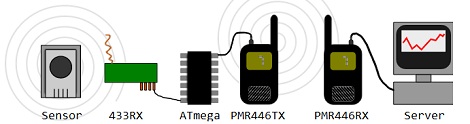
To increase the range of his weather station, [Roel] took his existing hardware and added a pair of inexpensive FRS walkie talkies. The build uses the hardware from his previous build to get the radio data from the weather station. This data is sent over to an ATmega88 where it’s converted to packet radio and sent over the walkie-talkie. On the receiving side, the output of a second walkie-talkie is piped into the Linux soundmodem app (link, but it’s down as of this writing) where it’s decoded. Sending the received data to gnuplot makes a very nice graph of the temperature and humidity.

[Roel] put the code for both the tx and rx sides of the build up on his build page. Very nice work that uses very inexpensive hardware.

Wireless Door Alarms Protect Your Stuff From Afar

wireless-shed-alarm

[Webby] had a friend named [Steve], and as the story goes [Steve] had a few storage sheds on his property that were prone to break-ins.

While the doors were all fitted with a lock, wooden doors are only so strong, and are easy fodder for intruders bearing crowbars and the like. [Steve] was looking for a good way to know when people were poking their heads where they don’t belong, so he rigged up a set of simple alarms that let him know when it’s time to break out the shotgun.

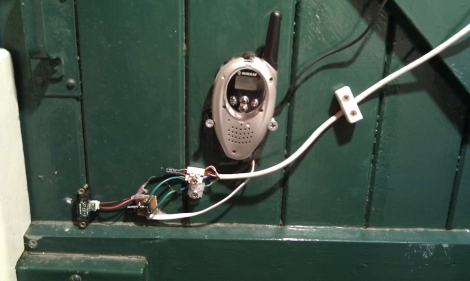
On each of the shed doors, he installed a small IR proximity sensor wired up to a PIC12F675 microcontroller. The PIC is is connected to the “call” button a medium range wireless radio, so that whenever the IR sensor detects that the door is ajar, the PIC triggers an alert on the base unit.

The solution is simple, which we figure also makes it pretty reliable – nice job!

Harvesting And Graphing Wireless Household Utility Meter Info

Both our electrical meter and our gas meter are located in the basement of our house (we recently had the gas meter moved outside though). When people see this they always ask if the meter readers have to come inside once a month. The answer is no, these meters broadcast usage data which is picked up once a month when a utility company vehicle drives down the street. If you have wireless meters in your house, here’s a way to harvest and graph the wireless data so that you can analyze your usage patterns.

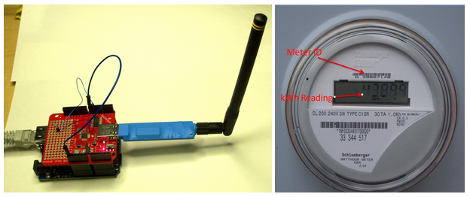
The hardware used here is a special USB dongle. This has a 900 MHz radio which picks out the packets from a reasonably large list of meter types, and pushes them through the USB interface. In the image above you can see that an Arduino with a USB host shield is used, but there are also drivers if you want to connect this directly to your computer.

We looked around and didn’t find any specifics on the hardware used on that board. But it can’t be all that hard to make one of these at home… the populated board seems to have just two ICs and a few passive components. Anyone up to the challenge of hacking together their own packet sniffer? We wonder if the Next HOPE badge could pull down the data?

[Thanks Chris]

Tethering A Kindle For Free 3G

[Excelangue] just posted a guide to using the free 3G connection in your Amazon Kindle to browse the Internet on your computer.

The hack requires a Kindle Keyboard 3G and the free worldwide Internet access that comes along with the purchase price. After jailbreaking the Kindle and applying a USB network hack, [Excelangue] managed to connect his laptop to the Internet through his computer. The process of tethering the Kindle’s 3G is remarkably easy, but we expect a one-click solution will pop up on the web sometime this week.

Of course we have to note here that tethering a Kindle is against the Amazon terms & conditions, and the data going through your Kindle is tied to a unique ID. If you do this, Amazon knows who you are and is more than likely willing to brick your device. [Excelangue] is looking into tethering to the Kindle over WiFi so Android and iOS devices can get in on the action, but he’s still in the process of experimenting with his build.

Touch-based Wirless RGB Lamp Control

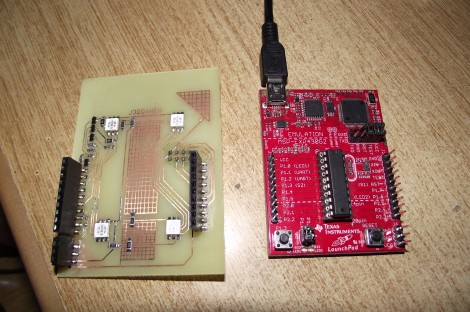
[Alex] built an add-on board for his TI launchpad that lets him use it as a wireless controller for an RGB lamp (translated). As you can see above, the board has a pair of female pin-headers which make it easy to install or remove the board. This way you can use it for other projects without any hassle.

The board itself doesn’t have any buttons. Instead, [Alex] etched a two-sided PCB, including pads for use as capacitive touch sensors. Here we only see the underside of the board, which hosts four RGB LED modules. These give feedback by showing the levels which are about to be set for each color. In the clip after the break you’ll get a good look at the touch sensors. There are two that act like buttons, scrolling through each color channel, and sending the updated values to the lamp via a wireless module mounted on that same side. There are also four pads which act as a slider. We didn’t see any code but apparently this uses one of TI’s touch sensor libraries.

Continue reading “Touch-based Wirless RGB Lamp Control”

Get Neck-deep Into ZigBee

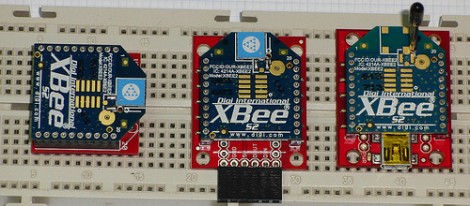
Here’s a bulky tutorial that will round-out your understanding of ZigBee wireless communications (translated). The protocol is great for hobby electronics projects because it uses low-power short range wireless devices to build a mesh network. The guide covers both hardware and software, but also takes the time to explain what that hardware is doing in the background.

As you can see, several different renditions of an XBee module are used as examples. They pretty much all rely on a series of SparkFun breakout boards that each serve different purposes. Once you’ve acquired these modules, there’s a fair number of choices needed to configure them to play nicely with each other. We read most of the tutorial (we’ll save the rest for later enjoyment) and had no problem following along even without owning the hardware or being able to use the interface as we learned.

Whenever we cover XBee modules we always like to mention that it’s quite easy to use these for remote sensors with no additional microcontroller needed.

WiFi Garage Door Opener Makes Forgotten Keys A Thing Of The Past

wifi-garage-door-opener

[Tod’s] daughter has a habit of forgetting to take a house key along with her, so he was looking for a way to make accessing the house easier in a pinch. He had tried wireless garage door keypads in the past, but their performance was so-so at best. After scouring the market for commercial solutions and checking out the work of other hackers, he decided that he needed to craft a custom solution of his own.

He started shopping around for wireless-enabled microcontrollers and settled on a Roving Networks RN-XV module, which is designed as a drop-in replacement for an XBee. Paired with a 5v to 3.3v power adapter, the RN-XV is nearly all he needed to interface his iPhone with his garage door opener.

The microcontroller has enough GPIO pins to control the garage door, while also monitoring the door’s status using a simple magnet/reed switch combo. A web server in [Tod’s] house takes input from any phone connected to his wireless LAN and relays the open/close commands to the opener. The opener in turn returns status messages to him via the web interface.

We really like the system’s simple design, and as long as [Tod] has turned WPS off at home, he really shouldn’t have to worry too much about unauthorized entry.