Running A Game On A PC With No System RAM

As a clear sign of how desperate these RAMpocalypse times are becoming, we have [PortalRunner] over on YouTube contemplating how to run modern-day software on a PC that has no sticks of that most precious PC-related commodity that is not printer ink. What fallbacks do we have when purchasing some sticks of DDR5 is inconceivable due to budgetary limitations or chronic sticker shock symptoms? As it turns out, quite a few.

Of course, it should be noted up front that none of these options are particularly good or desirable. The video starts with simply trying to push Linux to see how little RAM it really needs using boot arguments. This unfortunately soft-bricks the system if not enough RAM is allocated for boot. Next is the idea of leaning heavily into swap, as today’s SSDs ought to be a lot faster than memory page swapping from a HDD. Only this turns out to be also too slow to be usable due to the sheer overhead that this adds.

Even more desperate is to try and use the video RAM on GPUs as a kind of system RAM, which sort-off works, but also with enormous overhead and an if possible worse experience than running a system off basically a pure swap file. Ultimately the most viable method is to lean into the CPU’s many megabytes of cache and modify a CoreBoot BIOS image to simply not initialize system RAM.

As long as you can squeeze your software into the BIOS image and available CPU cache memory, you can run amazing software like the Snake clone in the video. Of course this concept could be expanded upon, and maybe even made to work with UEFI BIOSes, but there will probably not be anyone running Linux from a 32 MB L3 cache any time soon.

Continue reading “Running A Game On A PC With No System RAM”

A Nebula Straight From The Stars To Your Table

Space may truly be the final frontier, but maybe that frontier can be closer than you thought. Pictures of nebulae and planets bring the colorful sights of deep space right to your screen. You may even have models of some of the rockets used for those missions on a shelf. However, did you know that you could even have a model of those nebulae or planetary surfaces from [NASA]?

While we have covered some distributed models from [NASA] here before, the catalog has expanded far past what 2016 had in store. Additionally, the catalog has been sorted into a more user-friendly, filterable interface than a simple GitHub repository. Most models even have a description attached, giving some basic background information on what the Crab Nebula is, for example.

There could always be more; there don’t appear to be many models of the space shuttle or some other expected files, but what is there is incredible. Some non-3D model files can also be found from star maps to full planetary maps.

While this file repository is cool and all, it’s not all [NASA] does. When not sending rockets deep into space for cool pictures, [NASA] has to make sure the Moon doesn’t explode. Was that a possibility at some point? Of course it has been!

LED Matrix Clock Proudly Shows Its Inner Wiring

Some projects take great care to tuck away wire hookups, but not [Roberto Alsina]’s Reloj V2 clock. This desktop clock makes a point of exposing all components and wiring as part of its aesthetic. There are no hidden elements, everything that makes it work is open to view. Well, almost.

The exception is the four MAX7219 LED matrices whose faces are hidden behind a featureless red panel, and for good reason. As soon as the clock powers up, the LEDs shine through the thin red plastic in a clean glow that complements the rest of the clock nicely.

[Roberto]’s first version was a unit that worked similarly, but sealed everything away in a wedge-shaped enclosure that was just a little too sterile, featureless, and ugly for his liking. Hence this new version that takes the opposite approach. Clocks have long showcased their inner workings, and electronic clocks — like this circuit-sculpture design — are no exception.

The only components, besides the Raspberry Pi Zero W and the LED matrices, are the 3D-printed enclosure with a few hex screws and double-sided tape. Design files and code (including the FreeCAD project file) are available should you want to put your own spin on [Roberto]’s design.

A hex dump of the first iteration of the small ELF file

How Small Can A Linux Executable Be?

With ever increasing sizes of various programs (video games being notorious for this), the question of size optimization comes up more and more often. [Nathan Otterness] shows us how it’s done by minifying a Linux “Hello, World!” program to the extreme.

A naive attempt at a minimal hello world in C might land you somewhere about 12-15Kb, but [Nathan] can do much better. He starts by writing everything in assembly, using Linux system calls. This initial version without optimization is 383 bytes. The first major thing to go is the section headers; they are not needed to actually run the program. Now he’s down to 173 bytes. And this is without any shenanigans!

A hexdump of the final ELF file, significantly smaller than the original
The final tiny ELF file

The first shenanigans are extreme code size optimizations: by selecting instructions carefully (and in a way a C compiler never would), he shaves another 16 bytes off. But the real shenanigans begin when he starts looking for spaces in the ELF header that he can clobber while the program is still accepted by Linux: now he can move his already tiny x86_64 code into these “vacant” spaces in the ELF and program headers for a final tiny ELF file weighing in at just 120 bytes.

P.S.: We know it is possible to make this smaller, but leave this as an exercise to the viewer.

An Oscilloscope The Way They Used To Be

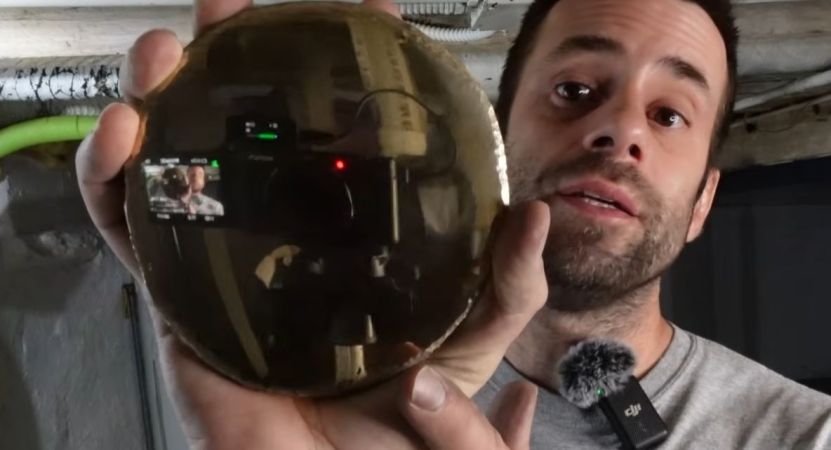
It’s likely that Hackaday has a readership with the highest percentage of oscilloscope ownership among any in the world, and we’re guessing that most of you who fit in that bracket have a modern digital instrument on your bench. It’s a computer with a very fancy analogue front end, and the traces are displayed in software. Before those were a thing though, a ‘scope was an all-analogue affair, with a vacuum-tube CRT showing the waveform in real time. [Joshua Coleman] has made one of these CRT ‘scopes from scratch, and we rather like it.

Using a vintage two inch round tube, it includes all the relevant power supplies and input amplifiers for the deflection plates. It doesn’t include the triggers and timebase circuitry you’d expect from a desktop instrument though, so unless you add a sawtooth on its X input it’s only good for some Lissajous figures. But that’s not the point of a project like this one, because it’s likely even the cheapest of modern ‘scopes way exceeds any capabilities it would have even if it were fully formed. It’s a talking point and an attractive demonstration of a bit of early-20th-century physics, which probably many of us would appreciate if it were ours.

A video of the device is below the break, meanwhile we’ve taken a look in the past at the prehistory of the oscilloscope.

Continue reading “An Oscilloscope The Way They Used To Be”

Art of 3D printer in the middle of printing a Hackaday Jolly Wrencher logo

Improving FDM Filament Drying With A Spot Of Vacuum

Keeping your filament safely away from moisture exposure is one of the most crucial aspects of getting a good 3D print, with equipment like a filament dryer a standard piece of equipment to help drive accumulated moisture out of filament prior to printing or storage. Generally such filament dryers use hot air to accomplish this task over the course of a few hours, but this is not very efficient for a number of reasons. Increasing the vaporization rate of water without significantly more power use should namely be quite straightforward.

The key here is the vapor pressure of a liquid, specifically the point at which it begins to transition between its liquid and gaseous phases, also known as the boiling point. This point is defined by both temperature and atmospheric pressure, with either factor being adjustable. In a pressure cooker this principle is for example used to increase the boiling temperature of water, while for our drying purposes we can instead reduce the pressure in order to lower the boiling point.

Although a lower pressure is naturally more effective, we can investigate the best balance between convenience and effectiveness.

Continue reading “Improving FDM Filament Drying With A Spot Of Vacuum”

A laptop communicating with the drone via an Arduino

Reverse-Engineering The Holy Stone H120D Drone

There are plenty of drones (and other gadgets) you can buy online that use proprietary control protocols. Of course, reverse-engineering one of these protocols is a hacker community classic. Today, [Zac Turner] shows us how this GPS drone can be autonomously controlled by a simple Arduino program or Python script.

What started as [Zac] sniffing some UDP packets quickly evolved into him decompiling the Android app to figure out what’s going on inside. He talks about how the launch command needs accurate GPS, how there’s several hidden features not used by the Android app, et cetera. And it’s not like it’s just another Linux SoC in there, either. No, there’s a proper Real-Time Operating System (RTOS) running, with a shell and a telnet interface. The list of small curiosities goes on.

After he finished reverse-engineering the protocol, he built some Python scripts, through which you can see the camera feed and control the drone remotely. He also went on to make an Arduino program that can do the latter using an Arduino Nano 33 IoT.