
Gameboy Color Boot ROM

top_view_full

It’s only been a week since the Super Gameboy’s boot ROM was dumped by [Costis] and he’s already at it again. This time he’s managed to grab the Gameboy Color’s boot ROM. He found the newer Gameboy Color’s hardware is able to cope with a clock speed up to 100MHz, so the original clock increase trick he used on the Super Gameboy wouldn’t work again.

Instead he discovered a quick disconnection of clock and power before 0xFF50 would make the Gameboy jump to a random area within the ROM. Then it was only a matter of entropy, luck, and some special NOP instructions until eventually he had the boot ROM. Keep up the good work [Costis].
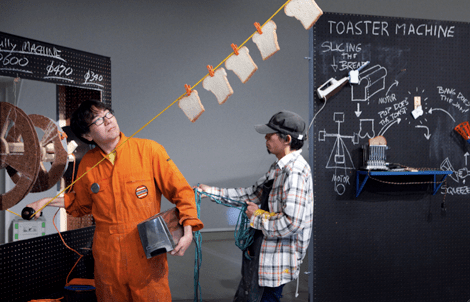
The Incredible Breakfast Machine

A lot of us skip breakfast in the morning, be it because we don’t have time to make something, don’t have the patience, or for some other reason. Yuri Suzuki and Masa Kimura are aiming to make your breakfast a little easier, a little quicker, and a lot more interesting. Their latest project is a Rube Goldberg-like machine that does everything from fry your eggs to brew your coffee. The coolest part about this project is it was built with the help of the public. The two designers put out an open invitation for people to come help in constructing the device at Platform21, a publicly accessible design forum in Amsterdam. Now if someone would tie this into an alarm clock, we could all wake up to the smell of toast and coffee instead of the super loud 140db alarm clock or the confusing (albeit effective) wake up machine.

Pinch Control2: Laser Drawing

[youtube=http://www.youtube.com/watch?v=0uXIqQxarYI]

[atduskgreg] posted this cool looking rig.  That’s a batting glove, chopped up and equipped with a flex sensor and a pressure sensor. The end goal was to create a new method of drawing. You can see he’s interfaced with the servos decently. It seems fairly responsive and intuitive. Looking at his results though, make us wonder if all that effort was worth it. We would probably apply this rig to some kind of animatronics.

Halloween Props: DMX Controlled Skeleton

[youtube=http://www.youtube.com/watch?v=9TSbxErzhkI]

[scarylady] has posted this video about her setup. The skeleton was rigged up to a rotating base with a single pneumatic solenoid to jostle it. She then goes on to show how she has it all connected to her computer with an explanation of the software setup. Though some of us might feel she could have accomplished very similar results with a simple oscillating fan, this is a decent intro to DMX.

We also had several people submit this fantastic list of Halloween projects, The Halloween monster list. There is enough information there to keep you busy for quite a while. We were going to list our favorites, but there are so many fantastic ones, we think you should just go look at them all. Remember to send us more of your projects.

Tool Tip: Microcontroller Timer Calculator

uC_timer_calculator

In life and embedded systems timing is everything. Give [Frank’s] web-based timer calculator a try. Set your system clock resolution (in hertz making sure you account for any system clock divider), select your timer resolution and prescaler, then calculate based on desired ticks, overflows, or real time. He’s built this with the AVR chips in mind but it should be handy for any family of microcontrollers.

Of course none of this is rocket science, but if you’re trying to use one timer for two differently synchronized events this can save you a lot of trial and error time.

Pong On Your Wrist

pong_wristwatch

[John] wanted to take a pong clock and put it in a wristwatch form factor. Take an afternoon and pour over his detailed build logs. This multi-year project is done with meticulous cleanliness that makes us jealous. He’s milled the case and buttons himself, achieving a professional look that equals or surpasses the quality of some commercially available “gaming” watches. The project centers around an OLED display driven by a TI MSP430F2013 processor. Don’t miss the video after the break covering prototyping, PCB work, case milling, and the watch in action. Currently, this is the third generation of development but with a project this exciting, are you ever really finished? Continue reading “Pong On Your Wrist”

Capacitive Buttons Control All Life

capacitive_game_of_life

Projects involving Conway’s Game of Life and utilizing a Nokia 3310 screen are quite popular with electronics hobbyists. [Droky] put these two together and went one step further by adding capacitive sensors to control the Game of Life. His work is a great example of how to use the Atmel QTouch capacitive sensor (QT100a datasheet). This chip does the heavy lifting that we’ve seen in other touch sensitive solutions. It operates from 2V-5.5V, requires only three capacitors and a resistor, has a one pin active high output, and sells for around $1 in low quantities. One thing [Droky] overlooked in his board layout is the ground pad on the bottom of the WSON6 chip. He was able to make it work by masking the trace that runs under the chip but you will want to alter the layout in your own designs.

If you’ve used the QT100a before we’d like to hear about your experience, and find out if button debounce handling is necessary with this chip. Let us know in the comments. You can see a video of it in action after the break.

Continue reading “Capacitive Buttons Control All Life”









