ExoPC Shows Off Some Guts

The folks over at Engadget have posted some pictures of the ExoPC’s insides. With the recent return of the tablet craze (remember xp tablet edition?) we’re seeing tablets everywhere. This one has some promise on the hardware side, sporting a 1.6GHz processor and 2GB of RAM.  Unfortunately we’ve heard using solely a tablet interface with windows7 is somewhat cumbersome even with the built in improvements. We’re not too worried though, a customized appliance style linux interface probably won’t be too far off.

The last couple times we mentioned tablet style computing, people have emailed us about the Touchbook. It also seems pretty cool, but seems like switching applications is visibly laggy in the demo video. Then again, a slimmed down interface might reduce some of that drag.


Altoids Upstaged By Gift Card Tins

Nothing Earth-shattering here. Just, dare we say it, really cute!

The venerable Altoids mint tin has become an icon of the maker culture. Browsing through past articles on Hack a Day, Adafruit or Instructables, you’ll find project after project for which these pocket-sized enclosures provided just the right fit. Eminently practical, affordable, but the aesthetics have occasionally left something to be desired.

We recently stumbled upon these nifty gift card holders that resemble miniature versions of current-generation game consoles. They might be the perfect housing for your next microcontroller project…

Continue reading “Altoids Upstaged By Gift Card Tins”

Running Bleeding Edge On Nexus One

We like to run the newest software available. We often encounter problems and things that don’t work because of this, but with open source that just give you the opportunity to contribute and make the package better. Now you can take the fun and daring of bleeding edge to your phone by installing the latest Linux kernel on the Nexus One. [Jon Lech Johansen] wrote up that eight step process to install 2.6.32, which should take you just minutes if you already have the Android SDK installed. If you don’t what are you waiting for?

Interfacing With An Analog Joystick

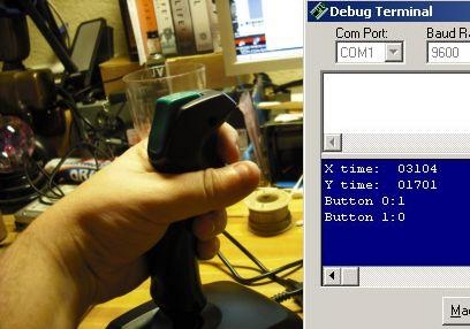
[Firestorm_x1] put together a tutorial about interfacing an analog joystick with a microcontroller. These analog sticks are easy to find; he got his from Goodwill but we’ve got a couple in our junk box right now. The stick uses variable resistors to report its position so it’s just a matter of reading and interpreting that data. After explaining the concepts he demonstrates how to use the joystick to control a Basic Stamp 2 based robot, the Boe-Bot. This could easily be adapted for use with other robot platforms.

Update: Adafruit Eagle Library, Now With Arduino

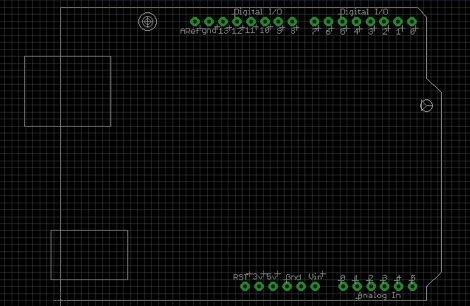
Adafruit Industries has just added an Arduino shield footprint to their EagleCAD library. If you don’t know, the Arduino headers use non-standard pin spacing. Learn to deal with it, there’s too many Arduino shields in production to have any hope for a change in the future. This footprint should make it a lot easier to design your own boards. If you use this package make sure you’re getting the library from their github, they’ve been adding parts regularly. Setting up version control will make sure you always have the latest libraries.

[Thanks pt]

Hardware Based Randomness For Linux

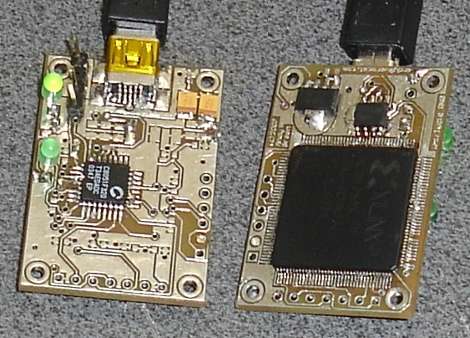
True randomness can be hard to come by in the digital world. [Andy Green] is making it easier to get true entropy by using this random USB dongle. The Whirlygig uses a CPDL to gather data from a set of of oscillators. The oscillators have a constantly fluctuating frequency due to temperature changes; if they run faster they generate more heat which in turn slows them down. This, along with the variable latency associated with polling a USB device, gives great depth of randomness. The device is detected and mounted under ‘/dev/hw_random’ and can then be fed into ‘/dev/random’ using the rng-tools package. [Andy’s] done a lot of testing, both on the hardware, and on the quality of randomness. We didn’t see an option to order this but he’s got hardware and firmware repositories so that you can throw one together yourself.

[Thanks Zunk]

Pre-spun Hard Drives

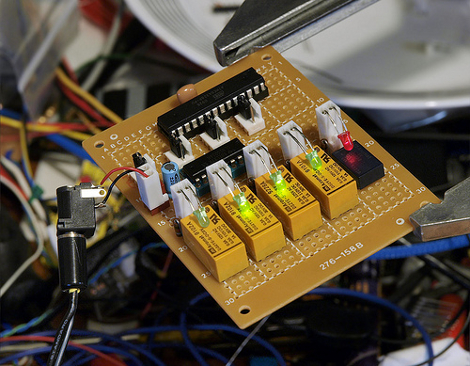
This device is lovingly called the SPINmaster. [Linux-works] built it to spin up multiple hard drives before the motherboard starts up. It detects the power-up from the PSU and uses a relay to hold the motherboard in reset, indicated by the red LED. Each of four relays then spins up a hard drive and illuminates the green LED when ready. Once all green lights come on the reset relay shuts off and the bios starts up. This type of staggered startup takes a lot of the load off of an under-powered PSU. He’s posted firmware and there’s a schematic available too. We took a look at his video but there’s not much to see as it’s just the inside of the machine while it boots up.