Arduino Powered ECG Informs Users Of Their Death

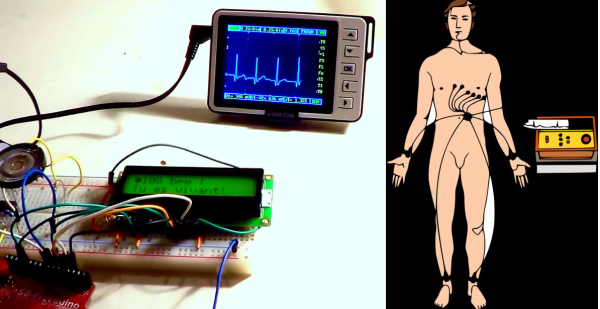
Just when you thought you’d seen an Arduino do everything, [birdyberth] built an Arduino powered Electrocardiogram (ECG or EKG). Electrocardiography is a non invasive method of studying the heart. For many of us that means a 10 minute test during our yearly physical exam. Medical grade ECGs can use up to 10 electrodes. To keep things simple [birdyberth] went the route of a few circuits we’ve seen before, and reduced it to two electrodes and a ground reference. [birdyberth] makes note that the circuit is only safe if battery power is used.

The “heart” of any ECG is an instrumentation amplifier. Instrumentation amplifiers can be thought of as super differential amplifiers. They have buffered inputs, low DC offset, low drift, low noise, high open loop gain, and high impedance among other favorable characteristics. The downside is cost. A typical op amp might cost 0.50 USD in single piece quantities. Instrumentation amplifiers, like [birdyberth’s] INA128 can cost $8.30 or (much) more each. The extra cost is understandable when one thinks about the signals being measured. The ECG is “picking up” the heart’s electrical signals from the outside on skin. On commonly used ECG graph paper, a 1mm square translates to about .1 mV. High gain and clean signals are really needed to get any meaningful data here.

Electrodes are another important part of an ECG. Medical grade ECG units typically use disposable adhesive electrodes that make a strong electrical connection to the skin, and hurt like heck when they’re ripped off by the nurse. [birdyberth] was able to make electrodes using nothing more than tin foil and paper clips. We think the real trick is in the shower gel he used to make an electrical connection to his skin. While messy, the gel provides a low resistance path for the tiny currents to flow.

The actual processing in [birdyberth’s] circuit is easy to follow. The signal from the instrumentation amplifier is sent through a low pass filter, through a 741 op amp, and then on to the Arduino. The Arduino uses a 16×2 LCD to display heart rate in beats per minute, along with a friendly message informing you if you are alive or dead. The circuit even provides audible feedback for heart beats, and the classic “flatline tone” when the users either disconnects the electrodes or expires. [birdyberth] has also plugged in his pocket oscilloscope just after the low pass filter. As his video shows, the familiar ECG waveform is clearly visible. We’d love to see a more complex version of this hack combined with [Addie’s] heart simulator, so we could know exactly which heart malady is killing us in real time!

Continue reading “Arduino Powered ECG Informs Users Of Their Death”

4 Axis Delta Router Says Hello World

deltaRouter

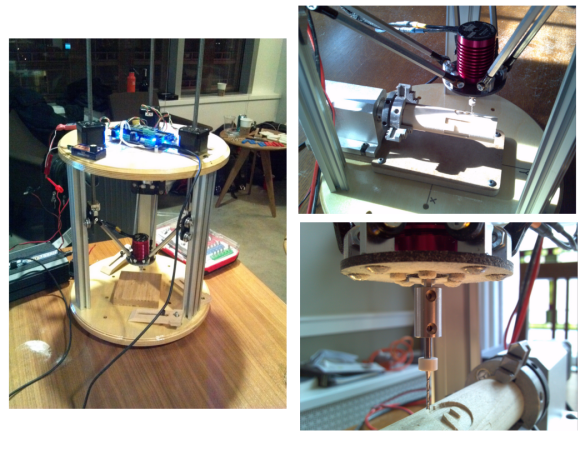
[Bart] stood upon the shoulders of the delta 3D printer giants and created this 4 axis delta router. The router was originally created for ORD Camp, an invite only hackers gathering. Each year he creates a new thing with one main purpose: to spark conversation. In his own words “Practicality and suitability are way down the list, so go ahead and snark away. If you do, you are missing the point.”

[Bart] did things a bit differently with his delta. For motors, he went with non captive steppers. “Non captive” means that rather than a shaft, the motor has a hollow threaded nut which rotates. A lead screw (usually with an acme thread) is passed through this nut. As the motor’s nut turns, the screw is pushed or pulled through the motor, creating a linear actuator. The only major downside is that a non captive stepper motor can’t be adjusted by hand. The screw doesn’t turn and neither do any external parts of the motor. For structure, the router uses MakerSlide and v-grove wheels. The spindle is a simple brushless hobby motor and 30 amp speed control. Rather than the outrunner motors we’ve seen lately, [Bart] wisely chose an inrunner motor normally used on R/C cars. Inrunners generally have less torque than their outrunner counterparts, but they make up for this in RPM. [Bart’s] motor is capable of 30,000 RPM, which is plenty for spindle duty. We think the motor bearings will probably need an upgrade, as the original motor bearings weren’t designed for side loads. For a controller, [Bart] utilized an  Azteeg X3 running Repetier.

The router made a great showing at camp, and [Bart] decided it needed a 4th axis. He sourced a rotary axis from eBay. To keep the software simple, he connected the rotary axis to the extruder outputs on his controller. He was then able to hack the mach3 wrapped rotary post processor to output extruder commands. The results look great. [Bart] says the system definitely needs a tailstock, and we agree. We’re looking forward to the next update on this machine!

Continue reading “4 Axis Delta Router Says Hello World”

Yo Fish, We Pimped Your Tank

fishie

[Studio Diip] a machine vision company based in The Netherlands has created fish on wheels, a robotic car controlled by a goldfish. The idea of giving fish mobility on land is nothing new, but this definitely is a novel implementation. A Logitech 9X0 series camera captures overhead images of the fish tank. The images are then fed into a BeagleBoard XM, where they are processed. The image is thresholded, then a centroid of the fish-blob is determined. With the current and previous blob locations known, the BeagleBoard can determine the fish’s swim direction. It then and commands the chassis to drive accordingly.

The system appears to work pretty well on the video, however we’re not sure how much of the input is due to the fish swimming, and how much is due to the water sloshing and pushing the fish around. We definitely like the chrome rims and knobby tires on the fishes’ pimped out ride.  This could become a trend. Just make sure no animals or humans are hurt, and send your animal powered hacks to our tip line!

Continue reading “Yo Fish, We Pimped Your Tank”

Meet ‘Raspberri’, Your Personal Voice Controlled Assistant

raspda

We’ve all seen the old movie scene where the executive calls his assistant on the intercom for some task or other. [Jan] may not be an executive, and he may not have an assistant. He does have Raspberri, his voice controlled personal digital assistant. Raspberri started life as a vintage Televox intercom box. [Jan] found it at a second-hand store, and snapped it up in hopes of using it in a future project. That project eventually happened when [Jan] got a Raspberry Pi and learned how to use it. He decided to build the Televox and Pi together, creating his own electronic assistant.

[Jan] started by adding a cheap USB sound card and WiFi module to his Pi. He also added a small 3 Watt audio amp board. The Televox used a single speaker as both audio input and output. [Jan] didn’t want to make any modifications to the case, so he kept this arrangement. Using a single speaker would mean dead shorting the audio amplifier and the sound card’s microphone input. To avoid this, [Jan] added a DPDT relay controlled by the original push-to-talk button on the Televox. The relay switches between the microphone input and the audio output on the USB sound card. Everything fit nicely inside the Televox case.

With the hardware complete [Jan] turned his attention to software. He went with PiAUISuite for voice input. Voice output is handled by a simple shell script which uses google voice to convert text to speech. For intermediate processing, such as scraping a weather website for data, [Jan] created custom python scripts. The end result is pretty darn good. There is a bit of lag between saying the command and receiving an answer. This may be due to transferring the audio files over WiFi. However,  [Jan] can always get away with saying his assistant was out getting him more coffee!

Continue reading “Meet ‘Raspberri’, Your Personal Voice Controlled Assistant”

Hacking The Linksys WRT120N

[Craig Heffner] recently found himself on the case of the Linksys WRT120N router. The router’s firmware was using some previously unknown form of obfuscation, causing headaches for those wishing to run their own software. The WRT120N, being a 2009 model is somewhat out of date at this point. That didn’t stop [Craig] though, as he dove into reverse engineering the firmware obfuscation.

[Craig] started by running the firmware through his own Binwalk tool. Binwalk analyzes firmware files for known data, be it embedded filesystems, raw compression streams, or binary files. In this case Binwalk only found a small LZMA block which contained the compressed html files for the router’s web interface. The rest of the firmware was unknown data with a high level of entropy. [Craig] couldn’t do anything more with the firmware update file alone, so he ordered a router to attack from the hardware side. Inside he found typical low-end router components:  An Atheros AR7240 SoC, a 2MB SPI flash chip, 32MB of RAM. He also found serial and JTAG headers.

[Craig] connected to the serial port and was greeted with a boot menu. This allowed him to run some commands on the router, but didn’t give him any way to dump memory. He had to go straight to the source – connecting directly to the router’s SPI flash with an FTDI C232HM cable. Using libmpsse, another of his open source tools, [Craig] was able to dump the flash. He now had the un-obfuscated bootloader code, albeit in MIPS assembly. [Craig] was then able to go after the bootloader with IDA Pro. After a bit of work, the obfuscation system was exposed. The system was simple – several byte and nibble swaps had been performed between the LZMA header block and the first few bytes of data. [Craig] finished out this part of his hack by writing a simple C program to de-obfuscate and decompress the firmware.

Free Falling Quadcopter Experiments End With Splat

Don’t get too attached to the great picture up above, as the quad shooting it was in a death plunge when the frame was snapped. There’s just something tempting about free fall. Nearly every tri/quad/hex/multicopter pilot has the impulse to chop the throttle while flying around. Most quadcopters are fixed pitch, which means that as power drops, so does control authority. When power is cut, they fall like stones. A quick throttle chop usually results in a few feet of lost altitude and a quickened pulse for the pilot. Cut power for much longer than that, and things can get really interesting.  [RcTestFlight] decided to study free fall in depth, and modified a test bed quadcopter just for this purpose.

First, a bit of a primer on free-falling quadcopters and their power systems.  Quadcopters always have two motors spinning clockwise, and two spinning counterclockwise. This configuration counters torque and allows for yaw control. Most large quads these days use sensorless brushless motors, which can be finicky about startup conditions. Brushless controllers are generally programmed to kick a motor into spinning in the proper direction. If a motor is spinning in reverse at several hundred RPM, things can get interesting. There will often be several seconds of stuttering before the motor starts up, if it starts at all. The controller MOSFETS can even be destroyed in cases like this.

When a quadcopter loses power, the motors slow down and thrust drops off. The quad begins to drop. As the falling quadcopter picks up speed, the propellers begin to spin (windmill) due to the air rushing up from below. If the quadcopter started its fall in a normal attitude, all four of  the propellers will rotate reverse of its normal direction.  The now spinning props will actually act as something of an air brake, slowing the fall of the quad. This is similar to a falling maple seed, or autorotation in a helicopter.  The spinning blades will also act as gyroscopes, which will add some level of stabilization to the falling quadcopter. Don’t get us wrong – the quadcopter can still be unstable as it falls, generally bobbing and weaving through the air. None of this is a guarantee that the quad won’t tip over onto its back – which will reverse the entire process.  Through all of this bobbing, weaving, and falling the flight controller has been along for the ride. Most flight controllers we’ve worked with have not been programmed with free fall in mind, so there is no guarantee that they will come back on-line when the throttle is rolled on. Thankfully many controllers are open source, so testing and changes are only a matter of risking your quadcopter.

Continue reading “Free Falling Quadcopter Experiments End With Splat”

A USB Connected Box-o-Encoders

picoscope-encoder

[Colin] loves his PicoScope, a USB based “headless” oscilloscope. While using it he found himself longing for a classic oscilloscope interface. Mouse clicks just weren’t a replacement for grabbing a dial and twisting it. To correct the situation he created his USB-Connected Box-o-Encoders. The box maps as a USB keyboard, so it will work with almost any program.

[Colin] started by finding encoders. There are plenty of choices – splined or flatted shaft, detents or no detents, panel, PCB, or chassis mount. He settled on an encoder from Bourns Inc. which uses an 18 spline shaft. His encoder also includes a push button switch for selection. With encoders down, knobs were next. [Colin] chose two distinct styles. The two knob styles aren’t just decorative. The user can tell which row of knobs they are on by touch alone. Electronics were made simple with the use of a Teensy++ 2.0. [Colin] used a ATUSBKey device running Teensy software, but says the Teensy would have been a much better choice in terms of size and simplicity.

Once everything was wired into the box, [Colin] found his encoders would “spin” when the knobs were turned. They are actually designed to be PCB mounted, and then screwed into a control panel. Attempts to tighten down the panel mounting nut resulted in a broken encoder. Rather than redesign with purely panel mounted encoders, [Colin] used a dab of epoxy to hold the encoder body in place.

Continue reading “A USB Connected Box-o-Encoders”