Case Modder Builds LCD Window; Causes LSD Flashbacks

lcd-casemod

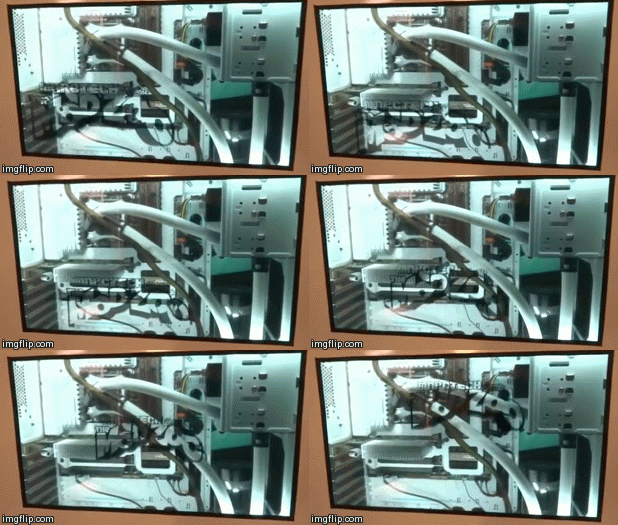
[Chris, aka Mosquito’s Mods]  is well-known for some awesome PC case mods. He’s outdone himself this time with an embedded LCD panel as his case window. This use of an LCD is becoming common on arcade games and slot machines. [Chris] was inspired by an arcade game he saw at a local Dave & Buster’s. He started with an off the shelf 16″ USB LCD monitor from AOC. [Chris] then stripped off the back light, diffuser, and reflectors. Left with  the bare panel and polarizers, he then created an LCD sandwich of sorts. First a layer of 2mm acrylic. Then the LCD and panel, along with 4 strips of acrylic forming a frame around the LCD. The frame strips are in blue in the image after the break. Continue reading “Case Modder Builds LCD Window; Causes LSD Flashbacks”

Roving Hexapod Poops Out 3D Prints

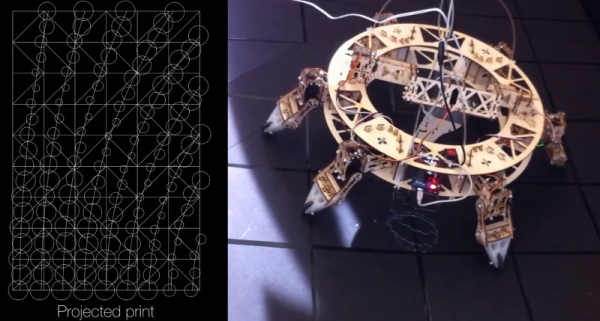
[Jia Wu, Mary Sek, and Jeff Maeshiro], students  at the California College of the Arts (CCA) in San Francisco, took on the task of developing a walking 3D printer. The result is Geoweaver, a hexapod robot with a glue gun extruder system. Hackaday has seen walking CNC machines before, but not a 3D printer. Geoweaver uses two servos on each of its six legs to traverse the land. The team was able to program several gaits into the robot, allowing it to traverse uneven terrain. Walking is hard enough on its own, but Geoweaver also uses a glue gun based extruder to make 3D prints. The extruder head uses two servos to swing in a hemispherical arc. The arc is mapped in software to a flat plain plane, allowing the robot to drop a dollop of glue exactly where it is programmed to. Geoweaver doesn’t include much in the way of on board processing – an Arduino Uno is used to drive the 15 servos. Those servos coupled with a glue gun style heater pull quite a bit of power, which has earned Geoweaver nicknames such as Servo Killer, Eater of Shields, Melter of Wires, and Destroyer of Regulators.

Geoweaver’s prints may not be much to look at yet, however the important thing to remember is that one of the future visions for this robot is to print on a planetary scale. Geoweaver currently uses reacTIVision to provide computer control via an “eye in the sky”. ReacTIVision tracks a fiducial marker on the robot, and applies it to a topographical map of the terrain. This allows Geoweaver to change its height and print parameters depending on the flatness of the ground it is printing on. On a scaled up Geoweaver, reacTIVision would be replaced by GPS or a similar satellite based navigation system.  Most of the software used in Geoweaver is opensource, including Grasshopper and Firefly, written by the team’s professor, [Jason Kelly Johnson]. The exception is Rhino 5. We would love to see an option for a free or open source alternative to laying out ~$1000 USD in software for our own Geoweaver.

Continue reading “Roving Hexapod Poops Out 3D Prints”

Chameleon Emulates Contactless Smart Cards

chameleon

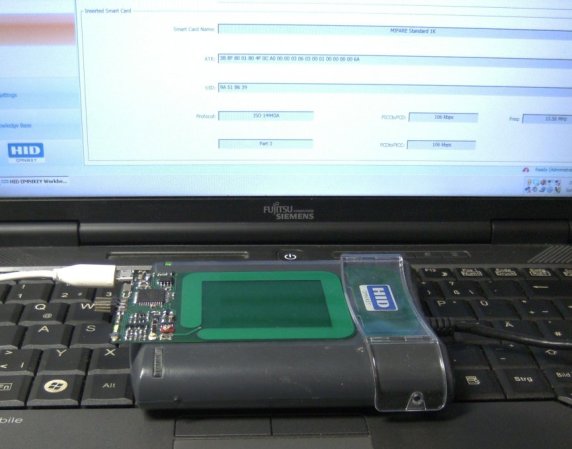
Researchers at Ruhr University of Bochum in Germany have been busy working with RFID and related devices for quite some time now. They call the fruit of their labors Chameleon, a versatile Contactless Smart Card Emulator. Contactless Smart Cards are RFID style devices that also contain a smart card style memory. These cards are often used for payment, replacing mag strip style credit cards. Philips MIFARE Classic cards are a common example of contactless smart cards. The Chameleon is set up to emulate any number of cards using the common 13.56MHz frequency band. Adding a new card is as simple as loading up a new CODEC  and application to the firmware. Currently Chameleon can emulate MIFARE cards using the ISO14443A.

The Chameleon is completely open source, and can be built for around $25 USD. The heart of the system is an Atmel ATxmega192A3 microcontroller. The 192 is a great microcontroller for this task because it contains hardware accelerators for both DES and AES-128. An FTDI USB interface chip is used to provide an optional communication link between a host computer and the ATxmega. The link can be used for debugging, as well as manipulating data in real-time. A host PC is not necessary for use though – the Chameleon will operate just fine as a stand alone unit. We definitely like this project – though we’re going to be doubling down on the shielding in our RF blocking wallets.

DARPA Robotics Challenge Trials Wrap Up

schaft-drive

The DARPA robotics challenge trials 2013 are have finished up. The big winner is Team Schaft, seen above preparing to drive in the vehicle trial. This isn’t the end of the line for DARPA’s robotics challenge – there is still one more major event ahead. The DARPA robotics finals will be held at the end of 2014. The tasks will be similar to what we saw today, however this time the team and robot’s communications will be intentionally degraded to simulate real world disaster situations. The teams today were competing for DARPA funding. Each of the top eight teams is eligible for, up to $1 million USD from DARPA. The teams not making the cut are still welcome to compete in the finals using other sources of funding.

The trials were broken up into 8 events. Door, Debris, Valve, Wall, Hose, Terrain, Ladder, and Vehicle. Each trial was further divided into 3 parts, each with one point available. If a robot completed the entire task with no human intervention it would earn a bonus point. With all bonuses, 32 points were available. Team Schaft won the event with an incredible total of 27 points. In second place was Team IHMC (Institute for Human Machine Cognition) with 20 points. Team IMHC deserves special praise as they were using a DARPA provided Boston Dynamics Atlas Robot. Teams using Atlas only had a few short weeks to go from a completely software simulation to interacting with a real world robot. In third place was Carnegie Mellon University’s Team Tartan Rescue and their Chimp robot with 18 points.

The expo portion of the challenge was also exciting, with first responders and robotics researchers working together to understand the problems robots will face in real world disaster situations. Google’s recent acquisition — Boston Dynamics — was also on hand, running their WildCat and LS3 robots. The only real downside to the competition was the coverage provided by DARPA. The live stream left quite a bit to be desired. The majority of videos on DARPA’s YouTube channel currently consist of 9-10 hour recordings of some of the event cameras. The wrap-up videos also contain very little information on how the robots actually performed during the trials. Hopefully as the days progress, more information and video will come out. For now, please share the timestamp and a description of your favorite part with your comments.

Continue reading “DARPA Robotics Challenge Trials Wrap Up”

DARPA Robotics Challenge Trials Day 1

darpa-val1

Today was the first of two days of trials at the DARPA Robotics challenge at Homestead-Miami Speedway in Florida. Created after the Japan’s Fukushima nuclear disaster, The robotics challenge is designed to advance the state of the art of robotics. The trials range from driving a car to clearing a debris field, to cutting through a wall. Robots score points based on their performance in the trials. Much of the day was spent waiting for teams to prepare their robots. There were some exciting moments however, with one challenger falling through a stacked cinder block wall.

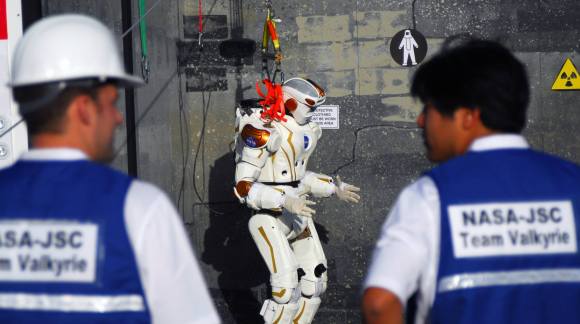
Pictured above is Valkyrie from NASA JPL JSC. We reported on Valkyrie earlier this month. Arguably one of the better looking robots of the bunch, Valkyrie proved to be all show and no go today, failing to score any points in its day 1 trials. The day one lead went to Team Schaft, a new robot from Tokyo based startup company Schaft inc. Schaft scored 18 points in its first day. In second place is the MIT team  with 12 points. Third place is currently held by Team TRACLabs with 9 points. All this can change tomorrow as the second day of trials take place. The live stream will be available from 8am to 7pm EST on DARPA’s robotics challenge page.

Continue reading “DARPA Robotics Challenge Trials Day 1”

An Even Larger Array Of Many LEDs And No Ping-Pong balls

Color Led Matrix

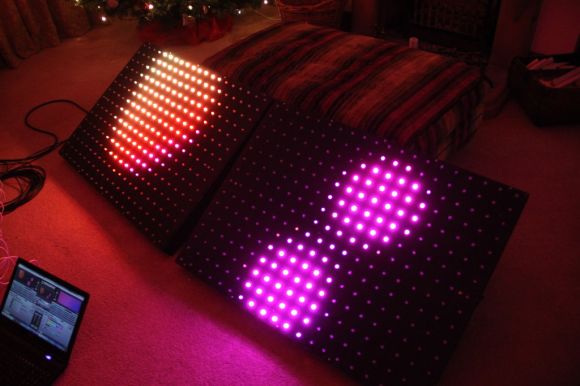
[George] has gone pro with his latest RGB LED panel. We’ve chronicled [George’s] journey toward the elusive land of LED nirvana for a couple of years now. He started with an 8×8 rainbow board of many ping-pong balls. When that wasn’t enough, he upped the ante to a 32×16 array of ping-pong balls. Still not satisfied, [George] has now increased the size to two 20×15 panels, for a total of 600 LEDs. While this is only a modest size increase from the previous incarnation, the major changes here have been in the design and construction of the array.

[George] found himself using his LED panels in some professional settings. The stresses of moving and rigging the panels revealed several design weaknesses. The point to point discrete LED design tended to short, leading to troubleshooting by poking at wires in a dark club. The control code was also a mixed bag of solderlab’s code, [George’s] code, and various scripts. Even the trademark ping-pong ball light diffusers were a problem, as they created a fire hazard. [George] took all the lessons from the first and second LED arrays and started a new design – the MX3. The panel frames were constructed by a professional metal shop. Starting with a square steel tube backbone, and aluminum panel shell was welded into place. The steel tube provides a hardpoint mount for any number of rigging options. The front panels are medium-density fibreboard, treated with a fire-retardant paint.

The electronics have also changed. Gone are the individual RGB LEDs. [George] has switched over to the common WS2812 LED strings. Panel mounted Raspberry Pis control the LED strings. Communication is via Art-Net, an Ethernet implementation of the common DMX512 protocol commonly used in stage lighting. The final result looks great.  We’re impressed with how much [George] has accomplished at such a young age (He was 16 last June).

Continue reading “An Even Larger Array Of Many LEDs And No Ping-Pong balls”

Ambient Computer Noise Leaks Your Encryption Keys

[Daniel, Adi, and Eran], students researchers at Tel Aviv University and the Weizmann Institute of Science have successfully extracted 4096-bit RSA encryption keys using only the sound produced by the target computer. It may sound a bit like magic, but this is a real attack – although it’s practicality may be questionable. The group first described this attack vector at Eurocrypt 2004. The sound used to decode the encryption keys is produced not by the processor itself, but by the processor’s power supply, mainly the capacitors and coils. The target machine in this case runs a copy of GNU Privacy Guard (GnuPG).

During most of their testing, the team used some very high-end audio equipment, including Brüel & Kjær laboratory grade microphones and a parabolic reflector. By directing the microphone at the processor air vents, they were able to extract enough sound to proceed with their attack. [Daniel, Adi, and Eran] started from the source of GnuPG. They worked from there all the way down to the individual opcodes running on the x86 processor in the target PC. As each opcode is run, a sound signature is produced. The signature changes slightly depending on the data the processor is operating on. By using this information, and some very detailed spectral analysis, the team was able to extract encryption keys. The complete technical details of the attack vector are available in their final paper (pdf link).

Once  they had the basic methods down, [Daniel, Adi, and Eran] explored other attack vectors. They were able to extract data using ground fluctuations on the computers chassis. They even were able to use a cell phone to perform the audio attack. Due to the cell phone’s lower quality microphone, a much longer (on the order of several hours) time is needed to extract the necessary data.

Thankfully [Daniel, Adi, and Eran] are white hat hackers, and sent their data to the GnuPG team. Several countermeasures to this attack are already included in the current version of GnuPG.