
Booting A 1989 Mac With Mario

As a new recruit to the 68k Macintosh Liberation Army, [dougg3] is really showing off his hardware hacking ability. He came up with a replacement ROM SIMM for his Mac IIci and made it play the Mario theme on boot instead of the normal chimes.

Swapping out the ROM in these old macs isn’t an uncommon procedure. On some 68k machines, there’s a SIMM slot to either replace or expand the soldered ROM. In fact, it’s fairly common to take the ROM SIMM out of a IIsi and put it in the king of kings computer to make an SE/30 32-bit clean. We’ve never seen a re-writable ROM SIMM for these old macs, so we’re pretty sure [dougg3] just spared a Mac IIsi from the dumpster.

Now that the entire 68k Liberation Army is clamoring for one of [dougg3]’s re-writable ROMs (we’ve got cash), the question of what to do with it comes up. Of course, SE/30s can now be 32-bit clean without installing MODE32 and new startup chimes can be added. We’d really like to see some hard-core ROM hacking going on, like installing a 68060 in a Quadra 950.
Continue reading “Booting A 1989 Mac With Mario”

Remote-controlled USB Switch

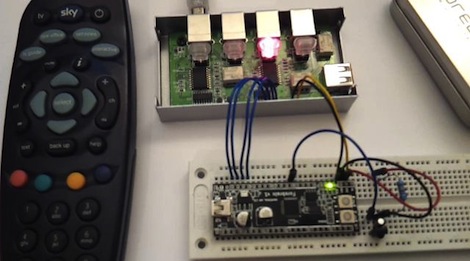
When [beerninja] wanted to swap his USB keyboard from one game console to another without mucking about with wires, he asked the Hack A Day forums for some help. [Meseta] (AKA [UAirLtd]) came to the rescue and built [beerninja] a remote-controlled USB switch.

After opening up a no-name USB switch, [Meseta] discovered that the switching is done with simple relays and switches. A hugely overpowered Forebrain ARM dev board was used to pull each switch low for a few hundred milliseconds to switch the output USB port.

For the infrared remote control, [Meseta] dug into Lady Ada’s IR sensor tutorial and decoded buttons 1 through 4 on a Sky TV remote. Each button from one to four corresponds to the buttons on the USB sharing switch. The ‘0’ button was also decoded as a convenience to put the Forebrain into its reprogramming mode. After drilling a small hole for the IR receiver, the finished project was stuffed back into the original steel enclosure.

Check out the video of the switch in action after the break.

Continue reading “Remote-controlled USB Switch”

Putting Twitter In A VFD Clock

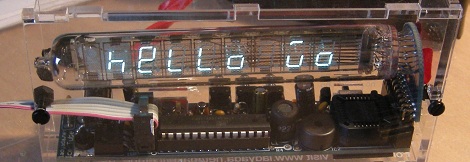
Not content with only knowing the time, [trandi] decided his Vacuum Fluorescent Display clock would be much better if it displayed the weather and a Twitter feed.

[trandi] received a Lady Ada Ice Tube clock last month. The kit went together almost too easily. Now he had to, “make it connect to other ‘stuff’ and display some custom messages.” After playing with the firmware to display a Hello World, [trandi] mucked around with the GPS mod and figured out how to add scrolling text over a serial connection.

A serial connection to an Internet-connected computer is all well and good, but [trandi] really wanted a stand-alone solution. A tiny WiFi to RS-232 board was sourced and the work of getting a clock on the internet began in earnest. After a weekend was wasted trying to debug the HTTP mode of the WiFi board, [trandi] gave up and used TCP mode with manually constructed HTTP headers.

The clock gets the current weather and a Twitter feed. To one-up to the Ice Cube GPS mod, the clock now sets its own time from the Internet. Check out the video of [trandi] showing off his Internet clock and fine collection of single malts after the break.

Continue reading “Putting Twitter In A VFD Clock”

Sustainability Hacks: Automatic Window Control

Sometimes, changing one little bit of a green hack turns it into a build that wastes as much energy as our gaming rig. [Dr. West]’s automatic window controller is one of these builds. The good news is the window controller can be easily modified to cut energy costs in the fall and spring.

[Dr. West] doesn’t have any control over the heat in his apartment and for the entire Canadian winter, his apartment gets really hot. He doesn’t pay for his heat, so he does what any of us would do – crack a window. Inspired by this post, he put a linear actuator in the frame of his kitchen window. [Dr. West] didn’t want to damage the window frame, so he attached the actuator to a piece of square aluminum tubing that mounts to the existing screw holes.

The electronics, [Dr. West] used a Rabbit 2000 dev board, LCD display and keypad, and built an H-bridge circuit on a bit of breadboard. Because of a port conflict and admitted laziness, an Arduino is used to read the thermistor. The display shows the current and desired temperature, and the Rabbit opens and closes the window accordingly. All the source code is posted in the forum post.

While it’s not the most ‘green’ idea to dump heat from a building’s HVAC system out into a frozen tundra, this would be a great build to automatically open and close windows in the more temperate seasons. Open windows during the day, close them at night and you’ll have no more problems coming home to a house that’s either too hot or too cold. Check out a video of the automatic window after the break.

Continue reading “Sustainability Hacks: Automatic Window Control”

CV Sequencer With A TV Out

[gijs] sent in the control voltage sequencer he’s been working on that uses the TVout Arduino library to provide a graphical interface.

The sequencer doesn’t produce any sound on its own. Instead, it outputs a Control Voltage so other synths can be sequenced with [gijs]’ TVSCV. Before MIDI came around, CV was the standard to connect synthesizers and drum machines together. Even today, a lot of boutique synths have at least one jack for CV. [gijs]’ build is really interesting because of the user interface – the TVout Arduino library was used in conjunction with a tiny CRT to change values, timing and speed of the CV output. The TVSCV is able to sequence two different channels of CV at 10 bit resolution with 16 steps per bank.

From the video after the break, the TVSCV sounds like it can produce what would be the trippiest soundtrack ever conceived for an Atari or NES game. It’s a great bit of kit, especially when connected to an Atari punk console or a TR-808 and a glitch delay.

Continue reading “CV Sequencer With A TV Out”

They May Be For Developing Countries, But We Want A Concrete Lathe

At the 2009 Ghana Maker Faire, [Pat Delany] met a young carpentry student that saved for three months to buy a cheap Chinese wood plane. He was confounded by this distribution of resources, so [Pat] created the Concrete Lathe project that aims to get useful machine tools out to where they’re needed most.

The idea for concrete machine tools came out of the US involvement in World War I. America had been staunchly isolationist before committing to the war, and production of arms did not match the needed output. A man named L.I. Yeomans came up with the idea of building concrete lathes to produce artillery shells for the war effort.

Of course, the concrete lathe project is a bit more peaceful in its intentions. The concrete lathe is meant to be a cheap machine tool for developing nations. Both the concrete lathe and the Multimachine are meant to be built cheaply using scrap materials, reduce training time for machinists, and create other machine tools in a Reprap-like biological distribution.

There’s a ton of documentation on the concrete lathe wiki like the bed instructions torn from the pages of Ikea instructions, and the thread follower. While they’re still a lot of work and testing to be done, giving some manufacturing capability to those who need it most is a pretty noble cause.

Thanks [Rob] for sending this one in.

Python On A Microcontroller

The team at LeafLabs was looking for something cool to do with their new ARM development board. [AJ] asked if anyone had ever played around with Python, so [Dave] cooked up an implementation of PyMite and put it on a Maple board. While the writeup is only about blinking a LED with a microcontroller, they’re doing it with Python, interactively, and at runtime.

The build uses the Maple Native board the team is developing. The board has a 32-bit ARM chip with 1 Meg of RAM – more than enough horsepower to run PyMite. The tutorial for putting PyMite on a Maple is up on the LeafLabs wiki.

PyMite is theoretically able to control every pin on the Maple Native and do just about everything a regular Python distro can do. The LeafLabs team is still working on the necessary libraries for their board (although we don’t see anything on the Google code page), so right now only blinking the LED is supported. Still, it’s pretty cool to have Python in your pocket.