DOOM Played On Series Of 555 Timers

It’s technically true that any piece of software can be reproduced in hardware, although modern software’s size and complexity generally makes this a non-starter. But if we go far enough back in time, older software becomes easier and easier to implement in hardware. The original DOOM from 1993 might one day be recreated in full this way, but that day is not today. Instead, [Nick] has recreated the original music from that game, playing the opening track in nothing but 555 timers.

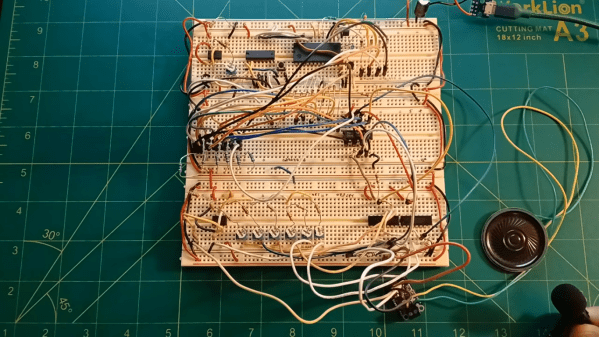
The circuit starts with a 555 timer that acts as a system clock with a rate of just over 7 Hz. These pulses feed a binary counter which in turn feeds a decoder, giving the circuit 15 positions. Each output of the decoder feeds to a diode matrix which stores information about what pitch the circuit should play. The circuit only needs to play six pitches so the diodes effectively connect each moment in time to one of these six notes. From there the circuit feeds into a set of switches which select different resistor networks of another 555 which is actually responsible for producing sound. The resistor networks have different values to adjust the timing of the 555 to produce different pitches.

Of course this entire exercise is largely academic as almost any microcontroller would be able to be programmed to play this chiptune quite easily, but it’s not a bad idea to get down into the weeds of digital logic from time to time in order to refine one’s skills and knowledge about what’s really going on in the inner workings of circuits. Or, go even deeper than that and build the logic gates themselves from first principles.


Continue reading “DOOM Played On Series Of 555 Timers” →

Panoramic Photography With A Linear Scanner

Although digital photography took a big bite of the film industry’s lunch, it wasn’t able to completely eliminate the need — or desire — for photographers to use film in some situations. But digital information from a camera sensor can be manipulated to augment the natural physical capabilities of a camera in ways not really feasible for film. High dynamic range images, focus and exposure stacking, and automatic panoramic stitching. This camera takes the latter example to the extreme.

[Philo]’s proof of concept was a smartphone camera set on a chair and rotated around a room. Some software grabbed a single column of pixels as it moved and stitched them all together to form an image. This came out well enough that the idea was refined a few times, but it wasn’t until a single-line digital camera meant for imaging assembly lines was found that this really took off. Using the camera and some custom software, [Philo] was eventually able to take some of the longest panoramic images we’ve seen, using things like railways and boats as the track the camera rides on, with accelerometer data to help stabilize the image.

The results speak for themselves. There’s a bit of wobble from the movement of the various vehicles despite the accelerometer data, but given that the image is coming from a sensor meant for examining conveyor belts, it’s hard to complain. Of course, if you want to stick to film, there are panoramic film cameras available too even if they don’t quite have the reach of this digital one.

Rooftop Camper For Roofless Vehicle

The Honda Goldwing is one of the more famous motorcycles ever produced. It’s known for its reliability and comfort, but also for being one of the first motorcycles Honda rolls out new technology with. It was the first to have a factory-installed airbag as well as integrated GPS, and is now largely associated for being a sort of two-wheeled RV with how many creature comforts it supports for long-distance riders. [Matt] has a Goldwing of his own, and is taking that RV-like feeling to the extreme with a rooftop camper for this motorcycle.

Of course, motorcycles don’t have roofs, but if this Goldwing had one this camper would definitely be above that. Goldwings are already heavy enough without an enormous weight dramatically increasing the center of gravity, and [Matt] certainly had his problems with that along the way. But before this adventure he had modified it into a hill climber, removing a lot of the extraneous equipment from it. Attaching some metal frame and a lightweight camper shell to it didn’t seem like too much of a stretch from there, so he got to work with a welder. At the end he has a box that’s just barely big enough for him to sleep in but is more or less functional as a camper.

Perhaps unsurprisingly, [Matt] dropped this more than once on its maiden voyage, and one of those falls damaged a wiring harness that caused his battery to drain in the night. Luckily he was not too far from home on the test drive. We’d tend to think that this camper won’t be one that [Matt] keeps working on (although we’d imagine a tricycle kit might solve his center of gravity issues) but since he’s built some other interesting campers in the past we’re not too sure we’d count this one out just yet.

New Controller Makes Heavy Machinery Intuitive

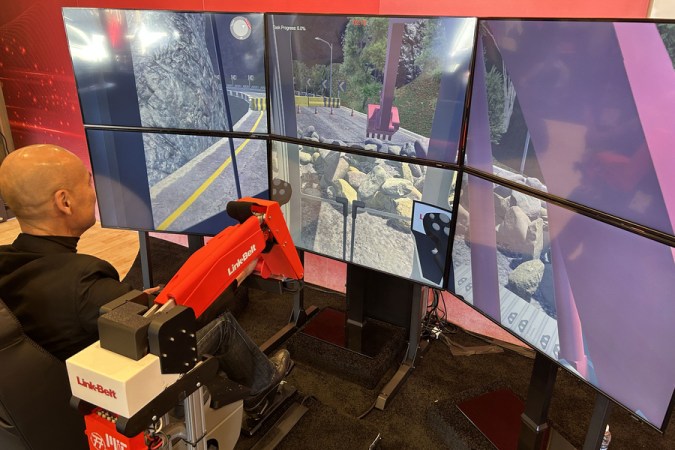
As children, many of us looked wistfully into the cockpits of heavy machinery, wondering just how the series of knobs and levers would do something like operate a bulldozer, crane, or excavator. The nature of these myriad of hydraulic and electronic controls for equipment like this is often inscrutable to adults as well; it takes a considerable amount of training to be able to competently operate most of these machines. But this new controller from MIT may help shorten that training time.

The controller is specifically meant for excavators. In a standard excavator, a pair of joysticks is typically used, with one controlling the swing and the boom and the other controlling the stick and the bucket. Getting used to this combination can take practice, so instead the group of researchers replaced them with a model excavator arm that the operator controls directly with their own arm. The new controller is more intuitive to use as it translates the movements of the model to that of either a real excavator or a training simulation.

The researchers plan to include haptic feedback in future versions, which will hopefully further increase the ease of which new operators can get a feel for using these machines. For those not working towards a new career or an ambitious weekend with rental equipment, there are some other ways of learning how to operate excavators and other pieces of heavy machinery.

Self-Hosting Offline Websites

If there’s one thing that’s guaranteed in the tech world it’s that nothing is guaranteed. From AOL, Netscape, Yahoo, and MySpace, every tech empire seems to eventually fall to ruin. One method to reliably maintain information or online experiences that are lost to whims of computer users and markets is to backup, preserve, and host that information on one’s own computers, and the Kiwix project aims to help make offline backups of favorite websites.

The open-source tool started as a way for users to make their own offline backups of Wikipedia but eventually expanded into having the ability to backup many other sites as well. Wiki-type sites are generally the easiest, but it can also create backups of other sites like StackExchange so that when the Internet goes down or the site vanishes from the world, the information is preserved for use. There are plenty of guides online for setting up Kiwix as well, with it running easily on most Linux systems with or without the help of Docker, as well as versions available for Windows, Android, and Apple platforms.

Although the Kiwix software hosts the website backups, creating the backups needs to be done with another tool called Zimit to create the .zim files Kiwix uses. The Kiwix organization also hosts pre-downloaded .zim files of common websites so each user is not independently crawling Wikipedia on their own, a task that could take months on limited consumer hardware. As for what hardware to ultimately host it on, we might recommend an armageddon-proof machine like this one.

Miniaturizing The Atari 2600 Console

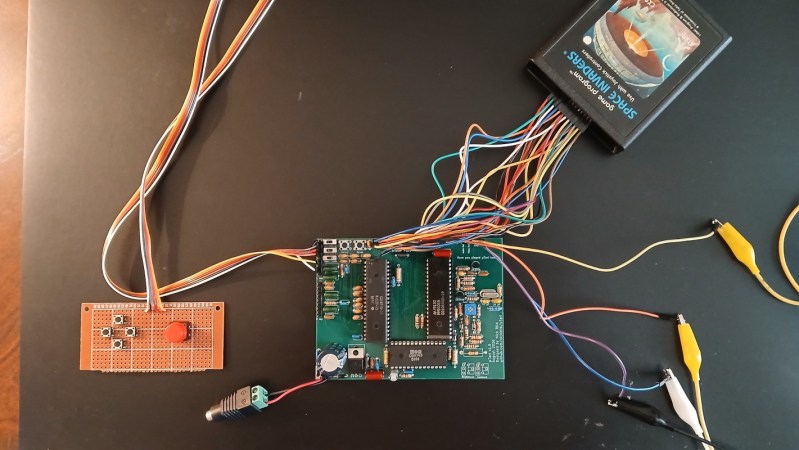
For as popular as Atari was in their heyday, it wasn’t until well after they were on their famous decline that they released their first handheld, the Atari Lynx. In retrospect, competing with the Game Boy was not going to be a recipe for success even without considering their other problems as a company, and as a result was their penultimate console before exiting the market completely. But [Nick]’s most recent project asks what the world would have been like with an Atari handheld from their golden era, and has been working on this miniaturized version of the 2600.

Unlike any modern emulators which can easily handle Atari 2600 games in almost any form factor today, this console is doing it all with as much original hardware as possible. It uses much smaller switches and buttons compared to the original, and omits some other unnecessary hardware for today’s world like the RF modulator. [Nick] has also designed a custom PCB that reduces the overall footprint considerably as well, and has relocated the cartridge port in preparation for its eventual handheld shape. The result is a console using original hardware that’s less than half the footprint of the original.

Although there were around 30 million Atari 2600 consoles sold and the system is unlikely to be a real collector’s item anytime soon, [Nick] makes sure to note that no real 2600 hardware was harmed in this build. And, as far as its handheld nature, this is a stepping stone on the path to that eventual goal. We’ll look forward to an eventual system that integrates a screen and controller as well as a port for the original cartridges. In the meantime, here’s another handheld 2600 that fits completely inside one of those cartridges.

Continue reading “Miniaturizing The Atari 2600 Console” →

A Keyboard With No Keys

For as capable as smartphone hardware is, the software running on them can be especially restrictive and cumbersome. Unlike a single-board computer with GPIO running a standard Linux operating system and some intuitive programming language like Python, smartphones are generally walled gardens where programming major overhead, and if a custom program can be run on them at all the user still has to figure out how to interface hardware with a USB-C port. To skip past all of this, [nicolas.ma] built an audio modem that can send keyboard input to a computer with nothing more than a browser.

The “keyboard” starts off in a browser running on a standard smartphone. A user can input text into the browser, which then gets converted into a series of audible audio pulses that can be sent to the keyboard. The keyboard itself listens to those pulses, decodes them, and then sends the text through to the computer as a standard USB device thanks to an Arduino Micro at the center. Arduino Micros are excellent choices for keyboard controllers because they have a built-in USB chip.

The protocol used here is designed and built by [nicolas.ma] as well. The words allow for variable length, with the device determining message length, and a word-ending scheme that automatically sends the message to memory when it’s detected that the message is finished. There’s also integrity checking and the ability to check on the link’s state. From hardware to software it’s an impressive build, and for anyone wondering what this might be used for [nicolas.ma] has already built a password manager from it.  Continue reading “A Keyboard With No Keys” →