Laser Engraver Uses All Of The DVD Drive

For the last ten to fifteen years, optical drives have been fading out of existence. There’s little reason to have them around anymore unless you are serious about archiving data or unconvinced that streaming platforms will always be around. While there are some niche uses for them still, we’re seeing more and more get repurposed for parts and other projects like this tabletop laser engraver.

The build starts with a couple optical drives, both of which are dismantled. One of the shells is saved to use as a base for the engraver, and two support structures are made out of particle board and acrylic to hold the laser and the Y axis mechanism. Both axes are made from the carriages of the disassembled hard drives, with the X axis set into the base to move the work piece. A high-output laser module is fitted to the Y axis with a heat sink, and an Arduino and a pair of A4988 motor controllers are added to the mix to turn incoming G-code into two-dimensional movement.

We’ve actually seen a commercial laser engraver built around the same concept, but the DIY approach is certainly appealing if you’ve got some optical drives collecting dust. Otherwise you could use them to build a scanning laser microscope.

Continue reading “Laser Engraver Uses All Of The DVD Drive”

Minimizing Stress On A Coin Cell Battery

When it comes to powering tiny devices for a long time, coin cell batteries are the battery of choice for things like keyfobs, watches, and even some IoT devices. They’re inexpensive and compact and a great choice for very small electricity needs. Their major downside is that they have a relatively high internal resistance, meaning they can’t supply a lot of current for very long without decreasing the lifespan of the battery. This new integrated circuit uses a special DC-DC converter to get over that hurdle and extend the life of a coin cell significantly.

A typical DC-DC converter uses a rapidly switching transistor to regulate the energy flow through an inductor and capacitor, effectively stepping up or stepping down the voltage. Rather than relying on a single converter, this circuit uses a two-stage system. The first is a boost converter to step the voltage from the coin cell up to as much as 11 volts to charge a storage capacitor. The second is a buck converter which steps that voltage down when there is a high current demand. This causes less overall voltage drop on the battery meaning less stress for it and a longer operating life in the device.

There are a few other features of this circuit as well, including an optimizer which watches the behavior of the circuit and learns about the power demands being placed on it. That way, the storage capacitor is only charged up to its maximum capacity if the optimizer determines that much charge is needed. With all of these features a coin cell could last around seven times as long as one using more traditional circuitry. If you really need to get every last bit of energy from a battery, though, you can always use a joule thief.

MS-DOS Meets The Fediverse

By now, most Windows users are set up with decently functional machines running Windows 10 or 11. Of course there are a few legacy machines still lagging behind on Windows 7 or 8 and plenty of computers in industrial settings running ancient proprietary software on Windows XP. But only the most hardcore of IBM PC users are still running DOS, and if you have eschewed things like Unix for this command-line operating system this long you might want to try using it to get online in the Fediverse with Mastodon.

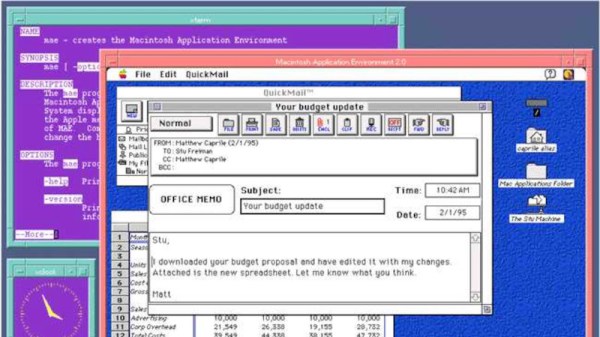
The first step is getting DOS 6.22, the most recent version released in 1994, set up with all the drivers and software needed to access the Internet. At the time of its release there were many networking options so the operating system didn’t include these tools by default. [Stephen] first sets up an emulated NE2000-compatible networking card and then installs the entire TCP/IP stack and then gets his virtual machine set up with an IP address.

With a working Internet connection set up, the next step on the path of exploring federated social media is to install DOStodon (although we might have favored the name “MastoDOS”) which is a Mastodon client specifically built for MS-DOS by [SuperIlu]. There are pre-compiled packages available on its GitHub page for easy installation in DOS but the source code is available there as well. And, if this is your first time hearing about the Fediverse, it is mostly an alternative to centralized social media like Facebook and Reddit but the decentralization isn’t without its downsides.

STM32 Oscilloscope Uses All The Features

[jgpeiro] is no slouch when it comes to building small, affordable oscilloscopes out of common microcontrollers. His most recent, based on an RP2040 with two channels that ran at 100 MSps, put it on the order of plenty of commercially-available oscilloscopes at this sample rate but at a fraction of the price. He wanted to improve on the design though, making a smaller unit with a greatly reduced bill-of-materials and with a more streamlined design, so he came up with this STM32-based oscilloscope.

The goal of this project was to base as many of the functions around the built-in capabilities of the STM32 as possible, so in addition to the four input channels and two output channels running at 1 MHz, the microcontroller also drives a TFT display which has been limited to 20 frames per second to save processor power for other tasks. The microcontroller also has a number of built-in operational amplifiers which are used as programmable gain amplifiers, further reducing the amount of support circuitry needed on the PCB while at the same time greatly improving the scope’s capabilities.

In fact, the only parts of consequence outside of the STM32, the power supply, and the screen are the inclusion of two operational amplifiers included to protect the input channels from overvoltage events. It’s an impressive build in a small form factor, and we’d say the design goal of keeping the parts count low has been met as well. If you do need something a little faster though, his RP2040-based oscilloscope is definitely worth checking out.

Continue reading “STM32 Oscilloscope Uses All The Features”

Hackaday Prize 2023: Machining Metals With Sparks

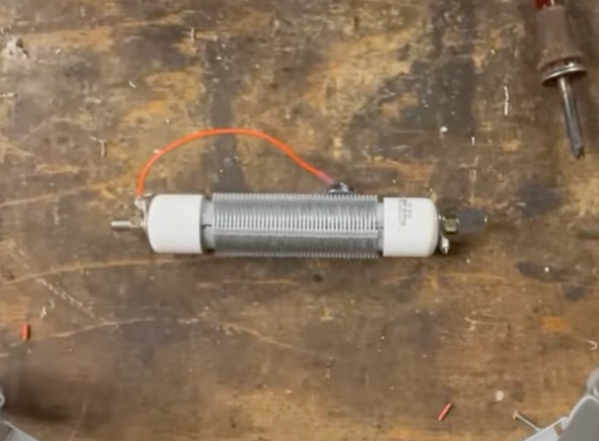
Working with metals can present a lot of unique challenges even for those with a fairly well-equipped shop. Metals like aluminum and some types of steel can be cut readily with grinders and saws, but for thick materials or some hardened steels, or when more complex cuts need to be made, mechanical cutting needs to be reconsidered in favor of something electric like electrical discharge machining (EDM) or a plasma cutter. [Norbert] has been on the path of building his own EDM machine and walks us through the process of generating a spark and its effects on some test materials.

Armed with a microscope, a homemade high-voltage generator, drill bit, and a razor blade to act as the workpiece, [Norbert] begins by experimenting with electrical discharges by bringing the energized drill bit close to the razor to determine the distance needed for effective electrical machining. Eventually the voltage is turned up a bit to dive into the effects of higher voltage discharges on the workpiece. He also develops a flushing system using de-ionized water, and then finally a system to automate the discharges and the movement of the tool.

While not a complete system yet, the videos [Norbert] has created so far show a thorough investigation of this metalworking method as well as some of the tricks for getting a setup like this working. EDM can be a challenging method for cutting metal as we’ve seen before with this similar machine which uses wire as the cutting tool, but some other builds we’ve seen with more robust electrodes have shown some more promise.

Continue reading “Hackaday Prize 2023: Machining Metals With Sparks”

An Open Firmware For LILYGO’s E-ink Smart Watch

The world’s first quartz wristwatches were miles ahead of electric and mechanical wristwatches by most standards of the time, their accuracy was unprecedented and the batteries typically lasted somewhere on the order of a year. Modern smart watches, at least in terms of battery life, have taken a step backwards — depending on use, some can require daily charging.

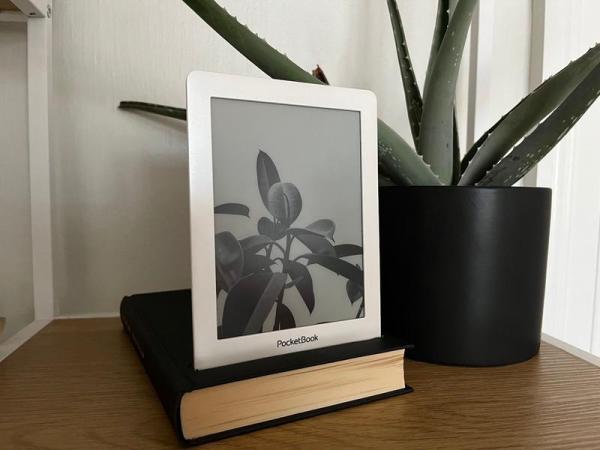
If you’re looking to bridge the gap between a day and a year, you might look into a smart watch with an e-ink display. One option is the ESP32-based LILYGO T-Wrist. Of course, it’s not a smart watch without some software to run on it, which is where qpaperOS comes in.

Developed by [qewer33], this open source firmware for the T-Wrist is designed to get the most out of the battery by updating only once per minute. With a 250 mAh battery, it should last about five days on a charge. Of course, with the power of the ESP32 comes a whole host of other features including GPS, a step counter, and a weather display, although since the firmware is still under development, some of these features have yet to be implemented.

With all of the code available, qpaperOS could make an excellent platform from which to build your own smart watch around. Or perhaps you could chip in and add some of the features on the whislity. The ESP32 is a capable and versatile chip, even capable of playing popular 8-bit video games, although we’re not sure this functionality would fit in a smart watch and preserve battery life at the same time.

Blinkenlights To Bootloader: A Guide To STM32 Development

While things like the Arduino platform certainly opened up the gates of microcontroller programming to a much wider audience, it can also be limiting in some ways. The Arduino IDE, for example, abstracts away plenty of the underlying machinations of the hardware, and the vast amount of libraries can contribute to this effect as well. It’s not a problem if you just need a project to get up and running, in fact, that’s one of its greatest strengths. But for understanding the underlying hardware we’d recommend taking a look at something like this video series on the STM32 platform.

The series comes to us from [Francis Stokes] of Low Byte Productions who has produced eighteen videos for working with the STM32 Cortex-M4 microcontroller. The videos start by getting a developer environment up and blinking LEDs, and then move on to using peripherals for more complex tasks. The project then moves on to more advanced topics and divides into two parts, the development of an application and also a bootloader. The bootloader begins relatively simply, and then goes on to get more and more features built into it. It eventually can validate and update firmware, and includes cryptographic signing (although [Francis] notes that you probably shouldn’t use this feature for production).

One of the primary goals for [Francis], apart from the actual coding and development, was to liven up a subject matter that is often seen as dry, which we think was accomplished quite well. A number of future videos are planned as well. But, if you’re not convinced that the STM32 platform is the correct choice for you, we did publish a feature a while back outlining a few other choices that might provide some other options to consider.

Continue reading “Blinkenlights To Bootloader: A Guide To STM32 Development”