MRRF: Tasty Filament From Proto-Pasta

Alongside printers from all walks of manufacturing, one can naturally expect to find people selling different kinds of filament at a 3D printing festival. One of these purveyors of plastic was Proto-pasta out of Vancouver, WA. Proto-pasta prides themselves on unique offerings and complete transparency about their manufacturing processes.

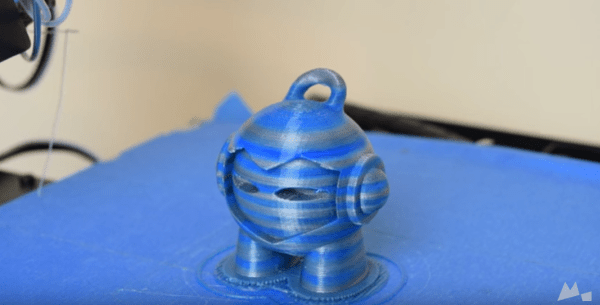
Almost all of their filaments are either PLA or HTPLA with something special added during extrusion. The menu includes steel, iron, carbon, and finely ground coffee. The coffee filament was one of our favorites for sure. The print they brought with them looked solidified light roast and had a transparent kind of lollipop quality to it. I couldn’t detect the coffee scent due to allergies, but [Alex] assured me that printing with this filament will make your house or hackerspace smell terrific.

[Alex] was giving away samples of their stainless steel composite PLA. This one can be polished to a smooth shine with a series of papers that run from 400 to 8,000-grit. Another of their newer offerings is PLA infused with magnetic iron particles. Prints made with this stuff can be rusted to achieve an antique, steampunk, or shabby chic aesthetic.

Proto-pasta also has an electrically conductive composite carbon PLA. This one is great for capacitive applications like making a custom, ergonomic stylus or your own game controller. According to the site, the resistivity of printed parts is 30 ohms per centimeter as measured perpendicular to the layers, and 115 ohms along the layers.

Have you made anything awesome with conductive or magnetic filament? Have you had any problems with unorthodox filaments? Let us know in the comments.

MRRF: Jellybox, A STEM-Oriented Printer

It’s the first full day of fun here at the Midwest RepRap Festival. This year’s turnout is quite impressive—as I’m writing this, we’re an hour or so in and there are already hundreds of people and a couple of R2D2 units milling about.

The talks will begin in a few hours. This year MRRF has expanded to another building, which should tell you something about the growth of this festival. We are excited to hear [Filip] and [Ladi] give a presentation about Jellybox, a STEM-driven project he started to bring 3D printing into education in a comprehensive and hands-on way. The initial idea was based on [Jean Piaget]’s theory of constructionism. [Piaget] was a clinical psychologist who helped advance the idea that human learning is greatly influenced by connecting a person’s ideas with their experiences.

Building a Jellybox printer is about as easy as it gets, and takes about 4-6 hours depending on your skill level. The laser-cut clear acrylic panels are connected with zip ties that lock around 90° plastic brackets. The back panel even has a etched diagram that shows where all the connectors should go, and the wiring is neat and tidy by design. It’s meant to be easy to tear down so that teachers can use them again and again with middle and high school-aged students. The Jellybox is open-source; both the extruder and the hot end can be swapped out in a flash.

IMade3D offers one- and two-day intensive courses in the DC area that cover building a Jellybox and learning some things about 3D modeling. The kit is included in the price of admission. Jellybox kits will be available in a few weeks, but can be preordered today for $799.

Third Person Driving IRL

It’s a dream come true: remote control of a real car. Besides being a lot of fun, a life-size RC vehicle has some practical applications, like performing rescue operations or delivering supplies to dangerous areas. For [Carter], [Dave], [Ryan], and [Sean], the dream became reality in the span of 24 caffeine-and-chicken-finger-fueled hours during an Ohio State University hackathon. They dubbed the system MagiKarpet because it sits in place of the floor mat and runs on pixies.

The plan was to control the throttle, brake, and steering of a Chevy Cobalt using a PlayStation controller. For added fun, a camera mounted high above the back bumper would provide a third-person view, and this feed would be displayed on a monitor in the backseat. Everything is controlled by an Arduino Mega. A beefy linear actuator works the brake and is attached temporarily with a band of Shapelock that slips around the pedal. The throttle is pushed by a lever attached to a car window motor. Another motor connects to the steering wheel with cables that can turn it 90° left and right. Although the build was successful, they ran into a couple of issues. But what’s a hackathon experience without a few problems?

The linear actuator was jammed for about an hour after some early testing, but they got it unstuck. The PS controller was borked, so they had to roll their own joysticks. The school wouldn’t let them actually drive it around because of safety (killjoys but we get it), so they put it up on a jack to demonstrate it for the judges. They took second place, though we can’t imagine what would have beat this. Check out the complete build video after the break.

You might remember these guys from last year around this time. They took first place at the same hackathon with Robottermilk Puncakes, a app-controlled pancake machine. Now that you’re hungry for pancakes, feast your eyes on this endless one.

Continue reading “Third Person Driving IRL”

TrainLight: Transit Info At A Glance

In a world of sensory overload, sometimes it’s nice to get the information you need without a bunch of clutter. [Savage] has created an attractive and minimalist system to display the current wait times for specific trains in his San Francisco neighborhood.

trainlight-legendIt’s basically a Spark Core and a 60 LED-per-meter strip of WS2812Bs. A 1000µF cap filters the power coming in from a switching adapter and a resistor limits the level-shifted logic going to the LEDs. Eight barriers made from card stock keep the light zones from bleeding together. The sides of the square canvas panel indicate cardinal directions and are oriented to [Savage]’s southern-facing house.

The server gets prediction data every 30 seconds using the RESTbus JSON API. [Savage] added in a bit of time for walking down the stairs, putting shoes on, and walking to each stop. TrainLight receives these times over WiFi and lights the LEDs accordingly. If a section isn’t lit at all, the wait time for that line is greater than 10 minutes. Dark green means you have 5-10 minutes to get there, and pale green means 2-5 minutes. If the LEDs are yellow, you’d better put on your running shoes.

This is a fairly simple build with a focus on subtlety. Even before guests in his house understand what they’re looking at, [Savage]’s TrainLight makes for an interesting conversational piece of blinkenlights and doubles as illumination for the stairs. There’s a slightly sped-up demo after the break.

Want to make your own? [Savage] has a tutorial page and his code is up on the gits. Blinky lights are also good for telling you whether the trains are running at all.

Continue reading “TrainLight: Transit Info At A Glance”

Adventures In Small Screen Video

[Kevin] wanted to make something using a small CRT, maybe an oscilloscope clock or something similar. He thought he scored big with a portable black and white TV that someone threw away, but it wouldn’t power on. Once opened, he thought he found the culprit—a couple of crusty, popped capacitors. [Kevin] ordered some new ones and played with the Arduino TVout code while he waited.

The caps arrived, but the little TV still wouldn’t chooch. Closer inspection revealed that someone had been there before him and ripped out some JST-connected components. Undaunted, [Kevin] went looking for a new CRT and found a vintage JVC camcorder viewfinder on the electronic bay with a 1-1/8″ screen.

At this point, he knew he wanted to display the time, date, and temperature. He figured out how the viewfinder CRT is wired, correctly assuming that the lone shielded wire is meant for composite video. It worked, but the image was backwards and off-center. No problem, just a matter of tracing out the horizontal and vertical deflection wires, swapping the horizontal ones, and nudging a few pixels in the code. Now he just has to spin a PCB, build an enclosure, and roll his own font.

[Kevin]’s CRT is pretty small, but it’s got to be easier on the eyes than the tiniest video game system.

Mindless Toddler Toy Becomes Teaching Tool

If you want to sell a toy for the toddler crowd, it ought to be pretty close to indestructible. A lot of toys out there are just plain nonsense game-wise and therefore waste their beefy potential. [2dom]’s wife was close to throwing out such a toy—a Little Tikes Goofy Ball. The thing literally does nothing but let you push its big buttons in. After some time passes, it pops them back out again and giggles. Game over. [2dom] rescued it from the trash and turned it into a toy that plays math games.

[2dom] removed the existing board and replaced it with an Arduino Pro Mini and a Darlington array that drives the motor that pops the buttons back out, the speaker, and a Nokia 5110 screen. Upon startup, the user chooses between addition, subtraction, and multiplication questions using the appropriate button. Questions appear in the middle of the screen and multiple choice answers in the corners.

Choose the right answer and the ball cheers and shows one of a few faces. Choose the wrong answer and it makes a buzzing sound and shows an X. There is an adaptive level system for the questions that [2dom] doesn’t show in the demonstration video after the break. For every five correct answers, you level up. His 3- and 5-year-olds love it. For more advanced teachable moments, there’s this toy-turned-enigma-machine.

Continue reading “Mindless Toddler Toy Becomes Teaching Tool”

This Hourglass Flips Itself

Once upon a time, [Mike] bought an hourglass for his sister. He intended to build it into a clock and give it to her as a gift, but life and other projects got in the way. Fast forward a couple of decades to the point when it all came together and [Mike] had everything he needed on hand to build a beautiful wooden clock that automatically flips the hourglass over.

Every 60 minutes, the bulb, which is situated inside a handcrafted maple ring, rotates 180 degrees to restart the flow of sand. Whatever number is at the top of the outer wheel denotes the current hour. The digit for the next hour is always at the five o’clock position relative to the current hour. This works out because the pockets on the outside of the bulb’s ring share a 5:6 ratio with the gear teeth on the outer ring. Confused? Watch the time-lapse video from [Mike]’s that shows it in action.

[Mike] was determined to build this clock using only things he already had on hand, like a cheap digital watch to keep time and a car window motor to rotate the hourglass. He hacked a USB port into the watch so he could use the hourly chime function to trigger the motor through a quad op-amp. The motor runs until it is triggered to shut off optically—a pair of slits cut into the gear that moves the hourglass pass over a sensor. [Mike] built a beautiful box to hold the guts from a nice piece of walnut and spared no detail in the design.

There are a ton of build pictures on the projects site and an in-depth video tour of the clock, which is embedded after the break. Whether they are designed to amaze or confuse, we love a good clock build around here. If you’re into hourglasses, we featured a digital version not too long ago.

Continue reading “This Hourglass Flips Itself”