3D Printable Scope Probe Adapts To Your Needs

If there’s one this we electronics engineers are precious about, it’s our test gear. The instruments themselves can be obscenely expensive, since all that R&D effort needs to be paid back over a much smaller user base compared to say a DVD player. The test probes themselves can often come with an eye-watering price tag as well. Take the oscilloscope probe, pretty much everyone who tinkers with hardware will be familiar with. It’s great for poking around, looking desperately for inspiration when you’re getting stuck in with some debug, but you’ve only got two hands, and that doesn’t leave any spare for button pushing.

Hands-free probing solutions exist, but they can be pricey, flimsy or just a pain to use. Sometimes you just want to solder a wire and leave the probe attached, hoping the grounding lead doesn’t fall off and short something. We’ve seen many solutions to this, so here’s yet another one you can 3D print yourself, so it’s almost free to make.

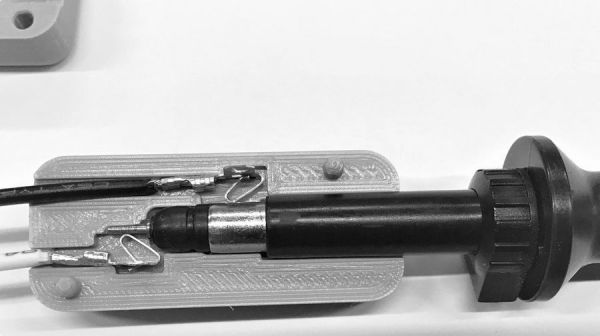
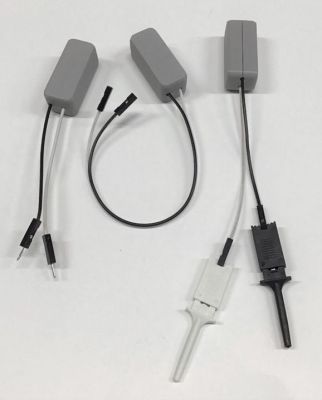
The two-part 3D printed assembly embeds a pair of wires with a Molex 0008500113 sprung terminal on one end, which can be terminated with your choice of pins, headers or just a pair of plain ‘ol wires. Once you’ve dropped your wiring of choice inside, simply glue the halves with a little cyanoacrylate and you’re good to go. Designed around the Siglent 200MHz PP215 specifically, it is likely compatible with many other brands. Thingiverse only has STL files (sigh!) so it may be tricky to adapt it to your exact probe dimensions, but the idea is good at least.

There is no shortage of electronics probing solutions out there, and boy have we covered a few over the years, here’s a low-cost current probe, an Open Source 2 GHz scope probe, and if you want to get really hacky, look no further for inspiration than the 2019 Hackaday SuperCon SMD Challenge.

Thanks [daniel] for the tip!

Quit Hunching Over Your Screen With A Little Robotic Help

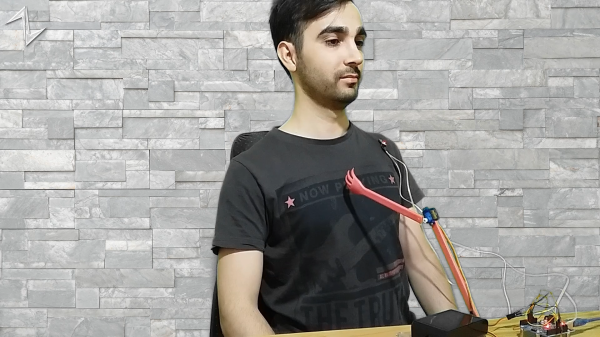
[Norbert Zare] has identified a problem many of us suffer from – chronically bad posture. Its very common to see computer users hunched forwards over a screen, which eventually will lead to back problems. He mentions that most posture correction devices are pretty boring, so the obvious solution to [Norbert] was to build a simple robot to give you a friendly nudge into the correct position.

This simple Arduino-based build uses the ubiquitous MPU-6050 which provides 3-axis acceleration and 3-axis gyro data all processed on-chip, so it can measure where you’re going, which way you are orientated and how fast you are rotating. This is communicated via the I2C bus, so hooking into an Arduino or Raspberry Pi is a simple affair. There are plenty of Open Source libraries to work with this very common device, which helps reduce the learning curve for those unfamiliar with programming a fairly complex device.

At the moment, he is mounting the sensor on his body, and hard-wiring it, so there’s already some scope for improvement there. The operating premise is simple, if the body angle is more than 55 degrees off vertical, move the servos and shove the body back in to the correct position.

The project GitHub has the code needed, and the project page over on Hackaday.io shows the wiring diagram.

We have seen quite a few projects on this subject over the years, like this one that sends you mobile notifications, an ultrasonic rangefinder-based device, and one that even uses a webcam to keep an eye on you. This one has the silliness-factor, and we like that round these parts. Keep an eye on [Norbert] we’re sure there more good stuff to come!

Continue reading “Quit Hunching Over Your Screen With A Little Robotic Help”

The Quadrivium EnsembleBot Is A Labour Of Love

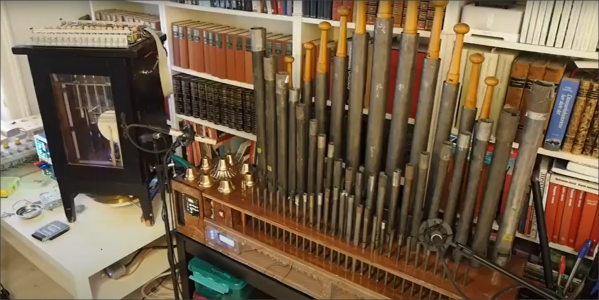
The Quadrivium EnsembleBot project is a mashup between old school musical instruments and the modern MIDI controlled world. Built by a small team over several years, these hand crafted instruments look and sound really nice.

The electronics side of things is taken care of with a pile of Arduinos and off-the-shelf modules, but that doesn’t mean the design isn’t well thought through, if a little more complicated than it could be in places. Control is taken care of with a PC sending commands over the USB to an Arduino 2560. This first Arduino is referred to as the Master Controller and has the immediate job of driving the percussive instruments as well as other instruments that are struck with simple solenoids. All these inductive loads are switched via opto-isolators to keep any noise generated by switching away from the microcontroller. A chain of four sixteen-channel GPIO expander modules are hung off the I2C bus to give even more opto-isolated outputs, as even the Arduino 2560 doesn’t quite have enough GPIO pins available. The are a number of instruments that have more complex control requirements, and these are connected to dedicated slave Arduinos via an SPI-to-CAN module. These are in various states of development, which we’ll be keeping our beady eyes on.

One of the more complex instruments is the PipeDream61 which is their second attempt to build a robotic pipe organ. This is powered by a Teensy, as they considered the Arduino to be a little too tight on resources. This organ has a temperature controller using an ATTiny85, in order to further relieve the main controller of such a burden and simplify the development a little.

Another interesting instrument is Robro, which is a robotic resophonic guitar which as they say is still work in progress despite how long they have been trying to get it to work. There’s clearly a fair bit of control complexity here, which is why it is taking so much fiddling (heh!) to get it work.

This project is by no means unique, lately we’ve covered controlling a church organ with MIDI, as well as a neat Arduino Orchestra, but the EnsembleBot is just so much more.

Continue reading “The Quadrivium EnsembleBot Is A Labour Of Love”

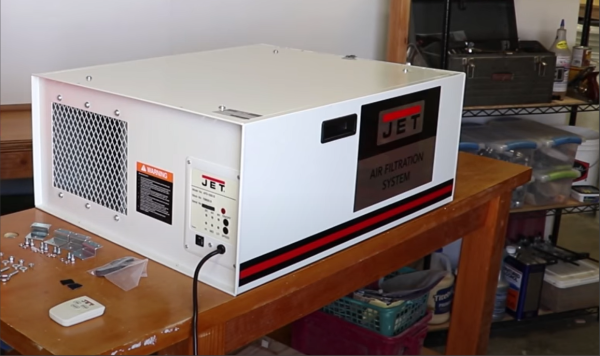
Jet tools air scrubber

It’s A Hack: Air Scrubber Controlled Using The Room Lighting

Some products just seem to be designed to be annoying. [hardmar] discovered the air filtration system installed in his son’s basement woodshop was orientated for the best airflow, but rather poorly positioned to actually turning the thing on and off. For some reason the unit has its single line-of-sight IR receiver on one side, which when mounted in some positions, forces the user to be the completely wrong position to use the supplied remote.

We find it a little unhelpful sometimes that devices specifically designed to be mounted with varying orientations don’t come fitted with IR receivers in different locations to ensure good controllability. It would get annoying really fast to have to contort oneself into some specific position just to turn something on, and some people just might not bother at all.

Proper control of dust is paramount for continued good health, and essential in any workspace or shared area. When you work wood, it produces a lot of dust. It cannot be avoided and gets into everything, your lungs included. PPE is not enough.  Even in your own shop you still really should manage dust production as best you can. Options are varied from centralised extraction, per machine solutions, and often augmented with air scrubbers mounted on the ceiling to grab those fine particulates.

Instead of solving the IR placement issue, [hardmar] wanted to have the unit tied to the lighting system so that it would power on as soon as someone turned on the appropriate light and would then stay on for a fixed amount of time after the user left in order to continue scrubbing the air some more. His simple hack was to first record and analyse the IR protocol used by the remote, and program an Arduino to be able to send it on/off commands. Next, he hooked up a phototransistor aimed at the light, in order to provide the necessary ‘user present’ trigger to tell the Arduino when to activate the scrubber. Super simple and effective. We love this non-invasive approach of adapting off-the-shelf equipment to our specific requirements, without even showing it a screwdriver.

As [hardmar] admits, the hack is not elegantly implemented, it’s just enough to make it work, and that’s just fine, sometimes you just have a job to do and no more.

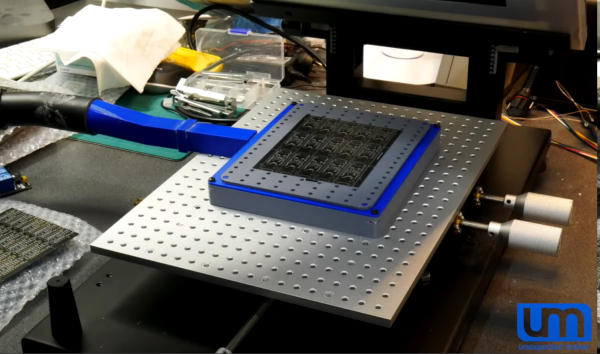
PCB sitting inside a 3D printed holder job, with holes to apply vacuum

Solder Paste Stencilling That Doesn’t Suck

Working with solder paste stencils can be a real faff, they rarely sit flat and move around when you so much as breath on them. [Unexpected Maker] airs his frustrations, and comes up with a simple solution, he simply makes a 3D-printed jig to align the PCB panel and applies his shop vacuum cleaner and hey presto!

If you’re ever been tempted to switch from frameless to framed solder stencils, then you’ll notice they can be rather awkward to work with. The usual online vendors have plenty of listings for stencil frame holders, but they do all seem to us, exactly the same, and more suited to stencilling T-shirts, than working with tiny PCB footprints.

The problem with unframed stencils is one of clamping and registration to the PCB, which framed stencils fix, when used with a jig that can dial in the rotation and translation errors.

But problem with those is, unless you have a perfectly flat support region all round the PCB, the weight of the frame tends to make the stencil bow up over the PCB, causing parts of it to lift away from the solder lands. This results in paste not being pushed into the places you want it, and instead it sticks to the stencil apertures and comes away when you lift it up. Most irritating.

You can try offset it by taping spare PCBs of the same thickness all around, but this is not always terribly successful in this scribe’s extensive experience doing this job by hand. [Unexpected Maker] solves this bowing issue by making a 3D printed jig that bolts to the stencil holder, takes a custom top plate with holes in, which in turns allows a vacuum to be applied from below. This sucks the PCB down to the jig, keeping it flat (in case it is also warped) and also pulls the stencil plate directly down to the PCB, making it also lie perfectly flat.

Continue reading “Solder Paste Stencilling That Doesn’t Suck”

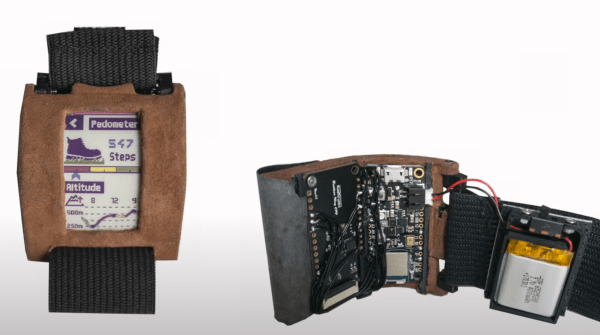
Wearable colour eink display in watch format showing additional internal details

Bendable Colour EPaper Display Has Touch Input Too

The Interactive Media Lab at Dresden Technical University has been busy working on ideas for user interfaces with wearable electronics, and presents a nice project, that any of us could reproduce, to create your very own wearable colour epaper display device. They even figured out a tidy way to add touch input as well. By sticking three linear resistive touch strips, which are effectively touch potentiometers, to a backing sheet and placing the latter directly behind the Plastic Logic Legio 2.1″ flexible electrophoretic display (EPD), a rudimentary touch interface was created. It does look like it needs a fair bit of force to be applied to the display, to be detectable at the touch strips, but it should be able to take it.

The rest of the hardware is standard fayre, using an off-the-shelf board to drive the EPD, and an Adafruit Feather nRF52840 Sense board for the application and Bluetooth functionality. The casing is 3D printed (naturally) and everything can be built from items many of us have lying around. The video below shows a few possible applications, including interestingly using the display as part of the strap for another wearable. Here is also is a report on adding interactive displays to smart watches. After all, you can’t have too many displays.

Many wearables projects can be found in the HaD archives, including this dubious wearable scope, a method for weaving OLED fibres into garments. Finally, for a good introduction to wearable DIY tech, you could do worse than this Supercon talk from Sophy Wong.

Continue reading “Bendable Colour EPaper Display Has Touch Input Too”

Interconnected CPU nodes forming a system-wide network

With Luos Rapid Embedded Deployment Is Simplified

Those of us tasked with developing firmware for embedded systems have a quite a few hurdles to jump through compared to those writing for the desktop or mobile platforms. Solved problems such as code reuse or portability are simply harder. It was with considerable interest that we learnt of another approach to hardware abstraction, called Luos, which describes itself as micro-services for embedded systems.

This open source project enables deployment of distributed architectures composed of collaborating micro-services. By containerizing applications and hardware drivers, interfaces to the various components are hidden behind a consistent API. It doesn’t even matter where a resource is located, multiple services may be running on the same microcontroller, or separate ones, yet they can communicate in the same way.

By following hardware and software design rules, it’s possible to create an architecture of cooperating computing units, that’s completely agnostic of the actual hardware. Microcontrollers talk at the hardware level with a pair of bidirectional signals, so the hardware cost is very low. It even integrates with ROS, so making robots is even easier.

Luos architecture

By integrating a special block referred to as a Gate, it is possible to connect to the architecture in real-time from a host computer via USB, WiFi, or serial port, and stream data out,  feed data in, or deploy new software. The host software stack is based around Python, running under Jupyter Notebook, which we absolutely love.

Current compatibility is with many STM32 and ATSAM21 micros, so chances are good you can use it with whatever you have lying around, but more platforms are promised for the future.

Now yes, we’re aware of CMSIS, and the idea of Hardware Abstraction Layers (HALs) used as part of the platform-specific software kits, this is nothing new. But, different platforms work quite differently, and porting code from one to another, just because you can no longer get your preferred microcontroller any more, is a real drag we could all do without, so why not go clone the GitHub and have a look for yourselves?

Continue reading “With Luos Rapid Embedded Deployment Is Simplified”