That Ultra-White Paint That Helps Cool Surfaces? Make Your Own!

It started with [KB9ENS] looking into paints or coatings for passive or radiative cooling, and in the process he decided to DIY his own. Not only is it perfectly accessible to a home experimenter, his initial results look like they have some promise, as well.

[KB9ENS] read about a type of ultra-white paint formulation that not only reflects heat, but is able to radiate it into space, cooling the painted surface to below ambient temperature. This is intriguing because while commercial paints can insulate and reflect heat, they cannot make a surface cooler than its surroundings.

Anecdotally speaking, this painted battery section of a solar recharger gets too hot to touch in full sunlight. But when painted over, it was merely warm.

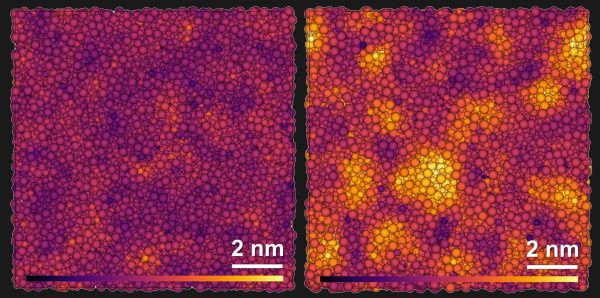
What really got [KB9ENS] thinking was that at its core, the passively-cooling paint in the research is essentially a whole lot of different particle sizes of barium sulfate (BaSO₄) mixed into an acrylic binder. These two ingredients are remarkably accessible. A half-pound of BaSO₄ from a pottery supply shop was only a few dollars, and a plain acrylic base is easily obtained from almost any paint or art supplier.

[KB9ENS] decided to mix up a crude batch of BaSO₄ paint, apply it to some things, and see how well it compared to other paints and coatings. He wetted the BaSO₄ with some isopropyl alcohol to help it mix into the base, and made a few different concentrations. A 60% concentration by volume seemed to give the best overall results.

There’s no indication of whether any lower-than-ambient cooling is happening, but according to a non-contact thermometer even this homemade mixture does a better job of keeping sunlight from heating things up compared to similarly-applied commercial paints (although it fared only slightly better than titanium dioxide-based white paint in the initial test.)

[KB9ENS] also painted the battery section of a solar recharger with his homemade paint and noted that while under normal circumstances — that is to say, in full sunlight — that section becomes too hot to touch, with the paint coating it was merely warm.

Actual passive cooling can do more than just keep something less warm than it would be otherwise. We’ve seen it recently used to passively and continuously generate power thanks to its ability to create a constant temperature differential, day and night.

Behold A Gallery Of Sony’s PS VR2 Prototypes

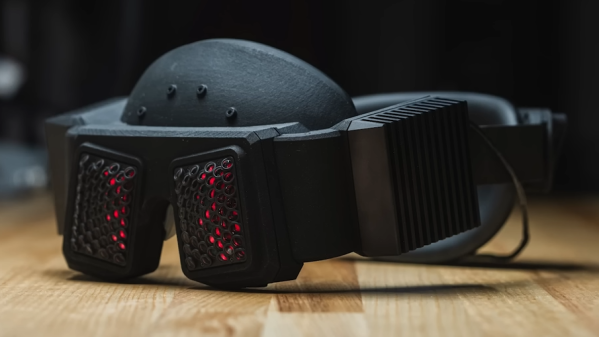
Every finished product stands at the end of a long line of prototypes, and Sony have recently shared an interview and images of their PlayStation VR2 prototypes.

Many of the prototypes focus on a specific functionality, and readers who are not familiar with building things might find it a bit wild to see just how big and ungainly un-optimized hardware can be.

Finished product (bottom) contrasted with functionally-identical prototype (top).

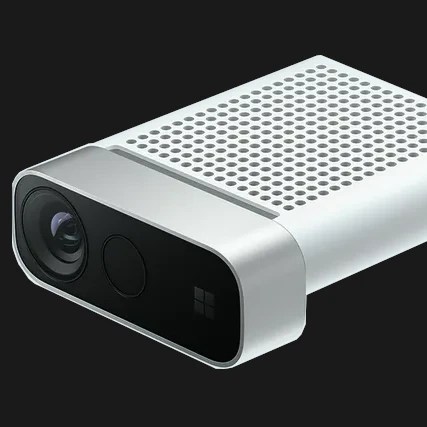
The images are definitely the best part of that link, but the interview has a few interesting bits. For example, one prototype was optimized for evaluating and testing camera placement with a high degree of accuracy, and it hardly looks like a VR headset at all.

The controllers on the other hand seem to have gone though more iterations based on the ergonomics and physical layout of controls. The VR2 controllers integrate the adaptive triggers from the PlayStation 5, which are of a genuinely clever design capable of variable resistance as well as an active force feedback effect that’s not quite like anything that’s come before.

There’s a lot of work that goes into developing something like a VR headset, as we see here and we’ve seen with Facebook’s (now Meta) VR research prototypes. But even when one can leverage pre-made modules as much as possible and doesn’t need to start entirely from scratch, making a VR headset remains a whole heap of work.

Physical Neural Network Can Be Trained Like A Digital One

Here’s an unusual concept: a computer-guided mechanical neural network (video, embedded below.) Why would one want a mechanical neural network? It’s essentially a tool to explore what it would take to make physical materials work in nonstandard ways. The main part is a lattice of interlinked mechanical components. When one applies a certain force in a certain direction on one end, it causes the lattice to deform in a non-intuitive way on the other end.

To make this happen, individual mechanical elements  in the lattice need to have their compliance carefully tuned under the guidance of a computer system. The mechanisms shown can be adjusted on demand while force is applied and cameras monitor the results.

This feedback loop allows researchers to use the same techniques for training neural networks that are used in machine learning applications. Ultimately, a lattice can be configured in such a way that when side A is pressed like this, side B moves like that.

We’ve seen compliant structures that move in unexpected ways before, and they are always fascinating. One example is this 3D-printed door latch that translates a twisting motion into a linear one. Research into physical neural networks seems like it might open the door to more complex systems, or provide insights into metamaterial design.

You can watch the video below just under the page break, or if you prefer, skip the intro and jump straight into How It Works at [2:32].

Continue reading “Physical Neural Network Can Be Trained Like A Digital One”

Open Source OLED Nametag Is Full Of Features

Ever wanted a sweet OLED nametag with fancy features like daylight readability, automatic brightness adjustment, GIF animation support, all-day runtime, easy web interface, and more? [TobleMiner]’s OLED Nametag is the project you want to keep an eye on in that case.

It’s still an early prototype, but the feature list looks great and works with a variety of OLED modules that are easily available. The enclosure can be 3D printed, and while there is very little spare room inside the housing, [TobleMiner] has clearly made the most of all available space. Some PCB fab houses offer component placement these days, and the board is designed with exactly that in mind.

We’ve seen a batteryless E-paper display make a serviceable nametag in the past, and while those offer high contrast and wide viewing angles, they lack the sort of features this project is bursting at the seams with. Affordable access to good components and the ability to have high-quality PCBs made on demand has really raised the bar in terms of what a hacker project can work with in recent years, and we love to see it expressed in projects like this one.

3D Printer Recognizes Third-Party Build Plates, Just Make Your Own ID Codes

The Bambu X1C 3D printer is a machine known for its speed, and it has a number of useful features like automatic build platform recognition. Factory build platforms are marked with an identifier code, and thanks to [elumspe] it’s now possible to make your own identifiers to stick onto third-party platforms and have the printer recognize them as though they were factory offerings. There’s even a super handy 3D-printable alignment tool that ensures the identifier goes in the correct spot, which is a nice touch.

These codes aren’t DRM so much as they are used by the printer to automatically verify that the installed build plate matches the slicer settings before a job begins. Printing one and sticking it in the right place is an easy way to get third-party plates recognized the same as factory offerings.

The identifier codes aren’t DRM so much as they are a way for the printer to verify that the installed build platform matches the slicer settings before a print begins, and throw up a warning if it doesn’t. The printer is perfectly happy to use third-party build surfaces, but since they lack an identifier, the printer will throw a warning each time. One solution is to simply disable checking the build platform before a print, but for those who would prefer to have the printer see what it expects to see, printing a small 2D barcode to stick on is an easy way to do it.

We see these sometimes called QR codes, but they look more like AprilTags. Both are types of 2D barcode, but while QR codes can encode a variety of information types, AprilTags are simpler and usually represent identifiers. In this case, they’re an appropriate way to let a camera-enabled printer know what kind of build plate is installed.

AprilTags are common in computer vision applications, and even relatively modest hardware can detect and decode them almost in real time. AprilTags are convenient and easy to use, as this gate access system demonstrates.

Hackaday Prize 2023: Tilting Mechanical Panels Make A Beautiful Display

Mechanical displays use a variety of different methods to represent data with physical objects, and [AIRPOCKET]’s Mechanical Display aims to be a platform anyone can use. Each “pixel” in this display is a panel of some kind, and different effects can be had by moving individual panels to different angles. Not only can images be represented, but the patterns of the movements themselves can be beautiful as well.

The panels are an important part of how the display presents, so the design makes them easy to change out.

These sorts of displays are fertile ground for artistic expression (one memorable implementation of this basic idea was the wooden mirror, which used varnished tiles of wood) but anyone looking to use the concept has usually been on their own when it comes to implementation.

The idea [AIRPOCKET] has is to make this kind of installation easier to implement. This method uses economical mini RC servos and 3D-printed pieces to create modular segments that can be assembled into whatever configuration one may need.

The material of the panels matters, too. Just below the page break, you can see a large unit with each “pixel” consisting of a mirrored square that reflects daylight. There’s also a video of an earlier prototype that uses some ridged two-color pieces to create a simple 4×4 three-level greyscale display.

There are a lot of possibilities if [AIRPOCKET] can make this sort of display more easily accessible, and that makes it a contender in the 2023 Hackaday Prize.

Continue reading “Hackaday Prize 2023: Tilting Mechanical Panels Make A Beautiful Display”

Brute Forcing A Mobile’s PIN Over USB With A $3 Board

Mobile PINs are a lot like passwords in that there are a number of very common ones, and [Mobile Hacker] has a clever proof of concept that uses a tiny microcontroller development board to emulate a keyboard to test the 20 most common unlock PINs on an Android device.

Trying the twenty most common PINs doesn’t take long.

The project is based on research analyzing the security of 4- and 6-digit smartphone PINs which found some striking similarities between user-chosen unlock codes. While the research is a few years old, user behavior in terms of PIN choice has probably not changed much.

The hardware is not much more than a Digispark board, a small ATtiny85-based board with built-in USB connector, and an adapter. In fact, it has a lot in common with the DIY Rubber Ducky except for being focused on doing a single job.

Once connected to a mobile device, it performs a form of keystroke injection attack, automatically sending keyboard events to input the most common PINs with a delay between each attempt. Assuming the device accepts, trying all twenty codes takes about six minutes.

Disabling OTG connections for a device is one way to prevent this kind of attack, and not configuring a common PIN like ‘1111’ or ‘1234’ is even better. You can see the brute forcing in action in the video, embedded below.

Continue reading “Brute Forcing A Mobile’s PIN Over USB With A $3 Board”