This Camera Produces A Picture, Using The Scene Before It

It’s the most basic of functions for a camera, that when you point it at a scene, it produces a photograph of what it sees. [Jasper van Loenen] has created a camera that does just that, but not perhaps in the way we might expect. Instead of committing pixels to memory it takes a picture, uses AI to generate a text description of what is in the picture, and then uses another AI to generate an image from that picture. It’s a curiously beautiful artwork as well as an ultimate expression of the current obsession with the technology, and we rather like it.

The camera itself is a black box with a simple twin-lens reflex viewfinder. Inside is a Raspberry Pi that takes the photo and sends it through the various AI services, and a Fuji Instax Mini printer. Of particular interest is the connection to the printer which we think may be of interest to quite a few others, he’s reverse engineered the Bluetooth protocols it uses and created Python code allowing easy printing. The images it produces are like so many such AI-generated pieces of content, pretty to look at but otherworldly, and weird parallels of the scenes they represent.

It’s inevitable that consumer cameras will before long offer AI augmentation features for less-competent photographers, meanwhile we’re pleased to see Jasper getting there first.

Answering Some Pico Balloon Questions

When the US Air Force shot down some suspected Chinese spy balloons a couple of weeks ago, it was widely reported that one of the targets might have been a much more harmless amateur radio craft. The so-called pico balloon K9YO was a helium-inflated Mylar balloon carrying a tiny solar-powered WSPR beacon, and it abruptly disappeared in the same place and time in which the USAF claimed one of their targets. When we coveredĀ  the story it garnered a huge number of comments both for and against the balloonists, so perhaps it’s worth returning with the views of a high-altitude-ballooning expert.

[Dave Akerman] has been sending things aloft for a long time now, we think he may have been one of the first to put a Raspberry Pi aloft back in 2012. In his blog post he attempts to answer the frequently asked questions about pico balloons, their legality, whether they should carry a beacon, and what the difference is between these balloons and the latex “weather balloon” type we’re familiar with. It’s worth a read, because not all of us are part of the high-altitude balloon community and thus it’s good to educate oneself.

Meanwhile, you can read our original report here.

Testing The Raspberry Pi Debug Probe

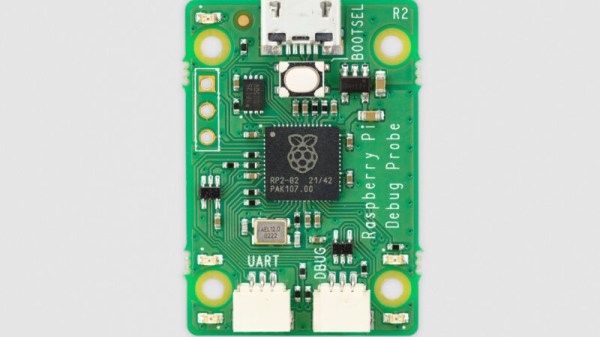
We mentioned the Raspberry Pi Debug Probe when it was launched, a little RP2040-based board that provides both a USB-to-UART and an ARM SWD debug interface. [Jeff Geerling] was lucky enough to snag one, and he’s put it through its paces in a handy blog post.

The first question he poses is: why buy the Pi offering when cheaper boards can be found on AliExpress and the like? It’s easily answered by pointing to the ease of setting up, good documentation and support, as well as the device’s reasonable price compared to other commercial probes. It also answered a personal question here as he hooked it up to a Pico, why it has three jumpers and not the more usual multi-way header we’ve seen on other ARM platforms. We should have looked at a Pico more closely of course, because it matched neatly to the Pi product. On the Pico they’re at the edge, while on the Pico W they’re in the center.

No doubt if the latest addition to the Pi stable has any further revelations we’ll bring them to you. But it’s worth a quick look at this piece to see a real experience with their latest. Meanwhile, take a quick look at our launch coverage.

An Amiga Mouse, The Modern Way

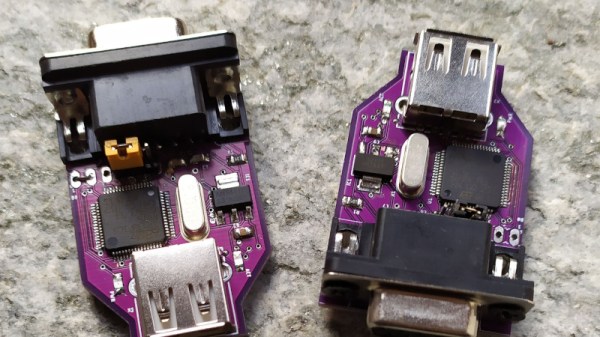
When we recently featured an Amiga upgrade project, [EmberHeavyIndustries ] was prompted to share one of their own, an adapter to allow a modern USB HID mouse to be used with the Commodore quadrature mouse port.

The first mice simply transferred the rotation of the ball through rollers to switches or optical sensors which passed pulse trains to the host computer. From the relative phase of these pulse trains the computer could work out what direction the mouse was going, as well as how far it had moved through counting the pulses. Since this was the simplest mouse interface, many of the 16-bit era machines used these signals. The PC meanwhile lacked such a port, so companies such as Microsoft had to place a microcontroller in the mouse to do the position sensing, and send the result over a serial interface. This evolved over time into the USB HID mouse interface you are probably using today.

Unfortunately for owners of quadrature mouse driven machines, real quadrature mice are a little thin on the ground these days, thus the adapter is a seriously useful device. At its heart is an STM32 microcontroller, and it’s been through a few updates and now supports mouse wheels. Your Amiga has been waiting for this!

There are quite a few other treats for Amiga enthusiasts in the EmberHeavyIndustries GitHub account, meanwhile here’s the video upgrade which caused us to receive the tip.

YouTube As Infinite File Storage

Anyone who was lucky enough to secure a Gmail invite back in early 2004 would have gasped in wonder at the storage on offer, a whole gigabyte! Nearly two decades later there’s more storage to be had for free from Google and its competitors, but it’s still relatively easy to hit the paid tier. Consider this though, how about YouTube as an infinite cloud storage medium?

The proof of concept code from [DvorakDwarf] works by encoding binary files into video files which can then be uploaded to the video sharing service. It’s hardly a new idea as there were clever boxes back in the 16-bit era that would do the same with a VHS video recorder, but it seems that for the moment it does what it says, and turns YouTube into an infinite cloud file store.

The README goes into a bit of detail about how the code tries to avoid the effects of YouTube’s compression algorithm. It eschews RGB colour for black and white pixels, and each displayed pixel in the video is made of a block of the real pixels. The final video comes in at around four times the size of the original file, and looks like noise on the screen. There’s an example video, which we’ve placed below the break.

Whether this is against YouTube’s TOS is probably open for interpretation, but we’re guessing that the video site could spot these uploads with relative ease and apply a stronger compression algorithm which would corrupt them. As an alternate approach, we recommend hiding all your important data in podcast episodes.

Continue reading “YouTube As Infinite File Storage”

New Product: The Raspberry Pi Debug Probe

It’s fair to say that among the new product launches we see all the time, anything new from the folks at Raspberry Pi claims our attention. It’s not that their signature Linux single-board computers (SBCs) are necessarily the best or the fastest hardware on paper, but that they’re the ones with meaningful decade-plus support. Add to that their RP2040 microcontroller and its associated Pico boards, and they’re the one to watch.

Today we’ve got news of a new Pi, not a general purpose computer, but useful nevertheless. The Raspberry Pi Debug Probe is a small RP2040-based board that provides a SWD interface for debugging any ARM microcontroller as well as a more generic USB to UART interface.

The article sums up nicely what this board does — it’s for bare metal ARM coders, and it uses ARM’s built-in debugging infrastructure. It’s something that away from Hackaday we’ve seen friends using the 2040 for as one of the few readily available chips in the shortage, and it’s thus extremely convenient to have readily available as a product.

So if you’re a high level programmer it’s not essential, but if you’re really getting down to the nuts-and-bolts of an ARM microcontroller then you’ll want one of these. Of course, it’s by no means the first SWD interface we’ve seen, here’s one using an ESP32.

Digital Video From The Amiga’s DB23 Socket

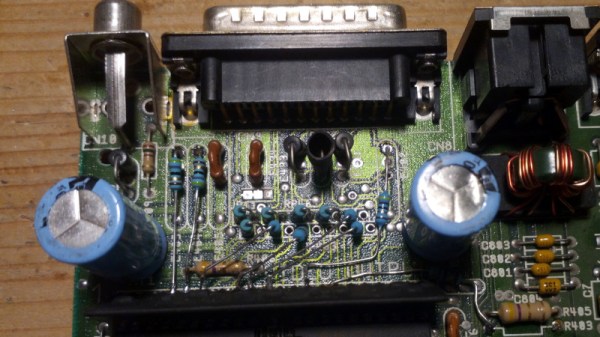
Back in the days of 16-bit home computers, the one to have if your interests extended to graphics was the Commodore Amiga. It had high resolutions for the time in an impressive number of colours, and thanks to its unique video circuitry, it could produce genlocked broadcast-quality video. Here in 2023 though, it’s all a little analogue. What’s needed is digital video, and in that, [c0pperdragon] has our backs with the latest in a line of Amiga video hacks. This one takes the 12-bit parallel digital colour that would normally go to the Amiga’s DAC, and brings it out into the world through rarely-used pins on the 23-pin video connector.

This follows on from a previous [c0pperdragon] project in which a Raspberry Pi Zero was used to transform the digital video into HDMI. This isn’t a hack for the faint-hearted though, as it involves extensive modification of your treasured Amiga board.

It is of course perfectly possible to generate HDMI from an Amiga by using an external converter box from the analogue video output, of the type which can be bought for a few dollars from online vendors. What this type of hack gives over the cheap approach is low latency, something highly prized by gamers. We’re not sure we’re ready to start hacking apart our Amigas, but we can see the appeal for some enthusiasts.