Regular Hackaday readers will be familiar with our convention of putting the name, nickname, or handle of a person in square brackets. We do this to avoid ambiguity as sometimes names and particularly nicknames can take unfamiliar forms that might be confused with other entities referred to in the text. So for example you might see them around [Bart Simpson], or [El Barto]. and occasionally within those brackets you’ll also see a capitalised string of letters and numbers after a name. For example the electronic music pioneer [Bob Moog, K2AMH], which most of you will recognise as an amateur radio callsign.
Every licenced radio amateur is issued one by their country’s radio authority as a unique identifier, think of it as similar to a car licence plate. From within the amateur radio bubble those letters and numbers can convey a significant amount of information about where in the world its user is located, when they received their licence, and even what type of licence they hold, but to outsiders they remain a mysterious and seemingly random string. We’ll now attempt to shed some light on that information, so you too can look at a callsign in a Hackaday piece or anywhere else and have some idea as to its meaning.
Do you know how to harvest data from your bench tools, like plotting bandwidth from your oscilloscope with a computer? It’s actually pretty easy. Many bench tools make this easy using a standard protocol with USB to make the connection.
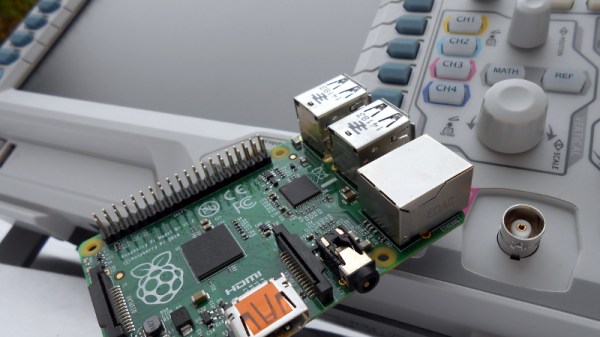
In the previous installment of this article we talked about the National Instruments VISA (Virtual Instrument Software Archetecture) standard for communicating with your instruments from a computer, and introduced its Python wrapper with a simple demonstration using a Raspberry Pi. We’ll now build on that modest start by describing a more useful application for a Raspberry Pi and a digital oscilloscope; we’ll plot the bandwidth of an RF filter. We’ll assume that you’ve read the previous installment and have both Python and the required libraries on your machine. In our case the computer is a Raspberry Pi and the instrument is a Rigol DS1054z, but similar techniques could be employed with other computers and instruments.
Like many industrialized countries, in the period after the Second World War the United Kingdom made significant investments in the field of nuclear reactors. British taxpayers paid for reactors for research, the military, and for nuclear power.
Many decades later that early crop of reactors has now largely been decommissioned. Power too cheap to meter turned into multi-billion pound bills for safely coping with the challenges posed by many different types of radioactive waste generated by the dismantling of a nuclear reactor, and as the nuclear industry has made that journey it in turn has spawned a host of research projects based on the products of the decommissioning work.
One such project has been presented by a team at Bristol University; their work is on the property of diamonds in generating a small electrical current when exposed to radioactive emissions. Unfortunately their press release and video does not explain the mechanism involved and our Google-fu has failed to deliver, but if we were to hazard a guess we’d ask them questions about whether the radioactivity changes the work function required to release electrons from the diamond, allowing the electricity to be harvested through a contact potential difference. Perhaps our physicist readers can enlighten us in the comments.
So far their prototype uses a nickel-63 source, but they hope to instead take carbon-14 from the huge number of stockpiled graphite blocks from old reactors, and use it to create radioactive diamonds that require no external source. Since the output of the resulting cells will be in proportion to their radioactivity their life will be in the same order of their radioactive half-life. 5730 years for half-capacity in the case of carbon-14.
Of course, it is likely that the yield of electricity will not be high, with tiny voltages and currents this may not represent a free energy miracle. But it will be of considerable interest to the designers of ultra-low-maintenance long-life electronics for science, the space industry, and medical implants.
We’ve put their video below the break. It’s a straightforward explanation of the project, though sadly since it’s aimed at the general public it’s a little short on some of the technical details. Still, it’s one to watch.
Our wonderfully creative community has a penchant for clocks. We have seen so many timepieces over the years that one might suppose that there would be nothing new, no instrument of horology that would not elicit a yawn as we are presented with something we’ve seen many times before.
Every once in a while though along comes a project that is different. A clock that takes the basic idea of a timepiece and manages to present something new, proving that this particular well of projects has not yet quite run dry.
Such a project is the circular word clock made by [Roald Hendriks]. Take a conventional circular wall clock and remove the hands and mechanism, then place LEDs behind the numbers. Add the words for “Quarter”, “Half”, etc. in an inner ring, and place LEDs behind them. Hook all these LEDs up to a microcontroller with a real-time clock, and away you go with a refreshingly novel timepiece.
[Roald]’s clock has the wording in Dutch, and the brain behind it is an Arduino Uno with the relevant driver ICs. He’s provided a video which we’ve put below the break, showing the clock in operation with its various demo modes.
Imagine this, you have a friend who grew up in Shenzhen, China. The place from whence all your really cool electronics come these days. They speak Chinese in a way only someone born there can, and given that you know them through a shared interest in hardware hacking you can assume they know their way round those famous electronics marts of their home town.
Now, imagine that in a rash move, your friend has offered to pick up a few bits for you on their next trip home. A whole city-sized electronic candy store opens up in front of you, but what do you ask for them to seek out?
Before you continue, consider this. Why has Shenzhen become the powerhouse of electronic manufacturing (and everything else) that it is? Economists will give you pages of fascinating background, but if you want a simple answer it is that those electronics are produced for export, and that its citizens are only too happy to export them to you. Therefore if you want to get your hands on electronics from Shenzhen you do not need a friend who is a native of the city, all you need is a web browser and a PayPal account.
We have all become used to seeking out the cool stuff and eagerly waiting for a padded envelope from China Post a week or two later, so there are very few items that are worth putting a friend to the extra task of finding. At which point you realize that it is the candy store rather than the candy itself which is so alluring, and you ask your friend for a video walkthrough with commentary of their travels through the electronics marts. Oh, and maybe a Chinese Raspberry Pi with red solder resist, just for the collection.
If you had a friend about to board a plane to Shenzhen, what would you ask them to find for you that you can’t just buy for yourself online? Remember, nothing that’ll land them with awkward questions at either airport, nor anything that’ll land them with a hefty customs bill. That’s a very good way to end a friendship.
Huaqiangbei skyline image: Edward Rivens (PD) via Wikimedia Commons.
There are many kits available to today’s hobbyists who wish to try their hand at producing simple computer-controlled robots. Small concoctions of servos and laser-cut acrylic, to which boards such as the Arduino, Raspberry Pi, or Beaglebone can easily be fitted.
In the 1980s though this was a market that was yet to be adequately served. The sheer size of the many 8-bit machines of the day meant they could not be incorporated in your robot, and interfacing to them was a bit more challenging than the easy-to-use GPIOs of their modern counterparts. Then the mechanical hardware of a small robot was something that had not been easily and cheaply packaged for the constructor, making building a physical robotic platform a significant task in itself.
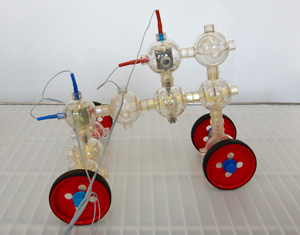
[Charlie] is a robot based on the Capsela construction system, a toy consisting of interlocking plastic spheres containing different functions of shafts, gears, and motors. There was a Robotic Workshop kit for Capsella that featured a Commodore 64 interface, and it is through this means that [Charlie]’s three motors are controlled. It includes a ROM that extends Commodore BASIC with extra commands, which allow the robot to be easily controlled.
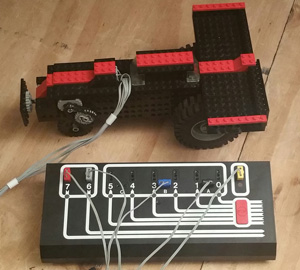
Artie the robot, with Dacta box in foreground
Meanwhile [Artie] is a Lego robot, using the Dacta TC Logo, a kit sold for the educational market and available at the time with interfaces for the PC and the Apple II. They had a Dacta control box but not the Apple II card to go with it, so had to make do with a functional replica built on a prototyping card. As the name suggests, this was programmed using Logo, and came with the appropriate interpreter software.
Both robots are reported to have been a success in terms of working in the first place, then demonstrating the 1980s technology and providing entertainment and engagement with the faire’s visitors.
We have covered numerous Lego robots over the years, as a search of our site will confirm. But this is only the second time we’ve featured a Capsela project, the first being this Arduino rover from 2011. [Mike] mused why we don’t see Capsela more often, and the same sentiment is true today. Do you have a Capsela set gathering dust somewhere that could make a robotic project?
Does everyone watch a load of videos on YouTube that are somewhat on the unadmissibly geeky side? In my case I might not care to admit that I have a lot of videos featuring tractors in my timeline. The mighty Russian Kirovets hauling loads through the impossible terrain of the taiga, tiny overloaded 2WD tractors in India pulling wheelies, and JCB Fastracs tearing around the British Fenland. You can take the girl off the farm, but you can’t take the farm out of the girl.
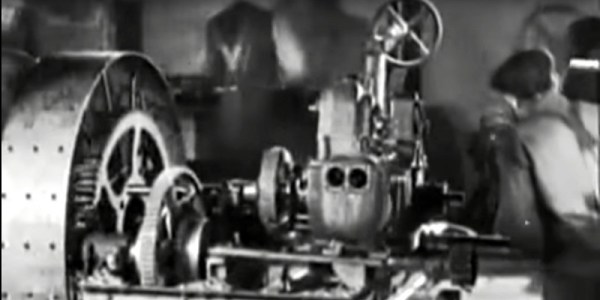
So my recommendations have something of an agricultural flavor. Like the video below the break, a 1917 silent film promoting the Ford Model B tractor. This one was eye-catching because it was a machine I’d not seen before, a rather unusual three-wheeler design with two driving wheels at the front and a single rear steering wheel.
During the early years of the twentieth century the shape of the modern tractor was beginning to evolve, this must have been a late attempt at an alternative. Speaking from the viewpoint of someone who has operated a few tractors in her time it does not look the easiest machine to control, that cloud of exhaust smoke surrounding the driver would not be pleasant, and the operating position hanging over the implement coupling at the rear does not look particularly comfortable or safe.
The film has a charming period feel, and tells the tale of a farmer’s son who tires of the drudgery of manual farm labor, and leaves for the city. He finds a job at the tractor factory and eventually becomes a tractor salesman, along the way meeting and marrying the daughter of a satisfied customer. He returns home with his bride, and a shiny new tractor to release his father from ceaseless labor. Along the way we gain a fascinating look at agriculture on the brink of mass mechanization, as well as the inside of a tractor factory of the time with an assembly sequence in which they appear to use no fasteners.
[Image Source: Tractor Industry Fraud on Farm Collector]All of this is very interesting, but the real nugget in the story lies with its manufacturer. This is a Ford Model B tractor. But it’s not a Ford Model B. Confused? So, it seems were the customers. The Ford we all know is the Michigan-based motor company of Henry Ford, who were already very much a big name in 1917. This Ford however comes from the Ford Tractor Co, of South Dakota, an enterprise set up by a shady businessman to cash in on the Ford brand, manufacturing an already outdated and inferior machine backed up by dubious claims of its capabilities.
On the staff was an engineer called Ford who lent his name to the company, but he bore no relation to Henry Ford. The company didn’t last long, collapsing soon after the date of this film, and very few of its products survived. It did have one legacy though, the awful quality of one of its tractors is reputed to have been the impetus behind the founding of the Nebraska Tractor Test Laboratory, the place where if you sell a tractor in the USA, you’ll have to have it tested to ensure it performs as it should. In their museum they house one of the few surviving Ford Model B tractors.
Meanwhile the Ford in Michigan produced their own very successful line of tractors, and their Fordson Model F from the same year is a visible ancestor of today’s machines. But as the video below shows, there’s nothing new about a fake.







![[Image Source: Tractor Industry Fraud on Farm Collector]](https://hackaday.com/wp-content/uploads/2016/11/ford-tractor-company-poster.jpg)









