Live Train Departure Screens Keep You Abreast Of Transit Developments

If you want to know when the train is coming, you could pull up a webpage on your phone, or walk all the way to the station to look at the displays there. Or, like [eastfamilyreddish], you could build a neat little train info display to decorate your desktop instead.

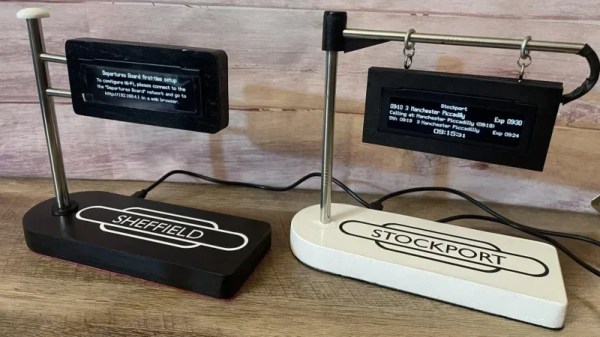
The build is based on the work of [gadec-uk]—who developed a train information display some time ago. It’s based around an ESP32 D1 Mini, paired with a 256 x 64 OLED screen to display relevant train information. It accesses a National Rail API for train status information—known as the Darwin LDBWS (Live Departure Board Webservice). Configuration is via a web GUI hosted by the ESP32 itself.

[eastfamilyreddish] took the concept further by adapting this hardware into a more pleasing form. The ESP32 and OLED screen are built into a neat little hanging sign setup that apes one you might expect to see at a real railway station. You might expect that 3D printing was involved, but instead, this was achieved with lasercut parts and resin casting to create something with a beautiful finish. They even went so far as to include a wireless phone charging module in the base, making the device extra useful to really earn its place on the desktop.

The fact is, around these parts we love both trains and the displays you find around them. If you’ve got a railway-adjacent project, or you’ve just built your own awesome railway, don’t hesitate to let us know on the tipsline!
Build Your Own Compact Temp Gun

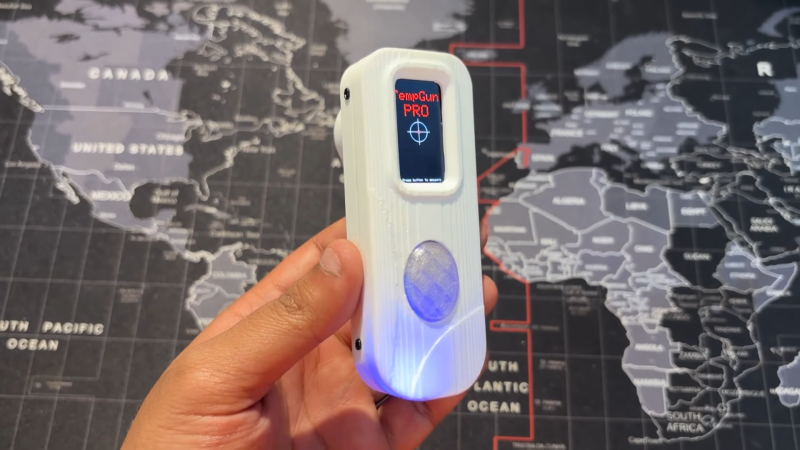
Sometimes you need to know what temperature something is, but you don’t quite want to touch it. At times like these, you might want a temp gun on hand to get a good reading, like the one [Arnov Sharma] built.

The build is a relatively simple one, and is based around an Waveshare ESP32 C6 development module that comes with a small LCD screen out of the box. The microcontroller is set up to read an MLX90614 infrared temperature sensor. This device picks up the infrared energy that is emitted by objects relative to their temperature. The sensor has a great range—from -70 C to 380 C. The readouts from this sensor are then displayed on the screen. Battery power is from a small 600 mAh LiPo cell, which is managed by a IP5306 charge module.

It’s worth noting that these infrared temperature sensors aren’t infallible devices. The temperature they perceive is based on certain assumptions about factors like an objects emissivity. Thus, they don’t always give accurate readings on metallic or shiny objects, for example. It’s also important to understand the sensor’s field of view. Despite many commercial versions featuring a laser pointer for aiming, many of these infrared temperature sensors tend to average their reading over a small spot that gets larger the farther away they are from the object being measured.

Tools like portable temp guns are pretty cheap, but sometimes it’s just fun to build your own. Plus, you usually learn something along the way. Video after the break.

Continue reading “Build Your Own Compact Temp Gun”

USB DAC Comes With Graphic EQ

[shiura] had a problem — they wanted a nice high-quality audio output for their computer, but they didn’t fancy any of the DACs that were readily available on the market. They specifically wanted one that was affordable, capable, and included a graphic equalizer so they could simply hook it up to a regular amplifier and dial in the perfect sound. When they couldn’t find such a device, they decided to build their own.

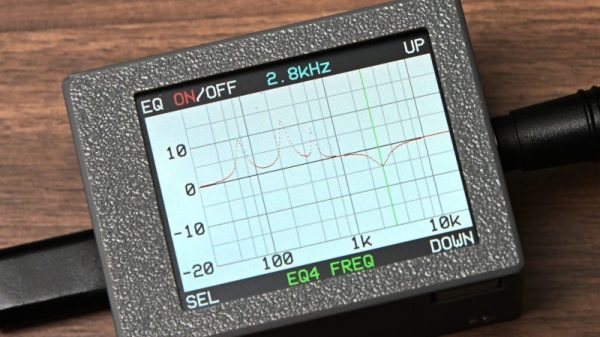
The build is based around a Raspberry Pi Pico, chosen for its feature set that makes it easy to configure as a USB audio device. It’s paired with a Waveshare Pico Audio module, which is based on the PCM5101A stereo DAC and slots neatly on top of the microcontroller board. An SPI-controlled LCD screen was also fitted in order to display the graphic equalizer interface that [shiura] whipped up. The project write-up explains the code required to implement the equalizer in detail. A four-channel equalizer was possible on the original Pi Pico (RP2040), while upgrading to a more powerful Pi Pico 2 (RP2350) allowed implementing eight channels in total.

If you’re looking to build a digital audio system with the ability to do some equalization to suit your listening room, this might be a project of interest to you. We’ve featured other projects in this realm before, too.

Continue reading “USB DAC Comes With Graphic EQ”

Damaged Pocket Computer Becomes Portable Linux Machine

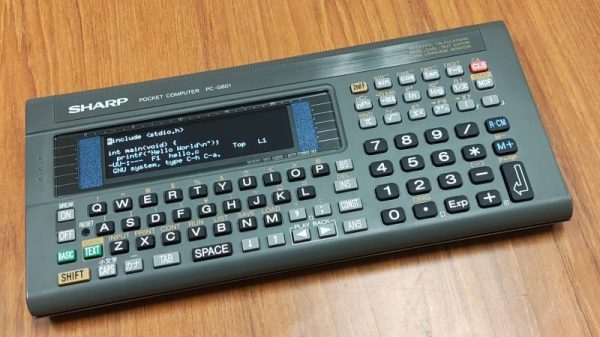
The Sharp PC-G801 was an impressive little pocket computer when it debuted in 1988. However, in the year 2025, a Z80-compatible machine with just 8 kB of RAM is hardly much to get excited about. [shiura] decided to take one of these old machines and upgrade it into something more modern and useful.

The build maintains the best parts of the Sharp design — namely, the case and the keypad. The original circuit board has been entirely ripped out, and a custom PCB was designed to interface with the membrane keypad and host the new internals. [shiura] landed on the Raspberry Pi Zero 2W to run the show. It’s a capable machine that runs Linux rather well and has wireless connectivity out of the box. It’s paired with an ESP32-S3 microcontroller that handles interfacing all the various parts of the original Sharp hardware. It also handles the connection to the 256×64 OLED display. The new setup can run in ESP32-only mode, where it acts as a classic RPN-style calculator. Alternatively, the Pi Zero can be powered up for a full-fat computing experience.

The result of this work is a great little cyberdeck that looks straight out of the 1980s, but with far more capability. We’ve seen a few of these old pocket computers pop up before, too.

Continue reading “Damaged Pocket Computer Becomes Portable Linux Machine”

Any Old TV Can Be A Clock With Arduino

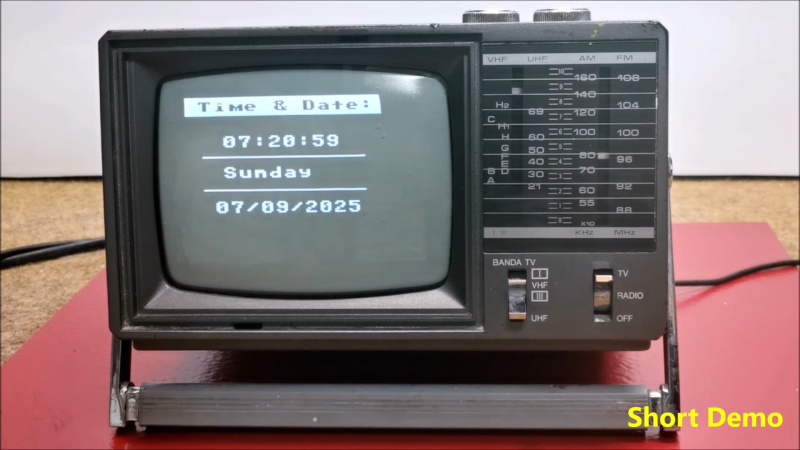
If you’ve got an old black and white TV, it’s probably not useful for much. There are precious few analog broadcasters left in the world and black and white isn’t that fun to watch, anyway. However, with a little work, you could repurpose that old tube as a clock, as [mircemk] demonstrates.

The build is based around an Arduino Nano R3. This isn’t a particularly powerful microcontroller board, but it’s good enough to run the classic TVOut library. This library lets you generate composite video on an Atmel AVR microcontroller with an absolute minimum of supporting circuitry. [mircemk] paired the Arduino with a DS3231 real-time clock, and whipped up code to display the time and date on the composite video output. He then also demonstrates how to hack the signal into an old TV that doesn’t have a specific input for composite signals.

You’ll note the headline says “any old TV can be a clock,” and that’s for good reason. Newer TVs tend to eschew the classic composite video input, so the TVOut library won’t be any good if you’re trying to get a display up on your modern-era flatscreen. In any case, we’ve seen the TVOut library put to good use before, too. Video after the break.

Continue reading “Any Old TV Can Be A Clock With Arduino”

Hydrofoil Bikes Are Harder To Build Than You Think

Hydrofoils are perhaps best known for their application on boring ferries and scary boats that go too fast. However, as [RCLifeOn] demonstrates, you can also use them to build fun and quirky personal watercraft. Like a hydrofoil bike! Only, there are some challenges involved.

Hydrofoils work much like airfoils in air. The shape of the foil creates lift, raising the attached vehicle out of the water. This allows the creation of a craft that can travel more quickly because the majority of its body is not subject drag from the water. The key is to design the craft such that the hydrofoils remain at the right angle and depth to keep the craft lifted out of the water while remaining stable.

The hydrofoil bike is created out of a combination of plywood, foam, and 3D printed components. It uses a powerful brushless motor for propulsion, and that’s about it. Sadly, despite the simplicity, it wasn’t an instant success. As you might expect, balancing on the bike is quite difficult, particularly when trying to get it started—as the foils need some speed to actually start generating meaningful lift.

After further research into commercial hydrofoil bikes, [RCLifeOn] realized that the buoyancy of the bike made it too hard to straddle when starting out. Some of the 3D printed foils also proved more than a little fragile. It’s back to the drawing board for now—the power system is likely up to snuff, but the dynamics of the platform need work. It’s perhaps no surprise; we’ve covered the challenges of hydrofoil stability before. If you want to go fast on water, you could go the easier route and just build an electric surfboard. Video after the break.

Continue reading “Hydrofoil Bikes Are Harder To Build Than You Think”

One-Way Data Extraction For Logging On Airgapped Systems

If you want to protect a system from being hacked, a great way to do that is with an airgap. This term specifically refers to keeping a system off any sort of network or external connection — there is literally air in between it and other systems. Of course, this can be limiting if you want to monitor or export logs from such systems. [Nelop Systems] decided to whip up a simple workaround for this issue, creating a bespoke one-way data extraction method.

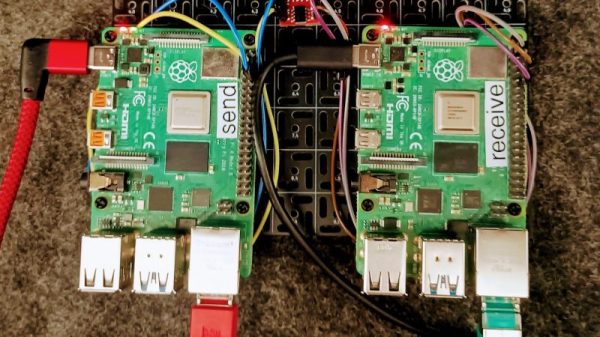
The concept is demonstrated with a pair of Raspberry Pi computers. One is hooked up to critical industrial control systems, and is airgapped to protect it against outside intruders. It’s fitted with an optocoupler, with a UART hooked up to the LED side of the device. The other side of the optocoupler is hooked up to another Raspberry Pi, which is itself on a network and handles monitoring and logging duties.

This method creates a reliable one-way transmission method from the airgapped machine to the outside world, without allowing data to flow in the other direction. Indeed, there is no direct electrical connection at all, since the data is passing through the optocoupler, which provides isolation between the two computers. Security aficionados will argue that the machine is no longer really airgapped because there is some connection between it and the outside world. Regardless, it would be hard to gain any sort of access through the one-way optocoupler connection. If you can conceive of a way that would work, drop it down in the comments.

Optocouplers are very useful things; we’ve seen them used and abused for all sorts of different applications. If you’ve found some nifty use for these simple parts, be sure to drop us a line!