Hacking Into Your Router’s Administrative Interface

zte_zxdsl_router_hack

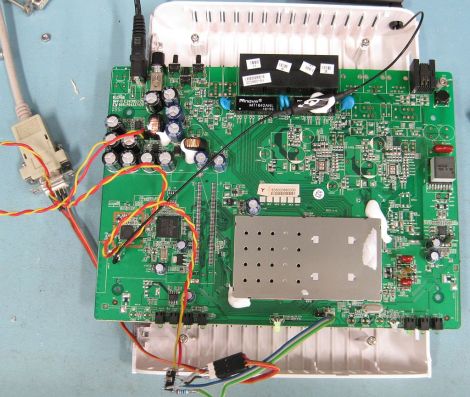
[Arto] recently upgraded his home Internet subscription from an ADSL to VDSL, and with that change received a shiny new ZTE ZXDSL 931WII modem/wireless router. Once he had it installed, he started to go about his normal routine of changing the administrator password, setting up port forwarding, and configuring the wireless security settings…or at least he tried to.

It seems that he was completely unable to access the router’s configuration panel, and after sitting on the phone with his ISP’s “support” personnel, he was informed that there was no way for him to tweak even a single setting.

Undaunted, he cracked the router open and started poking around. He quickly identified a serial port, and after putting together a simple RS232 transceiver, was able to access the router’s telnet interface. It took quite a bit of experimentation and a good handful of help from online forums, but [Arto] was eventually able to upload an older firmware image to the device which gave him the configuration tools he was looking for.

Aside from a few Ethernet timeout issues, the router is now performing to his satisfaction. However, as a final bit of salt in his wounds, he recently read that the admin panel he was originally seeking can be accessed via the router’s WAN interface using a well-known default password – frustrating and incredibly insecure, all at the same time! He says that he learned quite a few things along the way, so not all was lost.
Repairing A Broken Microwave Keypad

microwave_keypad_fix

[Alexandre Souza] needed a microwave pretty badly, but he didn’t have a lot of cash on hand. He located one for a great price, but once he got home he found that things weren’t working quite like they should be (Google translation).

After some investigation, he narrowed the problem down to a bad keypad membrane. Unfortunately for him, this model of microwave was never sold in Brazil (who knows how it got there) and the only membrane he could track down had to be shipped in from the US at a cost of $80.

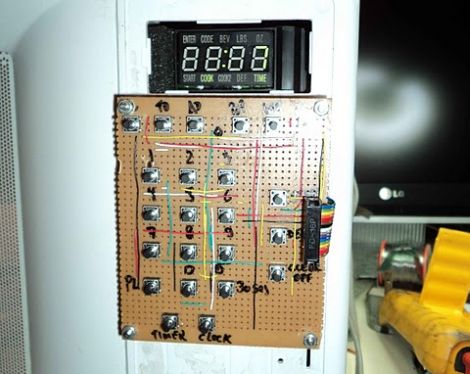
Rather than pay such a high price for a simple membrane, he opted to fix the microwave himself. He dismantled the control panel and thoroughly traced the keypad matrix to get an understanding of which pins toggled which functions. With a piece of protoboard and almost two dozen push buttons in hand, he built his own keypad and wired it directly into the microwave’s control board.

With labels written in marker it might not be the nicest looking thing you have ever seen, but it works a treat and is a great money-saving hack.

DIY CNC Touch Probe

diy_cnc_touchprobe

[Dennis] recently invested some money in the Tormach Tooling System for his CNC’d Sieg SX3 mill in order to make his tool changes easier. While the kit allows him to easily account for height offsets while changing tools, he has no quick, reliable means of locating the spindle in relation to his workpiece. Tired of manually finding the edges of his workpiece for each axis, he built himself a DIY touch probe to automate the process.

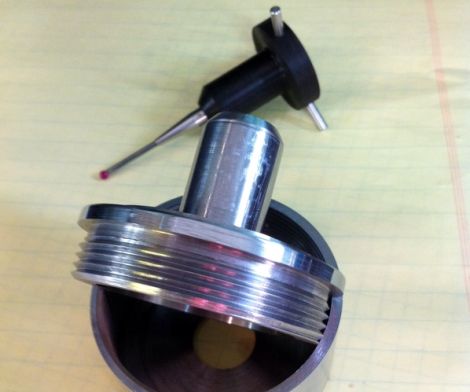
The theory behind the probe’s operation is pretty simple. In the probe’s housing, three conductive rods are mounted perpendicular to the probe tip. Each rod rests between two metal balls forming a complete circuit. When the probe touches the edge of his milling material, the circuit is broken, sending a signal to his CNC control box.

The probe is comprised of several different parts, milled from either aluminum or black delrin. [Dennis] says that after everything was assembled, the runout on the probe was unacceptable, so he made a few tweaks, and now the runout has been reduced to about 0.00025” – well within acceptable tolerance limits for any work he will be doing.

Be sure to check out his site, as there are plenty more pictures of the probe’s construction, as well as additional video.

In the meantime, continue reading to see a quick video of the finished probe in action.

Continue reading “DIY CNC Touch Probe”

Tiny Transforming Beer Can Robot

beer_can_robot

The next time you reach for a cold one, you might want to take a look at the can to ensure that your beer won’t suddenly sprout legs and start skittering across the table.

You might remember [Ron Tajima] from some of his previous creations, including this Roomba-based baby cradle and the PacMan Roomba mod. This time around, he has created a cool little transforming robot that fits inside a beer can.

The robot’s brains are stored just underneath the top of the beer can on a custom-built board. On one side of this board, you will find an mbed controller which is used to manage all of the robot’s functions, and on the other side, four batteries provide all of the device’s power. The robot’s three legs are controlled by six servos, allowing for movement in several different planes. The beer-bot’s movements are controlled with a Wiimote, so we’re assuming he has crammed a Bluetooth module somewhere in there as well.

[Ron] mentions that it moves a bit slowly when standing on end, but we think the robot is pretty awesome as is, and we can’t wait to see what improvements the next version might bring.

Stick around to see a video demonstration of the robot in action.

[Thanks Sascha]

Continue reading “Tiny Transforming Beer Can Robot”

pe_lang_art_installation

Machine Precisely, Methodically Arranges Water Droplets

While some projects we feature are meant to perform a useful function or make life easier, others such as this art installation by [Pe Lang] are far less functional, but amazing nonetheless.

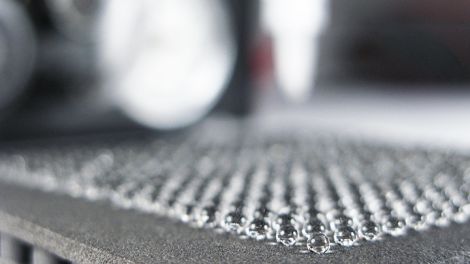
Taking a cue from CNC-style machines, his creation is an experiment in falling objects and the properties of water. The machine methodically moves along a small 370 x 330 mm plate that is constructed out of a special omniphobic material. A syringe full of water travels along with the machine’s arm, depositing a single 3.3 mm wide drop of water on the board every few seconds as it moves along. Due to the surface tension of the water, each droplet forms a near perfect sphere on the plate without disturbing any of its neighbors.

Once the machine is finished, it leaves the matrix of water droplets to evaporate, after which the machine starts its careful process once again. It really is amazing, regardless of the fact that it doesn’t exactly “do anything”.

Be sure to check out the video below to see the exhibit in action.

[via Make]

Continue reading “Machine Precisely, Methodically Arranges Water Droplets”

Vintage Peripheral Hacks Roundup

A few days ago, we featured an Apple ][ USB keyboard mod, and several readers chimed in sharing their own retro conversions in the comments section. We had no idea that many of you had made similar modifications of your own, so here’s a quick roundup of what your fellow Hackaday readers have put together.


Optical Atari STM1 Mouse

atari_stm1_usb

[JJ] had a 25-year old Atari STM1 mouse sitting around and was wondering how to get it to work with his new computer. Instead of interfacing the old mouse with his computer via a custom circuit board, he gutted the STM1 and replaced the innards with those of a much newer optical mouse. He did a bit of trimming to get the new PCB to fit, aiming the optical sensor through the now-empty “ball hole”. According to [JJ] it works just as good as it looks.


ZX Spectrum USB keyboard conversion

sinclair_zx_spectrum_usb

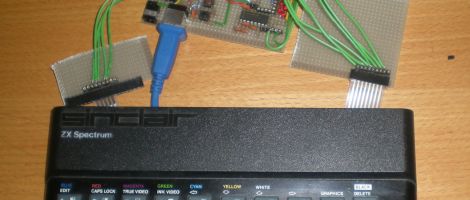
[Lee] is a sucker for vintage hardware, and with the help of his friend [LanceR], resurrected an old Sinclair ZX Spectrum computer into a working USB keyboard. After replacing the deteriorated membrane, the pair mapped out the keyboard to figure out how the matrix was wired. With that done, they built a prototype USB interface board, which they later replaced with a proper PCB.


BBC Master Compact USB keyboard conversion

bbc_master_compact_usb

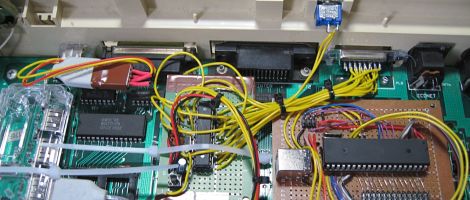
A friend of [MoJo’s] had a BBC Master Compact computer from back in the day and wanted to have the keyboard converted to USB in order to use it with certain emulators. [MoJo] gladly took on the project, stripping some of the old motherboard components out to make room for his new circuitry. He built a USB interface board around an ATMega162, and even got the old built-in speaker working properly. From the outside, the keyboard looks like it has never been touched – nice job!

Wifon Is Back And Better Than Ever

wifon_v2

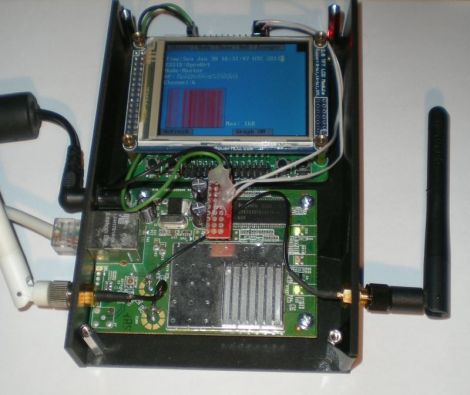
Hackaday forum member [Emeryth] recently posted his newest creation, the Wifon 2.0, which is an update to a project we featured last year. The second iteration of the device looks to make several improvements on the already solid concept.

Ditching the simple 16×4 LCD, version 2 sports a full color 320×240 touch panel LCD. A faster STM32 micro controller replaces the Atmega88 he used the first time around, allowing him to create a much more advanced user interface. The micro runs the ChibiOS/RT real time operating system, which enables multitasking, making the entire project a lot easier. Like the first version, an original Fonera performs all of the pen testing, though this time around he has ditched the vanilla DD-WRT distro for Jasager, which is purpose-built for running the Karma attack.

The project is coming along nicely, and [Emeryth] says he has a few simple apps running on the device already. He has found that running several applications on the device simultaneously is testing the practical limits of the Foneras capabilities, though he may add more memory to the router in order to squeeze a little more life out of it.

[via Hackaday forums]