Exploring The Healing Power Of Cold Plasma

It probably won’t come as much surprise to find that a blast of hot plasma can be used to sterilize a surface. Unfortunately, said surface is likely going to look a bit worse for wear afterwards, which limits the usefulness of this particular technique. But as it turns out, it’s possible to generate a so-called “cold” plasma that offers the same cleansing properties in a much friendlier form.

While it might sound like science fiction, prolific experimenter [Jay Bowles] was able to create a reliable source of nonthermal plasma for his latest Plasma Channel video with surprisingly little in the way of equipment. Assuming you’ve already got a device capable of pumping out high-voltage, all you really need to recreate this phenomenon is a tank of helium and some tubing.

Cold plasma stopped bacterial growth in the circled area.

[Jay] takes viewers through a few of the different approaches he tried before finally settling on the winning combination of a glass pipette with a copper wire run down the center. When connected to a party store helium tank and the compact Slayer Exciter coil he built last year, the setup produced a focused jet of plasma that was cool enough to touch.

It’s beautiful to look at, but is a pretty light show all you get for your helium? To see if his device was capable of sterilizing surfaces, he inoculated a set of growth plates with bacteria collected from his hands and exposed them to the cold plasma stream. Compared to the untreated control group the reduction in bacterial growth certainly looks compelling, although the narrow jet does have a very localized effect.

If you’re just looking to keep your hands clean, some soap and warm water are probably a safer bet. But this technology does appear to have some fascinating medical applications, and as [Jay] points out, the European Space Agency has been researching the concept for some time now. Who knows? In the not so distant future, you may see a similar looking gadget at your doctor’s office. It certainly wouldn’t be the first time space-tested tech came down to us Earthlings.

Continue reading “Exploring The Healing Power Of Cold Plasma”

Low-Cost Computer Gesture Control With An I2C Sensor

Controlling your computer with a wave of the hand seems like something from science fiction, and for good reason. From Minority Report to Iron Man, we’ve seen plenty of famous actors controlling their high-tech computer systems by wildly gesticulating in the air. Meanwhile, we’re all stuck using keyboards and mice like a bunch of chumps.

But it doesn’t have to be that way. As [Norbert Zare] demonstrates in his latest project, you can actually achieve some fairly impressive gesture control on your computer using a $10 USD PAJ7620U2 sensor. Well not just the sensor, of course. You need some way to convert the output from the I2C-enabled sensor into something your computer will understand, which is where the microcontroller comes in.

Looking through the provided source code, you can see just how easy it is to talk to the PAJ7620U2. With nothing more exotic than a switch case statement, [Norbert] is able to pick up on the gesture flags coming from the sensor. From there, it’s just a matter of using the Arduino Keyboard library to fire off the appropriate keycodes. If you’re looking to recreate this we’d go with a microcontroller that supports native USB, but technically this could be done on pretty much any Arduino. In fact, in this case he’s actually using the ATtiny85-based Digispark.

This actually isn’t the first time we’ve seen somebody use a similar sensor to pull off low-cost gesture control, but so far, none of these projects have really taken off. It seems like it works well enough in the video after the break, but looks can be deceiving. Have any Hackaday readers actually tried to use one of these modules for their day-to-day futuristic computing?

Continue reading “Low-Cost Computer Gesture Control With An I2C Sensor”

M5Paper Gets Open Source Weather Display Firmware

We know you like soldering irons, we’re quite fond of them ourselves. But the reality is, modular components and highly capable development boards allow the modern hardware hacker to get things done with far less solder smoke then ever before. In fact, sometimes all you need to finish your project is the right code.

Case in point, check out the slick electronic paper weather display that [Danko Bertović] shows off in the latest Volos Projects video. While it certainly fits the description of a DIY project, he didn’t have to put any of the hardware together himself. The M5Paper is an ESP32 development kit designed around a crisp 4.7″, 960 x 540 e-paper panel that includes everything from environmental sensors to an internal 1150 mAh battery. To make your handheld e-paper dreams come true, the only thing you need to provide is the software.

The weather display code provided by [Danko] should certainly get you going in the right direction. Now don’t get us wrong, there’s certainly no shame in just flashing his code to the device and plunking it on your desk. It’s a gorgeous looking interface, and we all know that a sprinkling of open source code is often all it takes to make a standard consumer device extraordinary. But by using the code he’s provided as a launching point, you can take this turn-key device and really make it your own.

Continue reading “M5Paper Gets Open Source Weather Display Firmware”

Rolling Your Own Long-Range IoT Sensor Network

Homebrew wireless sensors are nothing new around these parts: grab an ESP8266, hang a BME280 from the I2C pins, and you’re just a few lines of code away from joining the Internet of Things on your own terms. Builds like this are so cheap and easy that they make an excellent first project for folks looking to get into the electronics game, but what if you’re looking for something a bit more bespoke?

In that case, you could follow in the footsteps of [Discreet Mayor] and put together a custom modular architecture for long-range wireless sensors. The core of the system is a breakout board for the Texas Instruments SimpleLink CC1312 wireless MCU which features a simple 2×11 header connector. This allows the module to either be plugged into a larger board or have a small sensor PCB attached directly to it.

Rather than using WiFi or requiring some existing radio infrastructure, the boards automatically create a private network using the IEEE 802.15.4 standard at a range of up to 600 meters. A dedicated receiver isn’t necessary, to pull data off the network, one of the CC1312 boards simply gets connected to a computer through a simple FT232 adapter.

[Discreet Mayor] has already created a number of projects that use these custom radios for communication, from a pool monitoring system to a temperature sensor for the BBQ. That portable battery operated devices are able to use this common communications backbone just as well as mains powered static devices is a testament to the work that went into the firmware to make it as robust and efficient as possible.

Like the idea of long-range private networks, but less enthusiastic about having to come up with your own hardware? Not to worry. Over the summer, Espressif announced that they’re working on an ESP32 variant that includes support for IEEE 802.15.4. Just as soon as this chip shortage is over, we might even get to see the thing.

Teardown: Analog Radionic Analyzer

Have you ever looked up a recipe online, and before you got to the ingredients, you had to scroll through somebody’s meandering life story? You just want to know how many cans of tomato paste to buy, but instead you’re reading about cozy winter nights at grandma’s house? Well, that’s where you are right now, friend. Except instead of wanting to know what goes in a lasagna, you just want to see the inside of some weirdo alternative medicine gadget. I get it, and wouldn’t blame you for skipping ahead, but I would be remiss to start this month’s teardown without a bit of explanation as to how it came into my possession.

So if you’ll indulge me for a moment, I’ll tell you a story about an exceptionally generous patron, and the incredible wealth of sham medical hokum that they have bestowed upon the Hackaday community…

Continue reading “Teardown: Analog Radionic Analyzer”

Building A Heavy-Duty Log Splitter, One Piece At A Time

With temperatures dropping in the Northern Hemisphere, this is the time of year when many people start processing firewood for the coming winter months. For the city folks, that means chopping a tree into logs, and then splitting those logs into something small enough to fit in your wood stove. You can do it all with hand tools, but if you’ve got big enough logs, a powered splitter is a worthy investment.

Unless of course you’re like [Workshop From Scratch], in which case you can craft a powerful splitter from random bits of steel you’ve got laying around your impeccably outfitted shop. Given the incredible forces some parts of the splitter will be exposed to, he really takes his time on this build to make sure everything is bulked up. Add in his legendary attention to detail, and you’ll be watching this one for awhile. Not that we’re complaining.

Fitting the adjustable blade.

Early on it seemed like [Workshop From Scratch] was putting together a fairly simple log splitter, which in the most basic form is nothing more complex than a hydraulic cylinder pushing a log against a triangular piece of metal. But then he starts layering on the special features, such as the small hydraulic cylinder that can raise and lower the splitter’s fearsome looking blade.

There’s also the ladder-like feeder mechanism, which prevents the user from having to lift the log onto the machine manually; just stop the log between the rungs, and let the hydraulics raise the ramp and send the log rolling towards the machine’s hungry maw.

In short, this splitter may be a DIY project, but it’s just as strong and well built as anything on the commercial market. In fact, it’s probably an improvement over what you’d be able to find a the big box retailer. Which shouldn’t come as surprise if you’ve seen some of his previous work.

Continue reading “Building A Heavy-Duty Log Splitter, One Piece At A Time”

Here Are The Ten Finalists For The Hackaday Prize Wildcard Challenge

Each phase of the 2021 Hackaday Prize challenged designers to reimagine traditional solutions within various fields, from robotics to assistive devices. But for the Reactivate Wildcard, the fifth and final Challenge of this year’s Prize, this theme of Rethink, Refresh, Rebuild could be applied on anything the entrant wanted. Today we’re pleased to announce the ten Wildcard projects that have been selected to win $500 and move onto the finals. Who will win the top spot this year? We’ll find out during Hackaday Remoticon in just a few weeks!

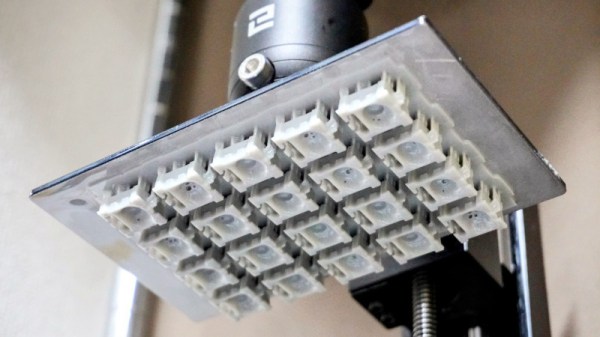
The MetaSense project is a perfect example of how new technology can be used to rethink what we generally consider to be a solved problem. This project leverages multi-material 3D printing to produce conductive cells which vary their capacitance in response to physical deformation. With some clever geometry, these cells can be chained together to produce single-part devices which can stand in for traditional toggle switches, joysticks, pressure sensors, and even accelerometers.

Speaking of 3D printing, the Direct Granules Extruder project imagines a future were desktop printers are no longer limited to using rolls of manufactured filament. The key is a robust extruder design that can grind up plastic pellets fast enough to feed them directly into the hotend of a conventional 3D printer. This not only means a considerable operational savings, as raw plastic pellets are much cheaper than filament by weight, but would potentially allow for printing with more exotic plastic blends and even recycled materials.

Some of the projects even made us rethink what’s possible for the individual hacker. The WiFiWart utilizes a miniature single-board Linux computer that was designed and built from the ground up by a single person, using only free and open source software. Whether it’s that this penetration testing gadget has packed a full Linux computer and two WiFi adapters into a box the size of a phone charger, or the fact that it’s been done by a dedicated hacker with free tools, you can’t help but come away impressed with this one.

Wild For Wildcard

With nearly 100 projects submitted for the Reactivate Wildcard challenge, this was clearly a theme that resonated with the Hackaday community. As always, it was extremely difficult to narrow this down to the ten finalists below:

Whether or not they made the Finals this year, the complete list of Reactivate Wildcard entries contains an incredible array of fascinating concepts that are well worth browsing through. If any of them particularly catch your eye, why not strike up a conversation with the creator in the comments and see if you can’t help out? There’s always next year.