A test print being struck with a comically large hammer. It did not break.

How Would You Break This Flexible PETG?

Polymaker has a new PETG formulation they bill as “unbreakable”, sold as G-Flex. Aside from the questionable choice of name, it certainly looks like good stuff in a recent video review by [3D Printing Nerd].

A little flex can go a long way to increasing durability — which PETG already has over PLA — but too much flex and you get into difficulty printing, which apparently this filament doesn’t have. It’ll go through a multi-material system like Bambu’s AMS without trouble, for instance, as [3D Printing Nerd] demonstrates with a multi-color figurine, which he also fails to break. Now, just because it didn’t get destroyed in one YouTube video doesn’t mean we’re willing to swallow the “unbreakable” marketing, and to his credit, the [3D Printing Nerd] isn’t either.

One big advantage of this slightly-flexible filament over a comparable TPU is its bridging ability: it bridges like PETG. It prints like PETG, it can even use the same G-code as a PETG print you already prepared. Except it’s shore 95A hardness, which does put it into the flex category.

We’re big fans of PETG, and there’s probably going to be rolls of flexy PETG in Hackaday printers at some point. But for now we leave it to you: how do you propose to break the “unbreakable” filament?
Continue reading “How Would You Break This Flexible PETG?” →

One Hundred Gratuitous Case Fans? We’re Fans Of This.

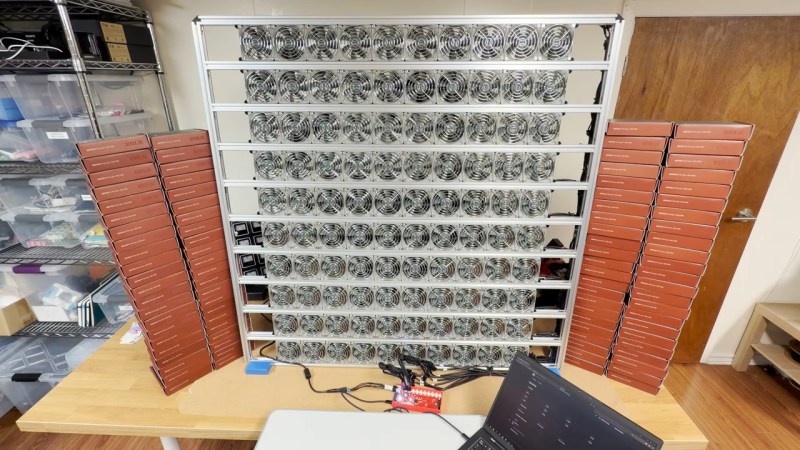
Sometimes you can’t help but boast about a project once you have it in your hands. [Sasa Karanovic] proudly declared that his new fan controller could handle “one hundred fans, without breaking a sweat” — but you should be mindful of that which you speak into being, for [Sasa] from that moment was haunted by the specter of those hundred fans. It would not leave him until he built what may literally be the coolest thing we’ve seen on YouTube this week: a literal wall of PC cooling fans.

Do you need one hundred computer fans? Does [Sasa]? Does anyone? No, of course not. That’s what makes this project great: it has no reason to exist, other than to prove a boast that. [Sasa]’s bespoke fan controller doesn’t have 100 outputs, though, so he had to chain the things together through a comical number of fan splitters. The frame is a big mass of aluminum extrusion with some 3D printed brackets to hold fans and wires both in place.

The fans are controlled in their rows of 10 by the fan controller, but as a stress test he drives 50 fans per channel just to see how his controller holds up. Spoiler: it does. If that kind of power interests you, the fan controller will be open-sourced once [Sasa] has finished development.

Now all he needs is an idea of what to use this gratuitous fan wall for — let us know in the comments if you have any ideas. Perhaps a really big fume extractor? Maybe a hilarious hovercraft?

Continue reading “One Hundred Gratuitous Case Fans? We’re Fans Of This.” →

Mesh2Cad Automates Re-Modelling

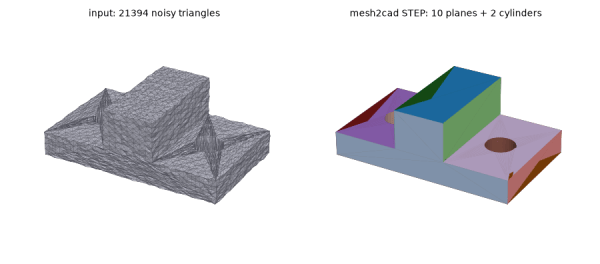
It’s happened to all of us, we find an STL that would just about solve our problems, but the mesh isn’t quite right. Sometimes mesh-editing is good enough, other times you need to rebuild the mesh in a proper CAD environment to get what you need. In that latter case, [Emir Mrkaljevic]’s Mesh2Cad program could save you a whole lot of work, because it does exactly what it says on the tin: turns a mesh to a CAD file.

Even better, [Emir] doesn’t pick the CAD format for you. Sure, it does STEP, but you can also go straight to FreeCAD, CadQuerry or OpenSCAD with these handy scripts. Well, technically the FreeCAD version generates a macro to make the object rather than a .FCSTD, but that’s still pretty handy. Scripts is the right word for mesh2cad, because the whole thing is python and just a pip install mesh2cad away from living on your machine. Of course you don’t need to use pip since the whole thing is on GitHub and available for your eyeballs to audit. Speaking of audit, the scripts apparently check their own work and only give you CAD if they can approximate the mesh within tolerance.

Now there are limits here, if you think it sounds too good to be true. You’re limited to things that can be made of the sort of primitive manipulation OpenSCAD usually deals in — no organic shapes, free-flowing curves, or the like. If it’s a box or a bracket with holes, fillets and chamfers, though, this tool might save you a couple minutes recreating it.

If you prefer to do it yourself or have one of those annoyingly-organic meshes this tool won’t touch, we have a guide for what to do when an STL needs some tweaking.

Not-So-Large Language Model Fits On A Floppy Disk

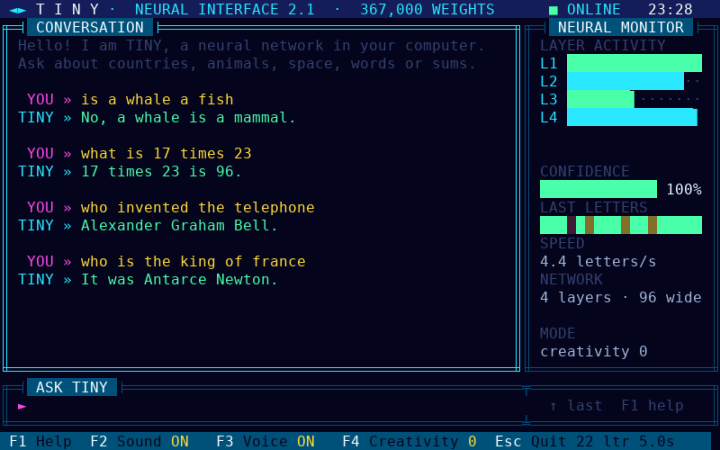
At some point when hackers start pushing edge cases, nomenclature gets weird, like Large Language Models, or LLMs. At some point, the word “large” obviously becomes impossible to justify, but we’re not going to call [WollyMonjac]’s Tiny2.1 DOS PC Chatbot just a ‘language model’ — perhaps “transformer” is the better term. That’s what LLMs and not-so-L-LMs like this one are under the hood, after all.

In any case, this one was written in Turbo C 2.0 by the no-debate ‘large’ LLM Fable 5.2 and trained by Opus 5.5. So for those of you who’ve got this one on their apocalypse bingo card: yes, machines are making machines. This second-gen transformer targets a 486DX or Pentium processor and runs on DOS, and you can get it onto the machine on a single period-appropriate floppy disk.

The actual network is 380 KB of 8-bit weights, while the rest of the floppy would hold the handy interface. As you might imagine, it needs 540 KB of free memory to run in. The transformer holds 3,500 facts in its 367K-parameter but outside of that it makes stuff up with the reckless abandon that these models can’t escape, regardless of size. 

The project is of course more of a conversation-starter than anything else, though if you want to train it on your own 3,500 facts the scripts for that are on GitHub under an MIT license. We’ve seen an LLM on a 486 before, but being able to easily curate exactly what the model knows raises some interesting possibilities.

Coding On Windows? Redmond May Already Know.

File this one under “shocked, but not that shocked”– hacker [Xusheng Li] did some digging on a recent Windows 11 build and found that it seems to be phoning home with details about not only what AI agents you might be using on your system, but what dev tools are in use too. The full writeup is worth reading before rushing to judgement on this, but no doubt Microsoft has your best interests at heart– they always do, right?

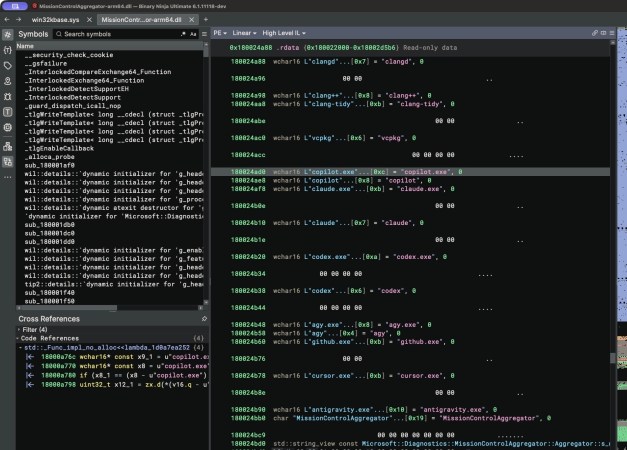
The saga starts with a library called MissionControlAggregator.dll, which contains a list of executable files to look for– things like codex.exe on the agent front, but also dev tools as common as python.exe or gcc.exe–which would be innocent enough, and perhaps even helpful if the OS was watching for these files to do something locally. It might be doing something locally, but [Xusheng] was able to trace the diagnostic that triggers when you launch one of the apps it is listening for, and yes, at least on a default Windows 11 install, it phones home about it. Alas, WSL won’t save you this time, as the same event is apparently generated when you launch the linux version in said subsystem.

Of course the default Windows 11 install does have “optional diagnostics” enabled by default, so you could argue that this is something that the system administrator consented to– provided they knew about it, which they likely don’t. We certainly had no idea that this was part of those “optional diagnostics” and are thankful to [Xusheng] for the tip.

Our own [Jenny List] took Windows 11 for a drive back in June, and emerged rather unimpressed. Your mileage may vary, but if you are, like the majority of the world’s desktop users, on Windows, you might want to double-check those privacy settings.

A Pen Plotter To Draw You Up (on) The Wall

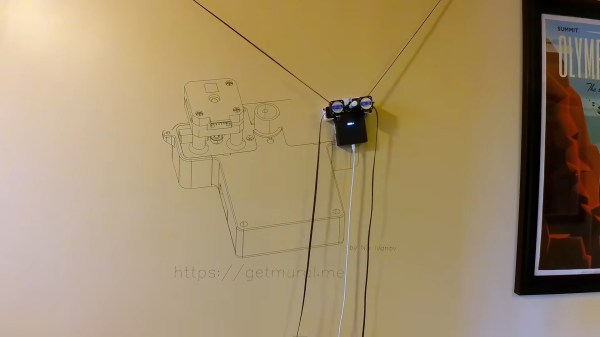
Back in our day you were told not to draw on the walls; nowadays we have robots for that– like Mural 2.0 by [Nik Ivanov]. If the name doesn’t give it away, this is a large format pen plotter made to draw, well, murals. It’s also not [Nik]’s first rodeo, though this version seems considerably improved from the orignial version.

He’s now using a FluidNC board based on an ESP32 and TMC2209 stepper drivers, while the steppers they drive are a pair of NEMA 17 pancake units. Using pancakes for this application makes sense, as the steppers are on the machine and must pull themselves up against gravity using the single belt that is anchored at ceiling level. The kinematics of that mean you don’t get the full area between the anchor points– you lose 20% at the edges– but you can still get a pretty big mural going. In the demo/build video embedded below, it looks like you’re more limited by marker life, [Nik] cautioning that past about 500 m of line things can start to get a bit weak as the pen dries out. He’s working on a ‘pause and replace pen’ routine for the next firmware version to help with that project.

For now, the WiFi-based interface [Nik] has on the ESP32 gives you that path length in advance, and can even process both SVG and raster images with both a sine-wave style squiggle and finite-curve style space filling. This isn’t the fastest pen plotter we’ve seen on these pages, and it might not quite be the simplest, either, but [Nik] has put together a very easy build that you could do with your nieces and nephews content in the knowledge that the easy-to-use firmware will let them keep making murals when you aren’t there– assuming, that is, that their mother lets them draw on the walls.

Continue reading “A Pen Plotter To Draw You Up (on) The Wall” →

VapourDeck Is The 486 Handheld You Didn’t Know You Needed

Do you need a 486-based handheld computer for DOS games? Well, we didn’t think so either — until we saw [Sprite_tm]’s impressive and excellently documented VapourDeck homebrew handheld PC. Now we want one for Christmas and to be [Sprite_tm] when we grow up.

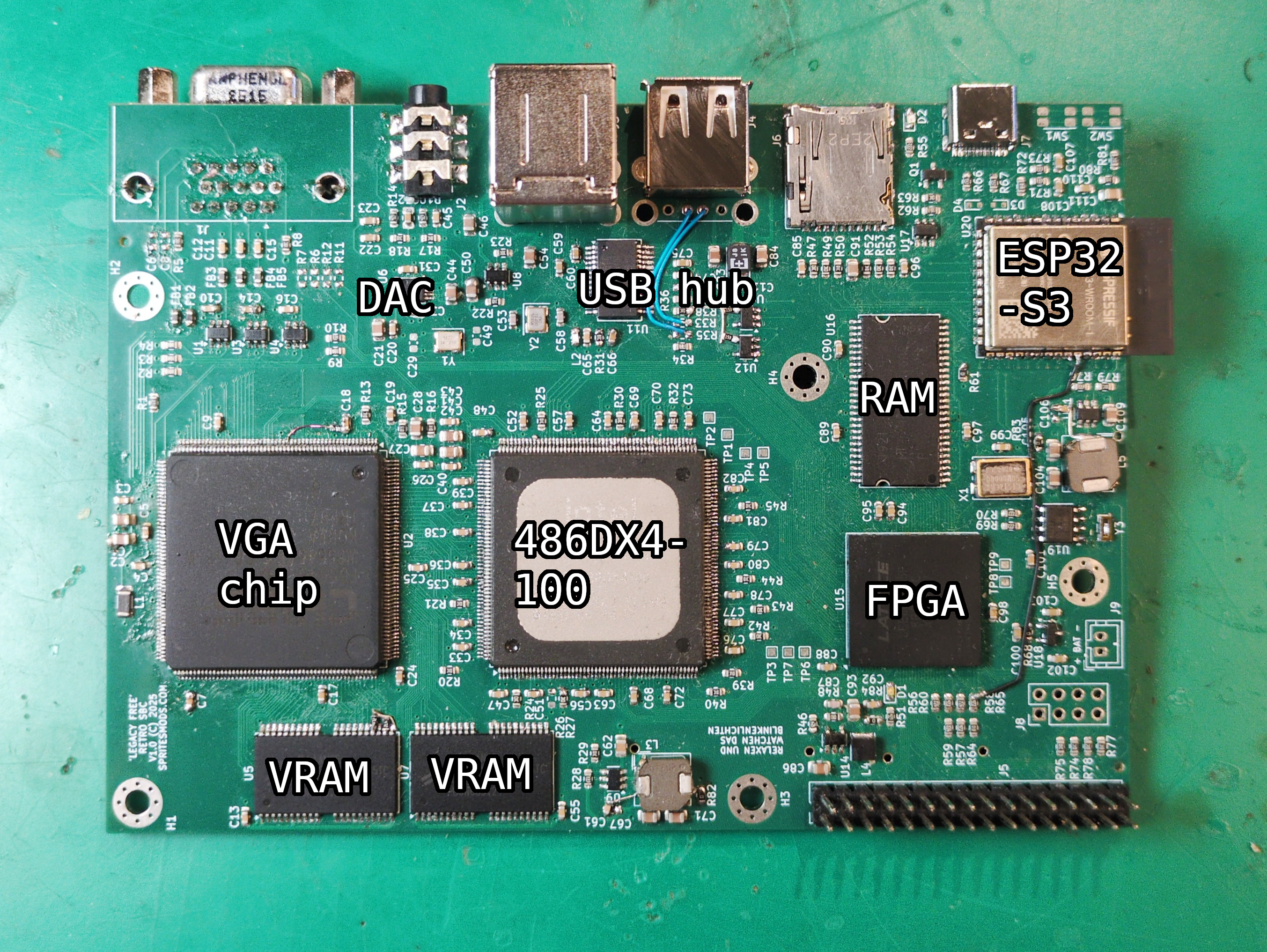
There exist industrial single-board computers designed around the Intel 486, and you’d be forgiven for thinking that’s what lives inside this build– but no. [Sprite_tm] was tired of thinking of a motherboard as “deep magic” and decided it was high time he designed his own. He chose the 486 because Intel actually let mere mortals at the documentation in those days, and it would let him play all his favourite DOS games on the fly. The board contains a period-appropriate VGA chip — complete with whopping 1MB of VRAM!– though most of the glue logic, I/Om and sound are on a modern FPGA and ESP32-S3, respectively. An image of the custom 486 SBC with the main components labelled

The writeup gives a good idea of the thinking behind this machine, but if you want to build one yourself, you can get all the files on Codeburg, because [Sprite_tm] was kind enough to open-source his work even if he’s not sure anyone else would want to replicate it.

We’ve seen a lot of [Sprite_tm]’s work on Hackaday over the years, including a portable Vectrex he walked us through at Supercon one year.

Thanks to [Vital] for the tip!