LineShine Is Fastest Supercomputer At Over 2 Exaflops

There is a phenomenon where as you get older, your sense of scale becomes somewhat fixed in the earlier era that shaped you– things like expecting the Dollar Store to carry items for 1$, or to get a burger and fries for less than twenty bucks– or, in this case, thinking of supercomputers as being petaflop-scale machines. That’s not wrong, per se– most of the world’s fastest machines benchmarks are best measured in petaflops– but when you’re clocking at 2198 of the things, it becomes easier just to say that the LineShine computer can do 2.188 exaflops. At double precision. With CPUs only. Yes, we are impressed.

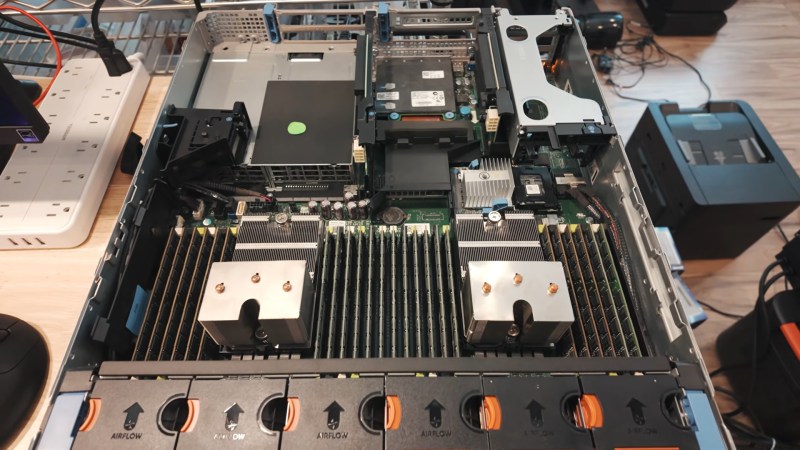
Even more impressive is that this machine just debuted in China, which means it was built without the benefit of the latest-and-greatest Western chips, thanks to US sanctions. It’s using a made-in-China LX2 CPU with 304 ARMv9 cores onboard. Well, it’s actually using around 46 thousand of them, but who’s counting?

Each CPU actually consists of two separate compute dies and onboard high bandwith memory (HBM) and DRAM– 4GB of HBM and 32GB of DDR5. The 152 ARMv9 CPU cores on each chip are all built with Scalable Vector Extensions (SVE) and Scalable Matrix Extensions (SME), so despite the lack of GPUs LineShine will have no problem doing the sorts of vector processing that is traditional for high-performance computing, given the 13.79 million cores.

On the other hand, the lack of GPUs shows when you change benchmarks– LineShine is number one in the rankings for High Performance Linpack (HPL), but getting outside the 64-bit box, the supercomputer only hits number four on the HPL-MxP mixed-precision benchmark, behind machines that pair their CPUs with accelerators like GPUs or NPUs. That may mollify the American ego, as while their El Capitain was bumped to second place on the HPL list, they can still claim the pole position on HPL-MxP. Which computer is actually more capable depends entirely on what you want to do with it, and neither Lawrence Livermore National Laboratory nor China’s National Supercomputing Centre in Shenzhen advertise their compute queues, though this paper suggests at least one job will be crunching earth observation data.

The definition of a supercomputer has shifted over time, and it’s only a matter of time before LineShine and El Capitain end up on the auction block, like other supercomputers before them. We might question it when it comes to desktops, but for institutional HPC, no amount of computing ever seems to be enough.

One Commodore, Five Displays

If you had one monitor back in the 8-bit era, instead of having to wait to use the family TV, you were already amongst the blessed. If you had five, maybe you worked at a computer store– but if you did, you could have done what [The 8-Bit Guy] demonstrates in a recent YouTube video and plug all five (5) monitors into a Commodore 128.

The computer isn’t modified in any way– well, except for the now standard use of an SD card disk emulator– so what gives? Well, you probably guessed he’s splitting up the colour signal into multiple monochrome images, but since the C128 actually has an RGBI, that I– intensity– actually gives another signal that can be broken out. That makes for four screens being driven from that port via composite, all sharing the same sync. The hardware for that was actually designed for [The 8-Bit Guy] by [Joe Burks] who open sourced the design on GitHub. He’s also selling them on Lectronz.

The fifth screen, of course, is driven by the VIC-II chip that Commodore provided for composite output to begin with. The interesting part is as much the software as the hardware, and while [The 8-Bit Guy] explains some of the thinking behind what he’s doing, he doesn’t link to any BASIC. If you know your way around a Commodore, you should be able to encode the multi-colour images required to do the splits.

For the people who prefer “real computers” — that is IBM compatible PCs– [The 8-Bit Guy] goes a bit outside of his 8-bit comfort zone to demonstrate that this same trick works quite well with the 16-color modes of EGA. With sixteen colours split between the two monitors, you of course get two colours each– combine the dithering with the blur of an old CRT, and it looks better than it has any right to. Just note that you need to have the right EGA card, as some blocked the 16-colour modes when set to output IRGB/CGA– he used a Trident card to good effect. The software here, though, was just Deluxe Paint, which can’t stop winning, even after four decades. 

The hack seems simple enough, and perhaps everyone knew about it back in the day, but this is the first time seeing it for this author. So we’ll leave it to the comments: have you ever seen a 5-display Commodore, or 4-screen EGA output done like this?

Of course CGA had some competition back in the 80s, and it would be fun to see how many retro standards this trick would work on; at the end of the video [The 8-Bit Guy] discusses splitting VGA signals, but that’s only three screens and way too new for him. If one of you takes up his challenge, please let us know. 

A Commodore Boombox: The 1530 As You’ve Never Heard It Before

No, this isn’t another product from [PeriFractic]’s revived company, though we hope he’s taking notes. This is, in fact, a hack on the beloved 1530 Datasette, using the tape mechanism and case to create a portable audio device for your precious remaining mix tapes. Well, [Jan Derogee]’s precious mix tapes, at any rate; we aren’t the government, we don’t know if you have any tapes, mixed or otherwise.

[Jan] started, obviously enough, with a Datasette, but they key was apparently to use a Made-in-Japan model–  the Made-in-Taiwan units are a later development and victims of the old Commodore’s infamous obsession with cost-cutting. The main difference is that the Japanese-built Datasettes have two sets of screws: one to hold the tape mechanism in place, and the other to hold two halves of the case together. The Taiwanese units make one set do double duty. Doubtless more was saved through streamlining assembly than the cost of four screws, but either way it made those models difficult to work with for [Jan]’s purposes.

As you likely can tell from the photo, he simply splits the case, allowing the tape transport to remain in place with those  Japanese screws, and inserts a 3D printed spacer to hold speakers, audio amplifiers, and a bay for AA batteries. For the people who really care about such things, the mod appears to be fully reversible, though you won’t be able to use it as data entry for your C64 until you do reverse it. Given how slow and dodgy tape loads could be, though, that’s not likely to bother many people, since it’s so much easier to load media onto the old breadbox from an emulated tapedeck.

If, on the other hand, you can’t stand the idea of using a Datasette for anything but data storage, maybe you should try connecting yours to a modern PC to remind yourself what it was really like. In either case, you can check out the 1530 Boombox at the link above or the video embedded below. For the actual Commodore product we didn’t see coming, click here for the phone. 

Bortle-1 Skies in the heart of darkest Texas.

“Telescope Rancher” Is The Coolest Job You Didn’t Know Existed

McCulloch County, Texas, is smack dab in the middle of a very large state. We wouldn’t exactly call it the middle of nowhere, but given there’s so little light pollution it scores a 1 on the Bortle Scale, it’s not exactly the Big Apple, either. [Bray Falls] lives there, and has a job description we have become immediately jealous of: [Bray] is a telescope rancher.

Like the song goes, the stars really are big and bright at night deep in the heart of Texas. Not only is his ranch free of the light pollution that plagues more urban locations, central Texas is pretty dry, with only a few days of rain in any given month. That’s not great for agriculture, but it’s great for astronomy since it means the skies are most often cloud-free. Combine that with access to high-speed internet, and you have the makings of a telescope ranch.

Telescopes being let out of the barns for the night.
Image: Starfront Observatory

It’s brilliant in its simplicity: along with his own ‘scopes, [Bray]’s Starscope Observatory hosts hundreds of other people’s CCD equipped goto telescopes, all set up to be remote controlled over the information superhighway. On clear nights– which again, is most of them–the roofs roll off the telescope barns and observations can begin. Pad rental comes with tech support, too, so you don’t have to fly out to heart of darkest Texas if your mount gets jammed or you lose signal for any reason. That said, you should be sure to read the fine print before signing up, because said tech support probably doesn’t apply if you 3D printed your own ‘scope, or built your own mount.

That said, having gone to the effort of doing all that, would you really send your baby away to a farm upstate? Best reserve that for the old Celestron collecting dust in the corner. If you think we should be leaving these observations to the pros, be aware [Bray] has apparently discovered a very oddly-placed supernova remnant, 40 degrees off the galactic plane in Virgo. So this isn’t just a rewarding hobby; it’s still science, too.

SmallRun.net Enters The Marketplace Market

So you have a project that you love, and everyone else loves too. People start saying “you should sell this” but where? Well, there’s a new marketplace you might want to consider called SmallRun, aiming at makers and their, well, small production runs.

SmallRun will absolutely host your custom PCBs, on-demand 3D prints, and other traditional maker products — but they’ll also happily sell your merch, too. Along with electronics and hardware, they aim to allow you to sell products in categories like tabletop gaming, sciences, and yes, accessories/apparel.

For sellers, they offer automatic payouts and promise to take care of the taxes by integrating with Stripe. That said, they’re still working on getting the whole VAT thing set up for products imported to the EU. EU to EU sales are apparently OK. They’ll host build logs, which may drive engagement with your product. There’s even a handy tool to import your existing listings from eBay, Tindie, Lectronz, Etsy, Shopify, or Crowd Supply if you’re already in the biz. They make their money by taking a cut of your sales: ̶e̶i̶g̶h̶t̶  now reduced to seven percent, plus forty cents per listing.

Depending on your perspective, you might wonder if we need another marketplace, To that we can only say: “Let a thousand flowers bloom!” Competition should drive these marketplaces to continuously improve and we all win.

If you’re selling online, even packaging can become a project. If you’re not, but are interested in starting, our “From Project to Kit” series from ten years back remains surprisingly relevant.

Thanks to [Aron] for the tip!

Blender 5.2: Coming Soon With Improved Simulations

Traditionally, one of the weak points in Blender has been simulations, with even professional users of the free and open source computer graphics suite off-loading such tasks to programs like Houdini. But according to [3Dan], once version 5.2 is out of beta in July, that may become a thing of the past. 

Simulations aren’t a necessary part of a 3D animation software, but they are very, very nice to have. If you want realistic-looking fluids, hair, or cloth, it’s incredibly difficult to animate it by hand. One, because there are so many degrees of freedom in, say, flapping cloth, keyframing is a major pain, but also figuring out how to make the model move and deform realistically is by no means trivial. It’s easier to offload all that on a physics simulation; then, as long as the physics is realistic, the animations will be as well.

That’s not easy, computationally speaking, and one thing that’s clear is there’s been work behind the scenes to optimize the simulation algorithms, not just improve the workflow, as the basic “drop cloth on a monkey head” demo now runs twice as fast. The new workflow itself bring simulations more into line with how Blender has been going– it’s part of geometry nodes now. So there’s simulation nodes you bring in, but that means things like tearing cloth become quite straightforward compared to the occasionally byzantine workarounds required before. This node-based workflow also brings Blender more into line with how paid software works these days.

[Dan] demonstrates the power of it by adding air pressure to a cloth simulation with some custom nodes, inflating and popping a fabric sphere. He also demonstrates how cloth simulation can be applied to animate realistic foliage. This update probably doesn’t have Houdini developer SideFX shaking in their boots, but it might allow some animators to stop paying that license and go fully-open source, which is great to hear.

Even if you’re not into digital sculpting or animating, you may find yourself downloading a copy of Blender at some point to add texture to 3D prints, or make fancy resin-print miniature models FEM-friendly. The right addon can even let Blender do parametric CAD, though FreeCAD is getting better all the time, too.

Continue reading “Blender 5.2: Coming Soon With Improved Simulations”

Bernoulli Disk Goes “Wii!” When Plugged Into WiiU

The Bernoulli disk was a wild piece of 1980s hardware. Take a big floppy. Spin the platter at 1500 RPM just a micron or so from a read head. The airflow around that rapidly-spinning disk actually stabilizes the disk that close to the read-head via the Bernoulli effect, hence the name. Once upon a time, everybody wanted a Bernoulli Box to put under their Macintosh 512, but [Will It Work?] wanted to see how well these old drives held up to the 21st century by using it to load games onto a WiiU.

It’s not as crazy at is it seems. The WiiU is happy to read and write anything that looks like a USB mass storage device. The Bernoulli Box is of course pre-USB — even the later model 5 1/4″ drive [Will] is using from 1987. That means it uses SCSI, the USB of the 1980s. He’s got a 90 MB disk, though Iomega did make disks of higher capacity in that format, all the way up to 230 MB. Yes, the same Iomega of Zip-drive fame and infamy. But don’t worry, the peculiar pneumatic nature of the Bernoulli disks makes them immune to the click of death.

You might think it’s going to take a great deal of hacking and homebrew to get the WiiU talking to a SCSI drive from the 80s, but as we said in the introduction, Nintendo made this thing respect USB conventions, so all that’s needed is an SCSI-to-USB cable. Well, plus a passive SCSI 1 to SCSI 2 adapter to get the USB adapter to fit.

It doesn’t seem like the drive slows down the WiiU nearly as much as we’d expect, but then it’s not a console known for fast load times. The other surprising detail is how much space the WiiU’s formatting sucked up, knocking the 90 MB disk down to only 68 MB. Combine that with the WiiU’s firmware wanting to pad space for save files, and not much fits. Thus we don’t expect this odd tower of power to take off like the original did. Still, if you had one of these back in the day, it might be a nice nostalgia hit to hear the drive whirring away.

If you think a disk drive is something Nintendo would never imagine for their consoles, think again! The Japanese version of the NES had the Famicom Disk System, which turns out to be essential if you want to run UNIX on it.

Continue reading “Bernoulli Disk Goes “Wii!” When Plugged Into WiiU”