Trunking Police Scanning With SDRTrunk

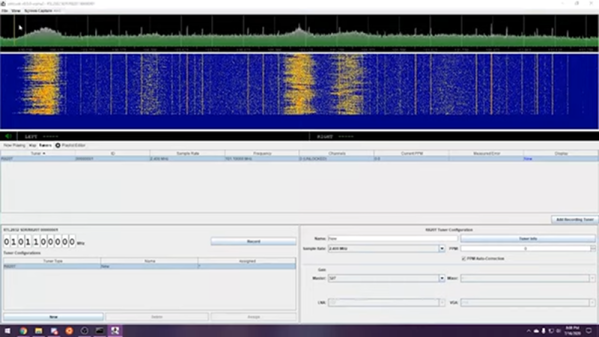
There was a time when it was easy to eavesdrop on police and other service radio networks. Police scanners fans can hear live police, fire, and ambulance calls. However, it isn’t as easy as it used to be because nearly all radios now are trunked. That means conversations might jump from channel to channel. However, P25 can unscramble trunked radio calls intercepted by a cheap SDR dongle and let you listen in. [SignalsEverywhere] shows you how to set it up for Windows or Linux and you can see the video below.

Trunking radio makes sense. In the old days, you might have a dozen channels for different purposes. But most channels would be empty most of the time. With trunking radio, a radio’s computer is set to be in a talk group and a control channel sorts out what channel the talk group should use at any given time. That means that one channel might have several transmissions in a row from different talk groups and one talk group might hop to a new channel on each transmission.


Continue reading “Trunking Police Scanning With SDRTrunk” →

FCC Fines Hobby King Almost $3 Million For Illegal Drone Transmitters

We take wireless devices for granted these days, and it is easy to forget that the use of the airwaves is subject to government control — the FCC in the United States. HobbyKing got a sharp reminder when the FCC levied a nearly $3 million fine for the company selling uncertified drone transmitters.

It was hardly a surprise, though. The FCC has been cracking down on these noncompliant transmitters for a while now and had issued a notice of apparent liability to the company back in 2018 and the investigation goes back to 2016. The problems included radios being sold that were on unauthorized frequencies, radios with higher than legal output power, and selling radios that were not type accepted.

Continue reading “FCC Fines Hobby King Almost $3 Million For Illegal Drone Transmitters” →

New Release Of FidoCadJ Draws Schematics Everywhere

Do you remember drawing your first schematic? Presumably you used a pen or a pencil and some kind of paper. Schematic capture software, though, makes it so much easier to draw schematics. There are many to choose from, but we spent some time checking out FidoCadJ and found it capable. Of course, there are many other options, but we did like that FidoCadJ runs locally and since it uses Java will run on just about any computer. Since it is open-source, you can modify it and you don’t have to worry about licensing it for your many computers or your team.

The program is a JAR file, and our first attempt to run it ran afoul of our older Java version that was the default Java Runtime Environment. But that was easy to fix, especially since a newer version was there, just not the default.

Continue reading “New Release Of FidoCadJ Draws Schematics Everywhere” →

Breadboarding Console Has The Power

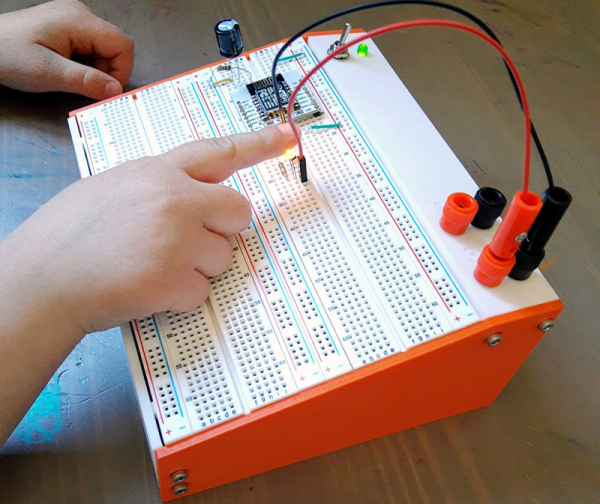
It is hard to remember how expensive an electronic hobby used to be. It wasn’t long ago, for example, that a solderless breadboard was reasonably expensive and was likely to have some sort of baseboard. The nicer ones even had a power supply or some simple test instruments. While you can still buy that sort of thing today, the low cost of bare breadboards have made them much more common. [Sebastian] decided to use his 3D printer to give those cheap breadboards a nice home.

The design looks great, and frankly isn’t much of a technical triumph, but it is useful and clean looking. The build uses some banana jacks, a switch, an LED, a 9V battery, and a common small power supply module. Of course, you also need a few breadboards.

Continue reading “Breadboarding Console Has The Power” →

ESP8266 Makes A Wireless Card Reader

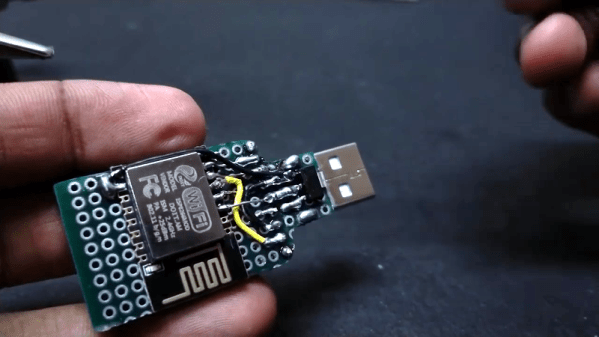
You can find commercial USB sticks that can also connect via WiFi. But [Neutrino] made his own using an ESP8266 married to a card reader. It all starts with the old trick of soldering a header to an SD card adapter. The USB port is still there, but it is only for power. A 3.3 V regulator and an ESP12E board round out the hardware.

Of course, the trick is the software. Starting from a few examples, he wound up providing an FTP server that you can connect to and send or receive files using that protocol.

Continue reading “ESP8266 Makes A Wireless Card Reader” →

Portable CP/M Runs The Classics Anywhere

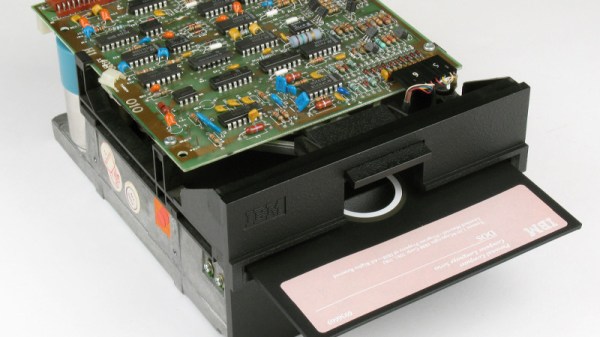
If you want to run an old CP/M program — maybe you want to run WordStar or play StarTrek — you have several options. One is to acquire some classic hardware. You can also build a new computer using a Z80 or some other processor that will emulate a Z80. Finally, you can emulate old hardware on your current computer. The iz-cpm project from [ivanizag] takes this last approach. Unlike some emulators, iz-cpm doesn’t try to emulate everything in one simulated environment. Instead, it directly accesses your file system so it allows CP/M executables to run more as though they were a native program.

You can think of it as Wine for CP/M. The code is portable to Linux, Windows, or MacOS. The author mentions, though, that it won’t run on CP/M itself! The program can run an executable standalone which means you could set .COM files up to execute automatically if you wanted to.

Continue reading “Portable CP/M Runs The Classics Anywhere” →

Linux Fu: Keep In Sync

Once upon a time, computers were very expensive and you were lucky to have shared access to one computer. While that might seem to be a problem, it did have one big advantage: all of your files were on that computer.

Today, we all probably have at least a desktop and one laptop. Your phone is probably a pretty good computer by most standards. You might have multiple computers and a smattering of tablets. So what do you do to keep your files accessible everywhere? Why not run your own peer-to-peer synchronization service? Your files are always under your control and encrypted in motion. There’s no central point of failure. You can do it with one very slick piece of Open Source software called syncthing. It runs on Windows, Linux, Mac, BSD, and Solaris. There are also Android clients. We haven’t tested it, but one caveat is that the unofficial iOS support sounds a little spotty.

The joke about the cloud — that it’s just other people’s servers — is on point here. Some people don’t like their files sitting on a third-party server. Even if your files are encrypted or you don’t care, you still have the problem of what happens if you can’t reach the server — may be on an airplane with no WiFi — or the server goes down. Sure, Google and Microsoft don’t go dark very often, but they can and do. Even if you build your own cloud, it runs on your servers. Syncthing is serverless: it simply makes sure that all files are up-to-date on all your end devices. Continue reading “Linux Fu: Keep In Sync” →